
Installation: Doro Hemma Doorbell User Manual
Content
doro Hemma Doorbell: Complete Product Manual and Buyer Guide
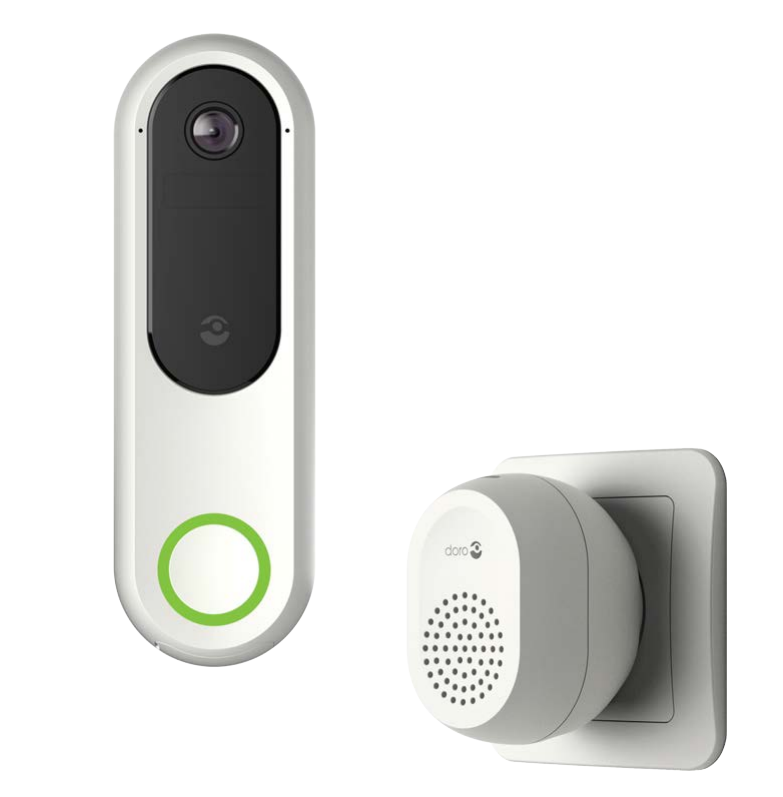
Introduction: What the doro Hemma Doorbell Offers
The doro Hemma Doorbell is a wireless video doorbell designed to make home entry safer, clearer, and easier to manage from a smartphone or tablet. Built with accessibility in mind, it combines 1440p video, motion detection, infrared night vision, a loud chime, and the ability to forward calls to a trusted relative through the Assist Me function. That makes it especially useful for seniors, caregivers, families, and anyone who wants a simple smart doorbell without subscription fees.
One of the main selling points of the doro Hemma Doorbell is its user-friendly setup and senior-focused design. It supports Wi-Fi on 2.4 GHz networks, works with iOS and Android devices, and includes a chime in the box. The product is positioned as a no-monthly-fee video doorbell, which adds long-term value compared with many subscription-based alternatives. It is a practical choice for households that want direct visitor communication, remote monitoring, and extra support options in one device.
Price typically ranges around £150 in the UK, with some European listings around €170 to €200 depending on the retailer and bundle. Availability is strongest through Doro’s official channels and selected online stores. For buyers looking for a reliable smart doorbell with clear video, app control, and a focus on accessibility, the doro Hemma Doorbell stands out as a strong mid-range option.
Troubleshooting the doro Hemma Doorbell
If the doro Hemma Doorbell will not connect, first confirm that the app is installed, an account has been created, and the doorbell is connected to a 2.4 GHz Wi-Fi network. If video is delayed or unavailable, check signal strength and reboot the router and doorbell. If the chime does not sound, verify volume settings in the app and confirm the chime is powered correctly.
Common setup issues are usually related to pairing, Wi-Fi settings, or app permissions. If an error appears during installation, restart the setup process, re-scan the QR code, and make sure Bluetooth, Wi-Fi, and location permissions are enabled on the phone. If the device stops recording motion events, review motion sensitivity, notification settings, and battery status. Preventive care includes keeping the battery charged, updating the app regularly, and installing the unit in a location with stable Wi-Fi coverage.
The product includes a 24-month warranty. For help, contact Doro support by region through the official support channels listed in the app and product documentation. UK users can use support.uk@doro.com or call 0800 026 5479. Ireland users can call 01 699 0983. If you need faster assistance, have the serial number, app version, and a short description of the issue ready before contacting support.
Pros & Cons of the doro Hemma Doorbell
- Pros: Excellent 1440p video quality with useful night vision for day and nighttime visitors.
- Pros: No subscription required, which improves value for money over many competing video doorbells.
- Pros: Assist Me call forwarding is ideal for seniors or users who want family support.
- Pros: Loud included chime makes it easier to hear across the home.
- Pros: Simple smartphone and tablet compatibility with iOS and Android.
- Cons: Battery charging can be frequent compared with some hardwired alternatives.
- Cons: It relies on a 2.4 GHz Wi-Fi connection, so modern dual-band flexibility is limited.
- Cons: Best suited to users who value simplicity over advanced smart-home ecosystems.
- Cons: Not always the cheapest option when compared with basic budget video doorbells.
Compared with alternatives, the doro Hemma Doorbell is stronger on accessibility and ease of use, while some competing models offer more advanced integrations or lower upfront prices. For families wanting dependable video doorbell features without monthly fees, it delivers solid value.
Customer Reviews: What Users Say About doro Hemma Doorbell
Customer feedback is generally positive, with many users praising the clear picture quality, easy app setup, and loud chime. Reviewers often highlight the Assist Me feature as especially helpful for older adults and caregivers. Typical ratings trend around 4 out of 5 stars, with users calling it a practical and reassuring smart doorbell.
Common complaints focus on battery charging frequency and occasional Wi-Fi sensitivity. Some users would also like deeper smart-home integration. A typical testimonial might read, “The video is sharp, the app is easy to use, and I love that my daughter can answer the door if I cannot.” Another common sentiment is, “Good value because there are no monthly fees.” For buyers who want an accessible, easy-to-manage video doorbell, this is a recommended purchase, especially for senior households and family support use cases.
Key Specifications and Quick Facts
- Product type: Wireless video doorbell
- Video quality: 1440p
- Connectivity: 2.4 GHz Wi-Fi
- Mobile support: iOS and Android
- Included accessory: Loud chime
- Power: Battery-operated with USB-C charging
- Standout feature: Assist Me call forwarding
- Best for: Seniors, caregivers, and families
Who Should Buy the doro Hemma Doorbell?
The doro Hemma Doorbell is ideal for users who want a simple video doorbell with strong accessibility features, clear communication tools, and no ongoing subscription cost. It is especially useful for seniors who want help answering the door, families supporting older relatives, and homeowners who prefer practical security over complicated smart-home systems.
Faqs
How do I set up the doro Hemma Doorbell for the first time?
Why is my doro Hemma Doorbell not connecting to Wi-Fi?
What features make the doro Hemma Doorbell different from a standard video doorbell?
Can I use the doro Hemma Doorbell with a smartphone and tablet?
Why is the video on my doro Hemma Doorbell blurry or hard to see at night?
How does the Assist Me function work on the doro Hemma Doorbell?
What should I do if the doro Hemma Doorbell motion detection is too sensitive or not sensitive enough?
How do I maintain and care for the doro Hemma Doorbell outdoors?
Tags
Leave a Comment