
Setup: Drive Medical Scout LT 4-Wheels Scooter User Guide
Content
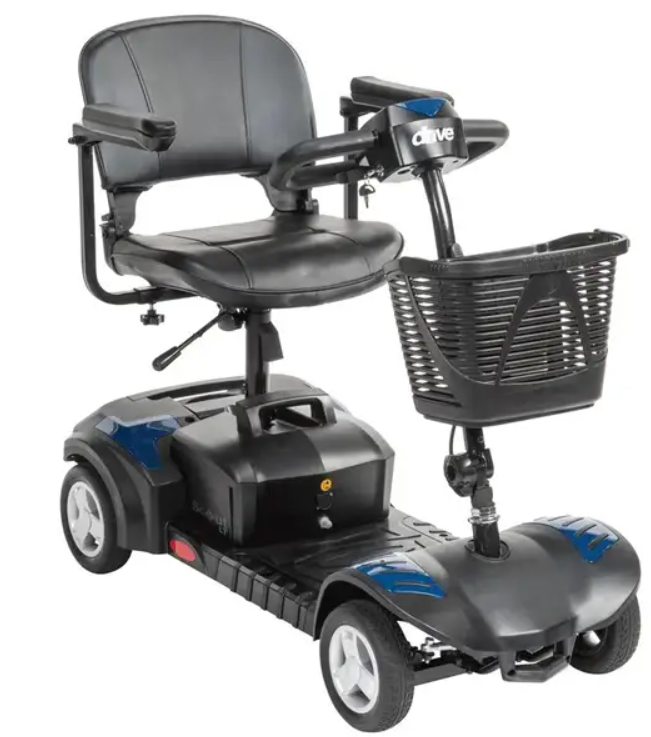
Drive Medical Scout LT 4-Wheels Scooter
Introduction
The Drive Medical Scout LT 4-Wheels Scooter is a versatile and reliable mobility aid designed to enhance the independence and mobility of individuals with limited mobility. This scooter is part of Drive Medical's renowned Scout series, known for its durability, comfort, and ease of use. The Scout LT is ideal for both indoor and outdoor use, making it a perfect choice for daily errands, social outings, or simply navigating around the home.
The estimated price of the Drive Medical Scout LT 4-Wheels Scooter is around $500-$700, depending on the retailer and any additional features or accessories. It has been available on the market since 2015, making it a well-established and trusted option in the mobility scooter sector.
This scooter is designed with user convenience in mind, featuring a compact design that makes it easy to maneuver in tight spaces. It also includes a comfortable seat, adjustable armrests, and a large storage basket for carrying essentials.
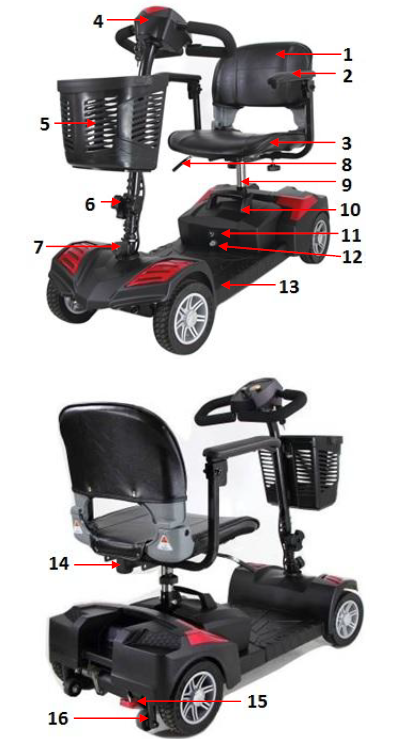
PARTS
- Seat Back
- Armrests
- Seat Base
- Control Panel
- Basket
- Tiller Adjustment Knob
- Front Wheel Lock
- Seat Swivel & Release Lever
- Seat Post
- Battery Pack
- Charge Port
- Circuit Breaker
- Footboard
- Accessory Post
- Freewheel Lever
- Anti-tip Wheels
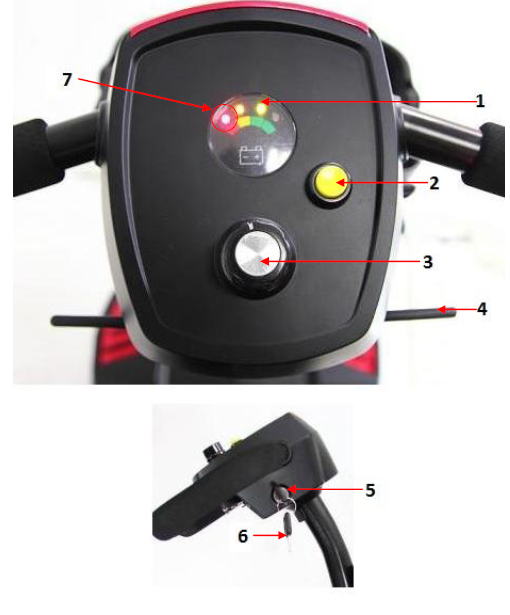
PARTS
- Battery Indicato
- Horn Button
- Speed Dial
- Throttle
- Key Switch
- Key
- Diagnostic Light (the red light on the battery indicator will also display flash codes when a problem exists)
SETUP
- Step 1:
Insert the seat post into the base of the scooter with the battery lock around the post. Secure tightly with the provided nut and bolt at the desired height. - Step 2:
Place the battery pack onto the front half of the scooter directly in front of the seat post. Then swivel the battery lock so the long side rests on top of the battery pack, and lock into place. Step 3:
While lifting up on the seat release lever, place the seat onto the seat post. Release the lever and rotate the seat until it locks into place.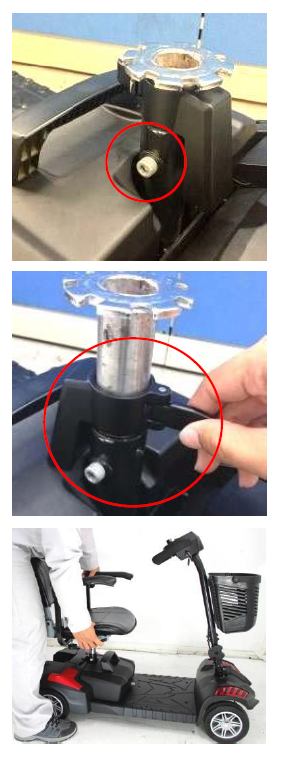
- Step 4:
Insert the armrests into the attachment points in the seat frame so that the armrests face forward. Secure the armrests in place with the provided star knobs at the desired width. - Step 5:
Attach the front basket by aligning the bracket on the tiller with the mounting holes on the basket, and then push down to secure in place. Step 6:
Fully charge the scooter by inserting the round charger connector into the battery charging terminal on the battery pack, and then insert the 3-pronged plug into a standard electrical outlet.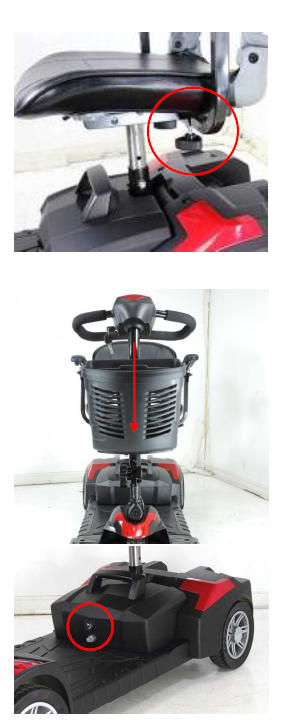
- Optional:
Your scooter comes with interchangeable shrouds, allowing you to customize your scooter to your liking. The Scout comes with the red shrouds installed, and a spare set of blue shrouds included in the box. The shrouds can be interchanged by hand, or using a small pry tool. Be sure not to scratch the painted shrouds while using the pry tool.- Control Panel Shroud Replacement: Using your thumb, gently grip the top of the color panel and lift upward until the panel releases. The new panel will snap into place.
Front Shroud Replacement:
Reach underneath the front shroud, and gently push up on the color panel until it releases from the scooter. The new panel will snap into place.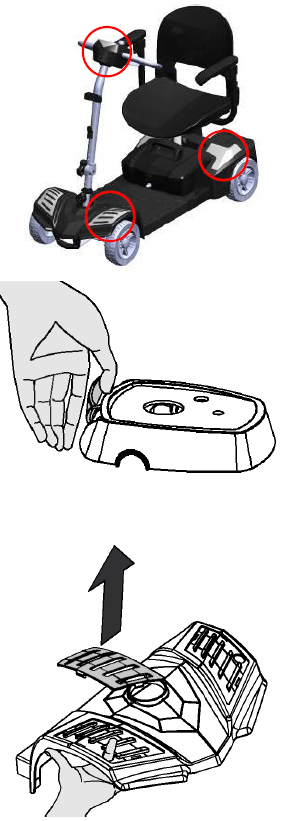
Rear Shroud Replacement:
Reach underneath the rear shroud, and gently push up on the color panel until it releases from the scooter. The new panel will snap into place.
INSPECTION & MAINTENANCE
GENERAL GUIDELINES
Your scooter is an advanced mobility device, and with the correct routine maintenance you can ensure years of maximum use. While some of the maintenance can be done by yourself, you may need assistance from an authorized Drive Medical provider. If you have any doubts, contact your authorized Drive Medical provider.
Preventative maintenance is key to keeping your scooter in prime operating condition. Follow the Maintenance Schedule at the end of this section to periodically inspect your scooter for serviceable items.
- Avoid abuse to the throttle and control functions.
- Avoid prolonged exposure to extreme heat or cold.
- Keep the scooter clean and free from moisture.
- Never use a conditioner on the tread of the wheels.
EXPOSURE TO MOISTURE
Should your scooter come in contact with water or moisture, dry your scooter thoroughly with a towel. Allow your scooter to sit in a dry place for 8 to 12 hours to allow unseen moisture to evaporate. Check the throttle operation and brakes before using your scooter again. If any items require service please contact your authorized Drive Medical provider.
OPERATING TEMPERATURES
Your scooter is designed to operate ideally between 18°F and 122°F. In extremely cold conditions your batteries may freeze depending on the battery charge, usage, and composition of the batteries. In extremely hot conditions your scooter may operate at a lower speed. This is due to the safety mechanism built into the unit to prevent damage to the gearbox and other electronic functions when operating too hot.
STORAGE
If you need to store your scooter, be sure it is stored in a dry place free from extreme temperatures. Always fully charge, and then disconnect the batteries prior to storage.
- ATTENTION: Infrequently charged batteries, or batteries stored without a full charge are susceptible to permanent damage, causing unreliable performance from your scooter.
- If your scooter is stored for a prolonged period flat spots may develop in the wheels. This will cause an uneven sensation when driving, but should work itself out over time. If you still notice the flat spots after continued use, replace the wheels on your scooter immediately.
- SUGGESTION: You can place a sturdy platform under the frame of your scooter to bring the wheels off the ground, and weight off the wheels. This will prevent flat spots from developing while storing your scooter.
- WARNING: Improper storage of your scooter may result in permanent damage to the frame and electronics.
CLEANING & DISINFECTION
- To clean your scooter use a damp cloth with a mild, non-abrasive cleaner on the plastic and metal parts. If necessary, clean your scooter with an approved disinfectant safe for use on your unit.
- WARNING : Never hose off your scooter or expose it to direct contact with water.
- WARNING : Never use any chemicals on the upholstery of your seat, this may cause the seat to dry out and crack.
BASIC TROUBLESHOOTING
The diagnostic flash codes for your scooter are designed to help you perform basic troubleshooting quickly and easily. A diagnostic flash code can be displayed in one of two ways:
- A light labeled “Diagnostic” on the control panel will flash OR
- The battery indicator light farthest to the left on the battery gauge (red light) will flash a 2 digit fault.
- Please refer to the diagram below for flash codes, description of problem, and recommended actions.
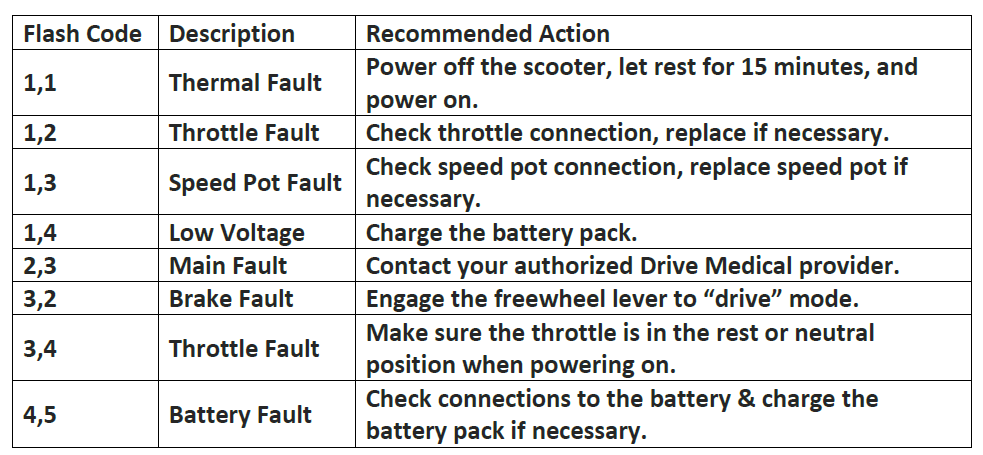
Once the recommended action is taken, turn the scooter off and then back on again to clear the flash code. If the problem was not corrected, or another problem exists the controller may display another flash code.
ATTENTION :Your scooter may have a diagnostic light on the tiller that will stay on constantly. The light will begin to flash when you have a serviceable item.
SPECIFICATIONS
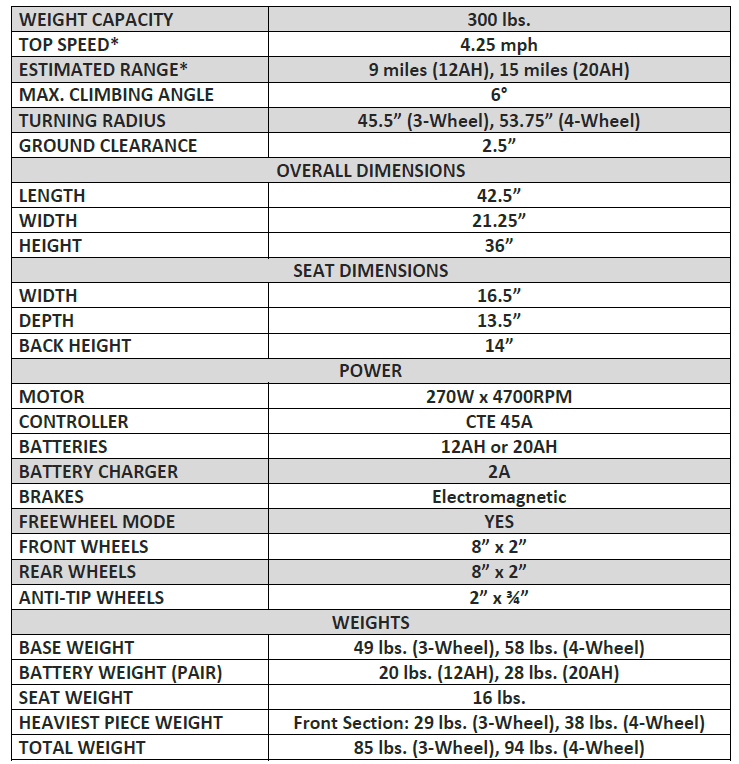
LIMITED WARRANTY
For the warranty periods listed below, beginning at the date of original purchase, Drive Medical will repair or replace, at its option to the original purchaser, free of charge, any of the following parts found upon examination by an authorized representative of Drive Medical to be defective in materials and/or workmanship. The warranties contained herein extend and apply only to the original purchaser.
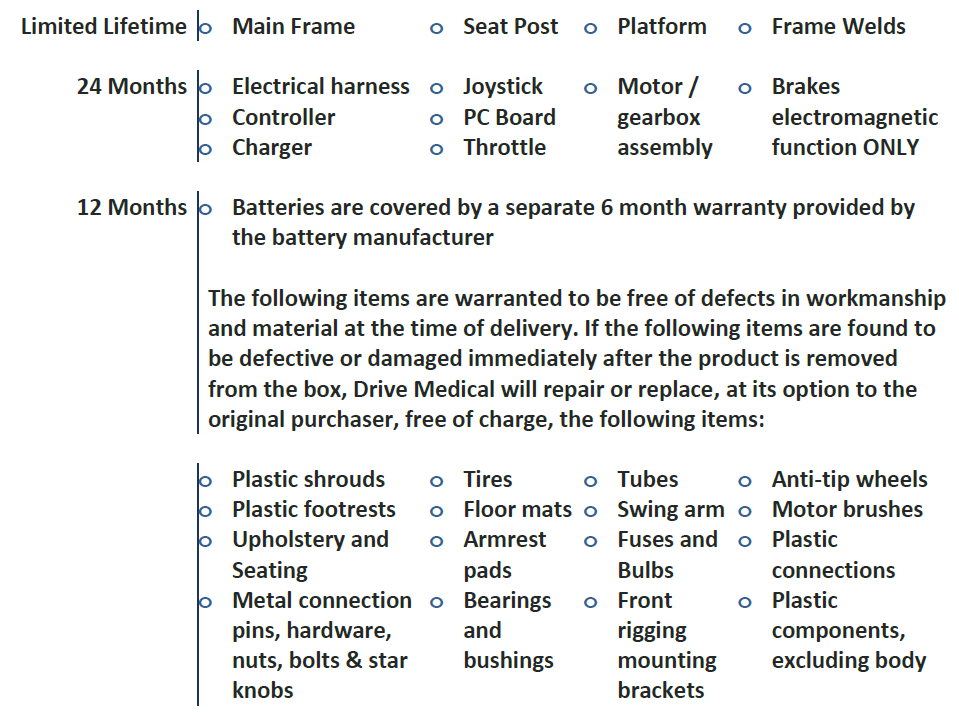
- RECONDITIONED UNITS WARRANTY
All reconditioned units are covered by a 90-day warranty from Drive Medical effective from the date of purchase. - REPLACEMENT PARTS WARRANTY
Parts that are supplied by Drive Medical as replacements to warranted parts will be warranted for a period of time equal to the remainder of the original part’s warranty period. - SERVICE CHECKS AND WARRANTY SERVICE
Warranty service must be performed by an authorized Drive Medical provider. Do not return faulty parts to Drive Medical without prior written authorization. All transportation costs and shipping damage incurred while submitting parts for repair or replacement are the responsibility of Drive Medical.
Failure to follow the instructions, warnings and notes in the owner’s manual and those located on your Drive Medical product can result in personal injury or product damage and will void Drive Medical’s product warranty.
There is no other express warranty. - IMPLIED WARRANTIES
Implied warranties, including those of merchantability and fitness for a particular purpose, are limited to one (1) year from the date of original purchase and to the extent permitted by law. Any and all other - implied warranties are excluded. This is the exclusive remedy. Liabilities for incidental, punitive, special and consequential damages under any and all warranties are excluded.
- Some states do not allow limitations on how long an implied warranty lasts or do not allow the exclusion or limitation of incidental, punitive, special and consequential damages. The above limitation or exclusion may not apply to you.
- This warranty gives you specific rights and you may also have other rights which vary from state to state.
- WARRANTY EXCLUSIONS
- Plastic shrouds and footrests
- Upholstery and seating
- Tires and tubes
- Brake pads
- Fuses
- Motor brushes
- Circumstances beyond the control of Drive Medical
- Labor, service calls, shipping and other charges incurred for repair of the product, unless specifically authorized by Drive Medical.
- Repairs and/or modifications made to any part without specific consent from Drive Medical.
Pros & Cons
Pros:
- Sturdy and durable construction
- Comfortable padded seat with adjustable armrests
- Easy-to-use control panel
- Large storage basket for carrying items
- Bright headlights for enhanced visibility
Cons:
- No folding mechanism for easier storage
- Relatively heavy weight
- Limited ground clearance which may affect off-road performance
Customer Reviews
Most Common Complaints:
- Difficulty in folding or disassembling for storage or transport.
- Slightly heavier than other models in its class.
Faqs
What is the maximum weight capacity of the Drive Medical Scout LT 4-Wheels Scooter?
How long does it take to charge the batteries fully?
Is the Drive Medical Scout LT 4-Wheels Scooter suitable for both indoor and outdoor use?
Can I adjust the speed of the scooter?
Does the Drive Medical Scout LT come with a warranty?
How do I maintain my Drive Medical Scout LT Scooter?
Is it easy to operate this scooter?
Can I use this scooter in wet conditions?
How much storage space does it have?
Are spare parts available for this scooter?
Leave a Comment