
Dual AM/FM Receiver MXD13 User Manual
Content
Dual AM/FM Receiver MXD13 Product Manual and Review
Introduction
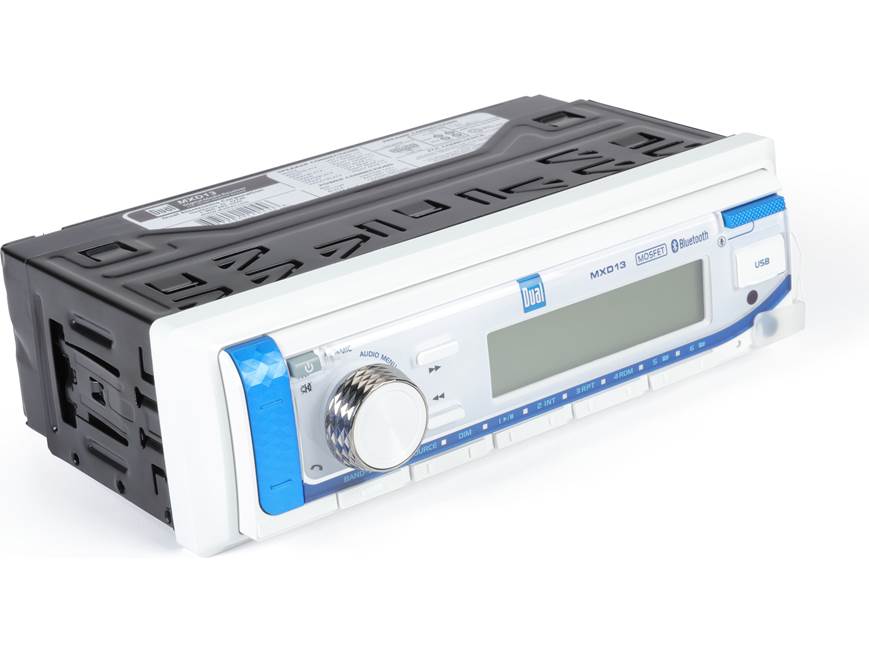
The Dual AM/FM Receiver MXD13 is a compact marine digital media receiver designed for drivers, boat owners, and outdoor audio users who want reliable radio, Bluetooth streaming, and simple in-dash control in one unit. Built around a fixed-face design, it focuses on durability, easy operation, and everyday convenience rather than disc playback, making it a strong fit for users who primarily listen through Bluetooth, USB, AUX, or AM/FM radio.
This receiver is especially appealing for marine and off-road applications where moisture resistance, straightforward controls, and dependable tuning matter. Key highlights include built-in Bluetooth for hands-free calling and wireless audio, support for USB and 3.5 mm auxiliary input, and an AM/FM tuner with station presets for fast access to favorite broadcasts. The unit also includes a compact single-DIN form factor, making installation easier in many standard dash openings. With power output rated at 14 watts RMS x 4 channels and a 1.2-volt line output, it is well suited for upgrading factory audio systems or powering small-to-medium speaker setups.
The dual AM/FM Receiver MXD13 is a practical choice for users who want an affordable, no-frills head unit with modern playback options. Estimated pricing typically falls in the budget-to-midrange category, often around $100 to $170 depending on seller, bundle, and availability. It is commonly available through marine audio retailers, car audio stores, and online marketplaces, with stock varying by season and region. For buyers seeking a compact Bluetooth marine receiver with AM/FM radio, the dual AM/FM Receiver MXD13 offers a strong mix of value, functionality, and ease of use.
Pros & Cons
Pros
- Bluetooth connectivity makes wireless music streaming and hands-free calling simple and convenient.
- USB and AUX inputs provide flexible playback from flash drives, phones, and portable music players.
- AM/FM radio with presets helps users switch quickly between stations without repeated tuning.
- Compact single-DIN design supports straightforward installation in many marine and vehicle dashboards.
- Good value for money for users who want essential features without paying for a CD player or advanced touchscreen functions.
- Suitable for marine and outdoor use where a rugged, basic digital media receiver is preferred over a complex infotainment unit.
Cons
- No CD playback, which may disappoint users who still want disc support.
- Power output is modest compared with larger external-amplifier systems, so audiophiles may want additional amplification.
- Fixed-face design offers fewer premium convenience features than detachable or touchscreen alternatives.
- Best suited to simple setups, while users wanting navigation, app integration, or large displays may prefer a more advanced head unit.
- Value is strongest for basic marine and budget audio builds; shoppers comparing it with higher-end receivers may find limited customization.
Customer Reviews
Customer feedback for the dual AM/FM Receiver MXD13 is generally positive, with many users praising its easy installation, reliable Bluetooth connection, and compact design. A common theme in reviews is satisfaction with the receiver’s practical feature set, especially for boat owners and drivers replacing older factory radios. Many buyers also like the AM/FM preset memory and the convenience of USB playback for playlists and podcasts.
Typical ratings average around 4 out of 5 stars, with comments such as, “Great basic marine radio that works exactly as expected,” and “Bluetooth pairing was fast and the radio sounds clear for the price.” Common complaints usually involve the lack of CD support, limited power without an external amplifier, and a feature set that is intentionally simple. Some users also mention that they would prefer a larger display or more advanced audio controls.
For shoppers who want a dependable budget marine receiver, the dual AM/FM Receiver MXD13 is often recommended as a solid purchase. It is especially appealing for buyers who prioritize ease of use, AM/FM radio, and wireless streaming over premium audio processing or multimedia extras.
Technical Overview: MXD13 Features at a Glance
- AM/FM receiver with Bluetooth wireless audio and hands-free calling
- Single-DIN fixed-face design
- USB and 3.5 mm AUX input support
- 30 station presets total, including 18 FM and 12 AM
- 14 watts RMS x 4 channels at 4 ohms
- 1.2 volts RMS line output
- Frequency response suited for standard radio and media playback
- Compact dimensions for common dash openings
Who Should Buy the Dual AM/FM Receiver MXD13?
This receiver is a strong match for marine owners, weekend drivers, and budget-focused shoppers who want a reliable replacement stereo with Bluetooth and radio. It is also a practical option for users searching for a marine digital media receiver that keeps controls simple while still covering the most important listening needs. If you want a basic, dependable setup for music streaming, radio, and hands-free calling, the dual AM/FM Receiver MXD13 delivers strong everyday value.
Final Verdict
The dual AM/FM Receiver MXD13 stands out as an affordable, easy-to-use marine and vehicle audio receiver for users who want essential functionality without unnecessary complexity. Its combination of Bluetooth, AM/FM tuning, USB, and AUX inputs makes it a flexible choice for many installations, while its compact format helps simplify upgrades. For buyers comparing basic marine head units, this model is one of the more practical options in its class.
Faqs
How do I set up dual AM/FM Receiver MXD13 for the first time without missing any important steps?
Why is my dual AM/FM Receiver MXD13 not picking up stations clearly, and how can I fix weak reception?
What features make dual AM/FM Receiver MXD13 useful for everyday listening and station tuning?
Can dual AM/FM Receiver MXD13 work with my existing speakers, amplifier, or home audio system?
How do I improve sound quality on dual AM/FM Receiver MXD13 when audio sounds noisy or distorted?
What should I do if dual AM/FM Receiver MXD13 powers on but does not respond to buttons or tuning controls?
How often should I clean and maintain dual AM/FM Receiver MXD13 for reliable long-term performance?
What settings should I adjust on dual AM/FM Receiver MXD13 to get the best reception in a crowded signal area?
More dual manuals
Leave a Comment