
Setup: E Easiecom CS169 Smart Watch Instruction Guide
Content
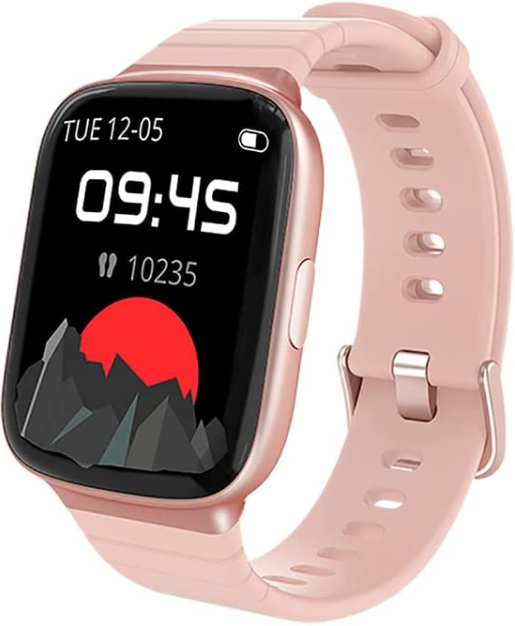
e easiecom CS169 Smart Watch
Introduction
The e easiecom CS169 Smart Watch is a feature-rich wearable designed for tech enthusiasts and fitness-conscious users seeking a powerful blend of style, connectivity, and health tracking at a competitive price. This smartwatch stands out with its vibrant touchscreen, comprehensive health sensors, and seamless smartphone integration, offering users an all-in-one device for daily convenience and wellness monitoring. Its intuitive interface and broad compatibility make it suitable for both Android and iOS users, appealing to professionals, athletes, and casual users alike.
Key benefits include real-time heart rate monitoring, sleep analysis, customizable watch faces, and support for notifications, calls, and music control. The watch supports multiple sports modes and offers water resistance, making it ideal for active lifestyles. Priced in the mid-range segment, approximately $80 to $120, the CS169 delivers excellent value and is widely available through online retailers and select electronics stores.
Which phone model is compatible with this watch?
This watch is compatible with iOS 10.0 & Android 5.0 or above smartphones.
How to connect the watch to your phone?
- Download the 'Zeroner' app from Google Play or the Apple store.
- Please click 'Sign Up' to register your account for the first time.
- Open your Bluetooth and open 'Zeroner ', click 'Device'→ 'Watch' → 'CS169'
How to sync up?
Please connect the watch with the 'Zeroner' app to update the data, time, and dial face.
How to get message notifications?
- Connect the watch with the 'Zeroner' app and click 'Device'→'Message Notification'.
- Choose the social app you want to receive. For example, if you want to receive Facebook notifications, turn on the 'Facebook' option and allow notifications.
- The most important thing is that you need to give 'Zeroner' notification permission in the phone settings.
First step is only for iOS:
Open 'Phone Settings'→Click 'Bluetooth'→Select 'CS169'→Turn on 'Share Systems Notification'.
Second step for iOS &Android:
Open 'Phone Settings'→Click 'Notifications'→Select 'Zeroner'→Turn on 'Allow Notification'.
The watch will only display notifications if there is a notification in the notification bar of the phone. If the phone does not display the notification, you need to enable the notification permission of the social app in the phone settings.
Note: The watch can receive incoming calls and message notifications, but it does not support answering or dialing.
How to change the watch face?
- Method 1 (on the watch) :
- Tap and hold the home screen.
- Swipe to choose one watch face and tap to confirm.
- Method 2 ( in the app) :
- Enter the App, Click 'Device'→ 'Watch Face'.
- Select a watch face or choose a photo in your phone album to display on the home screen.
How to change the time on the smart watch?
- The watch time will synchronize with the phone time when the watch is successfully connected to your phone. If the watch time is incorrect, please try to uninstall the 'Zeroner' APP->then reinstall the 'Zeroner' APP->after that, rebind the smart watch in the 'Zeroner' APP.
Do you have to pair this watch with a phone, or can it be a standalone watch?
You need to pair this watch with a phone to correct the watch time first, then this watch can work as a standalone.
- You need to download the 'Zeroner' App on your mobile phone.
- Then bind the watch in the 'Zeroner' App.
- The time will sync with your phone's time after binding, and the watch can work as a standalone with basic functions, such as a heart rate monitor, step monitor, etc.
- More functions can be used when the watch is bound to 'the Zeroner' App, such as sleep data analysis, sports route display, text/social media notifications, etc.
How to measure heart rate more accurately?
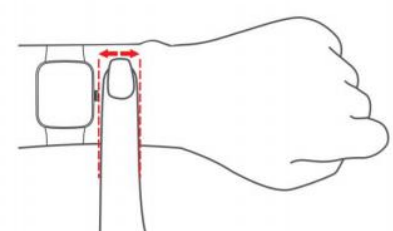
Please make sure the watch band contacts well with your wrist and wear the watch above one finger of your blood flow when the watch begins to detect the heart rate. In addition, please complete your personal information in the 'Zeroner' App.
- The data will jump up/down initially, and it needs several seconds to stabilize to offer you a reliable data. And remember to slide down the app homepage to sync the data on the device to the app.
If it is not monitoring your heart rate, please try the steps below: - Uninstall and download the 'Zeroner' App again, then bind the smart watch in the 'Zeroner' App
- If the issue still exists, please feel free to contact us, and we will definitely give you a satisfactory solution. (Go to Your Orders->Find the order ID in the list->Click Contact with us)
How to make sleep monitoring more accurate?
The watch doesn't show the sleep monitor icon directly on the screen. It will monitor your sleep quality from 8 P.M. to 9 A.M automatically when you wear it on your wrist correctly. If it is monitoring your sleep properly, the following steps may be helpful:
- Make sure the wristband is attached to your wrist but not loose on your wrist during sleep.
- Make sure you have refreshed data by sliding down the app homepage to sync the data on the device to the app.
If the issue still exists, please feel free to contact us, and we will definitely give you a satisfactory solution. (Go to Your Orders->Find the order ID in the list->Click Contact with us)
How to use the music control function?
Here are the steps to use the music control function:
- Download the 'Zeroner' App, then bind the smart watch in the ‘Zeroner’ App.
- Make sure the watch is connected to your phone successfully. Then you can use the play/pause/next/previous functions on the watch.
(Note: You cannot store or play music on the watch. In general, the watch can control Spotify, Amazon Music, Apple Music, Pandora, etc.)
Is this a waterproof watch?
- Yes, it is 5ATM waterproof.
- You can wear it when washing hands, running in the rain, swimming in a pool, or at a shallow beach. (Note: Not suitable for diving, swimming in the sea, or in a sauna. Too maintain a pleasant wearing experience, please wipe the waterproof watch as soon as possible after soaking in water.
What if the watch cannot be turned on?
- We need to confirm if the watch is defective or the charger. Could you please clean the charging sheet metal behind the watch before you attach the watch to the magnetic strip charging cord? Usually, the watch will attach to the magnetic strip charging cord closely, and it will show a green charging icon on the watch when it is charging.
- If there is no charging icon on the watch, the charger may be defective. If the watch is fully charged but it still can not be turned on, the watch may be defective. Please contact us via your order ID, and we will definitely give you a satisfactory solution. (Go to Your Orders->Find the order ID in the list->Click Contact with us).
Specifications of the e-easiecom CS169 Smart Watch
- Display: 1.3-inch IPS color touchscreen, 240×240 pixels
- Processor: Low-power chipset optimized for extended battery life
- Connectivity: Bluetooth 5.0 for fast and stable pairing with Android 6.0+ and iOS 11+
- Sensors: Heart rate sensor, accelerometer, gyroscope, blood oxygen (SpO2) sensor
- Battery Life: Up to 7 days on a single charge with typical use
- Water Resistance: IP68 rating suitable for swimming and daily water exposure
- Compatibility: Supports Wear OS companion apps for notifications, music control, and fitness tracking
- Additional Features: Sleep tracking, sedentary reminders, alarm, stopwatch, weather updates
Compared to other smartwatches in its price range, such as the Xiaomi Mi Band and Amazfit Bip series, the CS169 offers a more vibrant display and enhanced sensor accuracy, making it competitive for users seeking affordable yet capable wearables.
Setup Guide for the e easiecom CS169 Smart Watch
- Charge the watch fully before first use using the included magnetic USB charger.
- Press and hold the side button for 3 seconds to power on the device.
- Download and install the compatible companion app (usually named "e easiecom Health" or similar) from the Google Play Store or the Apple App Store on your smartphone.
- Enable Bluetooth on your smartphone and open the app. Follow the on-screen prompts to create an account or log in.
- From the app, select "Add Device" and choose the CS169 model from the detected devices list.
- Confirm that the pairing code shown on both the watch and smartphone matches, then tap "Pair".
- Customize settings such as watch face, notification preferences, and health monitoring parameters via the app.
Troubleshooting tips: If the watch does not pair, restart both devices and ensure Bluetooth permissions are granted. Keep the watch near the phone during setup. Avoid interference from other Bluetooth devices.
Safety warnings: Avoid exposing the watch to extreme temperatures, do not attempt to open the device, and consult the manual for water resistance limits.
Troubleshooting the e-easiecom CS169 Smart Watch
- Watch not powering on: Ensure the battery is charged; connect to the charger for at least 30 minutes,s and try again.
- Bluetooth connection fails: Turn off Bluetooth on your phone and watch, then turn them back on. Re-pair via the app.
- Inaccurate heart rate readings: Wear the watch snugly above the wrist bone and keep still during measurement.
- Screen unresponsive: Restart the watch by holding the power button for 10 seconds.
- Error codes: Refer to the companion app’s help section for specific error code meanings.
Preventive measures include regular software updates via the app, keeping the watch clean, and avoiding impacts. The e-easiecom CS169 comes with a standard 12-month warranty covering manufacturing defects. For support, contact the official customer service via email or phone listed on the packaging.
Pros & Cons of the e easiecom CS169 Smart Watch
Pros
- Affordable price point with premium features such as SpO2 monitoring and IP68 water resistance
- Bright, clear display with customizable watch faces for personalized style
- Long battery life lasting up to a week under normal use
- Comprehensive fitness tracking, including multiple sport modes and sleep analysis
- Compatibility with both Android and iOS devices
Cons
- Limited third-party app support compared to high-end smartwatches
- Occasional Bluetooth disconnections reported by some users
- Basic GPS functionality relies on a connected smartphone; no standalone GPS
Overall, the e-easiecom CS169 Smart Watch offers a strong balance of features and price, making it a valuable choice for users seeking an entry-to-mid-level smartwatch without sacrificing essential health and connectivity functions.
Customer Reviews of the e easiecom CS169 Smart Watch
Users praise the e easiecom CS169 Smart Watch for its vibrant display and accurate health tracking, especially heart rate and sleep monitoring. Many highlight its comfortable fit and intuitive interface as strong points. Positive star ratings average around 4 out of 5, citing excellent value for money.
Common complaints include occasional Bluetooth pairing issues and the absence of built-in GPS. Some users suggest that software updates could improve app notifications and add functionality. Nonetheless, customers recommend the CS169 for casual fitness tracking and daily smart features, particularly for those seeking an affordable, reliable smartwatch.
Faqs
How do I set up e easiecom CS169 Smart Watch for the first time?
What should I do if e easiecom CS169 Smart Watch is not working properly?
Can I use e easiecom CS169 Smart Watch with my iPhone?
How often should I maintain e easiecom CS169 Smart Watch?
What are the key features that make e easiecom CS169 Smart Watch different?
How do I optimize the battery life of e easiecom CS169 Smart Watch?
Can I use e easiecom CS169 Smart Watch for swimming?
How do I reset e easiecom CS169 Smart Watch to its default settings?
Leave a Comment