
Setup: Earlysincere T13 Smart Watch User Manual
Content
Arlysincere T13 Smart Watch
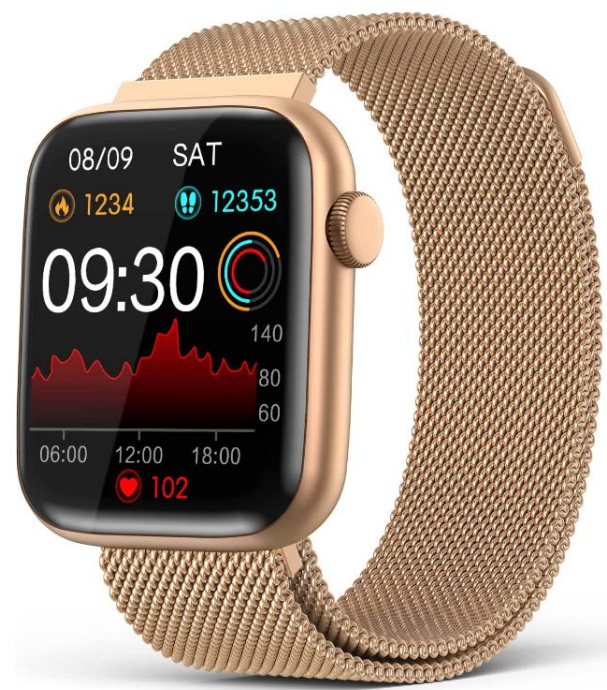
Introduction
The early sincere T13 Smart Watch presents a sleek and versatile wearable designed for tech-savvy users seeking an affordable yet feature-rich smartwatch. Combining style with functionality, this smartwatch delivers comprehensive health and fitness tracking, seamless smartphone connectivity, and customizable user experiences. Targeted toward fitness enthusiasts, busy professionals, and everyday users who want to stay connected and monitor their wellness, the T13 offers an intuitive interface and long battery life.
With features such as heart rate monitoring, step counting, sleep analysis, and multi-sport tracking modes, the T13 helps users maintain a healthy lifestyle while staying in sync with their digital lives. Notifications for calls, messages, and apps ensure users never miss important updates. Additionally, the watch includes customizable watch faces and supports music control, making it suitable for both workouts and casual wear.
Priced competitively in the range of approximately $35 to $60, the early sincere T13 Smart Watch is widely available through online retail platforms and select electronics stores. It's affordable, lit, and combined with robust capabilities,, makes it an excellent choice for anyone looking to experience the convenience of a smartwatch without a high investment.
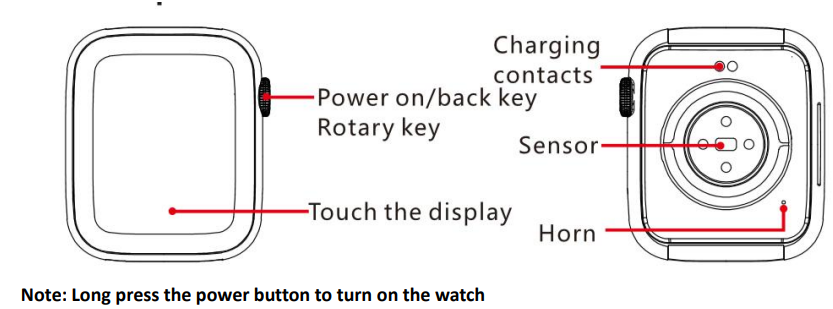
Introduction to function keys
- Screen display area
- Function button
- Pressure relief hole
- Heart rate sensor
- Microphone
- Speaker
- Front side
- Back side
Charge and Activate
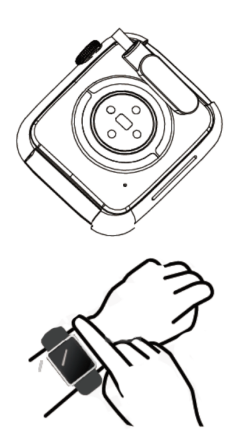
Align the magnetic charger with the magnetic hole on the back of the watch until the charging reminder appears on he watch screen. Please charge the watch for 2 hours before using it for the first time.
Wear Correctly
Please ensure that your watch is at least one finger above your wrist bone and that the sensor on the back touches your skin.
Bluetooth Connection
- Download and Login
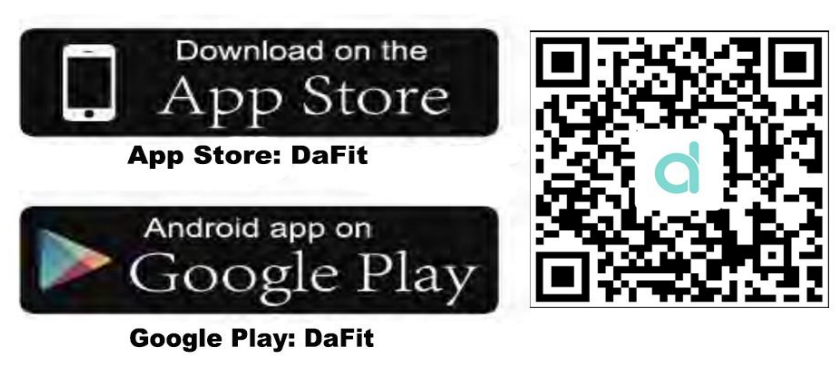
- Search for “DaFit” in the App Store, Google Play, or scan the QR code to download and install the app.
NOTE: When downloading apps, it is best to download them from the official app store. - Log in to the app and please fill in the correct gender, birthday, height, weight, etc.(*Incorrect information can affect the accuracy of data.
- Search for “DaFit” in the App Store, Google Play, or scan the QR code to download and install the app.
Bluetooth Connection steps
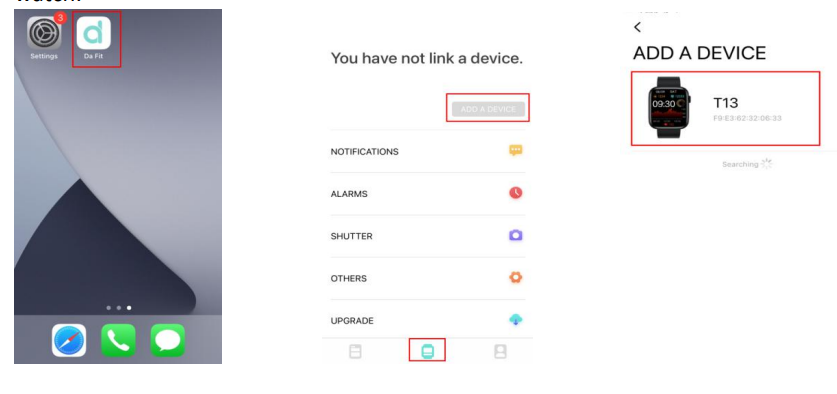
Step A:. Connect to Bluetooth in the DaFit App(for data transfer)
- Turn on the【Bluetooth】function of your phone.
- Enter【DaFit】,click【ADD A DEVICE】,find【T13】to pair and agree to bind on the watch.
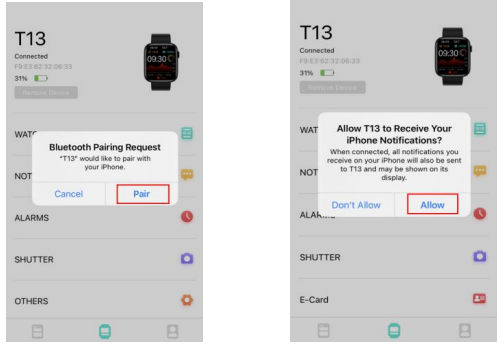
When connecting, the Bluetooth pairing request and notifications request appear on your phone. Pleasee click【Pair】and【Allow】
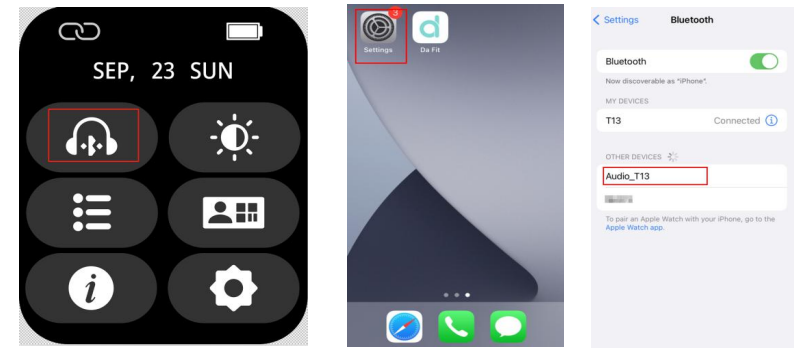
Step B: Connect to the audio Bluetooth in your phone (for answering/ dialing/ listening to music)
- Slide down the screen and turn on the【audio switch】function.
- Open the phone【Settings】-【Bluetooth】, Find【Audio_T13】and click to connect it.
- Note: When the watch is low, the Audio cannot be turned on
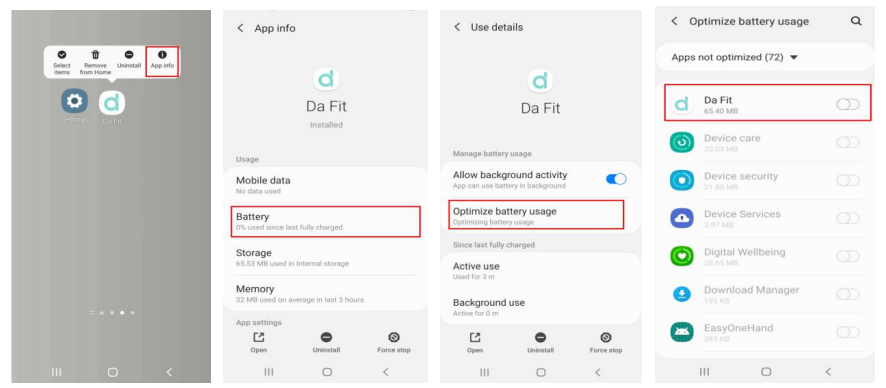
Q: Why are Android phones easily disconnected?
A: "DaFit" APP must be running on the phone so that the Bluetooth
will not be disconnected automatically. But the storage management of the Android system will forcibly turn off the APP, to prevent the
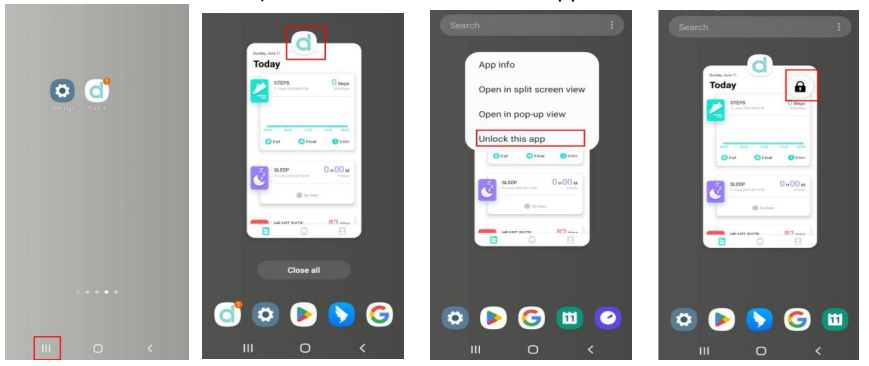
DaFit APP from being killed by the system, please make the following 2 settings:
- Battery optimization permission settings
Long press【DaFit】→click【App information】→【Battery】→【Optimize Battery usage】→【All】→【Close】DaFit App optimization button. - Clean up protection permission settings. To prevent the App process from being closed, click the【Multitasking】button in the navigation bar (or slide and stay from the bottom of the screen) →【DaFit】→【Lock this application】.
Specifications and Key Features of the earlysincere T13 Smart Watch
- Display: 1.3-inch IPS color touchscreen with 240 x 240 pixel resolution for clear visuals and easy navigation.
- Connectivity: Bluetooth 5.0 for stable and low-energy connection to iOS and Android smartphones.
- Health Monitoring: Continuous heart rate sensor, sleep tracking, blood oxygen (SpO2) measurement, and sedentary reminders.
- Fitness Tracking: Multiple sport modes including running, cycling, walking, and more, with accurate step and calorie counting.
- Battery Life: Up to 7 days of typical use on a single charge, with magnetic USB charging support.
- Water Resistance: IP68 rating, suitable for everyday use and sweat-resistant workouts (not recommended for swimming or diving).
- Compatibility: Supports smartphones running Android 5.0+ and iOS 10.0+, with a dedicated app for data syncing and customization.
- Additional Features: Call and SMS notifications, music control, alarm, stopwatch, weather updates, and customizable watch faces.
- Dimensions & Weight: Lightweight design,, approx. 40 grams with adjustable straps for comfort.
Compared to similar budget smartwatches, the early sincere T13 offers competitive battery life and a comprehensive health suite that rivals more expensive models, making it a strong option for casual and fitness users alike.
Troubleshooting Guide for Earlysincere T13 Smart Watch
Common Issues and Solutions
- Watch not pairing with smartphone: Ensure Bluetooth is enabled and the watch is within 0.5 meters of the phone. Restart both devices and try reconnecting through dedicated the dedicated dedicaEarlySincerecere app.
- No notifications received: Confirm notification permissions are enabled on the paired smartphone and that the watch’s “Do Not Disturb” mode is switched off.
- Touchscreen unresponsive: Restart the watch by holding the side button for 5-8 seconds. If the problem persists, perform a factory reset via Settings.
- Battery drains quickly: Reduce screen brightness, disable always-on display, and close background apps on the smartphone to conserve power.
- Incorrect health data readings: Wear the watch snugly on the wrist, ensure sensors are clean, and update firmware when available.
Error Codes and Fixes
The early sincere T13 does not display explicit error codes, but diagnostic alerts may appear on the companion app advising firmware updates or sensor recalibration.
Preventive Measures
- Regularly update the watch firmware and companion app for optimal performance.
- Keep the watch clean and dry to prevent sensor malfunctions.
- Avoid extreme temperatures and excessive impacts.
The early sincere T13 Smart Watch comes with a 12-month limited warranty covering manufacturing defects. For support, users can contact Earlysincerere customer service via the official website or through the app's support section for troubleshooting assistance.
Pros & Cons of the early sincere T13 Smart Watch
Pros
- Affordable pricing: Offers excellent value compared to similarly featured smartwatches.
- Comprehensive health tracking: Accurate heart rate, SpO2, and sleep monitoring enhance wellness insight.
- Good battery life: Lasts up to a week, reducing frequent charging hassles.
- IP68 water resistance: Suitable for daily wear and sweat, adding durability.
- Easy smartphone integration: Supports both Android and iOS with a dedicated app.
Cons
- Display resolution: Modest 240x240 pixels, less sharp compared to premium models.
- No GPS: Relies on phone GPS for location tracking, limiting standalone use.
- Limited app ecosystem: Fewer third-party app integrations than high-end smartwatches.
- Notifications: Cannot reply directly from the watch, requiring phone interaction.
The early sincere T13 outperforms many budget competitors in battery and health features but lacks advanced functions seen in higher-tier models, making it a balanced choice for users focused on core smartwatch capabilities without premium costs.
Customer Reviews and Feedback on Earlysincere T13 Smart Watch
Users frequently praise the earlysincere133 Smart Watch for its affordability and reliable health tracking features, often rating it around 4 out of 5 stars. Many reviews highlight its comfortable fit and impressive battery performance as standout benefits.
Common praises include the clear display and ease of use via the companion app. However, some customers report occasional Bluetooth connectivity drops and limited notification interaction as drawbacks. A few users mention slower software updates compared to competitors.
Overall, the watch is recommended for budget-conscious buyers seeking basic smartwatch functionality and health monitoring. Buyers who prioritize GPS tracking or richer app support may consider alternatives, but the T13 remains a strong contender in its price segment.
Faqs
How do I set up the earlysincere T13 Smart Watch for the first time?
What should I do if the earlysincere T13 Smart Watch is not pairing with my phone?
Can the earlysincere T13 Smart Watch track blood pressure and heart rate continuously?
Is the earlysincere T13 Smart Watch waterproof and suitable for swimming?
How can I optimize battery life on my earlysincere T13 Smart Watch?
What are the main fitness features included in the earlysincere T13 Smart Watch?
How do I update the earlysincere T13 Smart Watch firmware and app?
What maintenance tips should I follow to keep my earlysincere T13 Smart Watch in good condition?
Leave a Comment