
Ecowitt Wireless Indoor Outdoor Thermometer WH0281 User Manual
Content
ecowitt Wireless Indoor Outdoor Thermometer WH0281: Complete Product Manual and Buying Guide
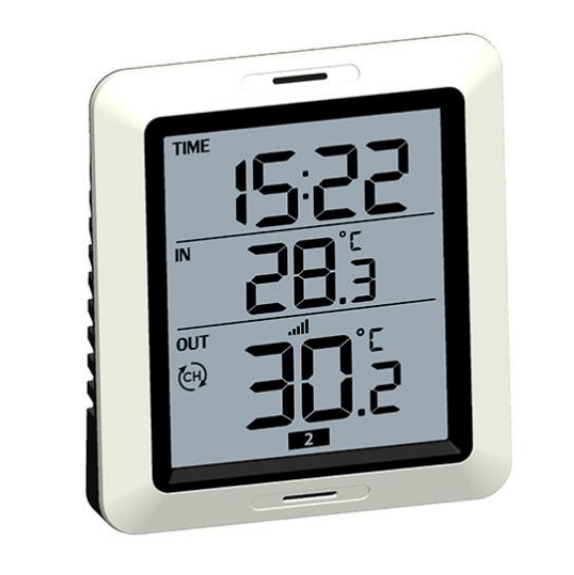
The ecowitt Wireless Indoor Outdoor Thermometer WH0281 is a compact, easy-to-read temperature monitoring system designed for homes, greenhouses, garages, RVs, workshops, and small business spaces. It includes a display console and three remote WH53 temperature sensors, allowing you to track multiple locations from one screen. The large LCD display shows current readings, max and min values, time, and alarm functions, making it especially useful for users who want a simple but reliable indoor and outdoor thermometer without a complicated setup.
One of the biggest advantages of the ecowitt Wireless Indoor Outdoor Thermometer WH0281 is its practical balance of range, simplicity, and value. With 433 MHz wireless transmission and an open-air range of up to 300 feet, it can cover typical home and property monitoring needs. The sensors update about every 60 seconds, which is ideal for everyday temperature checks. This model is a strong fit for homeowners, gardeners, pet owners, hobbyists, and anyone comparing a wireless thermometer with multiple sensors against more expensive weather station alternatives. It is also a useful choice for buyers looking for a budget-friendly digital thermometer monitor with multi-location readings.
Estimated pricing for the ecowitt Wireless Indoor Outdoor Thermometer WH0281 is typically in the budget-to-midrange category, with recent listings showing promotional pricing around $17.99 USD and retail availability varying by region and seller. Depending on location, shipping, bundles, and stock levels, the cost may also appear around £29 to £40 in some markets. Availability is generally best through official Ecowitt channels and regional resellers, though pricing changes frequently during sales.
Troubleshooting the ecowitt Wireless Indoor Outdoor Thermometer WH0281
If the display shows no sensor readings, first check that each WH53 sensor has a fresh AA battery installed and is powered on. Make sure the sensor is within range of the console and placed away from thick walls, metal surfaces, and interference sources such as large appliances or wireless devices. If one sensor updates while another does not, reinsert the batteries, reset the affected sensor, and allow several minutes for reconnection. Since the system updates about once per minute, short delays are normal.
Common issues include blank screens, unstable readings, or incorrect temperature values. If the console appears unresponsive, replace its battery and confirm the batteries are inserted correctly. If readings seem off, move the sensor out of direct sunlight, rain exposure, or heat-reflective surfaces. There are no widely used visible error codes for this model, so most problems are resolved by battery replacement, range improvement, or a full reset. Preventive care includes using high-quality batteries, keeping sensors dry, and checking placement seasonally.
Warranty coverage and support options depend on the seller or regional store. For help, contact Ecowitt through its official website or the retailer where the product was purchased. Keep your order number, product name, and a short description of the issue ready before requesting support.
Pros and Cons of the ecowitt Wireless Indoor Outdoor Thermometer WH0281
Pros
- Tracks temperatures in four locations total: the console plus three remote sensors.
- Simple setup with a clear LCD display and easy-to-understand max/min readings.
- Useful 300-foot open-air wireless range for typical home and garden use.
- Good value for money for users who need multiple temperature points without a full weather station.
- Works well for greenhouses, basements, baby rooms, garages, and outdoor storage areas.
Cons
- No humidity, pressure, or advanced weather forecasting features.
- Requires AA batteries for the console and each sensor, which adds ongoing maintenance.
- Performance can drop with walls, metal barriers, or long-distance placement.
- Best suited for temperature monitoring rather than professional-grade meteorological use.
- Alternative models may offer app connectivity or more environmental metrics at a higher price.
Overall, the ecowitt Wireless Indoor Outdoor Thermometer WH0281 offers strong value if your priority is reliable multi-point temperature monitoring rather than advanced smart-home features.
Customer Reviews for the ecowitt Wireless Indoor Outdoor Thermometer WH0281
Typical customer feedback for the ecowitt Wireless Indoor Outdoor Thermometer WH0281 is positive, with many users praising the easy setup, readable display, and convenience of monitoring three remote locations at once. A common sentiment is that it “does exactly what it promises” and works well for everyday temperature checks in homes and gardens. Buyers often rate it around 4 out of 5 stars for value and simplicity.
Frequent compliments include the compact design, useful alarm and clock functions, and the ability to track current, max, and min temperatures. Common complaints usually focus on battery life, limited smart features, and occasional signal dropouts when sensors are placed too far away or behind thick walls. Some users also mention that the display is best for indoor viewing rather than outdoor use in bright sunlight.
For shoppers who want an affordable wireless indoor outdoor thermometer with multiple sensors, this model is usually recommended. It is especially appealing for users who want dependable temperature tracking without needing Wi-Fi, an app, or a full weather dashboard.
Faqs
How do I set up the ecowitt Wireless Indoor Outdoor Thermometer WH0281 for the first time?
Why is my ecowitt Wireless Indoor Outdoor Thermometer WH0281 not showing the outdoor sensor reading?
What is the best place to mount the outdoor sensor on the ecowitt Wireless Indoor Outdoor Thermometer WH0281?
How accurate is the ecowitt Wireless Indoor Outdoor Thermometer WH0281 for temperature and humidity monitoring?
Can the ecowitt Wireless Indoor Outdoor Thermometer WH0281 work through walls and at a long range?
How do I troubleshoot inconsistent readings on the ecowitt Wireless Indoor Outdoor Thermometer WH0281?
What features should I use most on the ecowitt Wireless Indoor Outdoor Thermometer WH0281 for daily monitoring?
How should I clean and maintain the ecowitt Wireless Indoor Outdoor Thermometer WH0281 for long-term use?
Leave a Comment