
Setup: Efolen I68 Smart Watch User Manual
Content
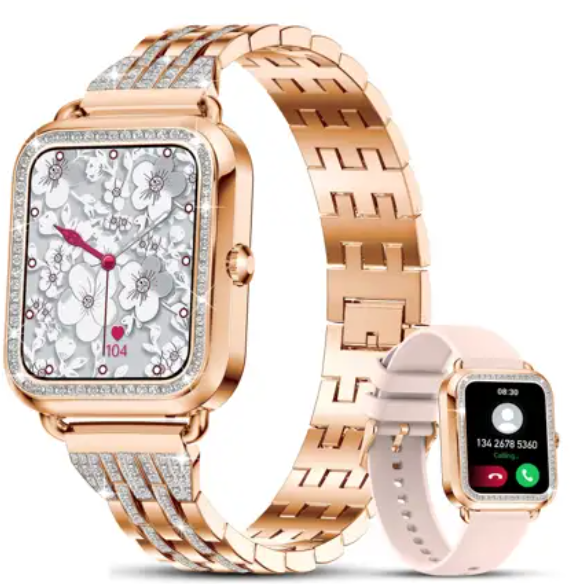
Efolen I68 Smart Watch
Introduction
The Efolen I68 Smart Watch is a cutting-edge wearable device designed to seamlessly blend health monitoring with a fashionable design. This smartwatch is perfect for those seeking a balance of style and functionality. Whether you're an athlete, a busy professional, or a health enthusiast, the I68 offers a comprehensive range of features that cater to different lifestyles. It supports heart rate monitoring, blood oxygen detection, sleep tracking, and more, making it an excellent choice for both men and women. The estimated price range for this smart watch is typically under $100, making it an affordable option for those looking to upgrade their fitness tracking experience. The I68 is widely available on platforms like Amazon, eBay, and AliExpress.
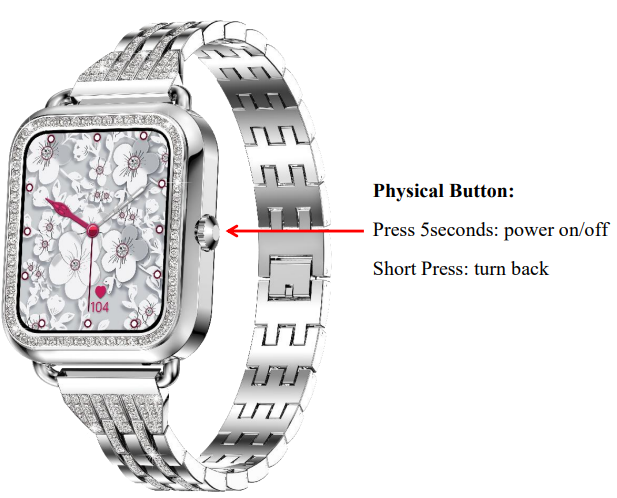
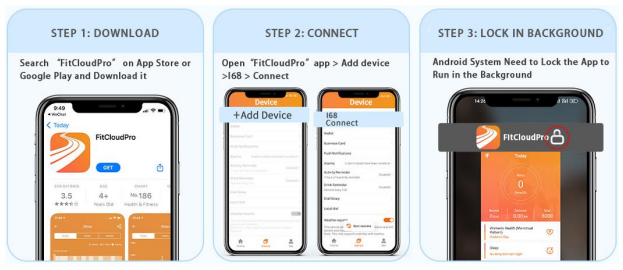
Install the watch app
- S.. Search “FitCloudPro” in the APP store
(Apple store/Google store). - Scan the QR code to download.
Equipment requirements: iOS 7.1 and above; Android 4.4 and above, supporting Bluetooth 5.2
User tips
- For the first time use, please make sure the battery is fully charged with the magnetic charging cable. The charging time is about 2 hours.
- Please do not use the fast charging head to avoid damaging the battery.
- When installing the APP, it will prompt to access the phone permissions. Please allow all permissions:
- Bluetooth
- Notification (including alerts /sounds/ icon badges)
- Local network in the “FitCloudPro” APP.
Connect the Smart Watch to the App
- Turn on the phone's Bluetooth
- Open the APP FitCloudPro
- Log in and set your personal information
- Click "Bind Device" and connect "I68"
- The devices get successfully connected via Bluetooth.
- Then the time, date, and language of the watch syncs accordingly.
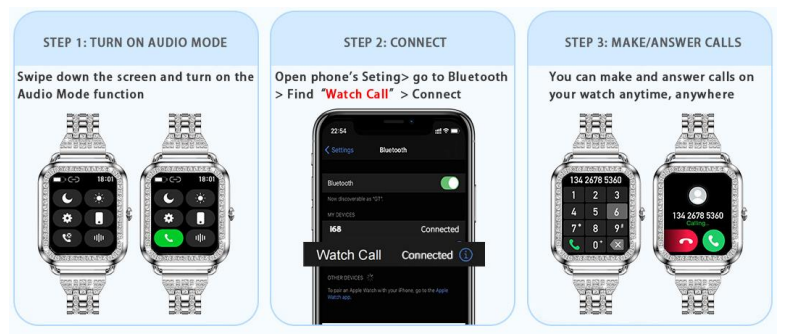
Connect Bluetooth Call
- Turn on audio mode: Swipe down the watch screen and turn on the Audio Mode function..
- Connect Bluetooth "Watch Call": Go to Bluetooth and find
- Watch Call" and connect.
- You can make and answer calls on your watch anytime,
Tips
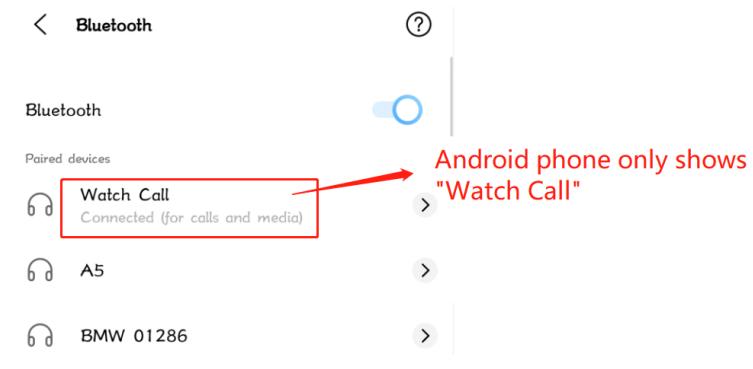
- After the Android phone is correctly paired and connected to the watch, it will automatically connect to the Bluetooth "Watch Call". (No need to manually connect "Watch Call"The )
- Android phone does not display Bluetooth "I68"
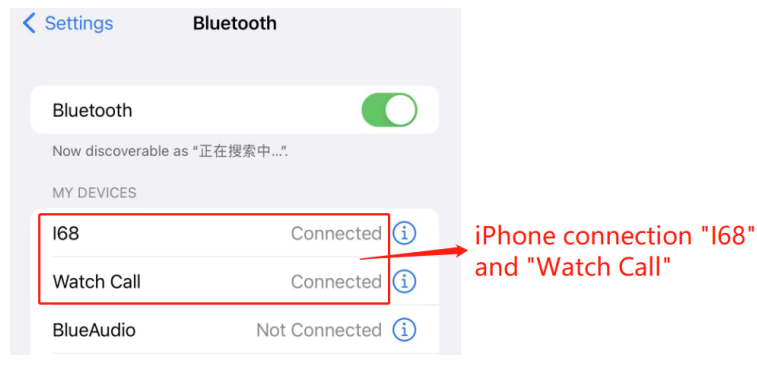
The iPhone needs to be connected to the "watch call" before you can use the watch to make Bluetooth calls.
Technical Specifications
The Efolen I68 Smart Watch comes with a variety of impressive features:
- Display Size: Typically around 1.32 inches for certain models, offering a clear and vibrant display.
- Health Monitoring: Includes heart rate monitoring, blood oxygen detection, blood pressure measurement, and sleep quality tracking.
- Connectivity: Supports Bluetooth calling, allowing users to make and receive calls directly from the watch.
- Compatibility: Compatible with both iOS and Android devices.
- Design: Features a sporty strap style with multiple color options, including black, silver, pink, and more.
- Water Resistance: Offers IP67 waterproofing for durability.
Compared to similar smart watches, the I68 stands out with its comprehensive health features and stylish design, making it a strong competitor in the budget-friendly smart watch market.
Troubleshooting
Common issues with the Efolen I68 Smart Watch and their solutions include:
- Bluetooth Connectivity Issues: Ensure that the watch is properly paired with your device. Restart both devices if necessary.
- Error Codes: Refer to the user manual for specific error codes and their fixes.
- Preventive Measures: Regularly update the watch's software to prevent bugs and performance issues.
- Warranty and Support: Contact Efolen at Efolen@163.com for warranty information and support.
Pros & Cons
Pros:
- Comprehensive Health Features: Offers a wide range of health tracking options.
- Bluetooth Calling: Allows for convenient call management directly from the watch.
- Affordable Price: Generally priced under $100, making it a budget-friendly option.
Cons:
- Quality Variance: Some users report variations in build quality.
- Software Updates: May require frequent updates to maintain optimal performance.
Customer Reviews
Users generally praise the Efolen I68 Smart Watch for its value for money and comprehensive features. Common praises include its stylish design and effective health monitoring capabilities. However, some users mention issues with connectivity and software stability. Overall, the watch averages a solid rating, with many recommending it for casual use. For those seeking a more reliable device, it might be worth considering alternatives with better build quality.
Star Ratings: 3.5/5 - A recommended purchase for those on a budget looking for basic cartwatch featuresfor basic cartwatch features.
For more information on the Efolen I68 Smart Watch, including detailed user guides and troubleshooting tips, visit Efolen's official resources.
Faqs
How do I set up the efolen I68 Smart Watch for the first time?
What should I do if my efolen I68 Smart Watch is not connecting to Bluetooth?
Can the efolen I68 Smart Watch monitor blood pressure and blood oxygen levels accurately?
Is the efolen I68 Smart Watch compatible with both Android and iOS devices?
How do I customize watch faces on the efolen I68 Smart Watch?
What are common troubleshooting steps if the efolen I68 Smart Watch screen is unresponsive?
How do I maintain and care for my efolen I68 Smart Watch to ensure longevity?
How can I optimize battery life on the efolen I68 Smart Watch during daily use?
Tags
Leave a Comment