
Setup: Efqfo Smart Watch P22 User Manual
Content
Efqfo Smart Watch P22
Introduction
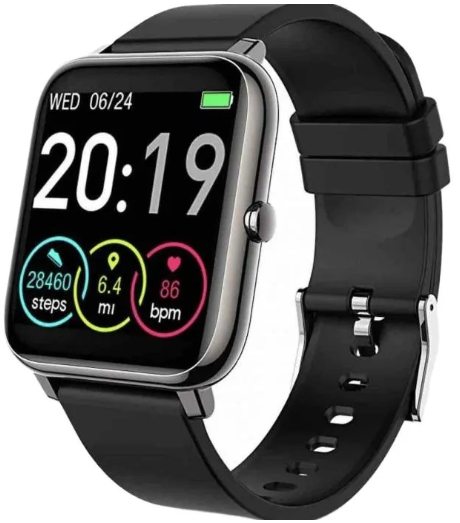
The efqfo Smart Watch P22 is a versatile wearable designed to blend cutting-edge technology with everyday convenience. Tailored for fitness enthusiasts, busy professionals, and tech-savvy users, this smartwatch offers a comprehensive solution to monitor health metrics, manage notifications, and enhance communication on the go. Its sleek design and user-friendly interface make it an excellent companion for both casual and active lifestyles.
Key benefits of the efqfo Smart Watch P22 include continuous health monitoring with heart rate tracking, step counting, sleep analysis, and multi-sport modes, all supported by reliable Bluetooth connectivity and an intuitive touch display. The watch supports smartphone notifications, music control, and customizable watch faces, providing seamless integration with Android and iOS devices.
This smartwatch is ideally suited for users seeking an affordable yet feature-rich device to boost productivity and maintain wellness. The estimated price range is around $40 to $60, positioning it as a cost-effective alternative to premium smartwatches on the market. Availability is widespread through online retailers and selected tech outlets, making it accessible to a broad audience.
Specifications and Key Features of the efqfo Smart Watch P22
- Display: 1.69-inch full touch IPS screen with 240 x 280 resolution
- Connectivity: Bluetooth 5.0 for stable pairing with smartphones
- Battery Life: Up to 7 days of typical usage; 15 days standby
- Health Monitoring: Heart rate sensor, blood pressure, SpO2 tracking, sleep quality analysis
- Fitness Modes: 14+ sports modes, including running, cycling, and swimming (IP68 water-resistant)
- Compatibility: Android 6.0+ and iOS 9.0+ devices via dedicated app
- Additional Features: Call & message notifications, music control, alarm clock, sedentary reminders
In terms of performance, the efqfo Smart Watch P22 delivers responsive touchscreen interactions and reliable sensor accuracy comparable to other budget smartwatches like the Amazfit Bip U or Xiaomi Mi Band 7, but with a larger display and more sport modes. Its water resistance and extended battery life provide practical advantages for active users.
INSTRUCTIONS
CHARGING INSTRUCTIONS
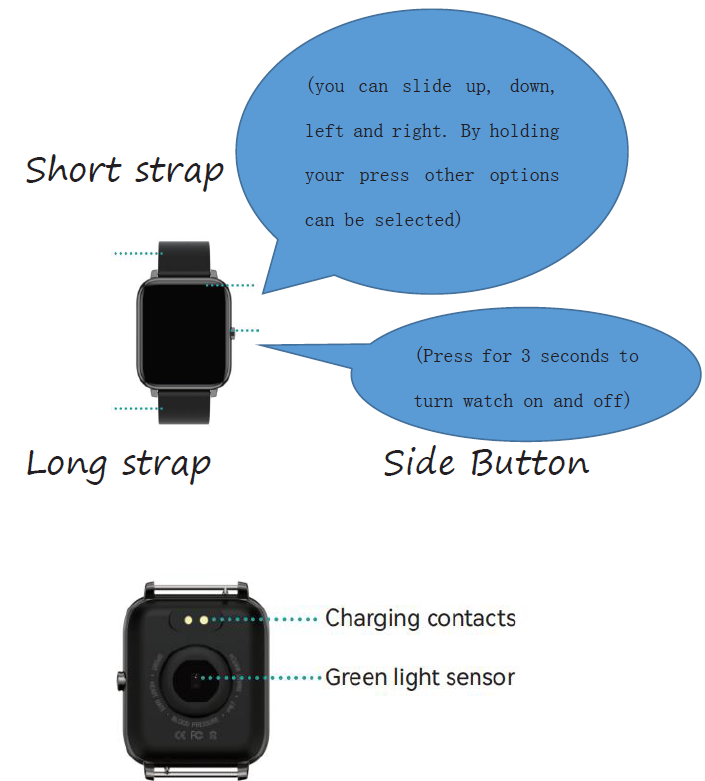
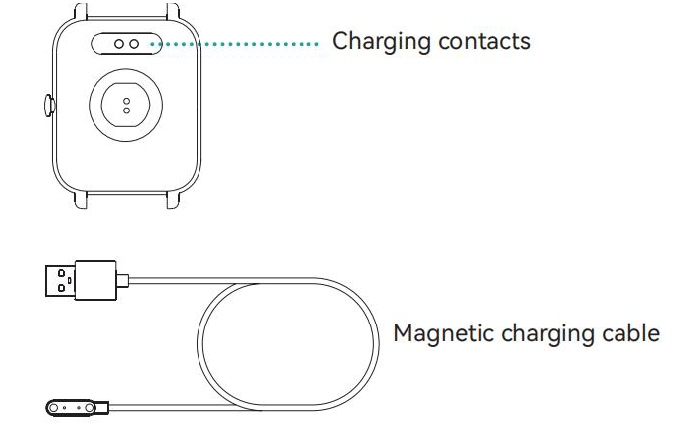
- Please use the charging cable provided with the product to charge the product at the charging contacts on the back of the smart watch.
- Plug the USB into a USB port or USB adapter (not included).
- TIPS: If people touch the watch by mistake or pets touch the watch, it may cause the contact between the charging line and the watch to be separated, and then the watch cannot be charged naturally, which is almost an inevitable problem of magnetic charging, won't charge.
SMARTWATCH APP INSTALLATION
This product is a wireless transmission product, and many functions need to be connected with the support of the app before it can be used.
You can only access certain functions in the app,, like time synchronization, call reminder, content push, weather display, remote camera, music control, etc. You can search Hero Band III in your phone store(Google Play or APP store) or scan the following QR code to download the app.
CONNECTING SMARTWATCH
- Download the HeroBandIII (you can scan the QR code or search for HeroBandIII in the app store to download), and then turn on the 8luetooth of your mobile phone.
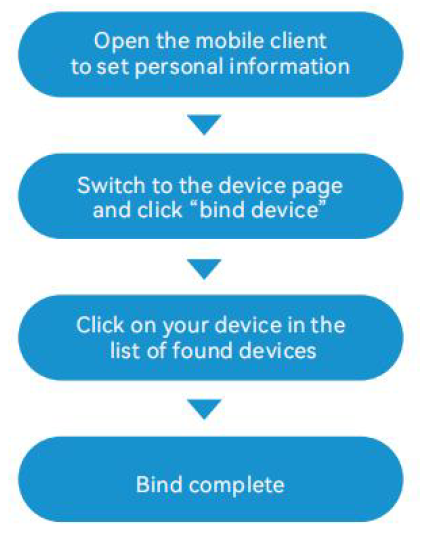
- Open the APP and click "Bind Device", select P22 in the list. Don't directly connect the smartwatch to the phone 8luetooth, you must to be complete in the App. The maximum Bluetooth distance is 8-10 meters. If the app can’t detect the watch, please restart your phone and also reset the watch (Turn on the watch--> Click the ”Settings” icon--> “reset”). Then try again. If you still can’t connect the watch, please uninstall the app and also delete the "P22" from the Bluetooth paired list of your phone. Reinstall the app and try again.
Note: when the phone is connected to the smart watch, you will need to keep the Bluetooth turned on. Make sure no other devices are connecting to your phone while you are connecting the smartwatch.
APP OPERATION
Enter the app movement page and refresh your screen. This way, the smartwatch data will refresh.
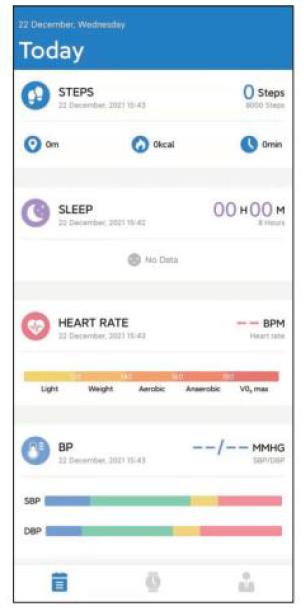
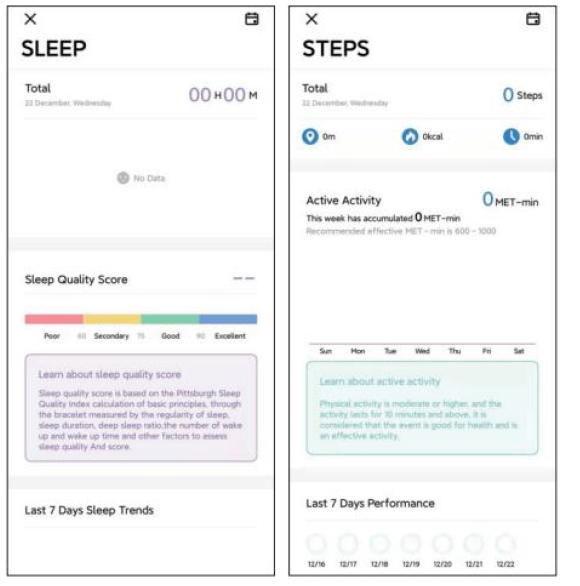
Click on the steps, sleep,, and the other functions. If you have previous data, you could enter this.
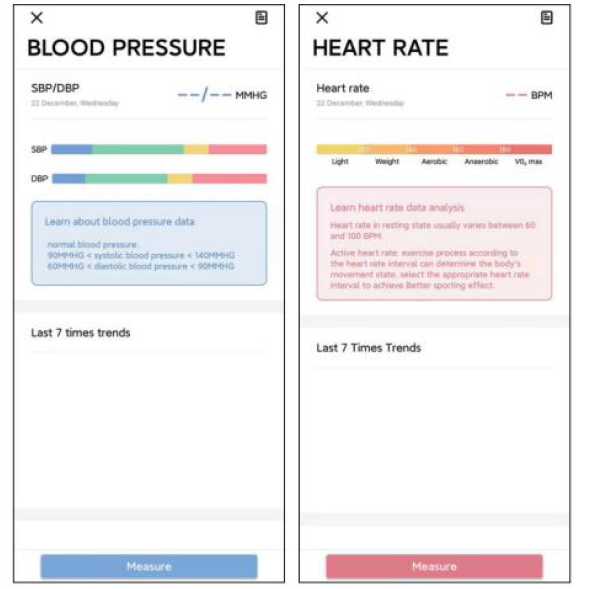
Click on heart rate and blood pressure. If you have previous data , you could enter this here, or you could start a measurement.
Troubleshooting and Support for efqfo Smart Watch P22
Common issues with the EFQFOOO Smart Watch P22 include startup problems, connectivity failures, and app synchronization errors. If the watch does not turn on, ensure it is fully charged by connecting it to the supplied charger for at least 30 minutes. A soft reset can be performed by holding the power button for 10-15 seconds to resolve freezing or unresponsiveness.
For Bluetooth connection issues, verify that the watch and smartphone are within 10 meters and that Bluetooth is enabled on both devices. Restart both devices and ensure the companion app is updated to the latest version. If the app does not recognize the watch, uninstall and reinstall the app or perform a factory reset through the watch settings, noting this will erase personal data.
Preventive measures include keeping the watch firmware up to date, avoiding exposure to extreme temperatures, and using only manufacturer-approved chargers. The efqfo Smart Watch P22 typically comes with a 12-month warranty covering manufacturing defects. For further assistance, users can contact EFQFO customer support via their website or authorized retail channels.
Pros & Cons of the efqfo Smart Watch P22
- Pros:
- Affordable price with a rich feature set, ideal for budget-conscious buyers
- Large, vibrant touchscreen offering excellent visibility and ease of use
- Comprehensive health and fitness tracking with multiple sport modes
- Good battery life supporting extended usage without frequent charging
- Water resistance enables use during swimming and rainy conditions
- Cons:
- Limited third-party app support compared to premium smartwatches
- Bluetooth connectivity can occasionally be unstable , depending on the smartphone model
- The touchscreen may experience slight lag during intensive multitasking
- Basic GPS functionality relies on smartphone GPS, not built-in
- Compared to alternatives like the Fitbit Inspire 3 or Samsung Galaxy Fit, the efqfo Smart Watch P22 offers competitive features at a lower price but lacks some advanced health sensors and ecosystem integration.
Customer Reviews and Feedback on efqfo Smart Watch P22
Users generally praise the efqfo Smart Watch P22 for its value-for-money proposition, highlighting accurate heart rate monitoring and comfortable wearability. Many appreciate the variety of fitness modes and the clear notification display. The watch averages around 4 out of 5 stars on popular e-commerce platforms.
Common complaints involve occasional Bluetooth disconnects and minor app glitches that require periodic re-pairing. Some reviewers note that the touchscreen sensitivity can vary, especially with screen protectors applied. Despite these issues, most customers recommend it as a reliable entry-level smartwatch suitable for daily use.
Leave a Comment