
Setup: Etekcity Upper-Arm Blood Pressure Monitor EBP-UA5 User Manual
Content
Etekcity Upper-Arm Blood Pressure Monitor EBP-UA5: Complete Product Manual and Review
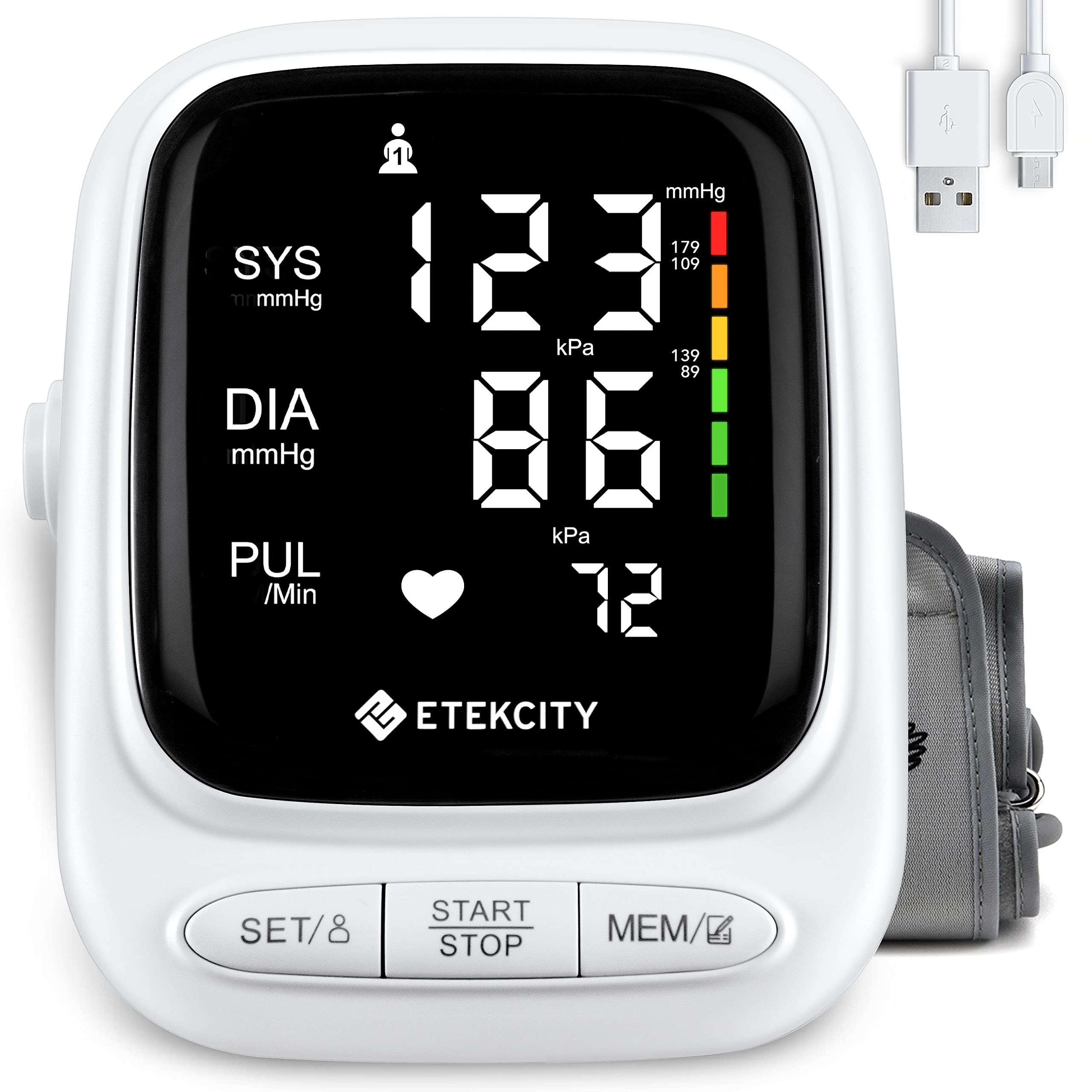
Introduction to the Etekcity Upper-Arm Blood Pressure Monitor EBP-UA5
The Etekcity Upper-Arm Blood Pressure Monitor EBP-UA5 is a reliable home health device designed for accurate blood pressure tracking, empowering users to monitor their cardiovascular health effortlessly. This upper-arm sphygmomanometer features a clear LED display, dual-user memory for up to 90 readings each, and advanced indicators like irregular heartbeat detection and World Health Organization (WHO) blood pressure classification. Ideal for seniors, individuals with hypertension, or anyone managing heart health, it supports daily use cases such as routine check-ups or sharing data with doctors.
Key benefits include its voice readout function for accessibility, ensuring results are heard aloud, and a comfortable arm cuff that minimizes discomfort during measurements. With a measurement range of pressure 0–290 mmHg (0–39 kPa) and pulse 40–199 beats per minute, plus ±3 mmHg pressure accuracy and ±5% pulse accuracy, it delivers clinically reliable results. Dual power options—AAA batteries or AC adapter—make it versatile for home or travel.
Targeted at health-conscious adults seeking an affordable upper arm blood pressure monitor, the EBP-UA5 stands out with its speaker function and multi-user support, perfect for couples or families. Priced at an estimated $36.99, it's widely available on Etekcity's official site and major retailers, offering exceptional value compared to pricier smart alternatives. Whether tracking hypertension trends or ensuring safe blood pressure levels, this device promotes proactive wellness in a user-friendly package.
Specifications
- Measurement Range:
- Pressure: 0–290 mmHg / 0–39 kPa
- Pulse: 40–199 beats per minute
- Accuracy:
- Pressure: ±3 mmHg / ±0.4 kPa
- Pulse: ±5%
- Units: mmHg / kPa
- Dimensions:
- Monitor: 4.9 × 4.5 × 2.8 in / 12.6 × 11.5 × 7.1 cm
- Cuff circumference: 8.7–16.5 in / 22–42 cm
- Weight: 0.56 lb / 256 g (excluding accessories)
- Operating Environment:
- Temperature: 41°–104°F / 5°–40°C
- Relative humidity: 15–80%
- Transport and Storage Environment:
- Temperature: -4°–131°F / -20°–55°C
- Relative humidity: 15–93%
- Battery Type: 3.7V, 800mAh Li-ion battery
- Rated Power: 5V, 1A
- Input: Type-C USB, 5V 1A
- Charging Time: 3–4 hours
- Automatic Shutoff: Approximately 60 seconds
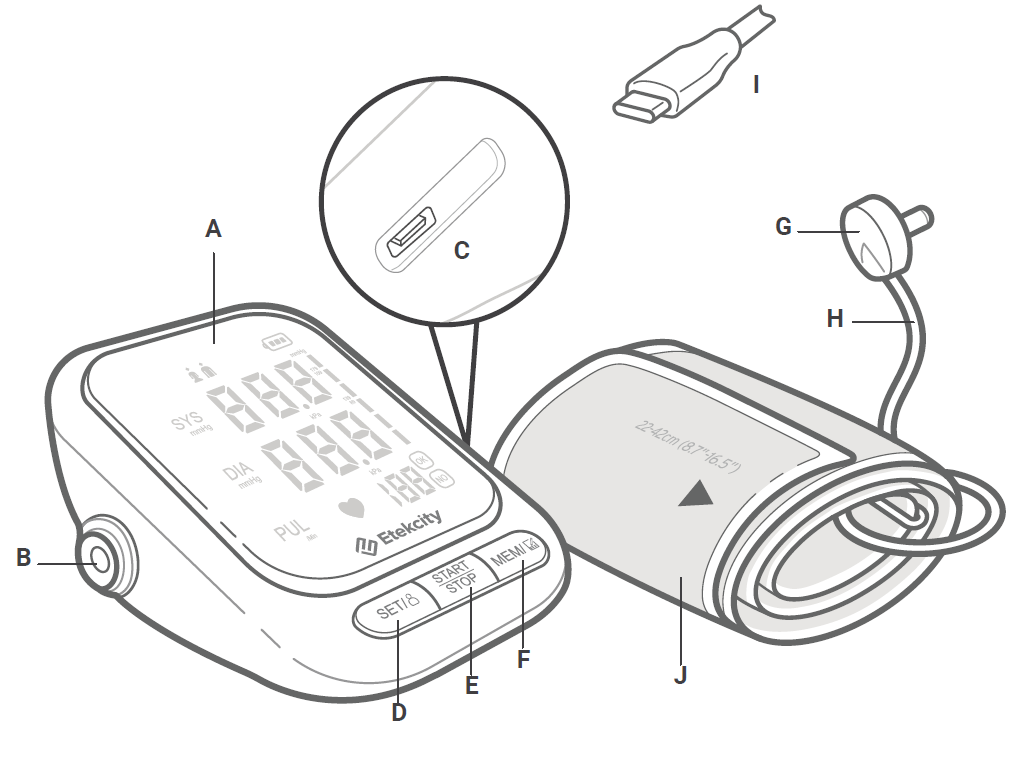
Functions
- Display
- Air port
- Type-C charging port
- Set/user button
- Start/stop button
- Memory button
- Air plug
- Air hose
- Type-C USB charging cable
- Cuff
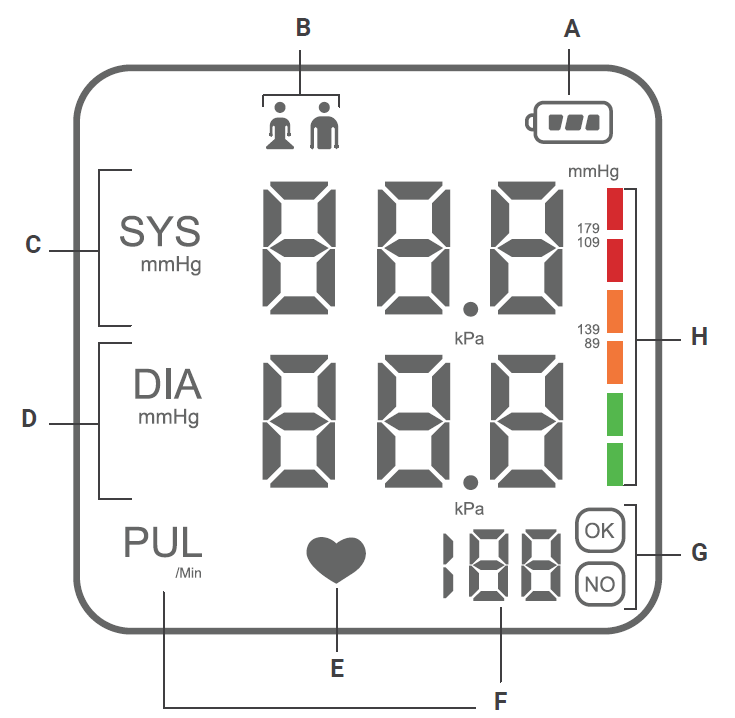
Display Diagram
- Battery
- User
- Systolic blood pressure
- Diastolic blood pressure
- Irregular heartbeat indicator
- Pulse
- Cuff status
- Blood pressure level indicators
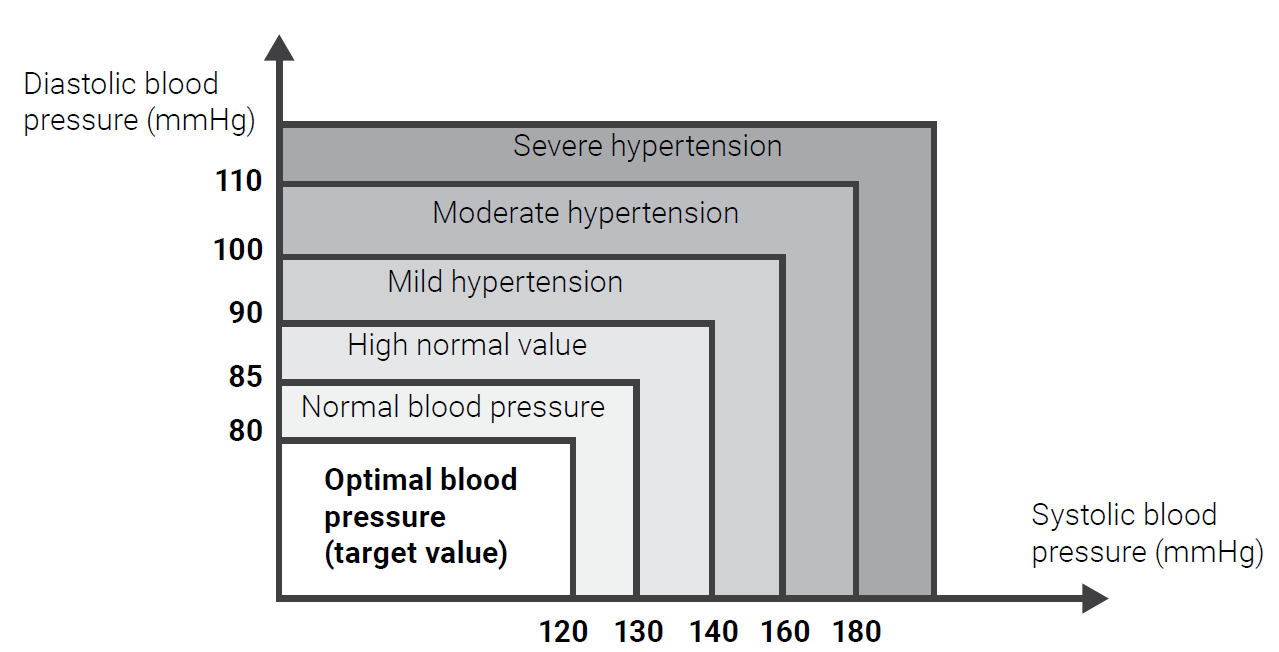
Getting to Know Your Blood Pressure Monitor
Blood pressure monitors use the oscillometric method to measure blood pressure. The monitor detects blood movement through the brachial artery and converts it into a digital reading. It is designed for simple and convenient operation without requiring a stethoscope. Results are automatically saved after each measurement. The monitor can store up to 90 results for each user..
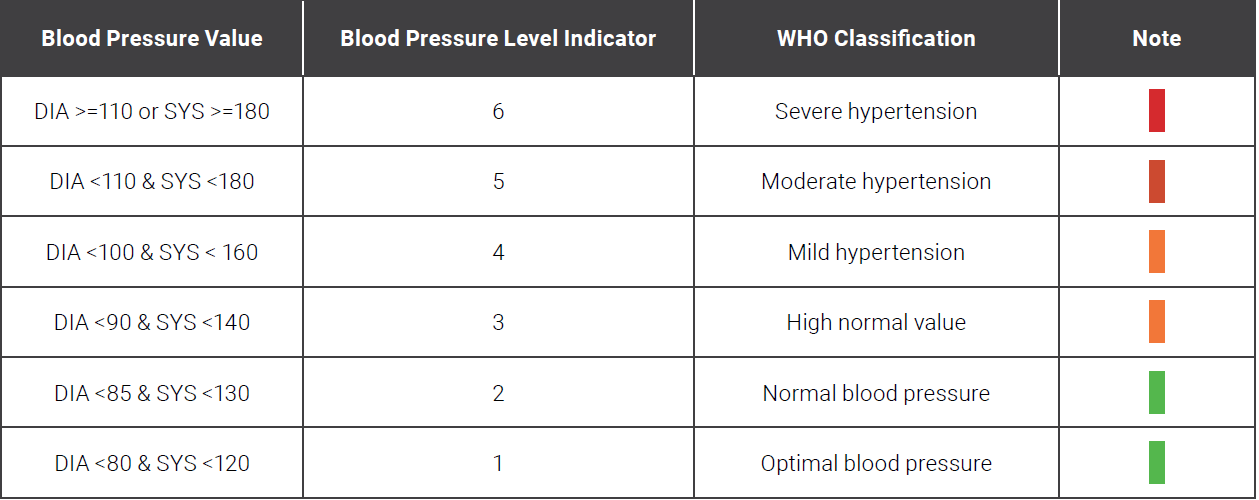
Viewing Saved Results
- Select a user.
- While the monitor is off, press the MEM button to display the average of the last 3 results. Press the MEM button again to view individual results, beginning with the most recent measurement.
- Press the MEM button again to view the next saved result.
Deleting All Saved Results
- Select a user.
- While the monitor is off, press and hold the MEM button for more than 3 seconds. While continuing to hold the MEM button, press the SET button.
- Once "All/EE" appears on the display, all saved results for the selected user have been deleted.
Turning the Speaker On/Off
- While the monitor is off, press and hold the SET button until the display shows "SP OFF" or "SP ON."
- "SP OFF" indicates that the speaker is disabled, while "SP ON" indicates that the speaker is enabled.
- Press the MEM button to switch between "SP ON" and "SP OFF."
- Press the SET button to confirm the selected setting.
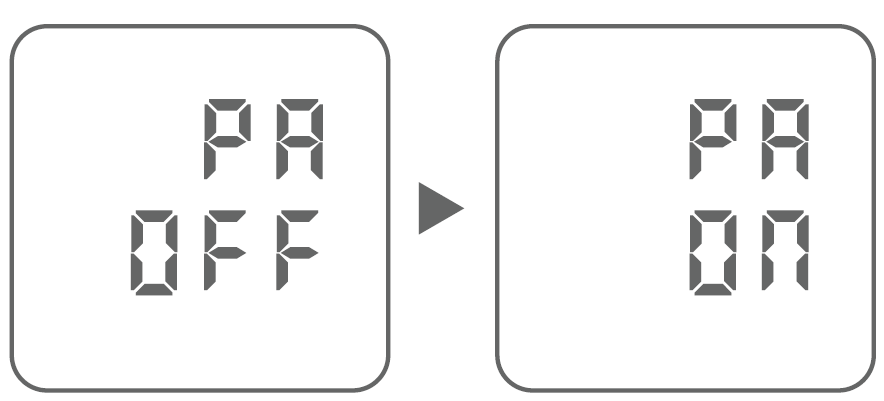
Changing Units
- While the monitor is off, press and hold the SET button until the display shows "SP OFF" or "SP ON."
- After the display blinks twice, press the SET button again until "PA OFF" appears, indicating mmHg.
- Press the MEM button to switch to "PA ON" for kPa.
- Press the SET button to confirm the desired measurement unit.
Using the Blood Pressure Monitor
Before using the monitor for the first time, fully charge the battery.
- Rest Before Measuring: Sit comfortably in a quiet area for at least 5 minutes before taking a blood pressure measurement to help ensure accurate results.
- Connect the Air Plug: Insert the air plug securely into the monitor's air port. Make sure it is completely connected to prevent air leakage during measurement.
- Position the Cuff: Place the cuff around your bare upper left arm, with the air hose positioned along the inside of your arm. Leave enough room to insert approximately two fingers between the cuff and your arm. Position the lower edge of the cuff about 0.8–1.2 in / 2–3 cm above your elbow.
- Select a User: Choose the appropriate user profile before starting the measurement.
- Position Your Arm: Rest your arm on a stable surface so that the cuff is at the same level as your heart. Keep your arm relaxed in a natural position.
- Start Measuring: Press the START/STOP button to begin the measurement. Remain relaxed and avoid talking or moving while the monitor operates. The measurement results will appear on the display when the process is complete.
- Repeat if Necessary: Wait approximately 3 minutes before taking another measurement to allow your arm to return to its normal resting condition.
Maintenance
Charging the Battery
The blood pressure monitor includes a built-in rechargeable Li-ion battery. Use the supplied Type-C USB charging cable to recharge the monitor when needed. The battery indicator flashes on the display when the battery level is low and charging is required.
- Connect the Charging Cable: Insert the Type-C USB charging cable into the charging port on the blood pressure monitor.
- Connect the Power Supply: Plug the other end of the USB cable into a compatible DC 5V power adapter and connect it to an electrical outlet. Alternatively, connect the cable to a powered USB port.
- Check the Charging Status: The blood pressure level indicator bars will flash while the battery is charging. Once the battery is fully charged, the indicator bars will remain solid and display full bars, indicating that charging is complete.
Pros and Cons of the Etekcity Upper-Arm Blood Pressure Monitor EBP-UA5
Pros
- Accurate and Feature-Rich: WHO indicator and irregular heartbeat detection provide clear health insights, with results displayed on a crisp LED screen.
- Dual-User Memory: Stores 90 readings per user (180 total), auto-saving after each test for easy trend tracking.
- Accessibility Features: Built-in speaker reads results aloud, ideal for visually impaired users; simple activation via buttons.
- Versatile Power: Runs on batteries or AC adapter for uninterrupted home monitoring.
- Affordable Value: At $36.99, it outperforms basic models like Omron entry-level units in memory and voice features.
Cons
- No Bluetooth Connectivity: Unlike Etekcity's TMB-1583-BS ($45.99), it lacks app integration for smartphone tracking.
- Manual Operation Only: Requires button navigation for user switching and speaker toggle, which may feel less intuitive for tech-savvy users.
- Cuff Fit Sensitivity: Air plug must be fully inserted to prevent leaks, potentially causing inaccurate readings if not positioned correctly.
Overall, the Etekcity EBP-UA5 blood pressure monitor offers strong value for money, excelling in core functionality while remaining budget-friendly compared to app-enabled alternatives.
Customer Reviews and Feedback on Etekcity Upper-Arm Blood Pressure Monitor EBP-UA5
Users praise the Etekcity Upper-Arm Blood Pressure Monitor EBP-UA5 for its ease of use and reliability, with many reporting 4.5-star average ratings across platforms. Common highlights include the "clear LED display and voice feature that's a game-changer for my elderly parents," and “accurate readings matching my doctor's office.” The dual memory and WHO color-coded scale receive frequent acclaim for simplifying hypertension monitoring.
Testimonials note: "Stores 90 readings per user—perfect for me and my wife!" However, some complaints mention occasional cuff air leaks if not secured properly, and the absence of Bluetooth as a drawback for app lovers. Frequently addressed issues like battery life are resolved with the AC adapter option. Most recommend it for home use, especially at $36.99, calling it a “must-have for daily blood pressure checks.”
Faqs
How do I set up the etekcity Upper-Arm Blood Pressure Monitor EBP-UA5 for the first time?
What should I do if the etekcity Upper-Arm Blood Pressure Monitor EBP-UA5 shows an error or inaccurate readings?
How do I enable the voice readout feature on etekcity Upper-Arm Blood Pressure Monitor EBP-UA5?
What arm sizes are compatible with the etekcity Upper-Arm Blood Pressure Monitor EBP-UA5 cuff?
How do I switch units from mmHg to kPa on etekcity Upper-Arm Blood Pressure Monitor EBP-UA5?
How do I maintain and clean the etekcity Upper-Arm Blood Pressure Monitor EBP-UA5?
What does the irregular heartbeat indicator mean on etekcity Upper-Arm Blood Pressure Monitor EBP-UA5?
How many readings can the etekcity Upper-Arm Blood Pressure Monitor EBP-UA5 store for multiple users?
More etekcity manuals
- Setup: Etekcity Smart Body Weight Scale ESB4074C User Manual
- Setup: Etekcity Smart Fitness Scale FIT 8S User Manual
- Setup: Etekcity Smart Nutrition Scale ESN00 Series User Manual
- Setup: Etekcity Smart Fitness Scale ESF38 User Manual
- Setup: Etekcity Infrared Thermometer Lasergrip 1022D User Manual
- Setup: Etekcity Smart Fitness Scale ESF14 User Manual
Leave a Comment