
Expresso GO-U Exercise Bike User Manual
Content
Expresso GO-U Exercise Bike: Complete Product Manual and Buyer Guide
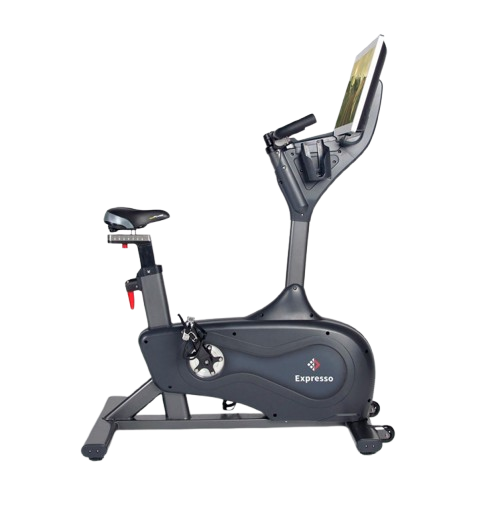
The Expresso GO-U Exercise Bike is an interactive upright indoor bike designed for users who want more than a basic stationary workout. It combines a commercial-style frame, a 26.5-inch touchscreen, and automatic resistance adjustment to create a ride experience that feels closer to outdoor cycling and guided studio training. The Expresso GO-U Exercise Bike is especially appealing to riders who want immersive workouts, structured training programs, and the motivation of on-screen routes, games, and classes.
Key benefits include its 30 resistance levels, belt drive system, magnetic resistance, and a high weight capacity that makes it suitable for a wide range of users. It is also a strong option for home gyms, wellness rooms, boutique fitness spaces, and rehab-focused training environments where low-impact cardio is important. Riders often choose this bike for its combination of durability, premium build quality, and engaging digital training features.
Typical pricing varies by seller and condition. New or demo units often fall in the premium range, with estimated prices around $2,699 to $7,499 depending on package, membership inclusion, and retailer. Refurbished models may be significantly lower, which improves value for buyers comparing smart exercise bikes, Peloton-style alternatives, and interactive upright cycles. Availability is usually limited through specialty fitness retailers and resellers, so stock may change quickly.
Specifications of the Expresso GO-U Exercise Bike
- Bike type: Upright interactive exercise bike with touchscreen training platform
- Dimensions: Approximately 47 x 24 x 62 inches
- Weight: About 165 pounds
- Resistance system: Magnetic resistance with automatic grade-based adjustment
- Resistance levels: 30 levels for varied cardio intensity
- Drive system: Belt drive for smoother and quieter operation
- Display: 26.5-inch high-definition touchscreen
- Power: 100–240V AC, 50/60 Hz, 3A
- Connectivity: Wi-Fi and wired LAN support on supported configurations
- Maximum user weight: Up to 350–400 pounds depending on model and seller listing
- Recommended rider height: Roughly 4'10" to 6'4"
- Pedals: Dual-purpose pedals with compatibility for standard cycling shoes on some versions
- Workout modes: Interactive roads, studio rides, training games, manual riding, and connected content
Compared with many standard exercise bikes, the Expresso GO-U Exercise Bike offers a much more immersive training experience and a heavier-duty frame. Compared with premium connected bikes, it stands out for automatic terrain simulation and a strong focus on virtual outdoor riding.
Troubleshooting the Expresso GO-U Exercise Bike
If the bike will not power on, check the power cord, wall outlet, and surge protector first. Make sure the unit is connected to a grounded outlet and that the power switch is fully engaged. If the touchscreen does not respond, restart the system and inspect all visible cable connections. A slow or frozen interface is often resolved by power cycling the unit for 30 to 60 seconds.
Common issues may include resistance not changing, connectivity problems, or a blank display. In many cases, these problems are caused by loose internal connectors, a network interruption, or software lockups rather than major hardware failure. If the bike shows a fuse-related failure, the unit uses internal fuses and replacement must match the correct rating. Preventive care includes keeping the bike on surge protection, maintaining a stable internet connection, wiping sweat from the console after every ride, and checking seat and pedal hardware for tightness.
Warranty support typically includes parts coverage, touchscreen coverage, and labor coverage for qualifying units, with coverage often depending on active membership and proper installation conditions. For help, contact support at 1-888-528-8589 ext. 2 or by email at support@bluegoji.com. Support hours are generally Monday through Friday, 6:00 a.m. to 4:00 p.m. PST.
Pros and Cons of the Expresso GO-U Exercise Bike
Pros
- Immersive touchscreen workouts make cardio more engaging than a basic upright bike
- Automatic resistance adjustment adds realism during hill climbs and route changes
- 30 resistance levels provide enough range for beginner and advanced riders
- Commercial-style construction supports heavier use and better long-term durability
- Quiet belt drive makes it suitable for home use, apartments, and shared spaces
- Strong value for users who want interactive fitness instead of a simple spin bike
Cons
- Higher price than traditional upright exercise bikes
- Large footprint and heavy frame make setup less convenient
- Best features may depend on membership or connected services
- Some buyers may prefer a simpler bike without touchscreen maintenance
- Refurbished and used units can vary in condition depending on seller
For buyers comparing alternatives, the Expresso GO-U Exercise Bike is stronger on immersive training than many budget bikes, but less accessible than simpler models from Schwinn, Sunny Health & Fitness, or basic magnetic upright bikes. It is best for users who value digital coaching and entertainment as much as fitness performance.
Customer Reviews for the Expresso GO-U Exercise Bike
Customer feedback is generally positive, with many users rating the bike around 4 to 4.5 stars for build quality, workout variety, and the realism of the virtual routes. Riders often praise the smooth resistance, sturdy frame, and the motivational effect of the touchscreen rides. One common testimonial style comment is, “It feels like riding outdoors without leaving home.”
Frequent complaints usually focus on the premium price, the size of the bike, and occasional setup or software frustrations. Some users also mention that the best features are tied to subscriptions or account activation. Buyers who want a connected fitness bike for daily use tend to recommend it, while casual users often prefer a lower-cost upright exercise bike. Overall, the Expresso GO-U Exercise Bike is best suited for committed riders who want a premium, interactive cardio machine.
Faqs
How do I set up the expresso GO-U Exercise Bike for the first time without missing any calibration steps?
What should I do if the expresso GO-U Exercise Bike display does not turn on?
How can I fix resistance problems on the expresso GO-U Exercise Bike if the pedal tension feels stuck or uneven?
Is the expresso GO-U Exercise Bike compatible with fitness apps, tablets, or heart rate accessories?
How do I adjust the seat and handlebars on the expresso GO-U Exercise Bike for better comfort and fewer knee problems?
Why is the expresso GO-U Exercise Bike making noise, and how can I reduce squeaking or clicking during rides?
What is the best maintenance routine for the expresso GO-U Exercise Bike to keep it running smoothly?
How do I get the most accurate workout data from the expresso GO-U Exercise Bike during training sessions?
Leave a Comment