
Setup: Fat Shark Dominator HDO Modular Goggles FSV1122 User Manual
Content
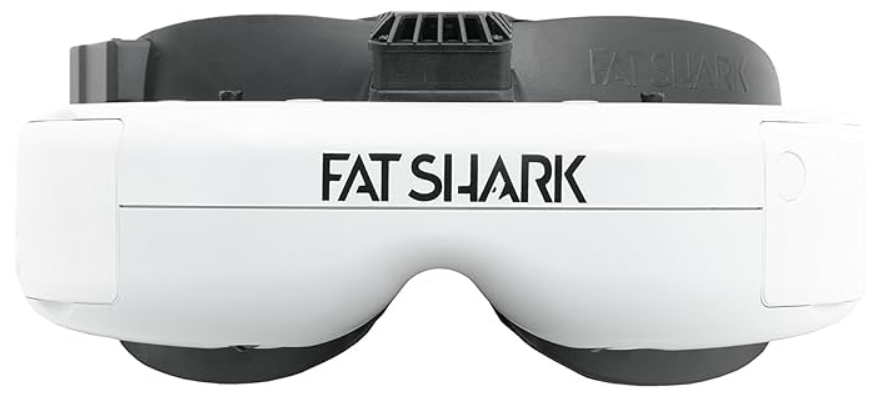
The Fat Shark Dominator HDO Modular Goggles FSV1122
Introduction
The Fat Shark Dominator HDO Modular Goggles FSV1122 is a cutting-edge piece of equipment designed for serious FPV (First Person View) enthusiasts and professionals. Launched in recent years, these goggles have quickly become a benchmark in the industry due to their advanced features and superior performance. The estimated price for these goggles is around $500, reflecting their high-quality construction and innovative technology.
The primary purpose of the Fat Shark Dominator HDO is to provide an immersive and crystal-clear viewing experience for drone pilots and FPV racers. With its modular design, users can easily upgrade or customize various components to suit their needs. Whether you are a seasoned pro or an avid hobbyist, these goggles offer unparalleled visuals and comfort.
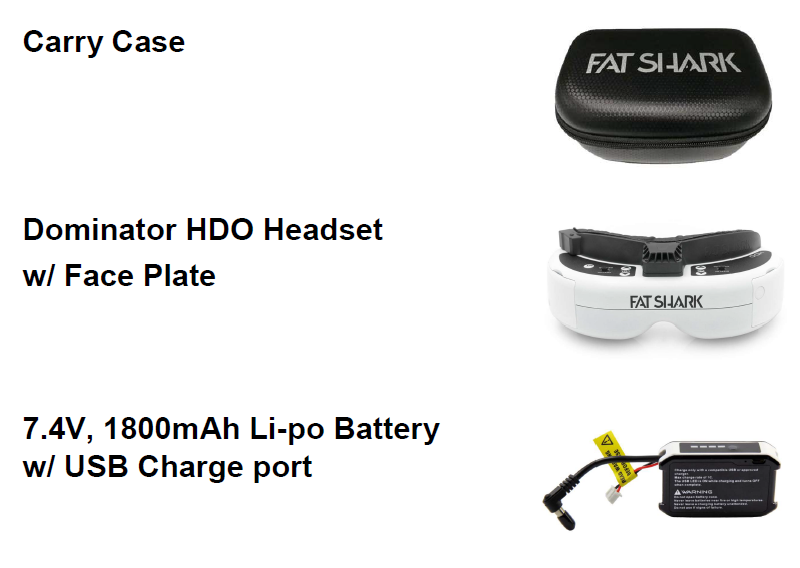
Product Contents
Control Diagram
Headset Operation
Controls
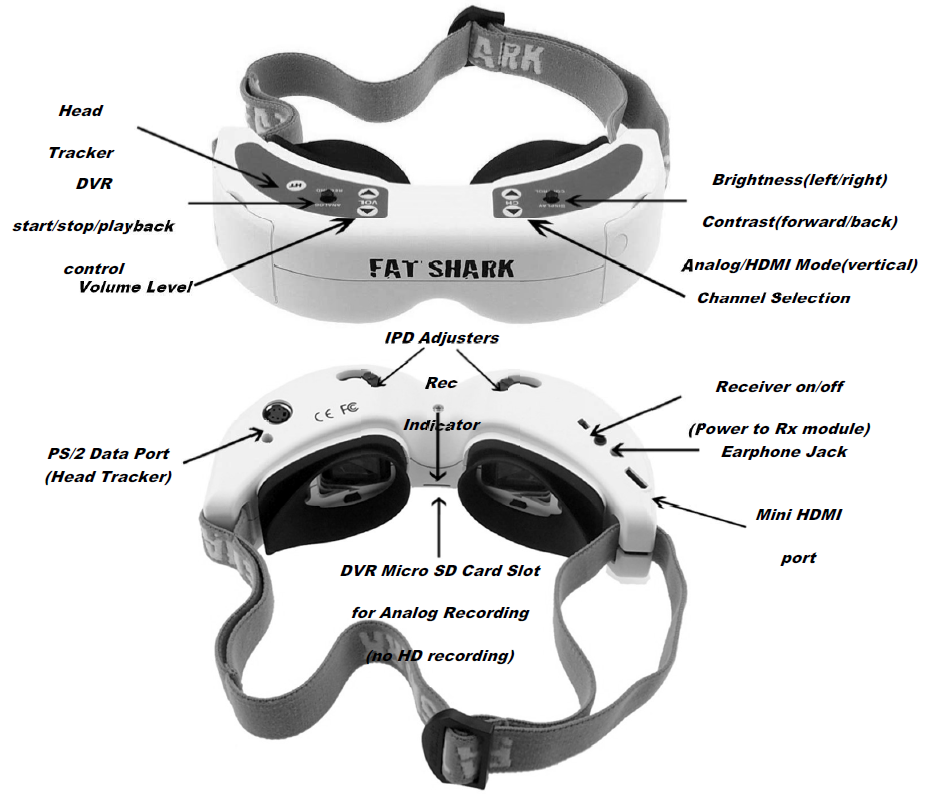
- Brightness/contrast control: pressing left and right increases/decreases display contrast. Press forward/back increases/decreases brightness.
- Display mode selection: Vertically depressing the contrast/brightness button scrolls through the following modes: Analog 2D/ HDMI 2D. OSD indicates mode.
- Channel select: Pressing channel up/down buttons will cause the channel to incrementally increase/decrease from channels 1 to 8 (see relevant receiver module for channel map). Audio beep on channel change. A long beep sounds on the channel's top and bottom limits.
- Low battery warning: Audio warning if input voltage drops below 6.8V
- Volume control: Each press of the button increments volume up or down. Standard earphones can be used with the Dominator HDO
- Head tracker: (refer to online Trinity documentation at http://fatshark.helpscoutdocs.com/)
- RX power switch: The RX module power is independently controlled via this switch. If a module is inserted, but the desired video source is via the AV cable, the RX module needs to be turned off to avoid image conflict.
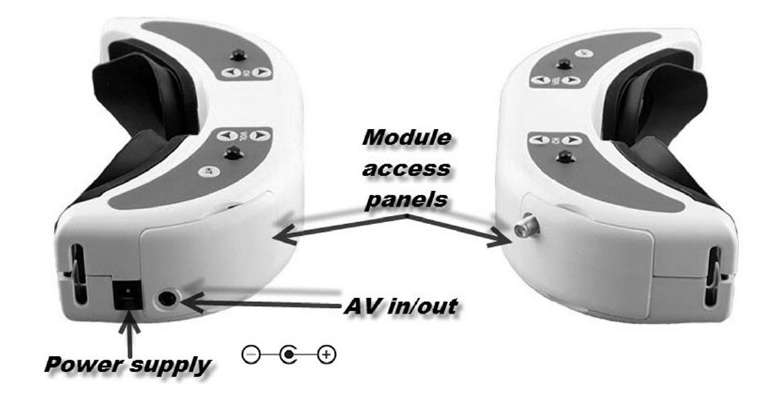
- DVR control: Connect the V cable to the AV out port on the right side of the headset. Connect the recording device to the cables and set up as per the manufacturer's directions.
DVR Operation
- The SD card MUST be formatted before use to ensure stable recording.
- The DVR is for analog recording only; HD recording is not supported.
- Do not place alternative files that you want to keep into the DVR. The DVR may not recognize the file space and write over your files. Use a dedicated SD card.
Recording:
- After powering goggles, turn on the DVR by depressing the vertical button and holding the DVR control button for one full second (long press).
- The red LED should now show solid.
- Ensure the SD card is inserted and short-press to start recording (the red LED will slowly FLASH (~2 times/second). Single beep on record start.
- Short-pressing again stops recording (turns to solid red LED). Double beep on record stop. Playback
- After turning on the DVR and in stop record mode (SOLD RED LED), depress and hold the DVR button for 1 second (long press) to enter the menu.
Menu Navigation
- Playback (press right to enter)
- Now can see: Preview shot with file number
- Press up/down to change the file number
- press right to play
- Up/down controls playback speed/direction
- Right press pause/play
- Left press, back to main menu
- Format (press right to enter)
- Execute (press right)
- Record (press right)
- Now can see:
- default (no recording until you press the button to start)
- auto start (auto start recording when powered on)
- auto start continuous (auto start recording when power is on and overwrite the file if space is full)
- Press up/down to select the recording mode
- Press right to enter to confirm
- Pressing left from the main menu exits menu
1800mA Battery Pack With USB Charging Port
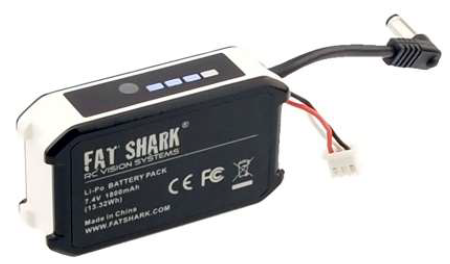
The Fat Shark 1800mAh pack with a row of stylish blue LED indicators allows you to visually check its remaining capacity (4 levels) to prevent a sudden power/vision loss.
Large 1800mAh capacity pretty much lets you fly all day. It seats securely in the headset strap pocket. The soft silicone battery cable extends out of the top of the pack to avoid contact with the head strap. Barrel connector cable features high-strand-count wire for flexibility and long life. Wire stress is minimized by the additional rubber gasket around the cable exit. The balancing circuit is already built inside (you only need to connect a USB cable for charging)
Battery Charging
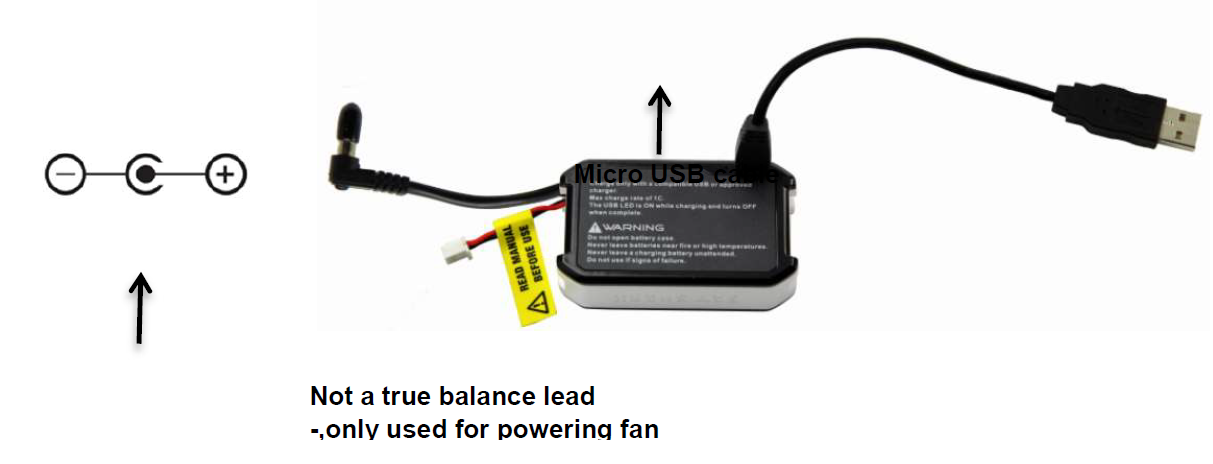
This lithium polymer battery pack is equipped with an internal cell balancing circuit that allows the battery to be charged from standard RC battery chargers.
Supports two ways of charging. Add capacity by charging the smart battery through the traditional barrel jack (no balance lead required) or via a micro USB cable. setting the charger for 7.4V, 1800mAh Li-Po, 1A (1C). Some RC chargers require a balance lead connector to be connected to the charger, or else the charging attempt will result in an error. The balance lead on the battery is not a true balance lead and is only used for powering the optional fan faceplate. To charge this battery,y set your LiPo charger to Fast Charge mode, which usually disables the balance lead requirement (set at 7.4V 2-cell - maximum 1.8A).
On some LiPo chargers, none of the above procedures will work. In that ,, case please contact support for alternate charging options at: support@fatshark.com
Note: If battery becomes fully discharged or shorted, an internal safety circuit will trip. To reset the battery, tap 9V directly to the barrel connector via the discharge adapter cable’s banana connector. This will instantly reset the battery, and it can be recharged as normal.
Specifications
Optics:
- FOV (field of view): 37 degrees diagonal
- Type: Plastic optics
- Interpupillary Distance (IPD): 59 to 69 mm (adjustable)
- Optional Diopter Lens Inserts: -2, -4, -6 dpt
Display:
- 1024 X 768 (XGA) OLED
- NTCS/PAL auto-selecting
- Audio: Stereo
User Controls:
- Channel Selection
- Volume Control
- Mode Selection (Wired/Wireless)
- Display Control
- DVR Control
- HT Control
Electrical:
- Power Supply: 7 - 13 V (2S/3S supply – fan plate only accepts 2S input)
- Power Consumption: 440mA wireless/ 250mA direct mode (no RX) (@7.4V nominal)
- RF Modules (Optional): Infinite channel support on multiple bands
- Head Tracker (Optional): Modular (sold separately)
Analog DVR:
- MicroSD supports up to 32 GB
- Record Rate: 6Mbps (MJPG compression, 30 fps, AVI)
- File playback (native recording, no codec support)
- Upgradeable via SD card
- Battery: 7.4V, 1.8A (13.32Wh)
Interface:
- 3.5mm AV in/out port
- Power in port
- 3.5mm 3p earphone port
- MiniDIN4 data port (head tracking)
- MicroSD
- Mini HDMI (1080p 50/60 Hz, 4 to 3 display ratio)
- RF module port
Mechanical:
- Ergonomic molded headset w/ adjustable headband
- Dimensions: 169.2 x 80 x 45.5 mm
- Weight: 159 g
- Package size: 572.5g, 20x 14 x 8.6cm
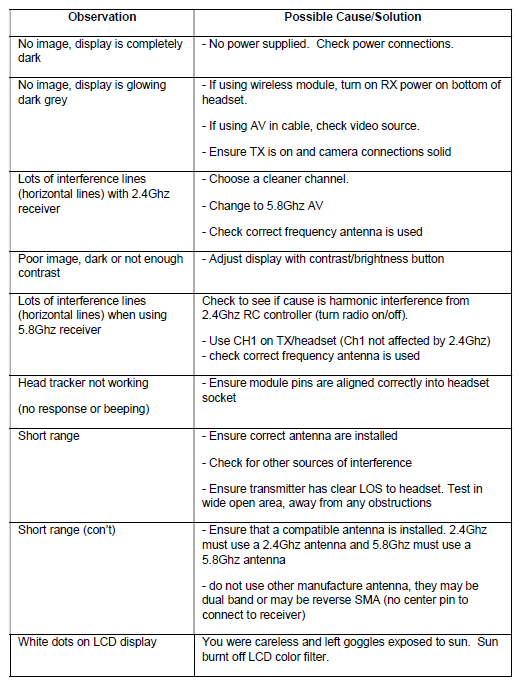
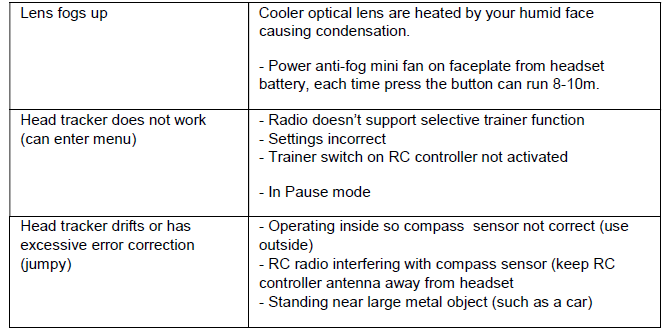
Troubleshooting
Warranty
The system can be exchanged for a new unit within 7 days for any manufacturing defects if returned in new condition. The video headset will be warranted for repair for 2 years if no signs of excessive use. The buyer will be responsible for shipping costs. If beyond the warranty period, we will provide repair services.
Pros & Cons
Pros:
- High-Resolution Displays: Offers crystal-clear visuals with high resolution.
- Modular Design: Allows for easy customization and upgrading of components.
- Low Latency: Ensures real-time video feed with minimal delay.
- Comfortable Fit: Ergonomic design provides long-lasting comfort during use.
- Robust Fan System: Prevents fogging and keeps goggles cool during operation.
Cons:
- High Cost: Priced at around $500, making it an investment for serious enthusiasts only.
- Complex Setup: Requires some technical knowledge for optimal configuration.
- Weight: Slightly heavier due to the robust build quality and additional features.
Customer Reviews
Customers have praised the Fat Shark Dominator HDO for its exceptional image quality and comfort. Many users appreciate the modular design, which allows them to upgrade specific parts rather than replace the entire unit. However, some users have noted that the setup process can be complex and time-consuming.
A common complaint is the high price point, but most agree that the performance and durability justify the cost. Overall, these goggles are highly recommended for those seeking a top-tier FPV experience.
Faqs
What is the resolution of the Fat Shark Dominator HDO Modular Goggles?
How do I adjust the IPD on my Fat Shark Dominator HDO?
Can I upgrade the receiver module in my Fat Shark Dominator HDO?
Why are my Fat Shark Dominator HDO goggles fogging up?
How do I pair my Fat Shark Dominator HDO with my drone?
Are Fat Shark Dominator HDO goggles compatible with third-party modules?
What is the estimated price of Fat Shark Dominator HDO Modular Goggles?
Can I use Fat Shark Dominator HDO goggles for other applications besides FPV?
How do I clean my Fat Shark Dominator HDO goggles?
What is the field of view (FOV) of Fat Shark Dominator HDO goggles?
Tags
Leave a Comment