
Setup: Fender MUSTANG" LT25 GUITAR AMPLIFIER User Manual
Content
Fender MUSTANG LT25 Guitar Amplifier

Introduction
The Fender MUSTANG LT25 GUITAR AMPLIFIER is a versatile 25-watt practice combo amp designed to deliver authentic Fender tone with remarkable ease of use. Featuring a robust 8-inch Fender Special Design speaker and a powerful solid-state design, this amplifier offers a wide range of tonal options suitable for beginners, students, and home players seeking professional-quality sound. Its lightweight 15-pound construction and compact wood cabinet (14.5" x 8.25" x 12.75") make it portable for rehearsals and small gigs.
Key benefits include 20 amp models inspired by classic and modern Fender sounds, 25 effects spanning distortion, overdrive, modulation, reverb, and delay, and an intuitive 1.8-inch full-color display for easy navigation. The amp includes 50 presets—30 preloaded and 20 customizable—giving users instant access to a plethora of tones for various genres. Its built-in chromatic tuner, USB connectivity for recording and firmware updates, and stereo aux input enhance functionality for seamless practice and creative recording sessions.
Targeted primarily at beginners and intermediate guitarists, the Fender MUSTANG LT25 is ideal for home use, practice, and small performances. With an estimated price range between $150 to $200, it is widely available through music retailers and online platforms, combining affordability with Fender’s renowned tonal heritage.
SPECIFICATIONS
- TYPE: PR 5250
- POWER REQUIREMENTS: 84 watts
- POWER OUTPUT: 25 watts into 8Ω
- INPUT IMPEDANCE: 1MΩ (instrument) 15kΩ (aux)
- SPEAKER: One 8” Fender Special Design speaker (8Ω)
- FOOTSWITCH: Fender 1-Button Economy On-Off Footswitch (optional, PN 0994049000)
- DIMENSIONS: AND WEIGHT Width: 14.5” (36.8 cm) Height: 13.1” (33.2 cm) Depth: 8.3” (21.1 cm) Weight: 12.8 lbs. (5.8 kg)
CONTROL PANEL
The Mustang LT25 top control panel consists of an INSTRUMENT INPUT, five CONTROL KNOBS, a DISPLAY WINDOW, an ENCODER wheel, four UTILITY pushbuttons, a FOOTSWITCH INPUT, an AUXILIARY INPUT (1/8”), a HEADPHONE OUTPUT (1/8”), a TAP LIGHT,, and a USB PORT.
- FOOTSWITCH (“FTSW”): Connect optional single-button footswitch here (page 17).
- INPUT: Plug the instrument in here.
- AUXILIARY INPUT, HEADPHONE OUTPUT: 1/8” auxiliary input for connecting external audio devices, and 1/8” output for headphone use (page 19). Headphone output disables the speaker.
- GAIN: Affects gain setting in each preset.
- VOLUME: Affects the individual volume of each preset.
- TREBLE: Affects treble tone setting in each preset.
- BASS: Affects bass tone setting in each preset.
- MASTER VOLUME: Controls actual overall volume.
- DISPLAY WINDOW: Shows preset in use, preset contents and parameters, and other functions (i.e., tuner and other menu functions).
- ENCODER: Rotary control with press-switch function. For viewing, selecting,, and adjusting Mustang LT25 presets, controls, and other functions.
- UTILITY BUTTONS
- BACK: Returns the user to the previous screen or the original preset screen.
- SAVE: For saving preset modifications, renaming presets, and saving presets to a new location.
- MENU: For accessing tuner, footswitch, and other functions (page 15).
- TAP: For setting delay times (page 12) and accessing the built-in tuner (page 16).
- TAP LIGHT: Flashes in time with delay effects.
- POWER: Turns the amplifier on and off.
- USB PORT: Amp connection point for USB audio recording (page 19).
- IEC POWER INLET (REAR PANEL; NOT SHOWN): Using the included power cord, connect to a grounded outlet in accordance with the input power voltage and frequency specified at the power inlet.
PRESET BASICS
Mustang LT25 features 30 sequentially numbered presets. Each preset consists of an amplifier and one or more effects (or, in some cases, no effects). Note that when turning the amplifier on, the default active preset is always factory preset 01. Further, 30 empty presets are available when using the “REPLACE” feature (page 7).
To scroll through presets, turn the ENCODER; whichever preset is displayed becomes active:
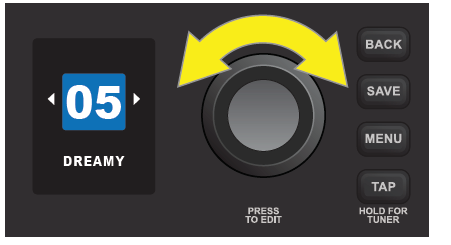
Mustang LT25’s 30 factory presets are:
- SILKY SOLO
- CHICAGO BLUES
- CLASSIC ROCK
- DREAMY
- COUNTRY PICKING
- SKATE PUNK
- SOLO MIDBOOST
- JAZZ AMP
- BRIT 64 RHYTHM
- METAL LEAD
- VINTAGE TREMOLO
- SUPER DRYCLEAN
- THRASH OVERKILL
- CLEAN DELAY
- OCTOBOT ONE NOTE
- LITTLE CHAMP
- PHASER SWIRL
- 60S FUZZ
- MYTHIC CRUNCH
- SUPER ROCK
- NICE FLANGE-R
- VIBRA DOOM
- SURF MUSIC
- BLUES LEAD
- ROCK A BILLY
- GARAGE FUZZ
- SPACE TRAVEL
- ACOUSTIC SIM
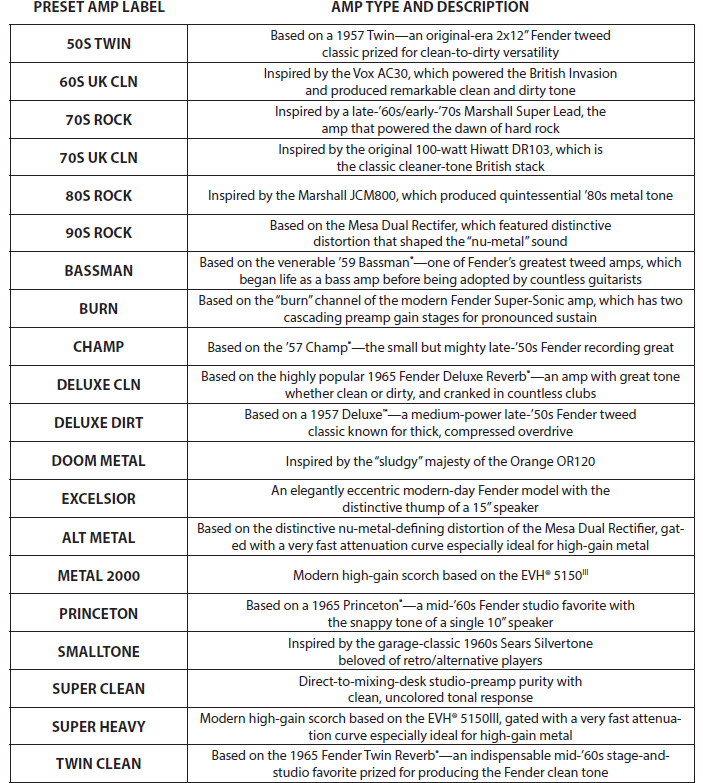
MUSTANG LT25 AMPLIFIER MODELS
This table lists the amp models in Mustang LT25. The amp label used in each preset appears in the left-hand column, followed by the amp type and a brief description in the right-hand column.
MUSTANG LT25 EFFECT MODELS
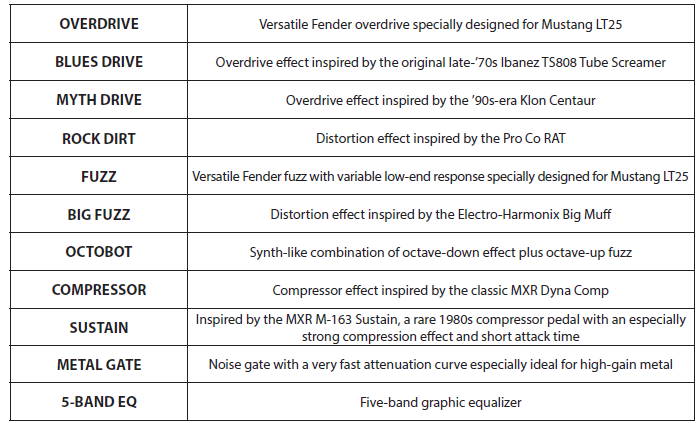
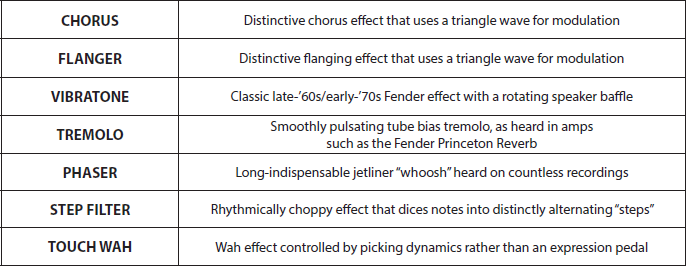
This table lists the effect models in Mustang LT25, organized into the four categories that appear in each preset—STOMP (stompbox), MOD (modulation), DELAY, and REV (reverb). The effects labels used in each preset appear in the left-hand column, followed by the effects types and a brief description in the right-hand column.
STOMPBOX EFFECTS
MODULATION EFFECTS
DELAY EFFECTS

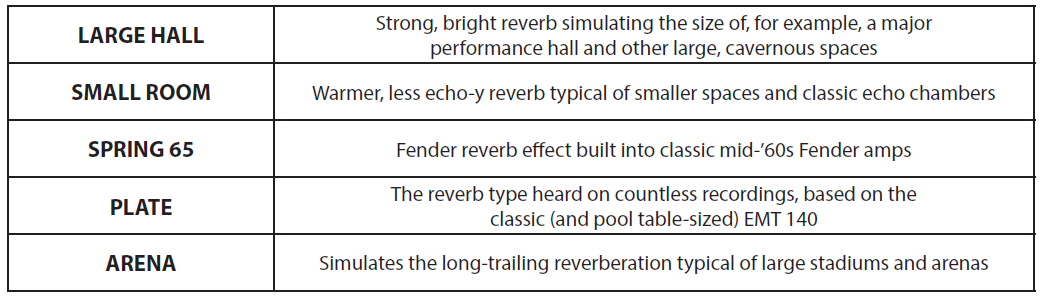
REVERB EFFECTS
MENU FUNCTIONS
Mustang LT25 features four convenient MENU functions—TUNER, FOOTSWITCH, SETTINGS,, and RESTORE—all easily accessed by pressing the MENU utility button. The first function (TUNER) is automatically highlighted; use the ENCODER to scroll to and select any MENU function:
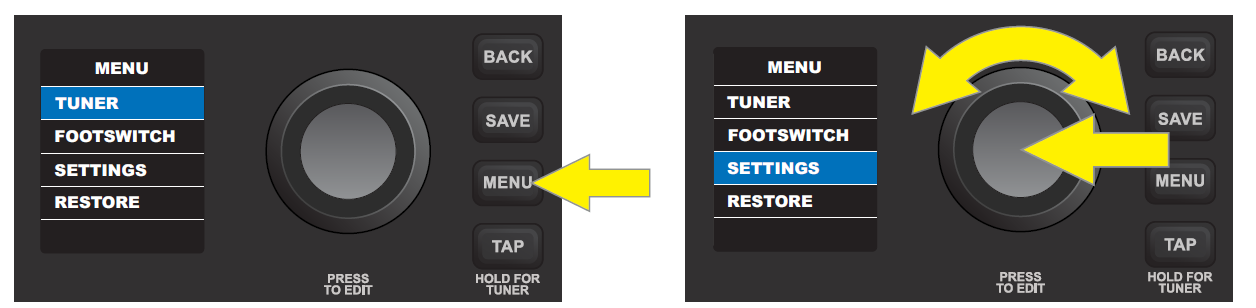
- TUNER: Enables use of Mustang LT25’s built-in chromatic tuner (page 16).
- FOOTSWITCH: For configuring Mustang LT25’s single-button footswitch to provide easy hands-free selection of any two presets (page 17).
- SETTINGS: Displays the firmware version (page 18). Also includes a gain control for use when recording using the USB audio port on the control panel (page 19).
- RESTORE: Enables restoration of factory presets and amplifier settings (page 18).
MENU FUNCTION: TUNER
There are two ways to access Mustang LT25’s built-in chromatic tuner. The first way is to press and hold the TAP utility button on the control panel until the tuner screen appears in the DISPLAY WINDOW:
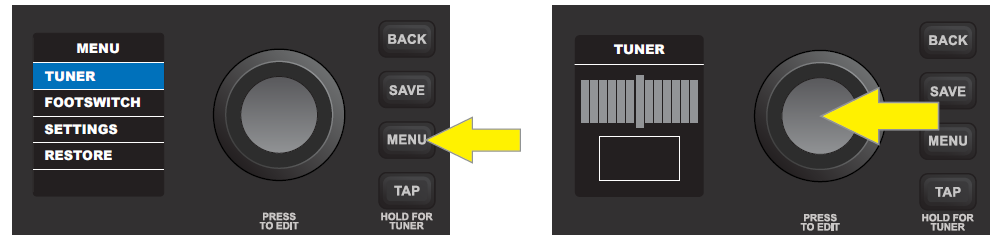
The second way is to press the MENU utility button on the control panel; the list of MENU functions will appear in the DISPLAY WINDOW with the TUNER function automatically highlighted atop the list. Press the ENCODER on the TUNER to access the tuner screen:
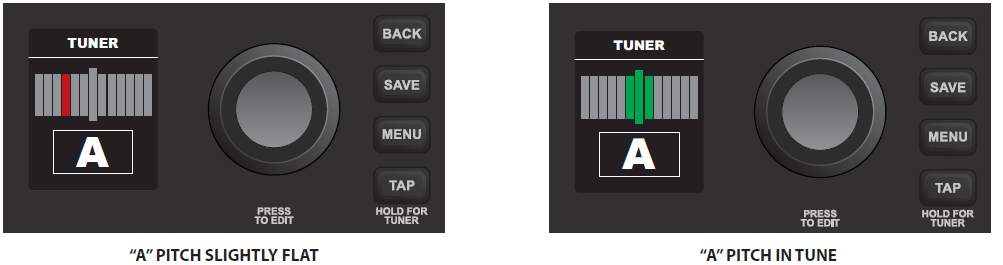
To use the TUNER, sound a note; the letter name of the pitch will appear in the box at the bottom,, and the shorter vertical bars on either side of the longer vertical center bar will illuminate red to indicate varying degrees of sharpness (to the right) or flatness (to the left). When a pitch is precisely in tune, the longer vertical center bar and the two shorter vertical bars on either side of it will illuminate green:
Note that speaker output is muted when tuning, and that the volume control on the instrument being tuned must be turned up sufficiently to register a TUNER reading.
MENU FUNCTION: FOOTSWITCH
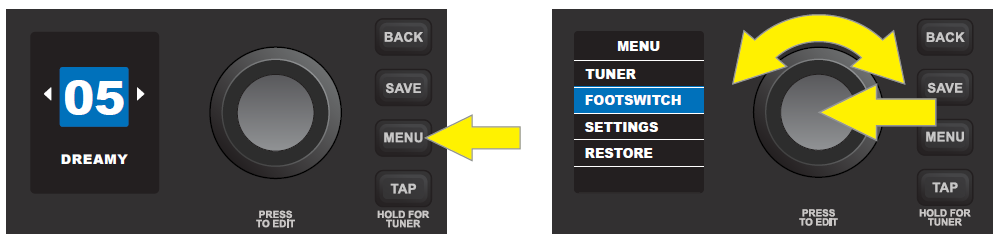
Connect an optional Fender single-button footswitch (PN 0994052000) by plugging it into the “FTSW” jack on the control panel. The footswitch provides convenient hands-free switching between two pre-determined “quick-access” presets. The second MENU function—FOOTSWITCH—enables easy configuration of any two presets for quick-access footswitch use. To do this, press the MENU utility button, then use the ENCODER to scroll to and select FOOTSWITCH:
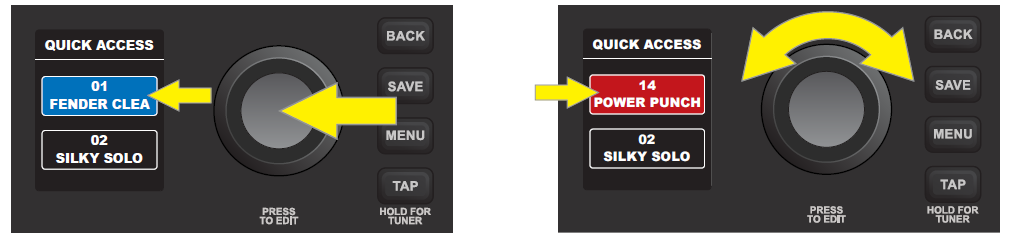
Two presets will be shown in the DISPLAY WINDOW below the header “QUICK ACCESS”; the upper preset is automatically highlighted in blue. To choose a new preset for this upper quick-access position, press the ENCODER on it; the box surrounding the preset name will turn red. Use the ENCODER to scroll to a new preset for the upper quick-access position:
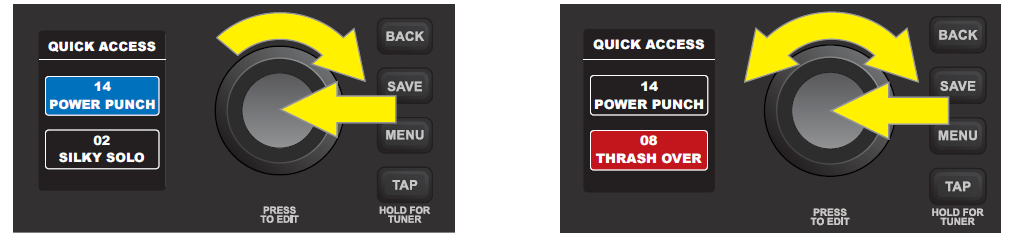
Press the ENCODER to select the new upper quick-access preset; the box surrounding the preset name will return to blue. To choose a new preset for the lower quick-access position, turn the ENCODER clockwise to highlight the lower preset, then follow the same steps as above:
IMPORTANT: If quick-access footswitch presets are not saved, the quick-access preset slots will revert to their original contents when returning to the preset after leaving it, or when turning the amplifier off and back on again. To save quick-access footswitch presets, follow the SAVE, SAVE AS, or REPLACE instructions on pages 6 and 7.
MENU FUNCTION: SETTINGS
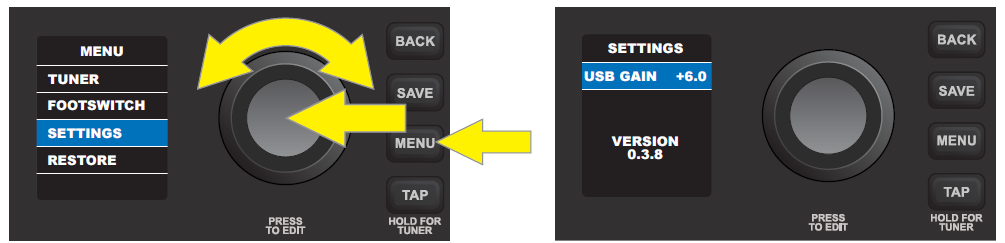
The third MENU function—SETTINGS—displays the current firmware version and features a gain control for use when recording using the USB port on the control panel. To access these options, press the MENU utility button and use the ENCODER to scroll to and select SETTINGS. The USB gain control appears at the top (see instructions under “USB PORT”, page 19), with the firmware version below (“VERSION”):
Be sure to check fender.com/firmware/support regularly for firmware updates that improve and enhance the Mustang LT25 experience.
MENU FUNCTION: RESTORE
The fourth MENU function—RESTORE—enables restoration of all original factory presets and amplifier settings. To do this, press the MENU utility button, then use the ENCODER to scroll to and select RESTORE:
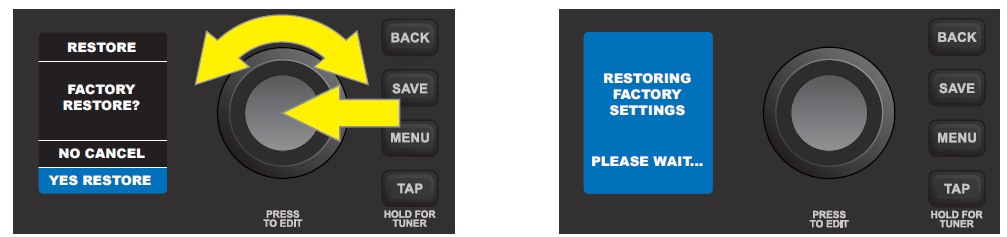
AUXILIARY INPUT AND HEADPHONE OUTPUT
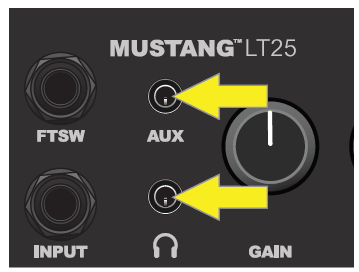
The Mustang LT25 control panel features two 1/8”-inch jacks: an auxiliary input for connecting external mobile/audio devices and an output for convenient headphone use.
Note that when using the auxiliary input, volume levels for external devices are set using volume controls on the external devices themselves (the amp’s volume controls are for overall volume level only and do not affect the individual volume of external devices connected to the auxiliary input jack). Also note that when headphones are plugged in, speaker output is muted.
USB PORT
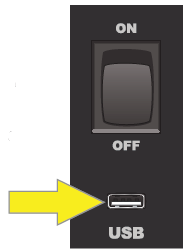
The Mustang LT25 control panel features a USB port for audio recording. Using a micro USB cable (not included), connect a computer with recording software to this port. No external driver is needed to connect to an Apple computer. To connect to a Windows-based computer, the user must download the ASIO driver setup with the Fender Mustang device, available at www.fender.com/support/articles/fender-universal-asio-drive.
Note that although the USB port and the auxiliary input can be used simultaneously, the USB port cannot be used to record a signal from the auxiliary input.
When recording using the USB port, a gain control is located in the SETTINGS menu function(page 18). To access and use this gain control, press the MENU utility button and use the ENCODER to scroll to and select SETTINGS; “USB GAIN” will automatically be highlighted. Press the ENCODER on “USB GAIN” to select it; the surrounding box will turn from blue to red:
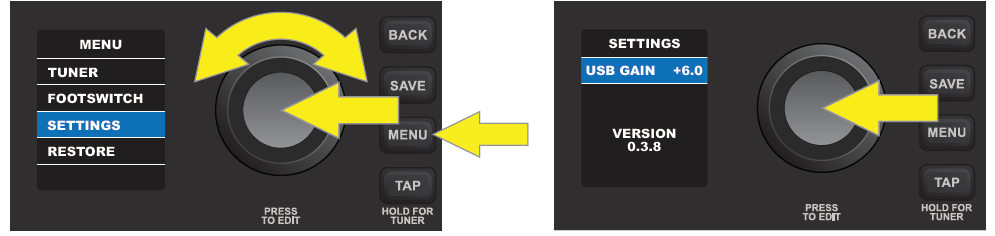
Turn the ENCODER to set a new “USB GAIN” value. Press the ENCODER to accept the new value; the surrounding box will return to blue (not shown). Alternatively, press the BACK utility button (green arrow) to accept the new value and return to the MENU function screen:
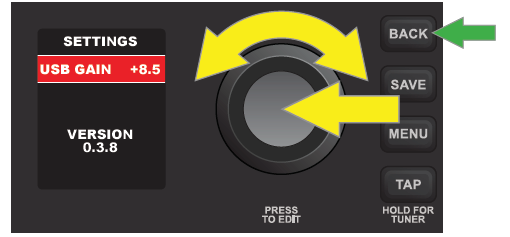
Note that the “USB GAIN” control in the SETTINGS menu function is the only one that affects USB recording; the actual physical GAIN control knob on the control panel does not affect USB recording.
FENDER TONE™
Fender Tone—the ultimate desktop companion to Mustang LT amplifiers for Mac and PC—is available as a free download from fender.com/ToneDesktop. With an easy-to-use interface, Tone users can have convenient control over existing Mustang LT25 functions, plus access to additional presets and many other features, including:
- Firmware updates
- Dozens of additional Fender presets for auditioning and downloading
- Preset creation and editing with a convenient “undo” feature
- Preset editing (replacing amp and effect models, and modifying parameters)
- Preset saving, renaming, moving,, and clearing
- Preset backup and restore
- Effect bypass
Learn more about Fender Tone at fender.com/ToneDesktop, and find support materials at fender.com/ToneSupport.
Troubleshooting the Fender MUSTANG LT25 Guitar Amplifier
Common issues with the Fender MUSTANG LT25 GUITAR AMPLIFIER often relate to connectivity, sound output, and preset management. If you encounter no sound:
- Check the instrument cable and speaker connections to ensure they are secure.
- Verify the volume and gain settings are appropriately adjusted and not muted.
- Confirm the input source is selected correctly and the headphone jack is not engaged, as this mutes the speaker.
If presets fail to save or load, ensure you are using the save button properly and that firmware is up to date via USB connection. For tuner-related issues, pressing the tuner button will activate or deactivate the chromatic tuner display.
Preventive measures include regularly updating firmware through Fender Tone software, using quality cables, and avoiding excessive exposure to moisture or extreme temperatures. The amplifier comes with a limited warranty covering manufacturing defects and offers Fender customer support reachable through their official website or authorized dealers for repairs and technical assistance.
Pros & Cons of the Fender MUSTANG LT25 Guitar Amplifier
Pros
- Wide tonal variety: 20 amp models and 25 effects covering classic to modern sounds provide excellent versatility.
- User-friendly interface: Intuitive controls and a color display simplify tone shaping and preset management.
- Portability: Compact size and lightweight design (15 lbs) make it easy to transport.
- Recording capability: USB output allows direct recording into DAWs, adding value for home studios.
- Reasonable price: Offers great value for money given its features and Fender quality.
Cons
- Limited speaker size: The 8" speaker may lack low-end punch for bigger venues.
- No external speaker output: Limits stage flexibility compared to larger amps.
- Not suited for high-volume professional gigs: 25 watts is ideal mainly for practice or small spaces.
- Effect editing is basic: While accessible, effects parameters are less detailed than premium modeling amps.
Compared to alternatives like the Fender Mustang GT series, the LT25 is more affordable but less feature-rich. It excels as a practice amp with digital versatility rather than a full-performance rig.
Customer Reviews of the Fender MUSTANG LT25 Guitar Amplifier
Users commonly praise the Fender MUSTANG LT25 GUITAR AMPLIFIER for its easy setup, wide range of tones, and solid sound quality at its price point. Many highlight the intuitive interface, making it excellent for beginners and intermediate players who want quick access to classic Fender sounds and modern effects. The USB connectivity for direct recording is frequently noted as a valuable feature for home studio use.
Some common complaints mention the limited speaker size, which can feel restrictive in volume and bass response, and occasional firmware update inconveniences. However, the overall star rating from verified buyers averages around 4.5 out of 5 stars, with users recommending it for practice, learning, and casual gigging.
Reviewers also recommend pairing the LT25 with quality cables and headphones to maximize silent practice sessions and emphasize its suitability as a budget-friendly yet feature-packed amplifier.
Faqs
How do I set up the fender MUSTANG LT25 GUITAR AMPLIFIER for the first time?
What should I do if my fender MUSTANG LT25 GUITAR AMPLIFIER is producing no sound?
How can I customize tones and effects on the fender MUSTANG LT25 GUITAR AMPLIFIER?
Is the fender MUSTANG LT25 GUITAR AMPLIFIER compatible with Fender Tone Desktop App?
What are the best practices for maintaining the fender MUSTANG LT25 GUITAR AMPLIFIER to ensure longevity?
Can I record directly from the fender MUSTANG LT25 GUITAR AMPLIFIER to my computer?
How can I optimize the performance of the fender MUSTANG LT25 GUITAR AMPLIFIER for different music styles?
What should I do if the fender MUSTANG LT25 GUITAR AMPLIFIER’s firmware update fails or the amp becomes unresponsive?
Tags
Leave a Comment