
Setup: Fireboltt BSW053 Smart Watch User Manual
Content
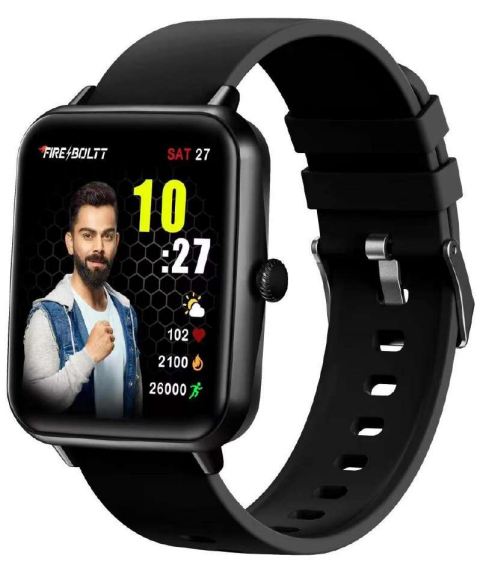
Firebolt BSW053 Smart Watch
Introduction
The fireboltt BSW053 Smart Watch, also known as the Ninja Call Pro, is a feature-rich wearable designed for fitness enthusiasts, tech-savvy users, and anyone looking to stay connected on the go. Boasting a vibrant HD display and seamless Bluetooth calling functionality, this smartwatch enables users to make and receive calls directly from their wrist without pulling out their phone. Its robust health monitoring suite, including 24/7 heart rate tracking, SpO2 monitoring, and advanced sleep analysis, caters to those invested in maintaining an active, healthy lifestyle.
With over 100 sports modes, AI voice assistant integration, and IP67 water resistance, the fireboltt BSW053 is built for diverse environments ranging from outdoor workouts to daily office use. Its user-friendly interface and compatibility with both Android and iOS devices make it accessible to a wide audience seeking convenience and comprehensive smart features in one device.
Available at an estimated price range of ₹1,900 to ₹2,000 in India, the fireboltt BSW053 Smart Watch offers excellent value through its premium features and durable build. It is widely available through online retailers and authorized distributors, making it a compelling choice for budget-conscious buyers who do not want to compromise on functionality or style.
Downloading and connecting of smart watch with Da Fit APP
- Download and install Da Fit APP Scan QR code with mobile phone to download APP.
- For IOS system, select APP Store, search for Da Fit App.
Android system, select Google Play to download and install Da Fit App. Or scan QR code to download
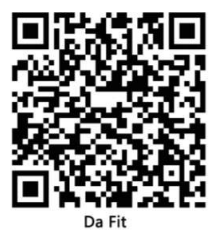
Note: your mobile phone must support Android 5.1 or IOS 9.0 or above, and Bluetooth 4.0 or above.
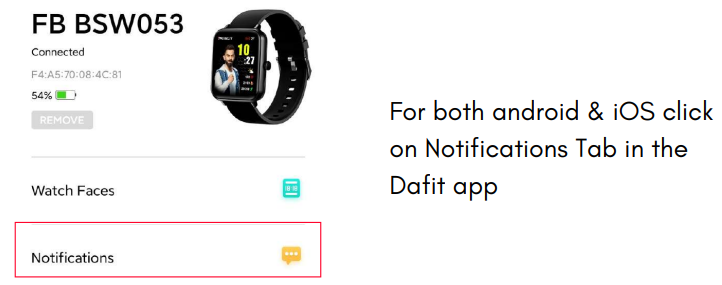
Connect smart watch with Da Fit APP
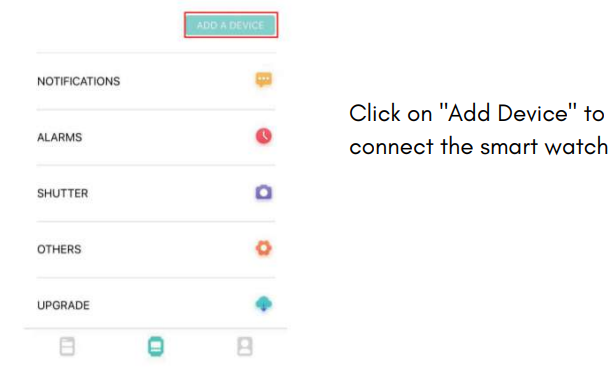
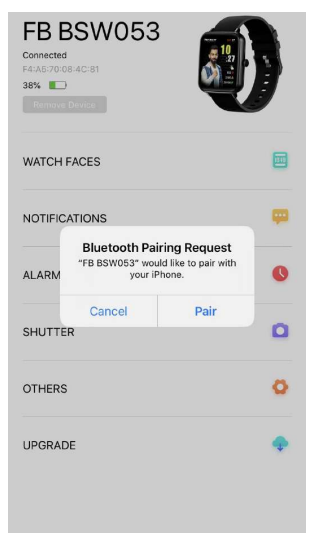
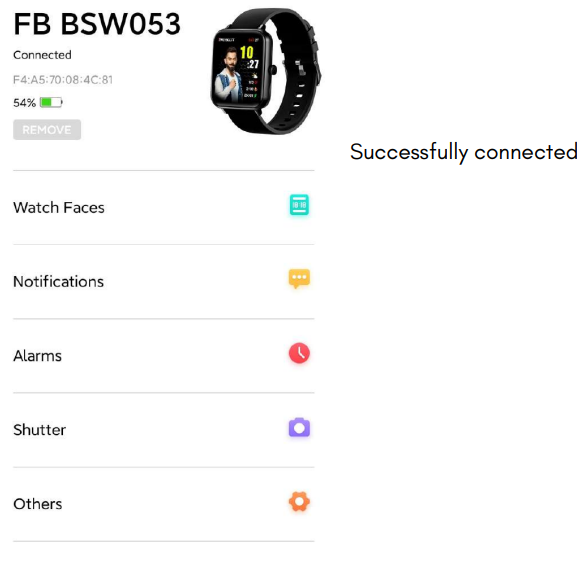
Click on your device in the device list scanned. Connect it directly to Android system.
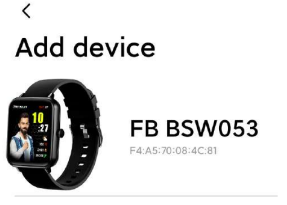
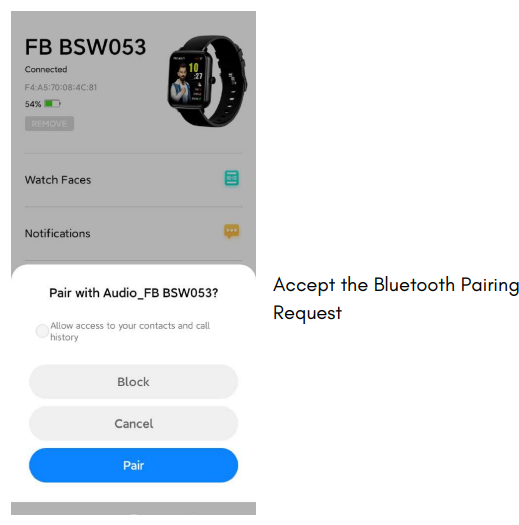
The IOS system will show a Bluetooth pairing request and you can click on Bluetooth "Pairing" to confirm.
BLUETOOTH CALLING FUNCTION
This watch comes with a special feature of Bluetooth calling. The user can make calls without having to open the phone. You can also view the call history of the watch. You need to keep the connection between the watch and the phone stable when using the Phone Call function.
The watch also has a microphone and a speaker built in for the ease of talking through the watch and to hear music, phone calls, and other notifications
Follow the steps to activate the calling function and much more.
Part A - How to connect
- Step 1:
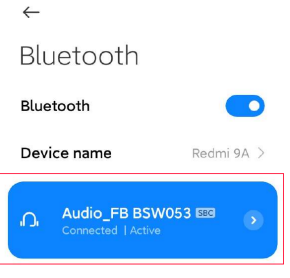
After connecting the watch to the Da Fit App, you need to go the bluetooth settings of the phone and pair the watch there as shown below.
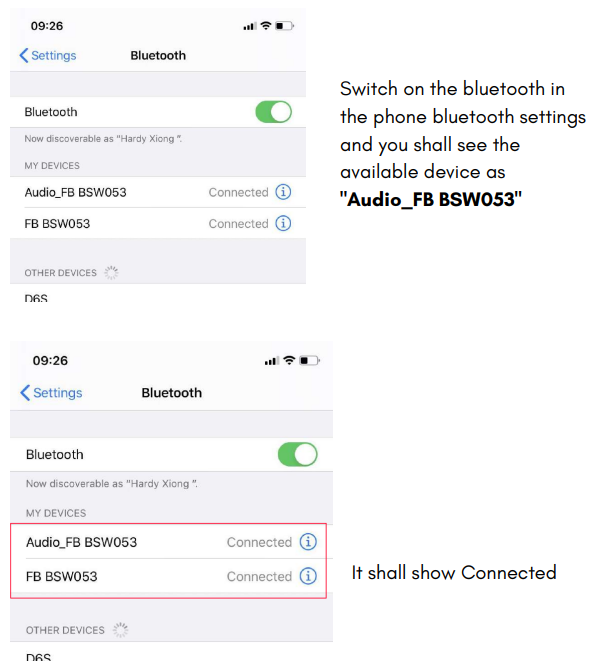
For Android
Step 2:
Go to the watch and swipe left to the features page and locate the phone function
- After successfully connecting the bluetooth you will get this screen.
- Upon clicking on the Recent Call you can see the recent calls of your device
- When you click on the dial pad you shall get this screen on your watch.
- Once you dial the number the call button on the right corner shall appear.
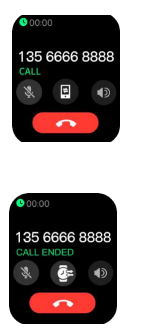
- You click the dial button, you can see that the number is dialling
- Through the microphone available in the watch you can talk through the watch and adjust the speaker volume by the + & - sign on the watch and disconnect the call.

Part B - How to disconnect
To disconnect the bluetooth calling the user simply has to go to the phone's bluetooth setting and "unpair" the Audio_FB BSW053 device
Part C - Add contacts
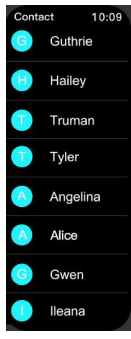
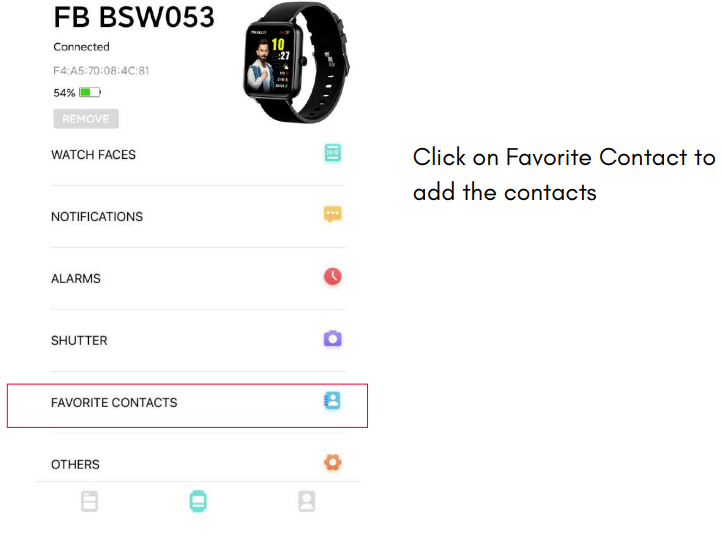
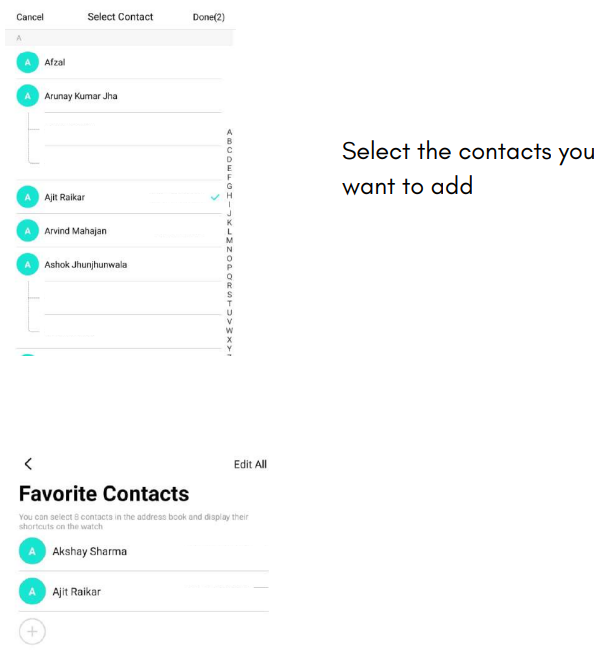
You can add upto 8 contacts - Add the contacts from the Dafit App. Go to "Favourite Contacts" and add contacts. The selected contacts will get synced to your watch.
Part D - Switch between Phone / Watch
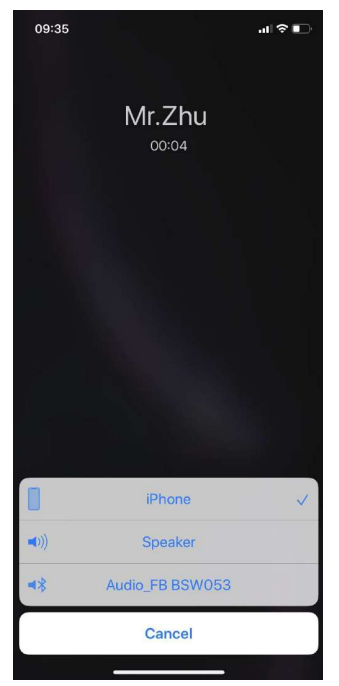
Switch Between Watch / Phone During an Active Call : If your watch is connected to the Phone via Bluetooth, all calls will come on the watch by default. If you want to change the call to the phone, during an active call, simply click on Handset earpiece icon to select it. The call will then come on your phone.
Part E - Battery Advisory
- The battery lasts for 2 to 3 days with bluetooth calling mode enabled.
- On standby the battery can stay for as long as 5-7days. Advisory- To conserve battery, It is advised to turn off the bluetooth when not in use.
Watch Wearing and Charging
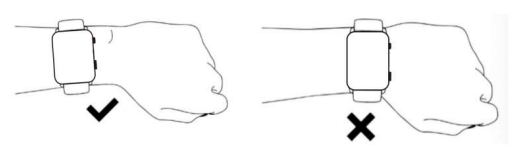
It is recommended to wear the watch with a moderate tightness at a distance two fingers far from your wrist to ensure that the optical heart rate monitor works properly
Tip - Please wear the device a bit little tighter when using the heart rate monitor & SpO2 feature
Charging
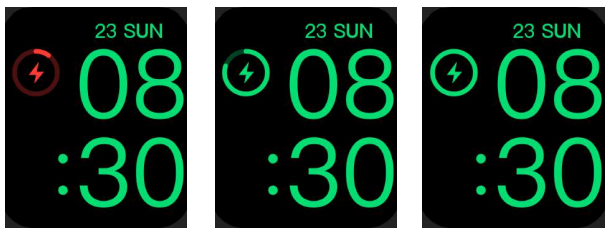
- Plug the charger's USB port into a mobile phone charger or a computer USB port to charge the watch.
- Attach the charging pin to charge the smart watch.
- The charging icon will appear on the screen, indicating that the watch is being charged.
- It is recommended to use computer USB ports or brand mobile phone chargers to charge the watch.
- Note: If smart watch can not be powered on after being left unused for long time, please clean up the charging metal pins to make sure connecting well
Technical Specifications and Features of fireboltt BSW053 Smart Watch
- Display: 1.69-inch (43mm) TFT LCD with 240 × 280 pixels resolution; vibrant HD full touch screen
- Connectivity: Bluetooth calling with built-in microphone and speaker; supports call answering, dial pad, and contact sync
- Health Monitoring: Continuous heart rate monitoring, SpO2 blood oxygen saturation tracking, sleep quality analysis (light and deep sleep stages)
- Sports Modes: 100+ sports and activity tracking modes including running, cycling, swimming, and more
- Battery Life: Up to 7 days on normal usage; approximately 3 days with continuous calling; around 25 days standby
- Water Resistance: IP67 certified water and dust resistance, suitable for everyday use and light water exposure
- Additional Features: AI voice assistant support, smart notifications (social media, SMS, sedentary alerts), inbuilt games, multiple watch faces
- Compatibility: Supports smartphones running iOS and Android operating systems
- Sensors: Accelerometer, pedometer, distance tracker
- Dimensions & Weight: 4.29 x 4.98 x 3.30 cm; 50 grams
Compared to similar smartwatches in the budget segment, the fireboltt BSW053 stands out with its Bluetooth calling feature and AI voice assistant, which are often missing in alternatives priced similarly. Its expansive sports mode library and long battery life also provide a competitive edge for users seeking multifunctional wearables.
Troubleshooting the fireboltt BSW053 Smart Watch
- Issue: Bluetooth not connecting or dropping frequently
Solution: Ensure Bluetooth is enabled on both devices; restart the watch and smartphone; clear Bluetooth cache on the phone; update the companion app; keep devices within 10 meters range. - Issue: Calls not ringing or voice issues during Bluetooth calling
Solution: Check microphone and speaker permissions; increase volume; reset Bluetooth settings; ensure no other device is connected to the watch simultaneously. - Issue: Heart rate or SpO2 measurements appear inaccurate
Solution: Wear the watch snugly above the wrist bone; avoid movement during measurement; clean the sensor area; restart the watch if persistent. - Issue: Watch not charging or battery drains quickly
Solution: Use the original charging cable and adapter; clean charging pins; avoid extreme temperatures; reduce screen brightness and disable unused features to optimize battery life.
Preventive measures include regular firmware updates via the official app, avoiding exposure to water beyond IP67 limits, and handling the watch gently to preserve hardware integrity. The fireboltt BSW053 comes with a standard warranty (refer to the purchase region), and customer support can be contacted via official Fire-Boltt website channels for repairs or guidance.
Pros and Cons of the fireboltt BSW053 Smart Watch
Pros
- Bluetooth Calling Feature: Enables hands-free communication directly from the wrist, rare in this price segment.
- Comprehensive Health Tracking: Continuous heart rate, SpO2, and sleep monitoring provide valuable wellness insights.
- Durable and Stylish: IP67 water resistance and sleek HD display combine functionality with a modern look.
- Battery Performance: Strong endurance with up to 7-day battery life, reducing frequent charges.
- Wide Sports Modes: Over 100 activities covered, accommodating diverse fitness routines.
Cons
- Display Size: 1.69-inch screen is slightly smaller compared to some competitors offering 1.83-inch displays.
- Accuracy Limitations: Health metrics such as SpO2 are for reference only and not medical-grade.
- App Ecosystem: Companion app functionality can sometimes lag or require manual syncing.
- Limited Cellular Connectivity: No standalone LTE support; relies fully on Bluetooth connection to smartphone.
Overall, the fireboltt BSW053 Smart Watch offers excellent value for money, especially for users prioritizing Bluetooth calling and extensive fitness tracking in an affordable package. Alternatives may offer larger displays or advanced sensors but often at significantly higher prices.
Customer Reviews and Feedback on fireboltt BSW053 Smart Watch
Users commonly praise the fireboltt BSW053 Smart Watch for its reliable Bluetooth calling feature and intuitive touchscreen interface, often rating it between 4 and 4.5 stars. Many appreciate the accurate heart rate and sleep monitoring, highlighting how the watch helps improve their daily fitness routine. The long battery life and stylish design receive frequent commendations as well.
On the downside, some reviewers mention occasional syncing delays with their smartphones and note that health data should not replace professional medical devices. A few users desire a larger display size and more responsive app support. Despite these minor issues, most buyers recommend the watch for those seeking a budget-friendly smartwatch with premium features like calling and voice assistance.
Verified testimonials indicate high satisfaction for everyday use, work-from-home convenience, and fitness tracking versatility, making it a popular choice in the affordable smartwatch market.
Faqs
How do I set up the fireboltt BSW053 Smart Watch for the first time?
What should I do if my fireboltt BSW053 Smart Watch Bluetooth calling is not working?
How can I use the SpO2 feature on the fireboltt BSW053 Smart Watch effectively?
Is the fireboltt BSW053 Smart Watch compatible with both Android and iOS devices?
How can I optimize the battery life of my fireboltt BSW053 Smart Watch?
What sports and fitness tracking features does the fireboltt BSW053 Smart Watch offer?
How do I clean and maintain my fireboltt BSW053 Smart Watch to ensure longevity?
Why is my fireboltt BSW053 Smart Watch not syncing data with the app and how can I fix it?
Leave a Comment