
Setup: Foreo Issa 3 Ultra-Hygienic Sonic Toothbrush User Manual
Content
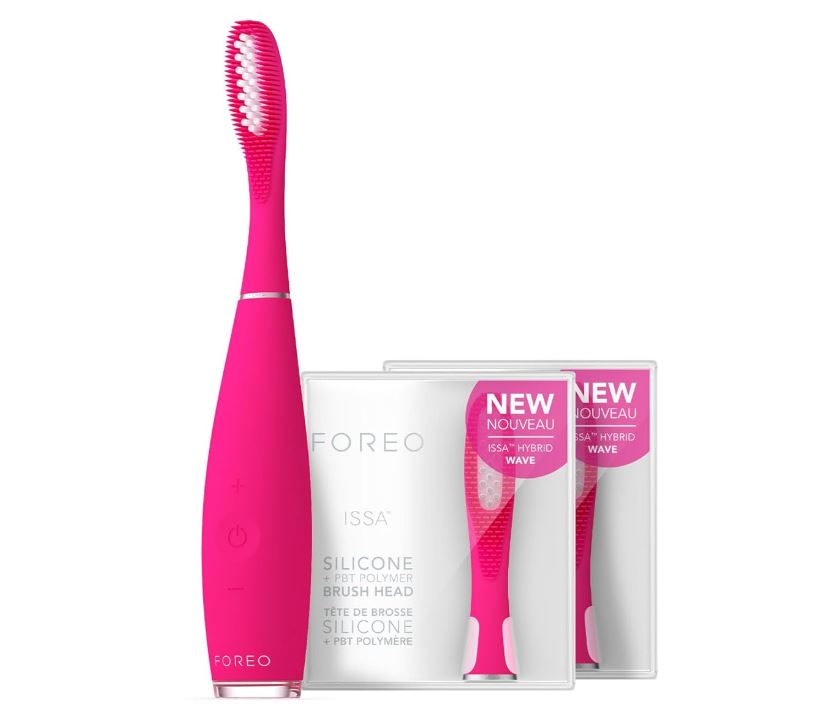
Foreo Issa 3 Ultra-Hygienic Sonic Toothbrush
Introduction
The Foreo Issa 3 Ultra-Hygienic Sonic Toothbrush is a revolutionary oral care device designed to provide an unparalleled cleaning experience. Launched in 2020, this toothbrush is part of Foreo's innovative Issa series, known for its unique design and advanced technology. The Issa 3 is estimated to be priced around $199, making it a premium option in the market.
This toothbrush is designed to cater to various oral care needs, including plaque removal, gum health, and whitening. It features a combination of sonic technology and gentle silicone bristles, ensuring a thorough yet gentle cleaning. The device is also known for its ultra-hygienic design, making it a preferred choice for those seeking a high level of cleanliness and durability.
Getting To Know Your issa 3
NOTE: issa™ 3 may be locked when first unboxed. Unlock it by holding down the + and – buttons together. The indicator light will then flash to indicate that your device is unlocked.
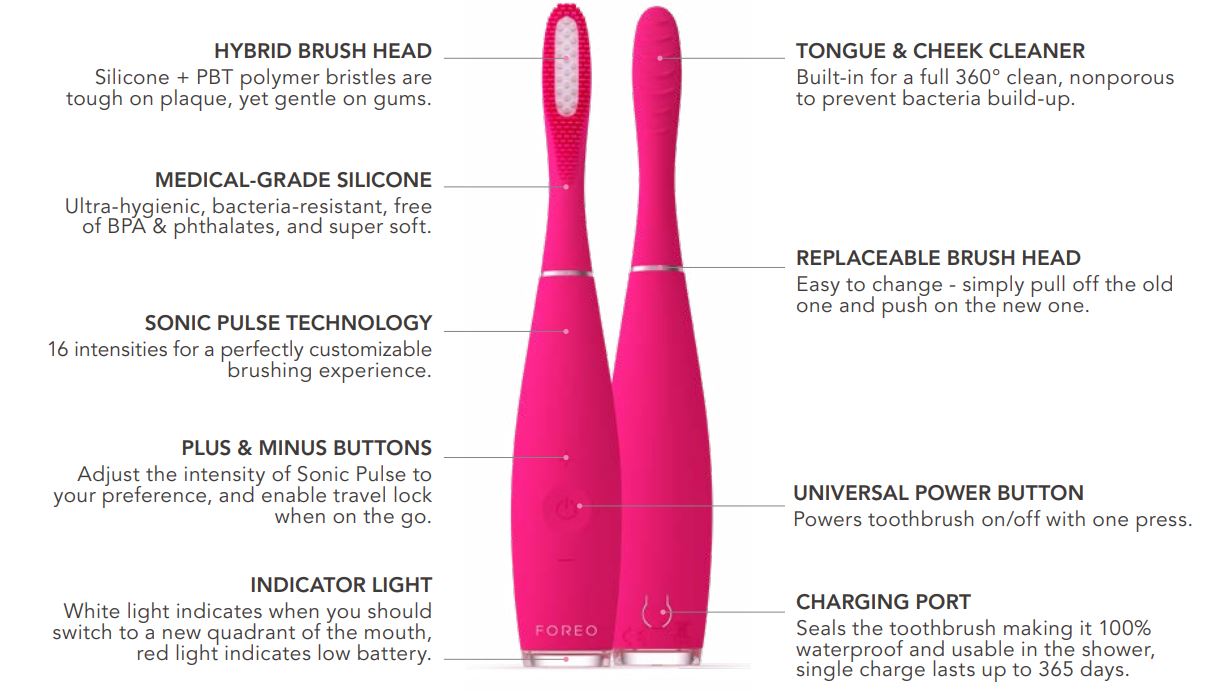

- EXTREMELY VERSATILE: Can be used with any issa™ brush head or attachment.
- SMART MEMORY: Will remember your prefer-ences for your next use.
- USB CHARGER: Charge anytime, anywhere with USB charging cable.
- TRAVEL POUCH: Protective sleeve keeps your issa™ 3 clean while on-the-go.
Detailed Specifications
- MATERIALS: Medical-Grade Silicone, PBT Polymer, PC + ABS
- COLORS: Fuschia / Pearl Pink / Mint / Black
- SIZE: 195 × 28 × 32.4 mm
- WEIGHT: 72g
- BATTERY: Li-Ion 1000mA 3.7V
- RATED: 5V DC, 0.6W\
- USER TIME: Up to 365 days
- STANDBY: 180 days
- FREQUENCY: 166 Hz
- INTERFACE: 3 buttons
- PULSATIONS/MIN: Up to 11,000
- TEMPERATURE: 5° to 40° Celsius
- HUMIDITY: 40% to 80%
- ATMOSPHERIC PRESSURE: 800 to 1,060 hPa
How To Use Your issa 3
Don’t change your brushing routine, just your toothbrush!
- APPLY TOOTHPASTE: Use your regular toothpaste & turn issa 3 on.
- BRUSH: Brush your teeth in the same way you would with a manual toothbrush. issa™ 3 will prompt you to brush a new quadrant of the mouth every 30 seconds.
- RINSE: Rinse your mouth, and clean your issa™ 3 under running water.
- TONGUE & CHEEK CLEANER (optional): For a full-mouth clean, turn your brush around and use the back of the brush head to gently scrub the tongue and cheeks.
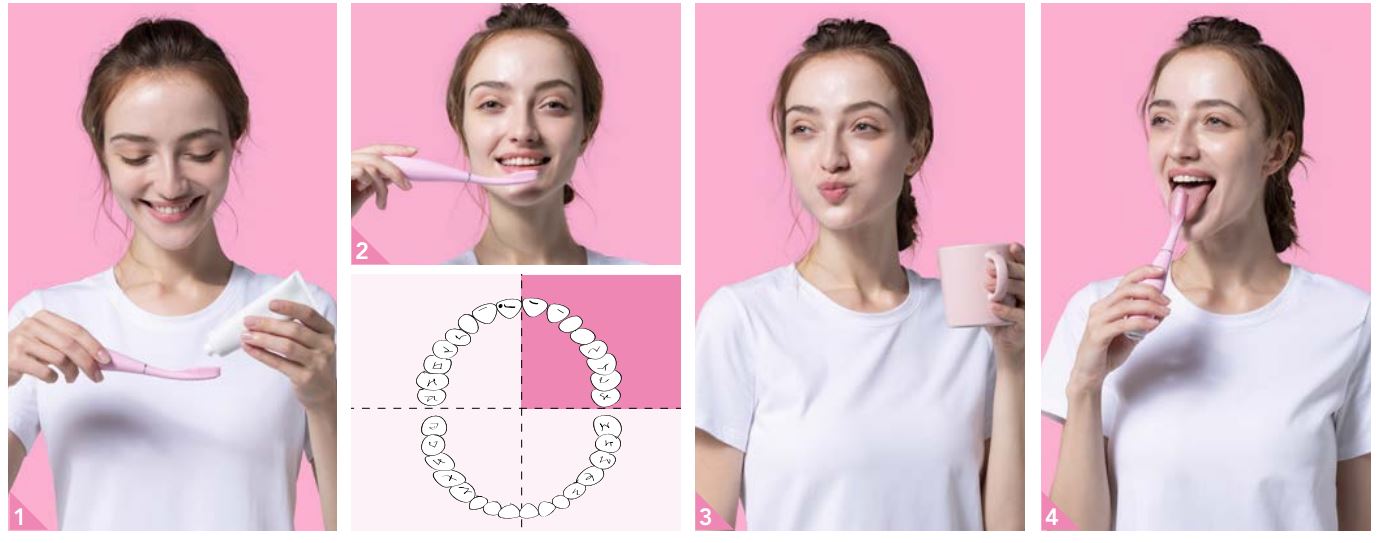
Repeat twice a day for a fresher, brighter smile!
CAUTION: If you experience any discomfort when using your issa™ 3 toothbrush, discontinue use immediately and consult a physician. If you find any blood on the brush surface, please clean the device with soap and water.
Cleaning Your issa 3
Clean the device after each use by washing the brush with warm water while running your fingers through the bristles. We recommend using FOREO Silicone Cleaning Spray on the body of your issa™ 3 and rinsing with warm water afterwards for optimal results. Allow your toothbrush to air-dry. We do not recommend placing issa™ 3 in a UV sanitation case.
NOTE: Never use cleaning products containing alcohol, petrol or acetone. Avoid using toothpastes with bleach on your device.
Replacing Your issa 3 Brush Head
PULL OFF, PUSH ON
All issa™ brush heads are compatible with issa™ 3. To replace a brush head, make sure your issa™ 3 is turned off, and lift the brush head straight up to detach. With the bristles of the replacement head facing forward, align its center hole with the metal dowel and push down to attach securely. For maximum effectiveness, we recommend changing your issa™ 3 brush head every 6 months. Each Sensitive Brush Head and Tongue Cleaner lasts up to 1 year. You can order your replacement brush heads on www.foreo.com or by contacting the nearest authorized FOREO retailer.
Charging Your issa 3
If the power of pulsations seems to diminish or the indicator light turns red, it’s time to charge your device. Connect the USB charging cable to any outlet for up to 2 hours. When the indicator light stops blinking, your issa™ 3 is fully charged.
CAUTION: Before charging, make sure the charging port and charger are free of water and toothpaste residue. Do NOT use your FOREO device while charging, and do NOT charge for more than 24 hours. Only use the USB charging cable provided by FOREO.
IMPORTANT FOR OPTIMUM SAFETY:
- Consult your physician prior to using issa™ 3 if you have any medical concerns.
- If you are undergoing treatment for any oral condition, consult your dental professional prior to use.
- If you experience any discomfort when using your issa™ toothbrush, discontinue use immediately and consult a physician.
- Avoid leaving your issa™ in direct sunlight and never expose it to extreme heat or boiling water.
- This toothbrush is not intended for children under the age of 5. Close supervision is necessary when this device is used by, on, or near children.
- Proper supervision and instructions for safe use should be given to children, as well as those with reduced physical and mental abilities.
- Children should not be allowed to play with the toothbrush.
- Discontinue use if this product appears damaged in any way (brush head, handle, charger).
- This product contains no serviceable parts.
- To avoid the risk of electric shock, this equipment must only be connected to a supply mains with protective earth.
Troubleshooting
Precautions to be taken in the event of changes in the performance of issa™ 3.
- issa™ 3 is not activated when pressing the universal button:
- • Battery is empty. Recharge using the USB charging cable for up to 2 hours until fully charged, and then restart your issa™ 3 toothbrush by holding down the universal power button.
- • Interface is locked. Unlock it by holding down + and – buttons together.
- issa™ 3 cannot be switched off and/or interface buttons do not respond:
- Microprocessor is temporarily malfunctioning. Connect to the USB charging cable and/or press and hold the universal button to restart the device.
- issa™ 3’s light does not blink when the USB charging cable is connected:
- • Battery is fully charged, ready for up to 365 days of brushing.
- • Battery is drained and will require several minutes to acknowledge USB charging cable.
- • USB charging cable is not properly connected. Check electrical outlet/USB socket and charging port.
- issa™ 3 has fallen into water and the charging port is wet:
- Dry off and continue use. issa™ 3 is completely waterproof and the charging port is fully sealed.
If you do not find the answer to your specific question in the troubleshooting section, or if you have any other questions regarding the operation of this toothbrush, please visit the Customer Care section of www.foreo.com
Warranty Terms And Conditions
REGISTER WARRANTY
To activate your 2-Year Limited Warranty, visit foreo.com/product-registration for more information.
2-YEAR LIMITED WARRANTY
FOREO warrants this device for a period of TWO (2) YEARS after the original date of purchase against defects due to faulty workmanship or materials arising from Normal Use of the device. The warranty covers working parts that affect the function of the device. It does NOT cover cosmetic deterioration caused by fair wear and tear, or damage caused by accident, misuse or neglect. Any attempt to open or take apart the device (or its accessories) will void the warranty.
If you discover a defect and notify FOREO during the warranty period, FOREO will, at its discretion, replace the device free of charge. Claims under warranty must be supported by reasonable evidence that the date of the claim is within the warranty period. To validate your warranty, please keep your original purchase receipt together with these warranty conditions for the duration of the warranty period.
To claim your warranty, you must log in to your account at www.foreo.com and then select the option to make a warranty claim. Shipping costs are nonrefundable. This undertaking is in addition to your statutory rights as a consumer and does not affect those rights in any way.
Battery Removal
NOTE: This process is not reversible. Opening the device will void its warranty. This action must only be undertaken when the device is ready to be disposed of.
Because this device contains a lithium-ion battery, the battery must be removed before disposal and should not be thrown away with household waste. To remove the battery, pull off the brush head, peel away the silicone cover, open the plastic shell and remove the battery to be disposed of in accordance with your local environmental regulations. Wear gloves during this process for your safety. Detailed visual instructions are provided below:

Pros & Cons
Pros:
- Efficient Cleaning: Combines sonic technology with gentle silicone bristles for thorough cleaning.
- Ultra-Hygienic: Resists bacteria growth, ensuring a clean and hygienic experience.
- Long-Lasting Battery: Up to 365 days of battery life on a single charge.
- Customizable Modes: Multiple modes for different oral care needs.
- Travel-Friendly: Compact design and travel case make it ideal for travel.
Cons:
- Expensive: Priced at around $199, making it a premium product.
- Limited Availability of Replacement Heads: May be harder to find replacement heads compared to other brands.
- No UV Sanitizer: Unlike some other models, it does not come with a built-in UV sanitizer.
Customer Reviews
Customers have praised the Foreo Issa 3 for its effective cleaning and gentle nature on gums. Many appreciate the long-lasting battery and ultra-hygienic design. However, some users find it expensive and note that replacement heads can be difficult to find.
Common Complaints: Some users have reported issues with the charging base not functioning properly and the need for more frequent head replacements than anticipated.
Faqs
What is the estimated price of the Foreo Issa 3 Ultra-Hygienic Sonic Toothbrush?
How long does the battery of the Foreo Issa 3 last?
What materials are used in the construction of the Foreo Issa 3?
How often should I replace the head of my Foreo Issa 3?
Is the Foreo Issa 3 travel-friendly?
Does the Foreo Issa 3 come with multiple cleaning modes?
How do I charge my Foreo Issa 3?
Can I use the Foreo app with my Issa 3?
What if my Foreo Issa 3 is not turning on?
How do I clean my Foreo Issa 3?
More foreo manuals
- Foreo Luna 4 Mini Facial Cleansing Device User Guide
- Foreo Microcurrent Facial Toning Device Bear-2 User Guide
- Foreo Microcurrent Facial Toning Device Bear 2-GO User Manual
- Foreo LUNA Play Plus2 Facial Massager User Guide
- How to Use: Foreo ISSA Baby Toothbrush F9892 User Manual
- How to Charge: Foreo Iris Illuminating Eye Massager User Manual
Leave a Comment