
How to Use: Fosi Audio BT20A Pro Bluetooth Amplifier User Manual
Content
Fosi Audio BT20A Pro Bluetooth Amplifier
Introduction
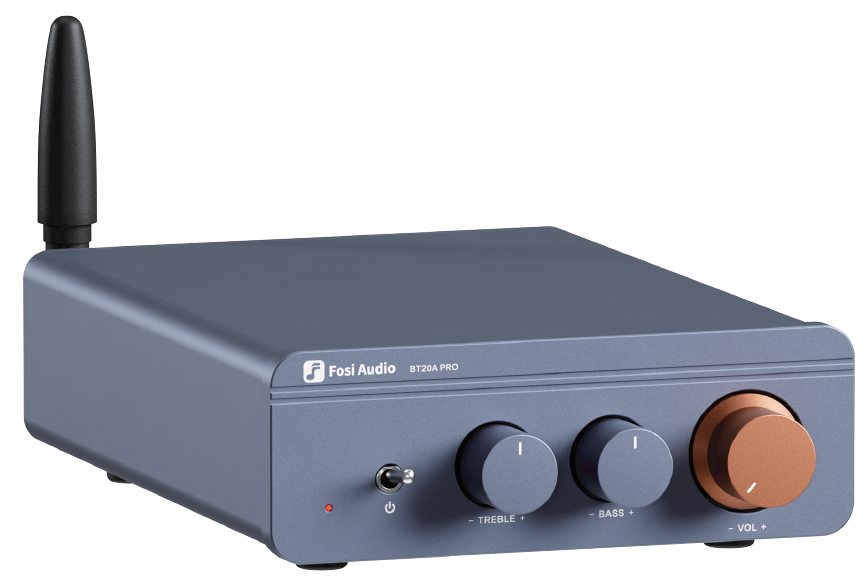
The Fosi Audio BT20A Pro Bluetooth Amplifier is a state-of-the-art 2-channel power amplifier designed to deliver high-fidelity audio with remarkable clarity and power. Engineered with the advanced Texas Instruments TPA3255 Class-D amplifier chip, it offers an impressive output of up to 300 watts per channel at 4 ohms, making it suitable for a wide variety of speaker setups.
Equipped with Bluetooth 5.0 technology, the BT20A Pro enables seamless wireless streaming from smartphones, tablets, and other Bluetooth-enabled devices, eliminating the clutter of cables while ensuring a stable connection up to 50 feet. Its built-in tone control knobs allow users to finely adjust treble and bass, tailoring the sound profile to personal preferences or room acoustics.
This amplifier features versatile inputs, including RCA and Bluetooth, as well as outputs for passive speakers and a 3.5mm pre-out port, enhancing compatibility and expandability with various audio systems. Its compact size and durable build make it ideal for home audio enthusiasts, audiophiles, and anyone looking to upgrade their sound system with a balanced mix of power, quality, and convenience.
Priced approximately between $80 and $120 depending on the retailer and bundle options, the Fosi Audio BT20A Pro is widely available through online platforms and specialty audio retailers. This affordable amplifier delivers premium sound performance, making it an excellent choice for users seeking a powerful, feature-rich Bluetooth amplifier without sacrificing value.
- Audio Input
- RCA/Bluetooth
- Audio Output
- Speaker Output/3.5mm Pre out
- Power Output
- 300Wx2 @40
- SNR
- ≥108dB
- Terminating Impedances
- 2-80
- THD
- 0.005%
- Power Amplifier Chip
- TPА3255
- Power Adapter
- 32V 5A
- DC Input Range
- DC24V-48V
- Frequency Response Range
- 20Hz-20kHz(‡1.2dB)
- Bluetooth Transmission Distance
- Up to 50Ft
Package Contents
- BT20A PRO Bluetooth Amplifier x1 Bluetooth Antenna x1
- Power Adapter x1
- AC Cord x1
- User Manual x1
Quick Start
Basic operation
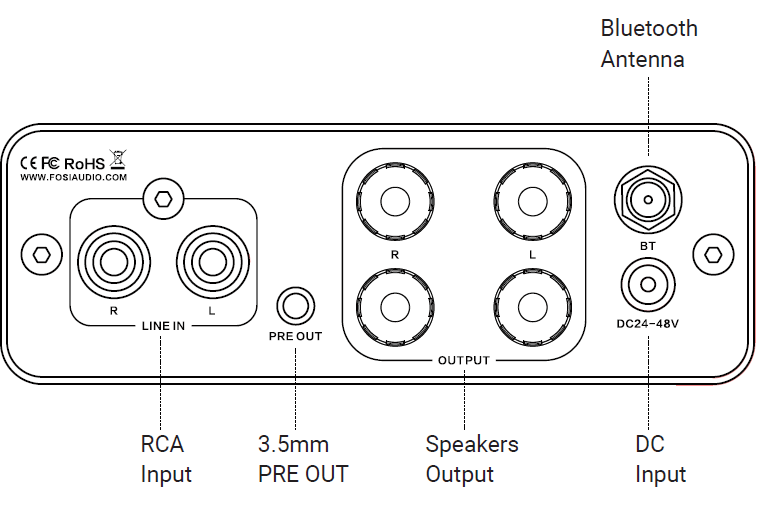
- Step 1: Install the Bluetooth antenna on the BT20A PRO.
- Step 2: Connect your passive speakers to the BT20A PRO via speaker wires.
- NOTE: The PRE OUT can be connected to an active subwoofer and speakers. Or you can connect it to the PRE OUT as a preamplifier.
- You don’t need to connect all the outputs. You can connect 2 passive speakers only.
- And you can connect all the outputs simultaneously.
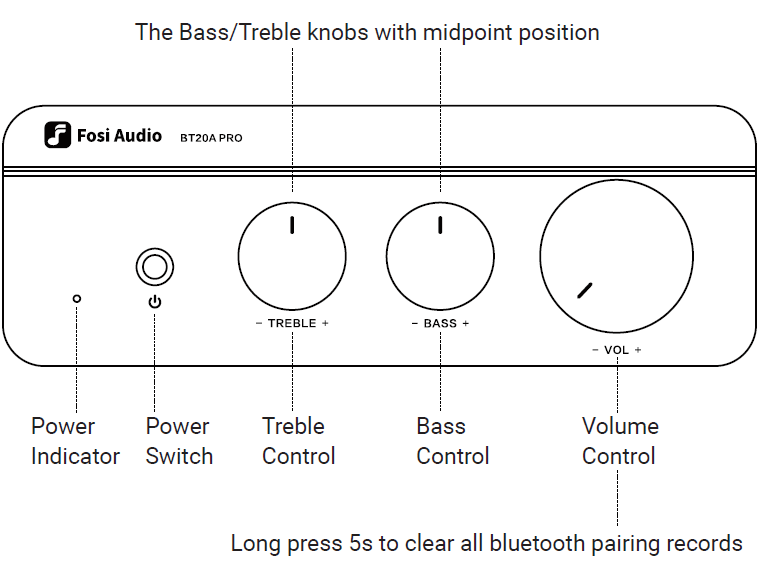
- Step 3: Connect the power supply to BT20A PRO and the socket. Flip the switch's toggle to power on the BT20A PRO.
- Then the input mode indicator light of BT20A PRO stays red after being powered on.
- NOTE 1: Please make sure the LED light on the power adapter stays on. NOTE 2: Before connecting the power supply, please set the bass and treble controls to the center position and set the volume to zero to avoid sudden loud noise.
- Step 4: Connect the audio source (RCA input/Bluetooth input) to the BT20A PRO.
- Step 5: Adjust the Volume control, Bass/Treble control, then enjoy it!
- NOTE: Make sure that all the cables are completely pushed into the device.
Connectivity
- RCA Input:
Use an RCA cable to connect the BT20A PRO and your device. The input indicator light will stay on Red. - Bluetooth Input:
Turn on the Bluetooth on your device, and select "Fosi Audio BT20A PRO" for pairing. The input mode indicator light will stay blue after a successful connection. - Input priority: The Bluetooth input mode first.
- NOTE: Please keep the Fosi Audio BT20A PRO away from other electrical devices. The Fosi Audio BT20A PRO can't be used with a radio at the same time.
- TIP: How to change/replace op-amp?
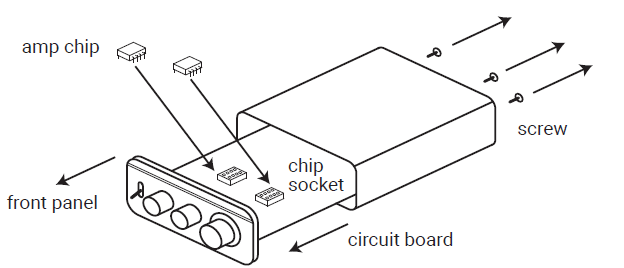
- It is built in with two plug-in NE5532 Op-Amps; different op amps make different sound quality. It can be replaced by LME49720HA/MUSES02/O-PA26041P/OPA2134PA/LM4562/NJM4556AD Op-Amps, etc.
- Use a hex screwdriver to remove the back panel screws, pull the board out,t and unplug the op-amp, align the holes, es and reassemble the other
op-amps.
TIP: How to clear the Bluetooth connection?
Press and hold the volume knob for 5 seconds, and it will be disconnected.
Troubleshooting/QA
Get noise when playing music?
- Bluetooth input mode: Try to use another Bluetooth device.s A weak or unstable Bluetooth signal will cause this problem. Try to place your device nearer to the BT20A PRO.
- RCA input mode: Please change the audio cable to try.
- Try another RCA cable and make sure the audio cable is connected correctly.
- Please unplug the RCA cable from the amplifier, and then turn it on to try.
- Please change the audio source or use other brand devices to try.
- Did you set the "treble" gain to the max? Please turn the "Treble" gain down.
- Make sure all cables are all securely in place and correctly connected.
- Please keep this device away from other electronic devices.
All cables are connected, but there is no audio output.
- Check to make sure the indicator lights on the front panel of the BT20A PRO and the power supply are both on.
- If the indicator light is on, please check if the volume knob is at the minimum level. If yes, please turn up the volume.
- Make sure that the BT20A PRO is set to the input mode you want. Note: Bluetooth input mode (The input mode indicator light will stay on blue)
RCA input mode (The input mode indicator light will stay on red) .Input priority: The Bluetooth input mode first. - Please check if the audio source is paused.
- Please try to change the sound source, cables, and speakers.
- Try restarting both your device and BT20A PRO, then connect again. NOTE: Make sure that all the cables are completely pushed into the device.
My Bluetooth device can’t be paired with the BT20A Pro?
- Check to make sure the BT20A PRO is powered on and the LED light on the power adapter stays on.
- Ensure that the BT20A PRO is not paired with another device.
- Make sure that the distance between your device and the BT20A PRO is not too far; place your device nearer to the BT20A PRO.
- Make sure there are no obstacles between your device and the BT20A PRO. Obstacles will affect the Bluetooth operation distance.
- Please try to change to another Bluetooth audio source to test.
- Please replug the power supply, move the amplifier to another room, and test it again.
- Restart the BT20A PRO and then try to connect again, or try to use another brand of mobile phone or device.
Why is the sound intermittent in Bluetooth mode?
- Use another Bluetooth device to have a try.
- Ensure that there is no other electronic equipment between the BT20A PRO and the audio source that may cause interference.
- Put your device closer to the BT20A PRO.
- Replug the power supply.
One channel does not work?
- Please test whether the Bluetooth and AUX inputs have the same problem first.
- If these two modes have the same problem, swap the speaker cables of the left and right channels, or change to use another speaker, and then test whether this channel still does not work;
- If only AUX mode does not work, change the audio source, change the audio cable, and test again, and make sure that the audio source and cables both deliver stereo sound, not MONO.
Can’t be powered on?
- Make sure that the LED light on the power adapter stays on.
- If it does not light up: Unplug the power adapter from the BT20A PRO, plug the power adapter directly into the AC power source, and see if the LED will light up. If it still does not light up, there may be a problem with the power adapter. Please contact us to replace the power adapter.
- You can uconnect the BT20A PRO to a camera or router'sDC 24V-48V power adapter of a camera or router to connect the BT20A PRO to test whether it can be turned on.
The BT20A Pro can be used as a pre-amp?
- Yes. There is a PRE-OUT port on the rear panel, which allows it to be used as a preamplifier.
Sound quality is not good?
- Make sure all the cables are fully connected.
- Adjust the treble and bass control of the BT20A PRO to find the right tone.
- Please try to change the sound source and cables to test.
Why does the sound cut in and cut out?
- Try to reduce the sound of the sound source.
- Try to change the audio source to test.
- Reduce the gain of the treble and bass knob on the BT20A PRO.
- Ensure that the positive and negative poles of the speaker output do not touch together. Some relatively large banana plugs are easy to touch together and cause a short circuit.
Does the BT20A PRO support Bluetooth aptX and Low Latency?
- No. The BT20A PRO does not support Dolby, aptX, aptX HD, or aptX Low Latency.
Can this amp be left on all the time?
- It can be connected all the time and it is safe without power consumption.
Can I listen to two audio inputs at the same time?
- No, only one mode can be used at a time.
Warranty Information
All Fosi Audio products have an 18-month limited warranty on parts and labor from the date of purchase. Please contact us if you have any problems.
Pros & Cons of the Fosi Audio BT20A Pro Bluetooth Amplifier
Pros
- High Power Output: Delivers up to 300W per channel at 4Ω, providing ample power for mid to large-sized rooms and a wide range of speaker impedances (2-8Ω).
- Bluetooth 5.0 Connectivity: Supports stable wireless streaming with AAC and SBC codecs, ensuring compatibility with most modern devices.
- Tone Control and Volume Adjustment: Features logarithmic taper A potentiometer knobs for smooth volume changes and dedicated bass/treble controls for personalized sound tuning.
- Replaceable Op-Amps: Allows audiophiles to customize the amplifier’s sound signature by swapping out the NE5532 op-amp chips.
- Low Distortion and High SNR: THD ≤0.005% and SNR ≥108dB ensure clean, clear audio reproduction with minimal noise or interference.
- Compact and Versatile: Small footprint (approx. 5x5x1 inches) fits easily into most audio setups and supports both passive speakers and pre-out connections.
Cons
- Power Supply Requirement: Requires an external 24-48V DC power supply (usually included), which might be an additional consideration for some users.
- Lack of Advanced Audio Inputs: No digital optical or coaxial inputs, which limits direct connectivity with some modern digital sources.
- Limited Bluetooth Range: Effective Bluetooth streaming range is about 15 meters (50 feet), which may be insufficient for very large spaces.
- Build Quality: While compact and functional, some users note the amplifier’s chassis is less premium compared to high-end competitors.
Compared to alternatives like the SMSL SA300 or Topping MX3, the Fosi Audio BT20A Pro focuses more on raw power output and tone customization rather than digital input versatility, making it a solid choice for users prioritizing analog and Bluetooth connectivity at a competitive price.
Customer Reviews of the Fosi Audio BT20A Pro Bluetooth Amplifier
The Fosi Audio BT20A Pro Bluetooth Amplifier has received generally positive feedback from users, with an average rating of around 4.5 out of 5 stars across multiple retailers. Customers praise its robust power output and clear, distortion-free sound quality, noting how it significantly enhances their home audio experience.
Many users appreciate the ease of Bluetooth pairing and the flexible tone control,s whallowsllow for personalized sound adjustments. The replaceable op-amps feature is particularly welcomed by audiophiles who enjoy customizing their audio signature.
On the downside, some reviewers mention occasional Bluetooth connection drops and express a desire for more input options like optical or USB. A few also note the physical size of the included power supply as a minor inconvenience.
Overall, buyers recommend the BT20A Pro for those looking for a powerful, value-packed Bluetooth amplifier that offers excellent sound for the price, especially in setups with passive speakers or multi-room configurations.
Faqs
How do I connect passive speakers to the Fosi Audio BT20A Pro Bluetooth Amplifier for the best sound quality?
Why is my Fosi Audio BT20A Pro Bluetooth Amplifier not pairing with my phone or tablet via Bluetooth?
Can I use the Fosi Audio BT20A Pro Bluetooth Amplifier to power a subwoofer or integrate it into a 2.1 system?
What are the benefits of replaceable op-amp chips in the Fosi Audio BT20A Pro Bluetooth Amplifier, and how do I swap them?
How do I optimize the tone controls on the Fosi Audio BT20A Pro Bluetooth Amplifier for different music genres?
What power supply should I use with the Fosi Audio BT20A Pro Bluetooth Amplifier for maximum performance?
Can the Fosi Audio BT20A Pro Bluetooth Amplifier be used with turntables or other analog sources?
How do I troubleshoot if the Fosi Audio BT20A Pro Bluetooth Amplifier produces no sound or distorted audio?
Tags
More fosi audio manuals
Leave a Comment