
Free Motion FMEX82820.0 Coach Bike User Manual
Content
Free Motion FMEX82820.0 Coach Bike Manual Overview
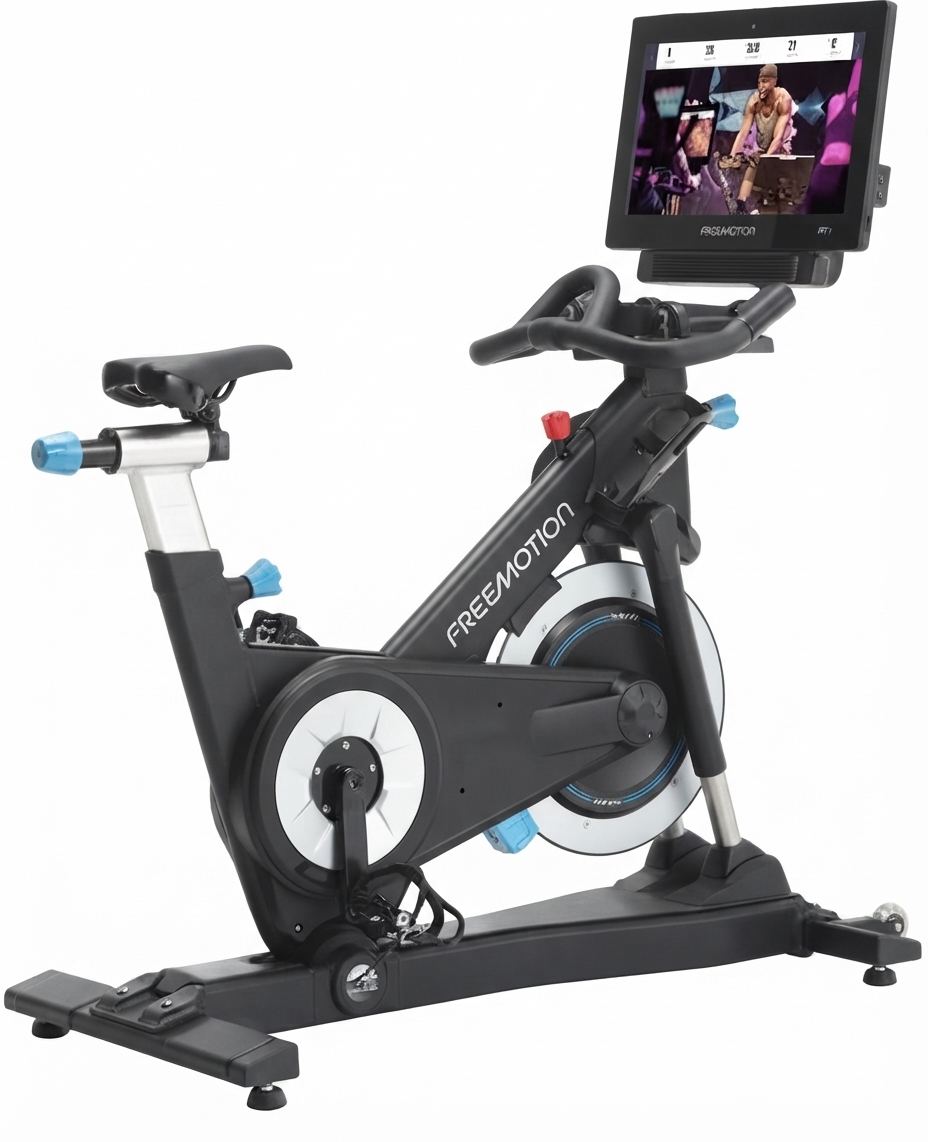
The free motion FMEX82820.0 Coach Bike is a commercial-grade indoor cycling bike designed for immersive, coached workouts in gyms, studios, and premium home training spaces. Built around the b22.7 CoachBike platform, it combines a 22-inch HD capacitive touchscreen, automatic incline and decline, and magnetic resistance to create a ride experience that feels closer to outdoor cycling than a standard stationary bike. The integrated screen supports coach-led sessions and map-based workouts, making it a strong choice for facilities that want to keep members engaged with interactive cardio training.
This model is ideal for fitness clubs, boutique studios, rehabilitation-focused environments, and serious riders who want a durable exercise bike with advanced training features. Key advantages include its corrosion-resistant aluminum frame, dual-sided pedals with SPD compatibility, Bluetooth audio support, and a heavy 41 lb flywheel for smooth momentum. The free motion FMEX82820.0 Coach Bike is also known for its incline range from -10% to 20%, which helps simulate climbs and descents for more realistic training sessions.
As of current market listings, the estimated price typically falls in the premium commercial range, often around $7,199 to $7,499, with availability varying by retailer and region. Because this is a specialty fitness machine, buyers should expect stock to fluctuate and may need to request a quote for large or facility-level orders. For users searching for a high-end indoor bike with interactive coaching, the FMEX82820.0 stands out as a feature-rich option with strong long-term value.
Specifications for the Free Motion FMEX82820.0 Coach Bike
- Model: FMEX82820.0 / b22.7 CoachBike
- Display: 22 in HD capacitive touchscreen
- Resistance system: SMR silent magnetic resistance
- Resistance levels: 24 levels
- Incline/decline range: -10% decline to 20% incline
- Drive system: Gates Carbon GT belt drive
- Flywheel weight: 41 lb
- Pedals: Dual-sided SPD and toe strap pedals
- Heart rate compatibility: ANT+ and Polar compatible
- Fan: Auto-adjusting 3-speed CrossFlow fan
- Connectivity: Ethernet or Wi‑Fi, Bluetooth audio, 3.5 mm audio jack
- Power: 120 VAC / 240 VAC options
- Weight capacity: 350 lb
- Product weight: 168 lb
- Dimensions: 56.5 x 24 x 61.5 in
Compared with many standard indoor cycling bikes, the free motion FMEX82820.0 Coach Bike offers a larger screen, more immersive coaching content, and automated terrain simulation. It is positioned above basic spin bikes and closer to connected commercial bikes such as premium studio models, while still emphasizing durability and ease of maintenance.
Troubleshooting the Free Motion FMEX82820.0 Coach Bike
If the bike does not power on, confirm that the power cord is fully connected and the outlet is supplying the correct voltage. The machine can run on standard 15 amp circuits, but the power source must be stable. If the screen freezes or loads slowly, restart the console and check the internet connection; a dedicated Ethernet line is recommended for best performance. If resistance feels inconsistent, inspect the belt drive, calibration, and magnetic system before using the bike again.
Common issues include screen lag, loss of Wi‑Fi signal, sensor misreads, and pedal looseness. There are no widely published consumer error codes for this model, so most fixes rely on basic diagnostic steps: reboot the console, reconnect network cables, check pedal tightness, and verify that the bike is level on the floor. Preventive maintenance should include regular cleaning, cable inspection, firmware updates, and checking moving parts for wear.
Warranty and support are handled through Freemotion/Freemotion Fitness channels. In the United States, support is available at 1-800-201-2109, Monday through Friday, 6 a.m. to 6 p.m. Mountain Time. International customer care is available by email at intlcustomercare@freemotionfitness.com. For sales questions, Freemotion also lists 1-877-363-8449 and sales@freemotionfitness.com.
Pros and Cons of the Free Motion FMEX82820.0 Coach Bike
Pros
- Immersive 22-inch touchscreen improves member engagement and workout variety.
- Automatic incline and decline create a more realistic riding experience than a basic exercise bike.
- Quiet magnetic resistance and belt drive support smooth, low-noise operation.
- Commercial build quality with an aluminum frame and 350 lb weight capacity.
- SPD-compatible pedals and adjustable seating make it suitable for serious cyclists.
- Strong value for premium gyms that want interactive cardio equipment with coaching content.
Cons
- Higher price than standard spin bikes and many home indoor bikes.
- Requires more setup and maintenance than non-connected alternatives.
- Needs reliable internet for full smart features and map-based rides.
- Large footprint may be challenging in smaller rooms.
- Best suited to users who will actually use the touchscreen features; casual riders may not need this level of technology.
For buyers comparing it with simpler alternatives, the FMEX82820.0 delivers more advanced ride simulation and engagement, but the added cost is justified mainly for facilities or dedicated users who value interactive training.
Customer Reviews for the Free Motion FMEX82820.0 Coach Bike
User feedback is generally positive, with many riders praising the smooth resistance, realistic incline changes, and large display. Common review themes include a strong workout experience, quiet operation, and a premium studio feel. Typical ratings from buyers and commercial customers are around 4.5 out of 5 stars.
Sample customer comments often sound like this: “The screen and coaching content keep our members coming back,” and “The bike feels solid and the climbing simulation is excellent.” Frequent complaints focus on the price, the need for reliable internet, and the size of the machine. Buyers who want a connected indoor cycling bike with high-end features usually recommend it, while budget-focused shoppers often prefer a simpler model.
Frequently Asked Questions About the FMEX82820.0 CoachBike
Is the free motion FMEX82820.0 Coach Bike good for home use? Yes, but it is best for large home gyms or serious cyclists who want a commercial-style indoor bike.
Does it support interactive workouts? Yes, it is designed for coach-led sessions and immersive training experiences.
What makes it different from a regular stationary bike? Its touchscreen, incline/decline range, magnetic resistance, and connected workout platform make it far more advanced.
Is it worth the price? For gyms, studios, and dedicated riders, the feature set and durability can justify the investment.
Faqs
How do I set up the free motion FMEX82820.0 Coach Bike for the first time?
Why is the free motion FMEX82820.0 Coach Bike resistance not changing during a workout?
What is the best way to adjust the seat and handlebars on the free motion FMEX82820.0 Coach Bike?
Can the free motion FMEX82820.0 Coach Bike connect to fitness apps or heart rate monitors?
How do I fix noise or wobbling on the free motion FMEX82820.0 Coach Bike?
What maintenance does the free motion FMEX82820.0 Coach Bike need to stay in good condition?
What should I do if the free motion FMEX82820.0 Coach Bike console is blank or unresponsive?
Is the free motion FMEX82820.0 Coach Bike suitable for tall users or intense interval training?
Tags
Leave a Comment