
Furrion DV3100S Entertainment System User Manual
Content
Furrion DV3100S Entertainment System: Complete Product Manual and Buying Guide
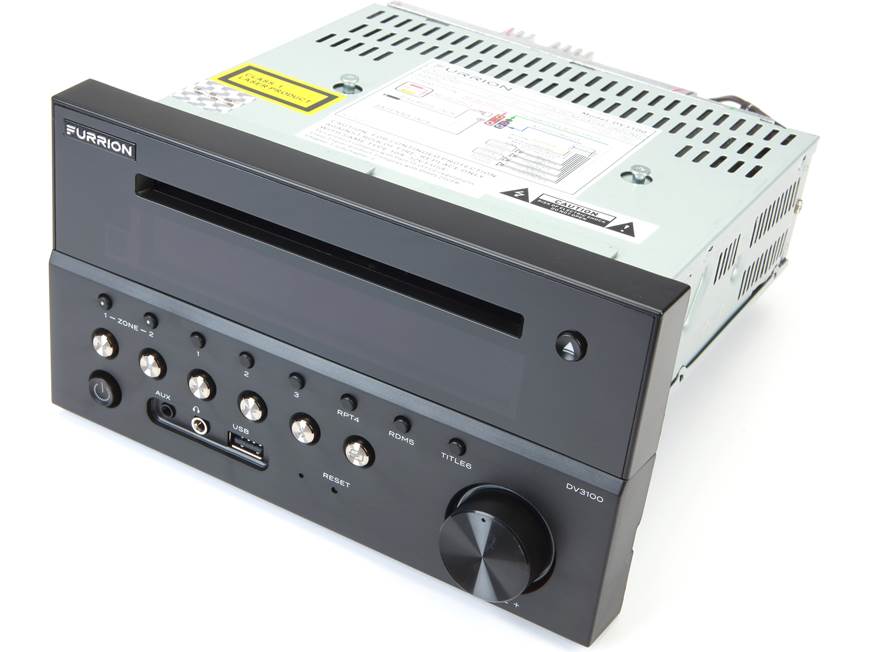
The furrion DV3100S Entertainment System is a popular RV and marine multimedia receiver built for travelers who want a compact all-in-one audio and video solution. Designed for recreational vehicles, trailers, and mobile living spaces, it combines DVD playback, AM/FM radio, Bluetooth streaming, USB media support, and multi-zone audio control in one wall-mounted unit. Its 12V DC power design and rugged form factor make it a practical fit for off-grid use, while the built-in LCD display and white key illumination improve visibility in low-light interiors.
One of the biggest strengths of the furrion DV3100S Entertainment System is its versatility. It supports DVD, CD, MP3, WMA, and MP4 playback, and many versions include front HDMI input, USB, AUX-in, and Bluetooth connectivity for smartphones and portable devices. The unit is especially appealing for RV owners who want to distribute audio to two zones, connect a subwoofer, or feed video to additional screens. Typical power output ranges from 4 x 15W RMS to higher advertised maximum ratings depending on the version and listing, which is enough for small to medium RV cabins and bedrooms.
Pricing usually falls in the estimated range of $150 to $300, depending on condition, retailer, and whether the unit is sold new, discontinued, or bundled with RV replacement hardware. Availability is often strongest through RV parts retailers, marine suppliers, and resale marketplaces rather than mainstream electronics stores. For buyers searching for a reliable RV stereo with DVD, Bluetooth, and multiple outputs, the furrion DV3100S Entertainment System remains a strong value-oriented choice.
Pros and Cons of the Furrion DV3100S Entertainment System
Pros
- All-in-one RV entertainment solution with DVD, radio, Bluetooth, USB, and AUX support.
- Two-zone audio output is useful for separating living room and bedroom sound.
- Multiple rear connections, including RCA outputs, video outputs, and subwoofer support, make it flexible for custom installations.
- Compact 1-DIN-style design fits many RV and trailer wall cutouts.
- Good value for travelers who want a dedicated RV media center instead of a consumer home stereo.
Cons
- Output power is modest compared with premium aftermarket car audio systems.
- Some units have limited smart-device integration compared with modern touchscreen receivers.
- The interface and remote are often described as basic rather than premium.
- DVD playback can feel dated if streaming is your main priority.
- Compared with newer alternatives, the display and controls are functional but not especially advanced.
For buyers who need a dependable RV multimedia receiver at a reasonable cost, the furrion DV3100S Entertainment System delivers solid value. Compared with newer touchscreen receivers or high-end marine audio units, it trades advanced features for simpler operation and better RV-specific compatibility.
Customer Reviews and Real-World Feedback on the Furrion DV3100S Entertainment System
Customer feedback is generally positive, with many users rating the unit around 4 out of 5 stars for RV use. Common praise includes easy installation, useful HDMI and USB connectivity, dependable Bluetooth streaming, and the convenience of two-zone audio. One typical comment is: “Great fit for our camper and simple to use for movies and music.”
Common complaints focus on the basic remote control, limited power compared with larger home audio systems, and occasional DVD-related issues over time. Some buyers also note that the feature set feels older than modern streaming-first systems. A frequent summary from owners is: “Works well for the RV, but don’t expect premium sound or a fancy interface.”
Overall, the furrion DV3100S Entertainment System is a smart purchase for RV owners who want practical multimedia features, good compatibility, and straightforward daily use. It is best suited for travelers who value function, reliable source switching, and multi-zone audio over cutting-edge smart entertainment features.
Key Features of the Furrion DV3100S Entertainment System
- 12V DC power system for RV and marine environments.
- DVD/CD playback with support for common media formats such as MP3 and MP4.
- Bluetooth connectivity for wireless audio streaming.
- Front input options that may include USB, AUX-in, and HDMI depending on the model variation.
- Rear RCA audio and video outputs for external displays and speaker expansion.
- Two-zone audio support for separate listening areas.
- Built-in AM/FM tuner for terrestrial radio.
Who Should Buy the Furrion DV3100S Entertainment System?
This RV stereo is ideal for travel trailer owners, fifth-wheel campers, and marine users who want a compact media hub with DVD playback and Bluetooth audio. It also works well for families who still watch physical discs while camping, or for buyers replacing an older Furrion unit and wanting a compatible upgrade path.
If you want a simple, RV-ready entertainment system with useful inputs and outputs, the furrion DV3100S Entertainment System is a practical and budget-conscious choice.
Faqs
How do I set up the Furrion DV3100S Entertainment System for the first time?
What should I do if the Furrion DV3100S Entertainment System has no power?
Why is the Furrion DV3100S Entertainment System not reading DVDs or CDs?
How do I connect Bluetooth on the Furrion DV3100S Entertainment System?
Can the Furrion DV3100S Entertainment System support multiple TV zones?
What inputs and media sources work with the Furrion DV3100S Entertainment System?
How can I improve sound quality on the Furrion DV3100S Entertainment System?
How should I maintain and clean the Furrion DV3100S Entertainment System?
More furrion manuals
- Furrion FGHMSA3DA-SS 3-Burner Gas Cooktop User Manual
- How to Operate: Furrion Digital Camera FRC12TA-BL User Guide
- Furrion FACW10ESSA-BL Standard Single Zone Wall Thermostat User Manual
- Furrion FDHS32M4A 32” HD LED TV User Manual
- Furrion 2-zone Soundbar Speaker FSB2N25MC-BL User Manual
- Furrion 24'' LED TV FEFS24A6A User Manual
Leave a Comment