
Setup: G35 IP68 Smart Watch User Manual
Content
g35 IP68 Smart Watch
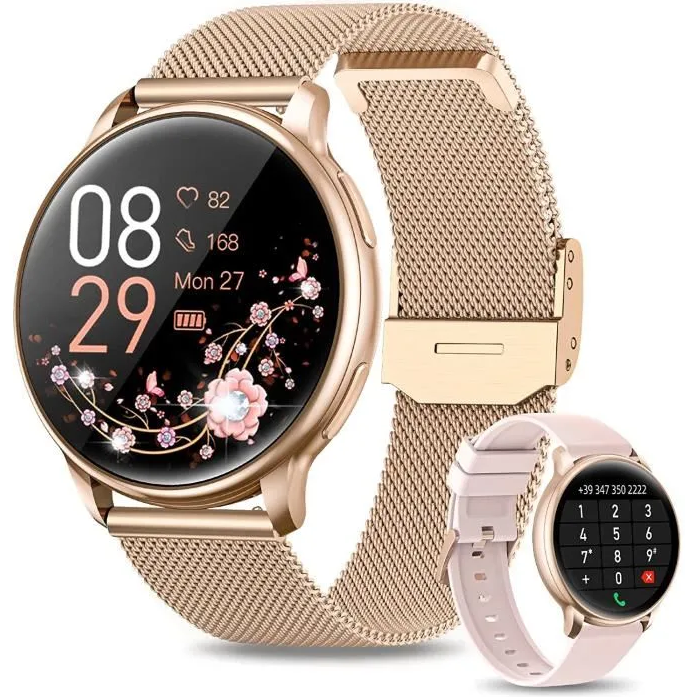
Introduction
The G35 IP68 Smart Watch is a versatile and stylish wearable designed to blend advanced technology with everyday convenience. Featuring a crisp 1.95-inch full touch screen and robust health monitoring tools, it caters to users seeking both fitness tracking and smart connectivity in one device. Its IP68 waterproof rating ensures reliable performance even in wet environments, making it ideal for active lifestyles.
Key benefits include comprehensive health features such as heart rate, blood oxygen, and blood pressure monitoring, alongside Bluetooth calling and message notifications. With compatibility for both Android and iOS, the g35 smart watch offers seamless integration with most smartphones. The watch also supports multiple sports modes, sleep tracking, and customizable watch faces, appealing to fitness enthusiasts and tech-savvy professionals alike.
This smartwatch is perfect for users who want to monitor their wellness, stay connected on the go, and enjoy a sleek, modern design. Estimated retail prices range from approximately $30 to $50, making it an affordable option within the mid-range smart watch market. Available through online retailers and direct suppliers, the G35 IP68 Smart Watch stands out as a reliable companion for everyday health and communication needs.
Touch and key operation instructions
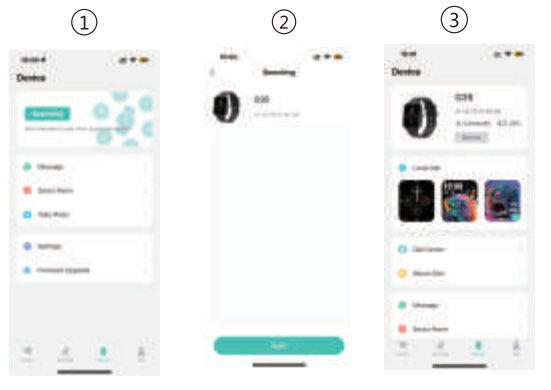
Bluetooth data transmission
When the watch is connected to the mobile app "FlowFit", it will instantly synchronize data such as weather, notification messages, sports,, and health data with the mobile app through Bluetooth. After disconnecting or turning off Bluetooth, data will not be synchronized.
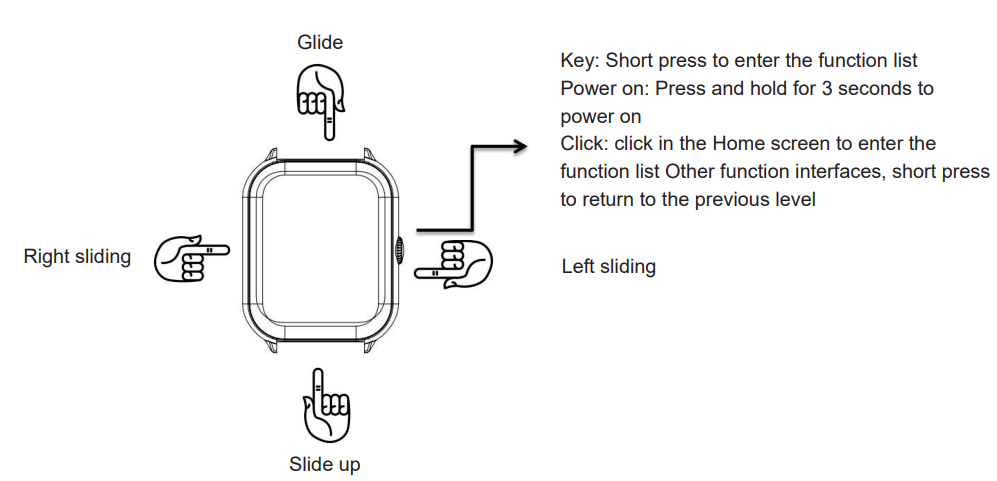
Touch Operating Instructions
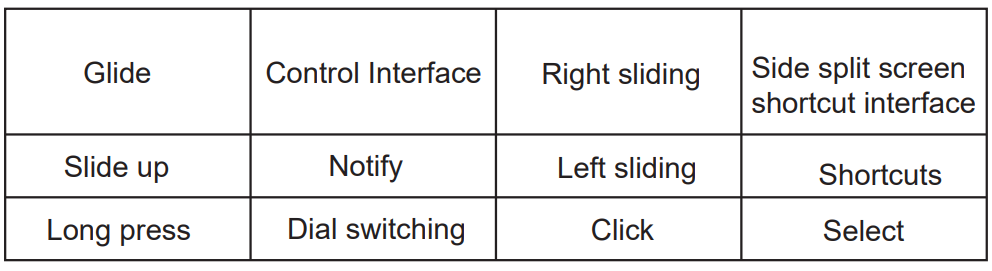
Please enter the APP to learn about the detailed features of the product
Watch charging
Simple explanation and display of commonly used functions
Dial selection: Press and hold for 3 seconds on the main dial to enter dial mode, then slide left or right to select the dial and click Select to exit viewing.;
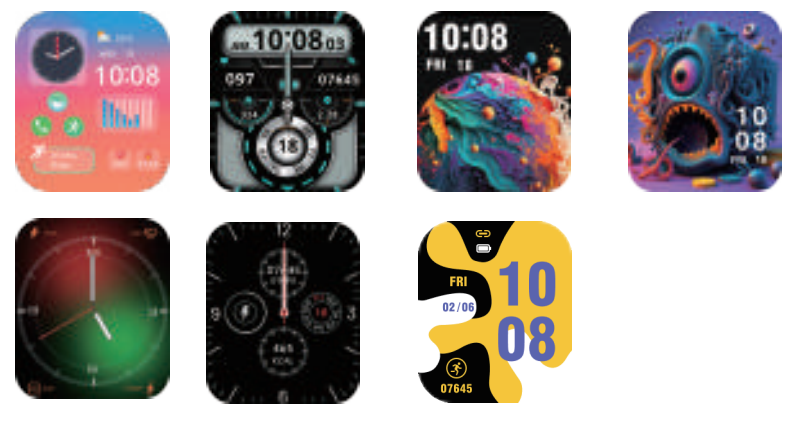
Introduction of main interface functions
After the smart bracelet and the app are first paired, the time and date of the mobile phone will be synchronized. Displayed below. For weather information, you need to connect to the client to obtain the data. If the disconnection lasts for a long time, the weather information cannot be updated.
Note
- Do not disassemble, repair, or modify the product without authorization.
- Do not violently collide with the product to avoid damage.
- Please avoid using the instrument in magnetic fields, direct sunlight, or high-temperature environments.
- This product is not intended for disease diagnosis, treatment, or prevention purposes.
- The waterproof grade of this product is IP67, to avoid prolonged immersion in water.
Please avoid wearing the watch strap too tightly and This product is a magnetic charging device. One end of the charging cable is connected to the charging adapter via USB, and the other end is attached to the contact point on the back of the watch. The watch screen will display charging instructions, indicating the start of charging.
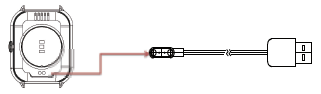
- Note: Connect the USB interface to a charger or computer USB interface with an output current of 500mA or above for charging.
Download and install the APP.
Use your phone to scan the QR code below, or directly scan the QR code in the watch settings to download and
- Step counting, distance,, and calories
The step-counting interface shows steps. Wear the smart bracelet your on your wrist, and the smart bracelet can automatically count steps, distance, and calories. - Sleep monitoring
Wearing the smart bracelet at night to automatically judge whether you are in a sleep state, to record deep sleep and light sleep respectively, and to summarize the total sleep time to help you monitor your sleep quality. The sensor can measure your sleep quality according to the range and frequency of wrist movements when you sleep.

Note: Because users' sleep time and habits are different, the time of sleep monitoring is only for reference.
- Heart rate measurement keeps the contact area between the watch and the skin clean.
- Children should use this product under the guidance of their parents to avoid harm.
Common problem handling
The watch cannot be turned on
- Please hold the power button for more than 3 seconds
- The battery may be too low. Please charge it promptly.
Bluetooth is not connected or is unable to connect
- Please try restarting the watch and reconnecting.
- Please try restarting your phone's Bluetooth and connecting again.
- Do not connect your phone to other Bluetooth devices at the same time.
Install the app; Android phones can also use Google Play, while Apple phones can use the App Store and search for "FlowFit" to download and install.
Mobile phone system requirements: Android 5.0 and above, iOS 10.00.0 and above.
Connecting a watch
- After enabling Bluetooth on the phone, open the "FlowFit" app on the phone, select "My", "My" Device ", click on Scan Device, find the corresponding device, and click on Connect Pairing Bind.
- Before pairing, ensure that the watch's battery level is above 20% to avoid pairing due to insufficient battery power fail.
Enter the heart rate test interface and click "Start Measurement" on the screen. After "Stop", the motor will vibrate once and display the current measurement data.
Exercise
Sports interface, including a variety of sports, walking, running, cycling, skipping rope, badminton, basketball, football,, and so on.
Al voice
Click on the voice, through the connection with the mobile phone, the user's spoken language is converted into text, intelligent dialogue,,ue and intelligent interaction of instant question and answer.
Phone
- Turn on the Bluetooth function of your phone,, and after the watch is connected, it will go to sleep when not in use. When not automatically connected to the watch after hibernation, the mobile app "FlowFit" needs to be opened and refreshed to automatically connect.
When the watch Bluetooth audio is not automatically connected, please go to Phone - Phone Settings - Bluetooth - Click to save the device "Watch" and connect to pair it.
Inaccurate measurement of heart rate/blood pressure/blood oxygen
- Generally, it is caused by poor contact between the sensor of the watch and the human body during measurement.
- Please pay attention to the full contact between the sensor and the wrist during measurement.
- Please keep your body stationary and keep your
- During pairing connection, ensure that the Bluetooth of the phone is turned on, the call audio of the watch, and the media audio are enabled.
- To turn off call audio and media audio, click on the phone icon to turn it on and off.
- If the watch is not connected to the mobile app for a long time or if the power is cut off for too long, it may result in inaccurate time. Need to synchronize apps.
- View watch product information, drop down, and click on the device information option to enter the information view product information. Smartwatch. The phone searches for the smartwatch's Bluetooth device and initiates pairing. When both parties confirm the pairing, there will be a prompt that the connection is successful. Click the dial pad of the watch to dial and answer the phone.
Blood pressure
Enter the blood pressure test interface, click "Start Measurement" on the screen, and after "Stop" measurement, the motor vibrates once and displays the current measurement data.
The environment for measuring blood pressure should be quiet and at a suitable temperature. Users should rest for at least 5 minutes before measurement to avoid tension, anxiety,, and emotional agitation. Blood pressure was measured 3 times, 2 minutes apart. Record the average of the three readings. Watch closely to your wrist during measurement..
Blood oxygen
Enter the blood oxygen test interface and click "Start Measurement" on the screen. After the measurement is "Stop", the motor vibrates once and displays the current measurement data.
Blood oxygen saturation (SpO2) is the percentage of the volume of oxyhemoglobin (HbO2)combined with oxygen in the blood to the volume of all (Hb, hemoglobin) which can be combined, ie, the concentration of blood oxygen in the blood.
Note: the data measured for blood pressure and blood oxygen are for reference only, and cannot be used as as the basis of relevant medical purposes.
Weather
The weather page will display today's current weather, and the weather forecast for the next two days will be
Insufficient accuracy of sleep data
- Sleep monitoring simulates a person's natural state of falling asleep and waking up, and requires normal wearing.
- Wearing too late or sleeping may cause errors.
- Monitor scientific sleep throughout the day, with normal sleep times of 8 pm and 10 am.
- Sleep monitoring simulates a person's natural state of falling asleep and waking up, and requires normal wearing.
- Wearing too late or sleeping may cause errors.
- Monitor scientific sleep throughout the day, with normal sleep times of 8 pm and 10 am.
Specifications of theG355 IP68 Smart Watch
- Display: 1.95-inch TFT full touch screen with a resolution of 240 x 282 pixels
- Waterproof Rating: IP68, suitable for swimming and water exposure
- Health Monitoring: Heart rate, blood oxygen (SpO2), blood pressure, sleep tracking
- Connectivity: Bluetooth 5.3 for calling, message notifications, and app sync with Android 5.0+ and iOS 10.0+
- Battery: 220mAh lithium battery providing up to 4 days of usage on a single charge
- Material: Alloy case with soft silica gel band for comfort and durability
- Memory: 64MB onboard memory for smooth operation
- Sports Modes: Multi-sport tracking including running, cycling, skipping, basketball, yoga, and more
- Additional Features: Alarm clock, calendar, weather forecast, customizable watch faces, do-not-disturb mode, password lock
Compared to similar mid-range smart watches, the g35 offers advanced health metrics typically found in higher-priced models, combined with an IP68 waterproof rating that surpasses many IP67 competitors. Its Bluetooth calling function and broad language support further enhance its versatility for global users.
Device maintenance
Please remember the following tips when you maintain your Smart Watch:
- Clean the Smart Watch regularly, especially its inner side, and keep it dry
- Adjust the Smart Watch tightness to ensure air circulation.
- Excessive skincare products should not be used on the wrist that wears the Smart Watch.
- Please cease wearing the Smart Watch in case of skin allergy or any discomfort.
Troubleshooting Guide for the g35 IP68 Smart Watch
- Watch not turning on: Ensure the battery is charged using the magnetic suction charger; charge for at least 2 hours before retrying.
- Bluetooth connection issues: Restart both watch and smartphone, ensure Bluetooth is enabled, and delete previous pairings before re-pairing via the FlowFit app.
- Health data not syncing: Confirm the app has the necessary permissions; update the FlowFit app and watch firmware if available.
- Screen unresponsive: Perform a soft reset by holding the power button for 10 seconds; avoid using sharp objects on the touch screen.
- Error codes: No specific error codes reported, but persistent issues recommend a full factory reset via settings.
- Preventive measures: Regularly clean the watch, avoid extreme temperatures, and keep the software updated.
The g35 IP68 Smart Watch comes with a 1-year warranty covering manufacturing defects. For additional support, users can contact the supplier’s customer service through email or official online platforms provided with purchase documentation.
Pros & Cons of the g35 IP68 Smart Watch
- Pros:
- Comprehensive health monitoring,, including heart rate, blood oxygen, and blood pressure.
- IP68 waterproof rating allows swimming and water exposure without damage.
- Bluetooth calling feature enables hands-free communication directly from the watch.
- Long battery life of up to 4 days reduces charging frequency.
- Compatible with both Android and iOS devices, broadening its usability.
- Multi-language support accommodates international users.
- Cons:
- No built-in GPS; relies on smartphone GPS for tracking outdoor activities.
- Screen resolution is modest compared to premium smart watches.
- Lacks a camera, which some users may expect for quick photo capture.
- Some users may find the watch size (44-49mm) large for small wrists.
Overall, the G35 IP68 Smart Watch offers excellent value for money, especially for users prioritizing health tracking and waterproofing. Alternatives may include watches with higher resolution or GPS,, but usually at a higher price point.
Customer Reviews and Feedback on the g35 IP68 Smart Watch
Users generally praise the G3535 IP68 Smart Watch for its reliable health monitoring features, ease of use, and affordable price. Many appreciate the Bluetooth call function that works smoothly with minimal lag. The battery life and waterproof capabilities receive positive remarks, especially from fitness enthusiasts.
Common complaints include occasional Bluetooth connectivity drops and the watch’s bulky size for smaller wrists. Some users report that the touch screen can feel less responsive under certain conditions. Star ratings average around 4 out of 5, reflecting strong satisfaction with minor issues.
Most reviewers recommend the G35 as a budget-friendly smartwatch ideal for daily health tracking and casual use. Potential buyers interested in extensive GPS or premium display quality might consider other models.
Faqs
How do I set up the g35 IP68 Smart Watch for the first time?
What should I do if my g35 IP68 Smart Watch is not syncing with my phone?
Can the g35 IP68 Smart Watch track multiple sports activities?
Is the g35 IP68 Smart Watch compatible with all Android and iOS devices?
How long does the battery last on the g35 IP68 Smart Watch, and how do I optimize battery life?
What do the IP67 or IP68 waterproof ratings mean for the g35 Smart Watch?
How do I clean and maintain my g35 IP68 Smart Watch to ensure longevity?
Why is the Bluetooth call feature not working on my g35 IP68 Smart Watch?
Leave a Comment