
Gacell CT-15000 Battery Charger User Manual
Content
gacell CT-15000 Battery Charger Manual and Product Guide
Introduction
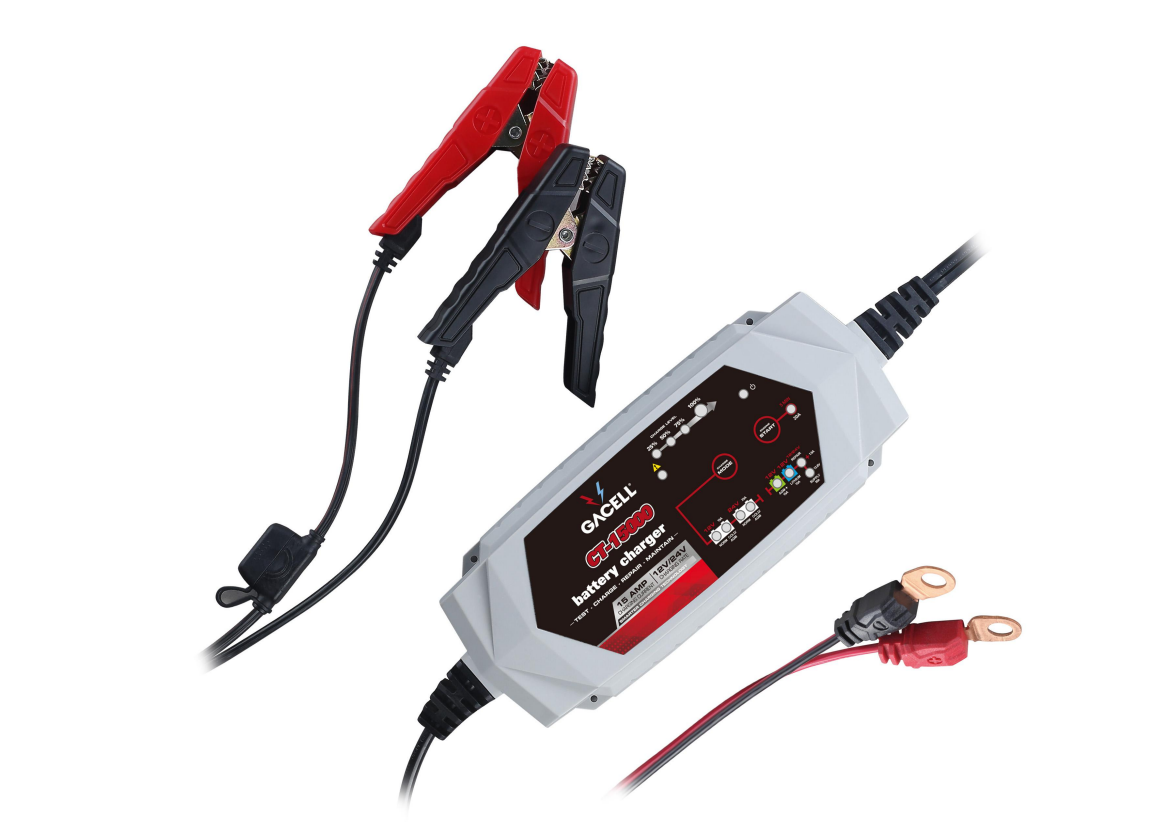
The gacell CT-15000 Battery Charger is a smart, microprocessor-controlled charging solution designed for modern 12V and 24V battery systems. Built for reliability and efficiency, it is commonly used for cars, trucks, vans, motorcycles, caravans, boats, and maintenance charging in workshops and fleet environments. Its automatic charging logic helps reduce overcharging risk while supporting a wide range of battery chemistries, making it a practical choice for users who need a dependable battery maintainer and recovery charger.
One of the main advantages of the gacell CT-15000 Battery Charger is its versatility. It is designed to handle lead-acid battery types such as flooded, AGM, GEL, and maintenance-free batteries, and some versions are marketed with lithium support and repair functions. This makes it appealing to both everyday drivers and professionals who need a charger for seasonal vehicles, commercial equipment, or battery recovery use. The charger is also valued for its automatic voltage detection, fast charging capability, and built-in protection features.
In the market, the estimated price range is typically around mid-range to upper-mid-range for smart chargers, often depending on seller, region, and included accessories. Availability is generally strongest through online retailers, automotive suppliers, and marketplace listings. For buyers searching for a 15A battery charger for 12V and 24V systems, the gacell CT-15000 Battery Charger offers strong value, practical performance, and broad compatibility.
Specifications for gacell CT-15000 Battery Charger
- Battery voltage support: 12V and 24V charging modes for common automotive and utility applications.
- Charging current: Up to 15A in 12V mode, with reduced output in 24V operation.
- Battery compatibility: Lead-acid, AGM, GEL, and maintenance-free batteries; some product variants also support lithium-ion and repair modes.
- Charging control: Microprocessor-controlled automatic charging for improved efficiency and battery safety.
- Input power: Universal AC input is commonly offered on smart charger models in this class.
- Protection features: Reverse polarity protection, overcharge protection, short-circuit protection, and thermal safeguards are commonly included.
- Use cases: Battery charging, maintenance charging, desulfation-style recovery, and long-term storage support.
- Performance note: A 15A charger is generally faster than 5A to 10A models, making it better suited for larger batteries and frequent use.
Compared with smaller smart chargers, the gacell CT-15000 Battery Charger is better suited to larger-capacity batteries and faster turnaround times. Compared with high-output workshop chargers, it is more compact and easier to use for home and light professional applications.
Troubleshooting gacell CT-15000 Battery Charger Problems and Fixes
If the charger does not start, first confirm that the AC outlet is live, the battery clamps are connected correctly, and the polarity is correct. Many smart chargers will refuse to charge if the battery voltage is too low, the clamps are loose, or the battery is severely damaged. If charging stops early, check for overheating, poor ventilation, or a battery that has reached full charge.
Common error-style issues usually involve reverse connection, fault detection, or battery incompatibility rather than complex numeric codes. A flashing warning light, no charging indicator, or a fault signal often means the charger has detected an unsafe condition. Disconnect the unit, let it cool, recheck the connections, and try again with a known compatible battery.
- Problem: No power output. Fix: Verify AC supply and replace damaged cables.
- Problem: Charging not starting. Fix: Check clamp placement and battery voltage.
- Problem: Fault light on. Fix: Remove reverse polarity or battery short conditions.
- Problem: Charger gets hot. Fix: Improve airflow and reduce charging load.
To prevent repeated issues, keep terminals clean, store the charger in a dry location, and avoid using it on batteries that are physically swollen or leaking. Warranty terms vary by seller, so confirm coverage at purchase. For support, use the retailer’s service channel or the manufacturer’s official contact details listed in the product paperwork or seller listing.
Pros and Cons of gacell CT-15000 Battery Charger
Pros
- Fast 15A charging is useful for larger car and truck batteries.
- Automatic smart charging reduces user error and helps protect the battery.
- Works with multiple battery types, including AGM and GEL.
- Good choice for home garages, workshops, and storage maintenance.
- Strong value for money when compared with premium workshop chargers.
Cons
- May be more charger than needed for small batteries or occasional top-ups.
- Compatibility details can vary slightly by seller or product variant.
- Some users may prefer a display with more detailed diagnostic information.
- Not as heavy-duty as industrial multi-bay charging systems.
For buyers comparing smart battery chargers, the gacell CT-15000 Battery Charger sits in a strong middle ground: powerful enough for practical use, but still affordable compared with professional-grade alternatives. It is a sensible pick for users who want a 12V 24V battery charger with automatic operation and broad battery support.
Customer Reviews and User Feedback
User feedback for the gacell CT-15000 Battery Charger is generally positive, with many buyers rating it around 4 out of 5 stars for convenience and charging speed. Owners frequently praise the easy setup, reliable automatic operation, and ability to charge larger batteries without constant monitoring.
Common complaints usually involve unclear documentation, differences between seller listings, or expectations about advanced features such as repair modes or lithium support. A typical testimonial style summary would be: “Works well on my 12V AGM battery and charges much faster than my old 6A unit.” Another common comment is: “Good value, but make sure the model you buy matches your battery type.”
For most buyers, the gacell CT-15000 Battery Charger is recommended for regular battery maintenance, seasonal vehicle storage, and general garage use. It is especially appealing to users who want a reliable smart charger with enough output for larger automotive batteries.
Faqs
How do I set up the gacell CT-15000 Battery Charger for the first time?
Why is my gacell CT-15000 Battery Charger showing an error or not starting a charge?
What batteries are compatible with the gacell CT-15000 Battery Charger?
How long does the gacell CT-15000 Battery Charger take to fully charge a battery?
How do I use the gacell CT-15000 Battery Charger to charge safely overnight?
What should I do if the gacell CT-15000 Battery Charger gets hot during use?
How can I maintain the gacell CT-15000 Battery Charger for longer life?
What charging mode should I choose on the gacell CT-15000 Battery Charger for better battery performance?
Leave a Comment