
Garmin Vivoactive GPS Smartwatch User Manual
Content
Garmin Vivoactive GPS Smartwatch Review and Product Manual
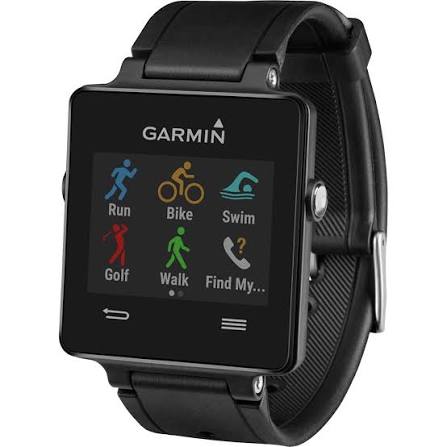
The Garmin Vivoactive GPS Smartwatch is a versatile fitness-focused wearable designed for users who want a lightweight smartwatch with built-in sports tracking, smartphone notifications, and all-day activity monitoring. It combines GPS-based workout tracking with everyday smartwatch convenience, making it a practical choice for runners, cyclists, golfers, swimmers, and active professionals who want health data on their wrist without moving to a bulky premium model.
One of its biggest strengths is the balance between sport and lifestyle features. The watch supports GPS-enabled running, biking, golf, swim tracking, and general activity monitoring, while also delivering smart alerts for calls, texts, emails, and calendar events when paired with a smartphone. It also supports Connect IQ customization, allowing users to add watch faces, widgets, and apps for a more personalized experience.
For shoppers looking at the original Garmin Vivoactive GPS Smartwatch, the estimated price range typically falls around $250 to $300 depending on bundle options and availability. Because this model is older, new stock may be limited and availability can vary by retailer, with some listings appearing as discontinued or refurbished. For users who want a modern alternative, Garmin’s newer vívoactive line offers updated displays, improved battery life, and expanded health features.
Garmin Vivoactive GPS Smartwatch Specifications and Key Features
- Display: Color touchscreen LCD, 205 x 148 pixel resolution
- Size and weight: Compact, lightweight design at about 38 g with strap
- Battery life: Up to 3 weeks in watch/activity tracking mode; up to 9 to 10 hours with GPS active
- Water resistance: 5 ATM, suitable for swimming and everyday water exposure
- Sports modes: Running, cycling, swimming, and golf with downloadable course information
- Connectivity: Bluetooth and ANT+ support for smartphone pairing and compatible accessories
- Smart features: Notifications for calls, texts, emails, calendar reminders, and app alerts
- Customization: Compatible with Connect IQ for watch faces, widgets, and apps
- Health tracking: Step counting, sleep monitoring, move alerts, and activity tracking
- Accessory support: Optional heart rate monitor and cycling sensors
Compared with newer Garmin fitness smartwatches, the original Vivoactive is less advanced in display quality, battery efficiency, and health analytics, but it remains appealing for users who want a simple GPS smartwatch with core tracking features. In comparison with similar entry-level devices, it stands out for its strong battery life, sports variety, and Garmin ecosystem integration.
Pros and Cons of the Garmin Vivoactive GPS Smartwatch
Pros
- Excellent battery life for a GPS smartwatch, especially in everyday watch mode
- Lightweight design that feels comfortable during workouts and all-day wear
- Built-in GPS and multi-sport tracking make it useful for fitness and outdoor activities
- Smart notifications and Connect IQ support add everyday convenience
- Good value for users who want Garmin tracking without paying for a premium model
Cons
- Older display technology compared with newer Garmin and AMOLED smartwatches
- No built-in heart-rate sensor in the original model, so some users need an accessory
- Limited smart features compared with modern smartwatches
- Availability is inconsistent because the model is discontinued in many markets
- Better alternatives now exist if you want advanced wellness tracking or music storage
For value for money, the Garmin Vivoactive GPS Smartwatch still makes sense if found at a good discount, especially for users focused on fitness rather than full smartwatch functionality. However, buyers who want a newer touchscreen GPS smartwatch may prefer Garmin’s latest vívoactive models or competing fitness watches with brighter displays and expanded health tools.
Customer Reviews and User Feedback on the Garmin Vivoactive GPS Smartwatch
User feedback is generally positive, with many owners praising the long battery life, comfortable fit, and reliable fitness tracking. The most common compliments focus on its simple interface, accurate GPS performance for running and cycling, and the convenience of receiving notifications on the wrist. Many reviewers rate it around 4 out of 5 stars for everyday fitness use.
Common complaints include the dated display, the lack of built-in heart-rate tracking on the original version, and the fact that newer models offer more polished smart features. Some users also mention that app support and software updates feel limited compared with newer wearables. A typical testimonial would be: “Great for workouts and daily steps, but not the best choice if you want modern smartwatch extras.”
Overall, the Garmin Vivoactive GPS Smartwatch is recommended for active users who want dependable GPS tracking, strong battery life, and a lightweight design at a reasonable price. It is especially appealing to runners, cyclists, and casual athletes who value Garmin’s ecosystem over flashy smartwatch features.
Faqs
How do I set up garmin Vivoactive GPS Smartwatch for the first time?
Why is my garmin Vivoactive GPS Smartwatch not pairing with my phone?
What features make the garmin Vivoactive GPS Smartwatch useful for daily fitness tracking?
Can I use garmin Vivoactive GPS Smartwatch with Android and iPhone devices?
How do I improve GPS accuracy on garmin Vivoactive GPS Smartwatch during workouts?
What should I do if garmin Vivoactive GPS Smartwatch battery drains too fast?
How do I clean and maintain garmin Vivoactive GPS Smartwatch without damaging it?
How do I troubleshoot inaccurate heart rate or activity data on garmin Vivoactive GPS Smartwatch?
More garmin manuals
Leave a Comment