
Ge 6100 Series Zoneline Air Conditioners User Manual
Content
GE 6100 Series Zoneline Air Conditioners: Complete Product Manual
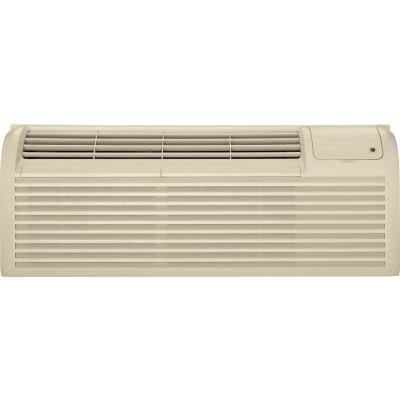
The GE 6100 Series Zoneline Air Conditioners are packaged terminal air conditioners designed for hotels, apartments, assisted living facilities, dormitories, and other spaces that need dependable year-round climate control. Built around a compact through-the-wall format, this series combines cooling, heat pump operation, and electric resistance heat in a single unit, making it a practical solution for properties that want simplified installation and consistent room-by-room comfort. The line is known for its standardized dimensions, which have remained consistent for decades, helping reduce retrofit headaches when replacing older Zoneline units.
One of the biggest advantages of the GE 6100 Series Zoneline Air Conditioners is flexibility. Models are available in multiple capacities, including 7,000, 9,000, 12,000, and 15,000 BTU/hr classes, with 230/208V and 265V options depending on configuration. Many installations also benefit from the built-in compatibility with ducted setups using approved accessories. For property managers, maintenance teams, and homeowners with compatible wall sleeves, this series offers straightforward serviceability, strong parts support, and a familiar operating design.
Typical pricing varies widely based on capacity, heating configuration, and installation accessories. A realistic estimate for the unit alone is usually in the mid-hundreds to low-thousands of dollars, while a fully installed system can be significantly higher depending on electrical work, wall case requirements, and labor. Availability is strongest through commercial HVAC distributors, appliance dealers, and replacement-parts suppliers, with select models still stocked for retrofit and replacement use. The GE 6100 Series Zoneline Air Conditioners remain a popular choice for buyers seeking durability, easy maintenance, and a compact all-in-one HVAC solution.
Specifications for GE 6100 Series Zoneline Air Conditioners
- Product type: Packaged terminal air conditioner and heat pump system.
- Cooling capacities: 7,000, 9,000, 12,000, and 15,000 BTU/hr model families.
- Voltage options: 208/230V single-phase and 265V single-phase configurations.
- Refrigerant: R-410A in the 6100 series generation.
- Indoor airflow: Approximately 340 to 370 CFM on high fan settings, depending on model.
- Heating support: Heat pump operation with electric resistance backup heat on supported units.
- Dimensions: Standard Zoneline footprint of 42 inches wide, 16 inches high, and 13 3/4 inches deep.
- Ducted compatibility: Approved with GE duct adapter and duct extension accessories.
- Best fit: Room-by-room comfort in hospitality, multifamily, and light commercial applications.
- Comparison: Compared with many compact PTAC units, the 6100 series is valued for stable replacement sizing, accessible service parts, and broad model selection.
Detailed Description of the GE 6100 Series Zoneline Air Conditioners
The GE 6100 Series Zoneline Air Conditioners are engineered to deliver reliable localized heating and cooling through a self-contained wall unit. The system pulls indoor air across an evaporator coil for cooling or a heat exchanger for heating, then recirculates conditioned air back into the room. When outdoor temperatures drop, compatible heat pump models can shift to supplemental electric resistance heat, improving comfort and helping maintain output in colder conditions.
These units are especially useful in hospitality rooms, senior living suites, rental properties, and office spaces where individual temperature control matters more than centralized zoning. The design supports standard wall-case installations and is intended for straightforward service access, which makes routine maintenance easier for technicians. Build quality focuses on practical durability, with a layout designed for repeated use in demanding environments. The familiar cabinet dimensions also make replacement easier for owners upgrading from earlier Zoneline generations.
Users generally appreciate the consistent airflow, simple controls, and dependable room-level performance. The GE 6100 Series Zoneline Air Conditioners are not built as luxury smart-home appliances; instead, they prioritize proven HVAC function, serviceability, and retrofit convenience. That makes them a strong option for property operators who value low-friction replacement and predictable operation over advanced automation features.
Setup Guide for GE 6100 Series Zoneline Air Conditioners
- Confirm that the wall case, grille, and electrical supply match the exact unit model before installation.
- Verify the voltage and phase requirements, including 208/230V or 265V compatibility as specified on the nameplate.
- Inspect the wall opening for level alignment, secure support, and proper drainage provisions.
- Slide the unit into the wall case carefully, making sure wiring and connections are not pinched.
- Secure the unit according to the manufacturer’s fastening points and install any approved accessories, such as ducts or extensions.
- Set the control mode to cooling, heating, or fan-only as needed, and confirm airflow at startup.
- Test the system for proper operation, including compressor engagement, fan speed changes, and heating response.
Configuration options may include fan speed selection, temperature setpoints, and heat pump versus electric heat behavior depending on the model. If the unit fails to start, check the breaker, wall-circuit sizing, and connector seating first. Safety is critical: disconnect power before servicing, never bypass electrical protections, and avoid operating the unit with blocked airflow or missing panels. If the model is installed in a ducted application, confirm that approved GE duct accessories are used correctly.
Troubleshooting GE 6100 Series Zoneline Air Conditioners
Common problems usually involve power, airflow, temperature control, or drainage. If the unit does not run, verify the circuit breaker, thermostat setting, and power connection. If cooling is weak, clean the filter, check for blocked discharge air, and confirm the room load is within the unit’s capacity. If heating is inadequate on a heat pump model, inspect for incorrect mode selection or extremely low outdoor conditions that may require supplemental resistance heat.
- No power: Check breaker, wall outlet supply, and unit connection.
- Weak cooling: Clean filter, clear obstructions, and confirm correct capacity for room size.
- Short cycling: Inspect thermostat placement and verify airflow is unrestricted.
- Water leakage: Confirm drain path is clear and unit is installed level.
- Frozen coil: Reduce blockage, clean filters, and allow the system to thaw before restarting.
Many service issues can be prevented with routine filter cleaning, annual inspection, and correct installation. If a fault code appears, refer to the model-specific service guide or installer documentation, since code behavior can vary by control board and revision. Warranty coverage for Zoneline commercial units typically includes one year on parts and labor for defects, with longer coverage for the sealed refrigeration system and selected components. For support, contact GE Appliances customer service, an authorized HVAC distributor, or a certified technician familiar with packaged terminal equipment.
Pros and Cons of the GE 6100 Series Zoneline Air Conditioners
Pros
- Reliable room-by-room heating and cooling for commercial and multifamily spaces.
- Standardized dimensions simplify replacement of older Zoneline units.
- Multiple capacities support different room sizes and load requirements.
- Heat pump and electric backup heat options improve year-round comfort.
- Approved ducted installation accessories add flexibility.
- Strong value for properties that prioritize durability and serviceability.
Cons
- Not as energy-efficient or connected as newer inverter-driven HVAC alternatives.
- Best results depend on proper wall-case compatibility and professional installation.
- Advanced smart controls are limited compared with modern residential mini-splits.
- Noise levels may be more noticeable than premium ductless systems.
- Upfront cost can rise once accessories, wiring, and labor are included.
For buyers comparing alternatives, the GE 6100 Series Zoneline Air Conditioners are often the better fit when replacement simplicity, long-term maintainability, and legacy compatibility matter more than cutting-edge efficiency features. They offer solid value for hotels and apartments, while ductless mini-splits may be better for homeowners seeking quieter operation and higher efficiency.
Customer Reviews of GE 6100 Series Zoneline Air Conditioners
Customer feedback for the GE 6100 Series Zoneline Air Conditioners is generally positive, especially among property managers and maintenance teams. Many users praise the dependable cooling, easy-to-source replacement parts, and predictable fit in existing wall cases. A common theme is that the units are practical and familiar rather than flashy, which many commercial buyers consider a strength. Average satisfaction often lands around 4 out of 5 stars in typical owner discussions.
Common complaints include basic controls, occasional noise during compressor startup, and the need for professional installation. One frequent testimonial style comment is: “It replaced our older unit without major construction, and the room stays comfortable all year.” Another common remark is: “Not the quietest option, but easy to service and reliable for guest rooms.” Buyers who want a low-maintenance replacement for an existing PTAC or Zoneline-style setup usually recommend it most strongly.
For users prioritizing retrofit compatibility, the GE 6100 Series Zoneline Air Conditioners remain a strong purchase recommendation. For those seeking the quietest and most advanced efficiency features, newer ductless systems may be a better match.
Faqs
How do I set up GE 6100 Series Zoneline Air Conditioners for the first time in a hotel room or guest suite?
What should I check if my GE 6100 Series Zoneline Air Conditioners is not cooling properly?
Why is my GE 6100 Series Zoneline Air Conditioners making unusual noise during operation?
Which wall sleeve and electrical setup are compatible with GE 6100 Series Zoneline Air Conditioners?
How can I improve energy efficiency on GE 6100 Series Zoneline Air Conditioners without sacrificing comfort?
How often should I clean and maintain GE 6100 Series Zoneline Air Conditioners?
Why does my GE 6100 Series Zoneline Air Conditioners keep turning on and off too quickly?
How do I troubleshoot poor airflow from GE 6100 Series Zoneline Air Conditioners?
Tags
More ge manuals
Leave a Comment