
Ge Appliances 2600 Series Zoneline Heat Model User Manual
Content
GE Appliances 2600 Series Zoneline Heat Model: Complete Product Manual and Buying Guide
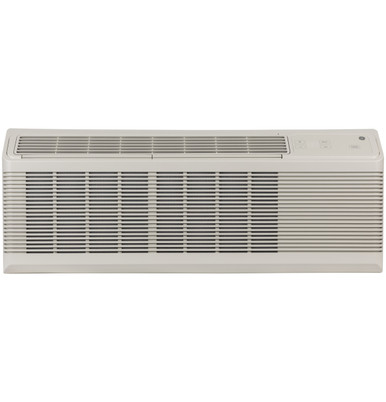
The GE Appliances 2600 Series Zoneline Heat Model is a commercial-grade through-the-wall air conditioning and heating solution designed for hotels, apartments, assisted living facilities, and other multi-room properties that need reliable year-round climate control. Built for durability and consistent performance, this Zoneline heat model combines cooling, electric resistance heating, and practical service features in a compact package that fits standard wall sleeves. It is especially well suited for property managers and facility owners who want a dependable PTAC-style unit with simple controls, efficient operation, and straightforward maintenance.
One of the biggest advantages of the GE Appliances 2600 Series Zoneline Heat Model is its versatility. It supports both cooling and supplemental heating, making it useful in regions with changing seasonal temperatures. The platform is known for quiet operation, service-friendly design, and compatibility with commercial applications where uptime matters. Depending on configuration, similar Zoneline systems can offer multiple voltage options and heating outputs, which helps owners match the unit to room size and electrical requirements. Estimated pricing typically falls in the mid-range commercial HVAC category, often starting around the high hundreds and extending into the low thousands per unit depending on capacity, voltage, and installed accessories. Availability is generally strongest through commercial HVAC distributors, appliance dealers, and hospitality equipment suppliers.
For buyers comparing PTAC and Zoneline systems, this model stands out for its balance of performance, installation flexibility, and long-term support. It is a strong fit for replacement projects, property renovations, and new commercial construction where reliable guest comfort and simple maintenance are priorities.
Specifications for the GE Appliances 2600 Series Zoneline Heat Model
- Product type: Through-the-wall packaged terminal air conditioner with heating capability
- Primary use: Commercial guest rooms, apartment units, healthcare rooms, and institutional spaces
- Power options: Common commercial voltage configurations include 208/230V and 265V models
- Cooling capacity range: Varies by configuration, with common Zoneline platforms covering small to large room loads
- Heating type: Electric resistance heat on many 2600 Series configurations
- Installation style: Wall sleeve-mounted for through-the-wall applications
- Control options: Mechanical or electronic controls depending on build and trim level
- Service access: Designed for front-service maintenance and easy component access
- Airflow design: Balanced airflow for guest comfort and reduced noise
- Compatibility: Works with standard GE Zoneline sleeves and selected accessories
In performance terms, the 2600 Series is positioned as a dependable commercial HVAC solution rather than a premium variable-speed comfort platform. Compared with higher-end inverter PTAC alternatives, it usually offers simpler operation, lower system complexity, and easier replacement planning. Against basic residential through-the-wall units, it provides stronger commercial support, more robust construction, and better suitability for continuous-duty environments.
Troubleshooting the GE Appliances 2600 Series Zoneline Heat Model
Common issues usually involve airflow, heating response, power supply, or control settings. If the unit does not heat, check that the thermostat is set to heat mode, confirm the breaker is on, and verify that supplemental or resistance heat is enabled. If airflow is weak, clean the filter, inspect the front grille, and make sure the indoor coil is not blocked by dust or debris. If the unit short-cycles, the room sensor may be affected by direct sunlight, drafts, or nearby heat sources.
- No heat: Verify mode selection, breaker status, and heater enable settings
- Weak airflow: Clean the filter and remove obstructions from the intake and discharge area
- Unit not powering on: Check outlet voltage, wall switch position, and service disconnect
- Frozen coil: Allow defrost, clean filters, and confirm airflow is not restricted
- Excess noise: Inspect mounting, sleeve fit, and loose panels
Preventive maintenance should include monthly filter cleaning, seasonal coil inspection, and regular checks for sleeve drainage and wall seals. Warranty coverage for Zoneline commercial products commonly includes sealed system protection and multi-year parts coverage for key components, with labor terms varying by period and part. For help, GE Appliances customer support can be reached at 1-800-626-2224, Monday through Friday, 8 a.m. to 8 p.m. ET. Owners can also use GE support resources for model-specific service guidance and documentation.
Pros and Cons of the GE Appliances 2600 Series Zoneline Heat Model
Pros
- Reliable commercial-grade construction for hospitality and multi-unit properties
- Heating and cooling in one compact through-the-wall package
- Easy maintenance access, which helps reduce downtime
- Good replacement option for existing Zoneline installations
- Practical value for property managers needing predictable operating costs
Cons
- Less advanced comfort control than premium inverter PTAC systems
- Electric resistance heat can increase operating cost in colder climates
- Performance depends heavily on correct wall sleeve installation
- Noise levels may be higher than some split-system alternatives
For value for money, the GE Appliances 2600 Series Zoneline Heat Model performs well when durability, standardization, and serviceability matter more than luxury features. Compared with ductless mini-split systems, it is easier to replace in existing PTAC openings but typically less efficient. Compared with basic hotel room units, it offers stronger commercial support and a more robust long-term ownership profile.
Customer Reviews of the GE Appliances 2600 Series Zoneline Heat Model
Typical customer feedback highlights dependable heating performance, straightforward installation in compatible sleeves, and solid room comfort. Many users rate the unit around 4 out of 5 stars for commercial reliability and ease of maintenance. Property managers often praise its consistency in guest rooms, especially when replacing older Zoneline units with a familiar format.
Common complaints focus on noise, heating costs in very cold weather, and the need for regular filter cleaning. A frequent testimonial theme is that the unit is “practical, dependable, and easy to service,” while another common note is that it works best when installed correctly and maintained on schedule. Buyers looking for a proven commercial PTAC replacement usually consider the GE Appliances 2600 Series Zoneline Heat Model a safe, sensible choice.
Frequently Asked Questions About the GE Appliances 2600 Series Zoneline Heat Model
- What is it used for? It is used for heating and cooling in commercial rooms and multi-unit properties.
- Is it suitable for hotels? Yes, it is widely suited for hospitality and similar applications.
- Does it require a wall sleeve? Yes, through-the-wall installation typically requires a compatible sleeve.
- How do I get support? Contact GE Appliances support at 1-800-626-2224 for service help and product guidance.
Faqs
How do I set up the ge appliances 2600 Series Zoneline Heat Model for the first time?
What should I do if the ge appliances 2600 Series Zoneline Heat Model is blowing cold air in heat mode?
Which room conditions work best with the ge appliances 2600 Series Zoneline Heat Model?
How do I troubleshoot noisy operation on the ge appliances 2600 Series Zoneline Heat Model?
What maintenance does the ge appliances 2600 Series Zoneline Heat Model need to keep heating efficiently?
Is the ge appliances 2600 Series Zoneline Heat Model compatible with standard thermostats or controls?
Why is the ge appliances 2600 Series Zoneline Heat Model cycling on and off too often?
What features of the ge appliances 2600 Series Zoneline Heat Model improve comfort in hotel or apartment rooms?
More ge appliances manuals
Leave a Comment