
Ge Appliances CWLRMDMBWM1 Wire-Free Smart Remote User Manual
Content
GE Appliances CWLRMDMBWM1 Wire-Free Smart Remote Manual
Introduction
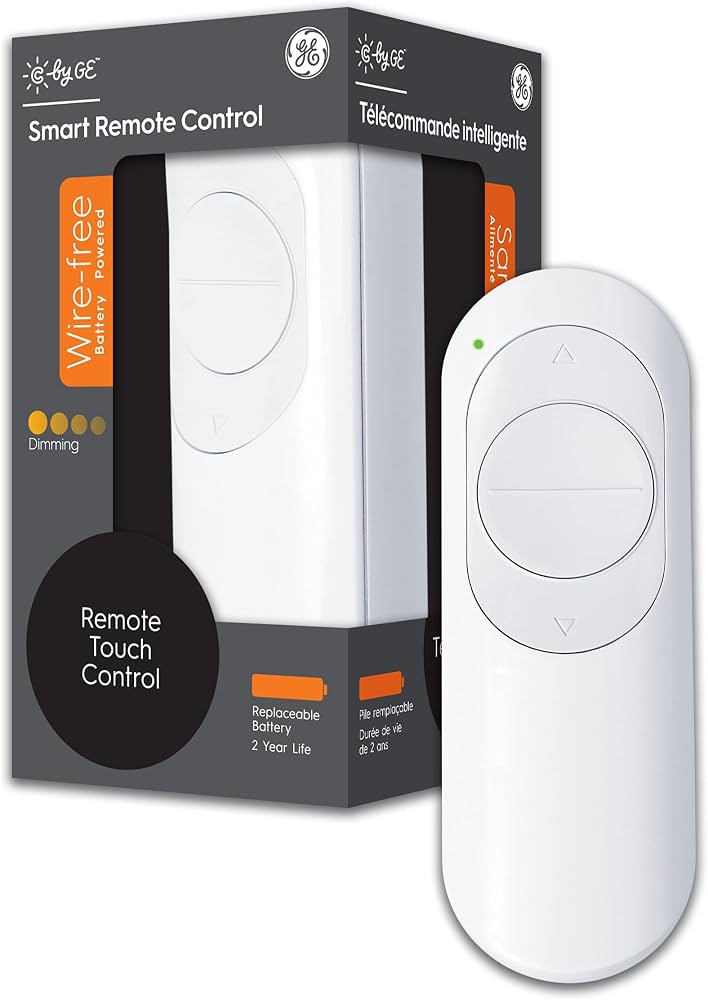
The GE Appliances CWLRMDMBWM1 Wire-Free Smart Remote is a compact, battery-powered lighting controller designed to add convenient wireless control to compatible Cync and C by GE smart devices. This wire-free smart remote is built for homeowners who want easy dimming, on/off control, and room-based automation without running new wiring or replacing existing switches. It is especially useful in bedrooms, living rooms, hallways, and rental spaces where a clean installation matters.
One of the biggest advantages of the GE Appliances CWLRMDMBWM1 Wire-Free Smart Remote is its flexible placement. You can mount it on a wall, keep it on a tabletop, or use it as a portable controller for everyday lighting adjustments. It works with smart bulbs, smart plugs, and smart switches in the same room or group, making it a practical choice for whole-room control. The remote uses low-voltage battery power, supports Bluetooth connectivity, and is designed for indoor use only.
For shoppers comparing smart lighting accessories, this model typically falls in the affordable mid-range category, with an estimated price range of about $20 to $35 depending on retailer and bundle options. Availability is generally best through major online marketplaces and lighting retailers, while stock may vary by region. The GE Appliances CWLRMDMBWM1 Wire-Free Smart Remote is a strong option for users who want a simple, reliable, and wire-free smart home upgrade.
Specifications for GE Appliances CWLRMDMBWM1 Wire-Free Smart Remote
- Model: CWLRMDMBWM1
- Remote type: Wire-free smart dimmer remote
- Functions: On/off control, dimming, room/group control
- Buttons: 4-button layout for core lighting commands
- Power: 3V DC
- Battery: CR2032, pre-installed
- Connectivity: Bluetooth enabled
- Compatibility: Cync bulbs, smart plugs, smart switches, and select C by GE devices
- Voice assistant support: Works with Amazon Alexa and Google Home when paired through the app
- Installation: Wire-free, no electrical connection required
- Use environment: Indoor, dry locations only
- Operating temperature: 32°F to 104°F
- Finish: White
Compared with a basic smart bulb app-only setup, this remote offers faster physical control and easier access for guests or family members. Compared with wired smart wall switches, it is easier to install and better for spaces where wiring changes are not practical.
Troubleshooting GE Appliances CWLRMDMBWM1 Wire-Free Smart Remote
If the remote does not respond, first check the CR2032 battery and confirm it is installed correctly. A weak battery is the most common reason for delayed or failed button response. If the LED indicator does not blink during setup, press any button once to wake the device, then reopen the Cync app and retry pairing.
- Remote not pairing: Move closer to the smart device and ensure Bluetooth is enabled on your phone.
- Buttons not working: Replace the battery and re-add the remote in the app.
- Light does not dim: Verify the bulb or plug is compatible with dimming control.
- Device offline: Remove and reconfigure the remote in the same room or group as the target device.
- LED blinking issues: Reset by removing the battery for several seconds, then reinstalling it.
There are no widely published error codes for this model, so most issues are solved through battery replacement, re-pairing, or app reconnection. Preventive care includes keeping the remote indoors, avoiding moisture, and using only compatible Cync devices. For support, GE connected home assistance is available through the manufacturer’s connected support channels and official product documentation. Warranty coverage and service terms may vary by retailer and region, so check the original purchase details.
Pros & Cons of the Wire-Free Smart Remote
Pros
- Easy installation with no wiring required, making it ideal for renters and quick upgrades.
- Physical button control is convenient for children, guests, and everyday use.
- Supports whole-room lighting control when linked to compatible smart devices.
- Compact design and battery power make placement flexible.
- Good value for money for users building a Cync smart lighting setup.
Cons
- Works best only within the Cync ecosystem, so it is less flexible than universal remotes.
- Battery replacement will eventually be needed.
- Limited to indoor use and dry environments.
- Advanced automation still depends on the Cync app or compatible voice assistant.
For buyers comparing alternatives, a wired smart switch may offer deeper control, while a universal smart hub may support more brands. Still, the GE Appliances CWLRMDMBWM1 Wire-Free Smart Remote stands out for simplicity, fast setup, and strong everyday usability.
Customer Reviews of GE Appliances CWLRMDMBWM1 Wire-Free Smart Remote
Typical user feedback highlights an average rating of around 4.3 out of 5 stars, with many customers praising the easy setup and reliable bedside or wall-mounted control. A common positive comment is, “It gave me the feel of a real wall switch without any rewiring.” Another frequent compliment is the convenience of controlling multiple Cync lights from one remote.
Common complaints usually focus on battery replacement and compatibility limits with non-Cync products. Some users also note that pairing can take a few attempts during first-time setup. Despite these issues, most reviews recommend it for anyone already using Cync smart bulbs or switches. It is especially well suited for households that want a simple, affordable smart lighting accessory instead of a full automation overhaul.
Faqs
How do I set up ge appliances CWLRMDMBWM1 Wire-Free Smart Remote for the first time?
Why is my ge appliances CWLRMDMBWM1 Wire-Free Smart Remote not connecting to the appliance?
What features does the ge appliances CWLRMDMBWM1 Wire-Free Smart Remote offer for everyday use?
Is ge appliances CWLRMDMBWM1 Wire-Free Smart Remote compatible with all GE Appliances models?
How can I improve the response speed of ge appliances CWLRMDMBWM1 Wire-Free Smart Remote?
What should I do if ge appliances CWLRMDMBWM1 Wire-Free Smart Remote buttons stop working intermittently?
How do I maintain ge appliances CWLRMDMBWM1 Wire-Free Smart Remote for long-term reliability?
Can ge appliances CWLRMDMBWM1 Wire-Free Smart Remote be reset if it stops responding?
More ge appliances manuals
- Ge Appliances AHNE05BC Air Conditioner User Manual
- Ge Appliances Split-Type Heat Pump AUH2436ZGDA User Manual
- Ge Appliances 2U18MS2HDA Ductless Multi-Split Heat Pump User Manual
- Ge Appliances Electric Ranges 20-inch User Manual
- Ge Appliances JX9152 Microwave Oven Built-In Trim Kits User Manual
- Installation: Ge Appliances Dishwasher GSD500 User Manual
Leave a Comment