
Ge Appliances CWLSWDMBWF1 Wire-Free Smart Switch User Manual
Content
GE Appliances CWLSWDMBWF1 Wire-Free Smart Switch: Complete Product Manual and Buyer Guide
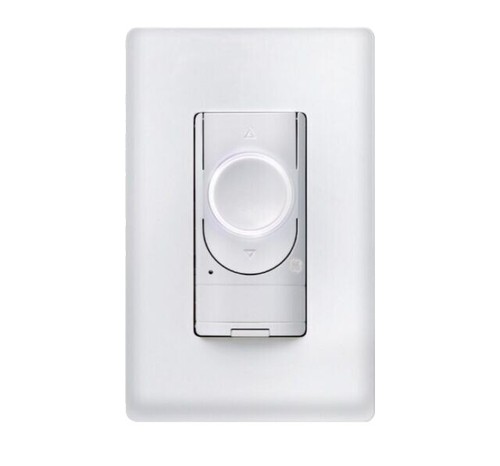
Introduction: What the GE Appliances CWLSWDMBWF1 Wire-Free Smart Switch Does
The GE Appliances CWLSWDMBWF1 Wire-Free Smart Switch is a battery-powered, wall-mount smart lighting controller designed to add convenient touch control without electrical wiring. It is built for homeowners, renters, and DIY users who want a fast way to control compatible smart lights, plugs, and switches from anywhere in a room. Because it is wire-free, it can be installed on walls, surfaces, or in locations where running power cables is difficult or unnecessary.
This model is especially useful for bedrooms, hallways, living rooms, and shared spaces where multiple people need simple access to lighting control. It supports room-based control in the Cync app, making it a practical choice for creating a whole-room lighting setup. Users can turn lights on and off, dim compatible bulbs, and create a more traditional switch experience for smart lighting systems.
One of its biggest selling points is easy installation. The switch typically mounts with adhesive tape or screws, and no neutral wire is required. That makes the GE Appliances CWLSWDMBWF1 Wire-Free Smart Switch a strong option for apartments, remodels, and temporary installations. Based on typical market listings, the estimated price range is usually around $20 to $35, depending on seller, bundle, and availability. It is commonly sold through major online retailers and the GE/Cync product ecosystem.
Specifications: Key Features and Technical Details for the GE Appliances CWLSWDMBWF1 Wire-Free Smart Switch
- Model: CWLSWDMBWF1 / CWLSWDMBWF1/ST1P
- Type: Wire-free smart dimmer switch
- Power source: Battery-powered
- Battery type: CR2032 coin-cell battery, pre-installed
- Connectivity: Bluetooth
- App support: Cync app powered by Savant
- Compatibility: Works with Cync and C by GE smart lights, plugs, switches, and sensors
- Installation method: Adhesive tape or screws
- Mounting style: Wall-mounted, surface-mounted
- Primary function: On/off control and dimming for compatible smart lighting
- Room control: Supports grouping for whole-room operation in the app
- Recommended use: Indoor lighting control
- Battery life: Rated for over two years under typical use
In practical performance, the switch offers fast local control and is designed for simple room-based operation rather than advanced automation hardware. Compared with hardwired smart switches, it is easier to install but depends on battery power and compatible devices. Compared with basic remote controls, it provides a more polished wall-switch experience and app integration. For users searching for a no-wiring smart switch alternative, the GE Appliances CWLSWDMBWF1 Wire-Free Smart Switch is a strong fit for compatible Cync ecosystems.
Troubleshooting: Common Problems, Error Fixes, and Support Tips
If the switch does not respond, first check the battery and confirm it is seated correctly. A weak CR2032 battery is one of the most common causes of delayed response or intermittent operation. If the switch is not controlling lights, verify that the switch and lighting devices are assigned to the same room or space in the Cync app. Full room control requires proper grouping.
- Problem: Switch does not pair. Solution: Restart the app, move closer to the device, and re-add it in Bluetooth pairing mode.
- Problem: Lights do not dim. Solution: Confirm that the connected bulbs support dimming.
- Problem: Switch feels unresponsive. Solution: Replace the CR2032 battery and clean the contact points.
- Problem: Adhesive mount loosens. Solution: Reinstall on a clean, dry surface or use the screw mount option.
- Problem: Device not discovered in app. Solution: Make sure Bluetooth is enabled and the device is within range.
There are no widely documented numeric error codes for this model, so troubleshooting is usually handled through pairing checks, battery replacement, and app grouping verification. To prevent issues, replace the battery before it fully drains, keep the switch inside its intended indoor temperature range, and avoid mounting it on rough or dusty surfaces. Warranty coverage and support are typically handled through GE Lighting/Cync customer support and the original retailer. For help, use the support section in the Cync app, the GE Lighting website, or the retailer’s order support channel.
Pros & Cons: Honest Review of the GE Appliances CWLSWDMBWF1 Wire-Free Smart Switch
Pros
- No wiring required, making installation quick and renter-friendly
- Battery-powered design allows flexible placement anywhere indoors
- Works well with compatible Cync and C by GE smart devices
- Supports whole-room control for a cleaner smart-home experience
- Useful for bedrooms, hallways, and areas needing a second switch location
- Good value for users already in the Cync ecosystem
Cons
- Limited compatibility outside the Cync and C by GE ecosystem
- Depends on battery life, which adds maintenance over time
- Bluetooth-based setup may feel less flexible than Wi-Fi-first alternatives
- Requires compatible dimmable bulbs for dimming control
- Not ideal for users wanting broad third-party smart home support
For value for money, the GE Appliances CWLSWDMBWF1 Wire-Free Smart Switch is attractive if you already own Cync products and want a clean wall-mounted control point without electrical work. Alternatives such as wired smart dimmer switches can offer broader home integration, but they require installation effort and a more permanent setup. For a simple no-wire solution, this model is competitive.
Customer Reviews: What Buyers Say About the Wire-Free Smart Switch
Average customer sentiment is generally positive, with many users giving it around 4 out of 5 stars for convenience and ease of setup. Buyers frequently praise the no-wire installation, compact design, and ability to make smart lighting feel more natural in daily use. One common compliment is that it works especially well in rooms where running electrical wiring would be inconvenient.
Common complaints include limited compatibility, occasional pairing friction, and the need to replace the battery over time. Some users also note that the switch works best when the entire room is built around the Cync ecosystem. A typical testimonial might say, “It gave me a real wall-switch feel without any electrical work,” while another might mention, “Great product, but it only really shines with Cync bulbs and accessories.” For buyers already invested in the brand, the GE Appliances CWLSWDMBWF1 Wire-Free Smart Switch is often recommended as a practical and clean-looking smart lighting upgrade.
Frequently Asked Questions About the GE Appliances CWLSWDMBWF1 Wire-Free Smart Switch
Is the GE Appliances CWLSWDMBWF1 Wire-Free Smart Switch hard to install?
No. It is designed for easy installation using adhesive tape or screws, and it does not require electrical wiring.
Does it work with standard smart bulbs?
It works best with Cync and C by GE smart lights, plugs, switches, and sensors. Compatibility with non-Cync devices is limited.
How long does the battery last?
The included CR2032 battery is rated to last over two years under typical use.
Who should buy it?
It is best for homeowners, renters, and DIY users who want a simple, wire-free way to control compatible smart lighting in one room.
Faqs
How do I set up the ge appliances CWLSWDMBWF1 Wire-Free Smart Switch for the first time?
Why is my ge appliances CWLSWDMBWF1 Wire-Free Smart Switch not pairing with the receiver or app?
What devices and systems are compatible with the ge appliances CWLSWDMBWF1 Wire-Free Smart Switch?
How can I improve the response time of the ge appliances CWLSWDMBWF1 Wire-Free Smart Switch?
What should I do if the ge appliances CWLSWDMBWF1 Wire-Free Smart Switch turns lights on and off inconsistently?
Does the ge appliances CWLSWDMBWF1 Wire-Free Smart Switch need batteries, and how do I maintain them?
Can I use the ge appliances CWLSWDMBWF1 Wire-Free Smart Switch in different rooms or locations?
How do I clean and care for the ge appliances CWLSWDMBWF1 Wire-Free Smart Switch?
More ge appliances manuals
Leave a Comment