
Ge Appliances RV Single Zone Thermostat RARWT1W User Manual
Content
GE Appliances RV Single Zone Thermostat RARWT1W: Complete Product Manual
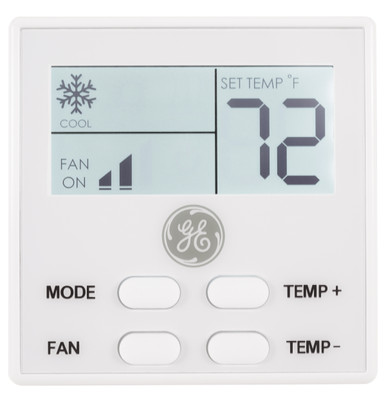
The GE Appliances RV Single Zone Thermostat RARWT1W is a compact wall thermostat designed for single-zone RV climate control, giving owners simple command over cooling, heating, fan-only operation, and heat pump modes. It is built for 12 VDC RV systems and is especially useful for travelers who want a straightforward replacement thermostat, an upgrade from a basic mechanical controller, or a dependable interface for a GE RV air conditioning setup. The unit is commonly used in travel trailers, fifth wheels, and motorhomes where stable temperature control and easy mode switching matter.
One of its biggest advantages is its RV-focused design. The thermostat supports a practical temperature range, clear button-based operation, and mode selection tailored to mixed climate conditions on the road. It also includes a low-voltage warning behavior, which helps protect the system when battery power drops. For many owners, the appeal is less about advanced smart-home features and more about dependable, easy-to-read control in a small footprint.
The estimated price range is typically budget-friendly, with clearance and resale listings often placing it around the low-cost thermostat category. Availability may vary by retailer and parts supplier, but it is commonly found through GE Appliances channels, RV parts stores, and online manual and parts marketplaces. If you need a simple, durable RV thermostat for a single zone, the GE Appliances RV Single Zone Thermostat RARWT1W is a practical option that balances convenience, compatibility, and value.
Specifications for GE Appliances RV Single Zone Thermostat RARWT1W
- Electrical rating: 12 VDC operating power
- Operating voltage range: 10.5 VDC to 14 VDC
- Operating temperature range: 0°F to 115°F
- Cooling setpoint range: 60°F to 85°F
- Heating setpoint range: 40°F to 85°F
- Temperature accuracy: ±1°F
- Wall thermostat terminals: 0V (GND), Signal (COMMS), +12VDC
- Unit display options: Fahrenheit and Celsius
- Mode support: Off, Fan Only, Cool, Heat Pump Only, and Heat Pump + Furnace
- Low-voltage behavior: display shows a low-power warning and switches off when voltage drops too far
- Mounting style: wall-mounted RV thermostat
Compared with basic RV thermostats, the RARWT1W offers better mode flexibility, especially for heat pump-equipped systems. Compared with more advanced Wi-Fi thermostats, it is simpler, more RV-specific, and less dependent on internet connectivity or app setup. For users who want a dependable single-zone climate controller rather than a smart-home platform, it delivers a strong balance of functionality and ease of use.
Setup Guide for GE Appliances RV Single Zone Thermostat RARWT1W
Start by turning off power at the main supply before installing, removing, or cleaning the thermostat. This is essential for both 120 VAC and 12 VDC safety. Mount the thermostat about five feet above the floor, away from direct sunlight, exterior walls, vents, and doors, since those locations can affect temperature readings.
- Remove the thermostat cover by releasing the bottom snaps carefully.
- Position the base on the wall and feed the wires through the opening.
- Level the base, mark the mounting holes, and secure it to the wall.
- Connect the wiring to the correct terminals before reattaching the cover.
- Restore power and test each mode: Off, Fan Only, Cool, and Heat settings.
- To switch between Fahrenheit and Celsius, hold the Temp + and Temp - buttons together for 2 seconds.
If the display does not power on, confirm wiring polarity, battery voltage, and breaker status. If the thermostat shows low voltage behavior, recharge or inspect the RV battery system. For heat pump models, ensure the correct system configuration is enabled on the thermostat before testing full operation.
Troubleshooting GE Appliances RV Single Zone Thermostat RARWT1W
Common issues usually involve power, wiring, or system compatibility. If the display is blank, check the 12 VDC supply and verify that voltage is above 10.5 VDC. If the thermostat shows a low-power message, the RV battery or power converter may need attention.
- Blank screen: Check fuse, breaker, wiring, and DC voltage.
- Temperature not changing: Confirm the selected mode and setpoint range.
- AC or furnace not starting: Inspect system wiring and verify the thermostat is matched to the HVAC equipment.
- Wrong temperature units: Hold Temp + and Temp - for 2 seconds to toggle units.
- Low-voltage warning: Recharge batteries or troubleshoot the RV power system.
Preventive care includes keeping the thermostat clean, avoiding moisture exposure, and checking wire connections during routine RV maintenance. Warranty coverage and parts support are generally handled through GE Appliances support channels and authorized RV parts sources. For help, use the manufacturer’s support line or the GE Appliances service and literature resources tied to the model number.
Pros & Cons of the GE Appliances RV Single Zone Thermostat RARWT1W
Pros
- Simple button-based control that is easy to learn and use
- Designed specifically for single-zone RV HVAC systems
- Supports heat pump and furnace combinations for better climate flexibility
- Compact wall design fits well in most RV interiors
- Useful low-voltage behavior helps protect the system
- Good value for money compared with more complex smart thermostats
Cons
- No Wi-Fi, app control, or voice assistant support
- Limited to single-zone operation
- Requires proper RV-specific wiring and compatibility
- Basic interface may feel too simple for users wanting advanced automation
- Replacement availability can depend on RV parts stock
For buyers comparing it with smart RV thermostats, the RARWT1W wins on simplicity and cost, while smart alternatives win on remote control and automation. If the goal is dependable RV temperature control at a reasonable price, it remains a strong choice.
Customer Reviews of GE Appliances RV Single Zone Thermostat RARWT1W
Typical customer feedback is generally positive, with many owners praising the easy installation, clear mode selection, and reliable day-to-day performance. A common rating theme is around 4 out of 5 stars for value and usability. Users often like that it works well as a direct RV replacement without needing a complicated setup process.
Common complaints focus on the lack of advanced features such as Wi-Fi, touch controls, and scheduling. Some users also mention that correct wiring and HVAC matching are critical for smooth operation. A frequent recommendation is to verify compatibility before purchase, especially for heat pump systems or older RV setups.
Example feedback: “Simple, reliable, and perfect for our travel trailer.” Another common sentiment is: “Not fancy, but it does exactly what an RV thermostat should do.” For buyers who want a straightforward climate controller, this unit is often recommended over more complex alternatives.
Frequently Asked Questions About GE Appliances RV Single Zone Thermostat RARWT1W
What type of RV system does it support?
It is designed for single-zone RV heating and cooling systems, including compatible heat pump setups.
How do you change from Fahrenheit to Celsius?
Hold the Temp + and Temp - buttons at the same time for 2 seconds.
What should I do if the display shows low power?
Check the RV battery, DC supply, fuse, and wiring, since low voltage can trigger shutdown behavior.
Is the GE Appliances RV Single Zone Thermostat RARWT1W a good replacement thermostat?
Yes, it is a practical replacement for compatible single-zone RV systems when simple control and reliable operation are the priority.
Faqs
How do I set up the GE Appliances RV Single Zone Thermostat RARWT1W for the first time?
What should I do if my GE Appliances RV Single Zone Thermostat RARWT1W is not turning the RV AC on?
Is the GE Appliances RV Single Zone Thermostat RARWT1W compatible with all RV air conditioners?
How do I change the GE Appliances RV Single Zone Thermostat RARWT1W between Fahrenheit and Celsius?
Why does my GE Appliances RV Single Zone Thermostat RARWT1W show a temperature but not match the room feel?
What is the best way to troubleshoot wiring problems on the GE Appliances RV Single Zone Thermostat RARWT1W?
How can I improve performance and comfort with the GE Appliances RV Single Zone Thermostat RARWT1W?
How do I maintain and clean the GE Appliances RV Single Zone Thermostat RARWT1W safely?
More ge appliances manuals
Leave a Comment