
How to Use: Ge Profile Opal 2.0 Ice Maker User Manual
Content
GE Profile Opal 2.0 Ice Maker
Introduction
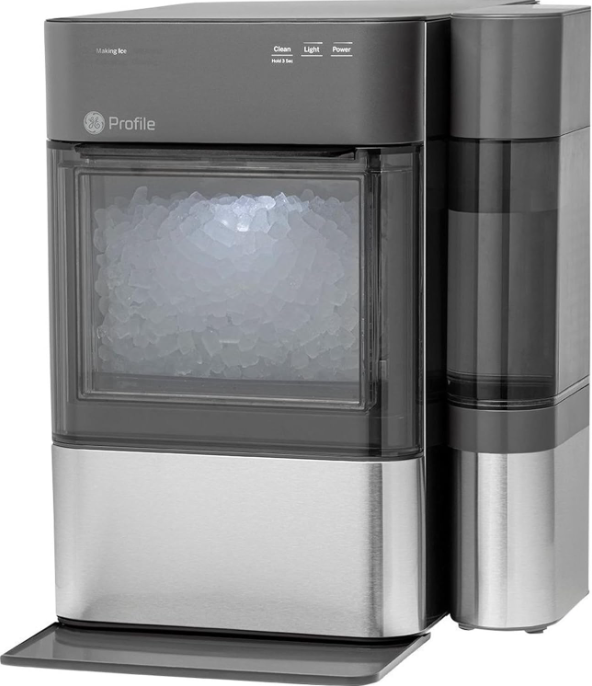
The GE Profile Opal 2.0 Ice Maker is a cutting-edge nugget ice maker designed to bring chewable, pellet-style ice right to your countertop. This portable appliance is perfect for home use, delivering fresh, batch-made nugget ice that cools drinks quickly and provides a satisfying crunch. Its compact design, measuring just 13.43" W x 16.5" H x 17.5" D, fits conveniently under kitchen cabinets or on any countertop, making it ideal for apartments, home bars, or offices.
Key benefits include rapid ice production—up to one pound of ice per hour—and a 3-pound ice bin capacity, ensuring a steady supply of fresh ice. The Opal 2.0 features smart technology with built-in WiFi and Bluetooth, allowing users to schedule ice production, monitor machine status, receive maintenance alerts, and even control the device via voice commands through Amazon Alexa or Google Assistant. This makes it a top choice for tech-savvy users who want convenience combined with modern functionality.
Targeted at households, entertainers, and anyone who values premium, chewable ice without the hassle of traditional ice trays or bulky machines, the GE Profile Opal 2.0 is a versatile solution for everyday ice needs and special occasions alike. It is generally available for purchase in major appliance retailers and online, with an estimated price range of around $600, offering strong value for its blend of innovation, style, and performance.
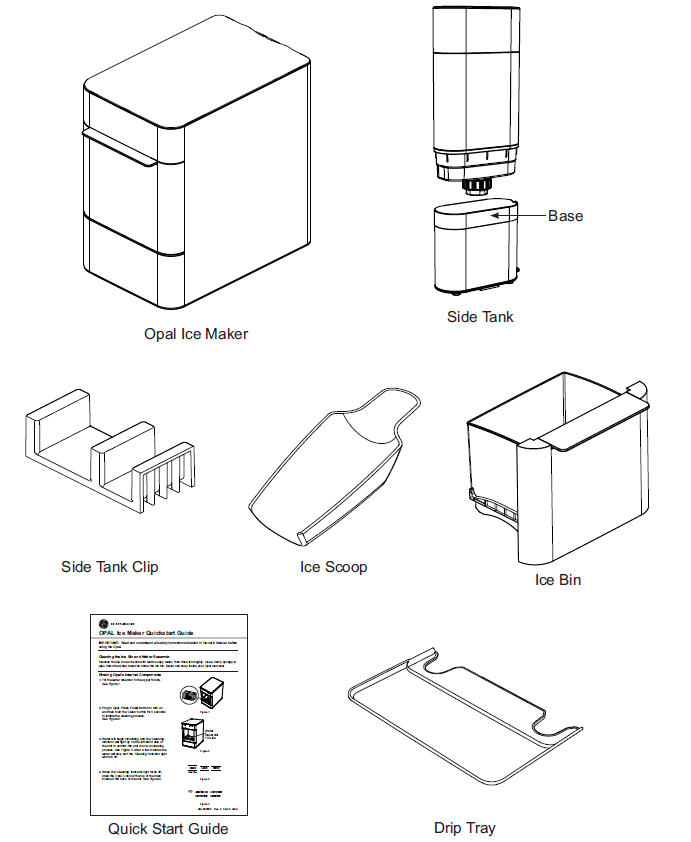
Parts Included
Ice Maker Product Specifications
- Description of product: Portable nugget ice maker
- Model: XPlOX3SCSS, XPlOX3BCBT
- Voltage/Frequency: 120V AC/60Hz
- Current: 3.0 A
- ICE storage capacity: 3.0 lbs
- Ice making rate: 38 lbs per day / 1.6 lbs per hour
- Dimensions (width x depth x height): 13.43x 17.5 x 16.5
- Installation clearance (sides and back): 3 in
- Operating environment: 550F - 900F
- Weight (when empty): 37.6 lbs
Understanding the display

- Power
The Power button, when pressed, will begin the ice-making process. When pressed, while ON, I will turn the ice maker off. - Light
The light feature has three different modes: ON/DIM/OFF. Toggle between the three modes by pressing the light button until you reach your desired lighting mode. - Clean
The cleaning cycle is initiated by pressing and holding the 'Clean' button for three seconds. - Descale Notification
After 100 hours of ice making, the 'Cleaning' indicator will flash to alert the user that a descale cycle is needed. Flashing will stop once the cycle has been completed. - Defrosting
If the ice maker has detected a frozen auger and low ice production, then the Defrosting indicator will light up. The unit will run a rinse cycle to defrost the ice maker and then start making ice again. - Indicator Lights
The four indicator lights on the left-hand side of the unit display the current status of the Opal. If 'Add Water' is highlighted, your unit needs more water before it can cycle to make ice or clean. - WiFi
Using the complimentary SmartHQ mobile app, customers can connect to their Opal and control it from their Android or iPhone. The indicator light on the left-hand side will confirm a successful connection. See page 14 for how to connect the Opal 2.0 Ice Maker to the WiFi Application.
Side Tank Accessory
NOTE: There are two drain tubes located on the back of your Opal Nugget Ice Maker, indicated as drain tubes A and B in the illustration below.
- . Hand Wash Only: Rinse and hand wash the Opal Side Tank with warm water and a mild dish soap. Remove the Opal Side Tank's cap and wash the cap and rubber valve with water and a mild dish soap. The Side Tank base can be washed by disconnecting the hose and adding a small amount of soapy water to it. Scrub as needed and rinse thoroughly. The rinse water should drain out the port in the back.
Rinse the cap, rubber valve, tank, and the base well to remove any residual soap (see illustration).
DO NOT WASH THE SIDE TANK IN THE DISHWASHER. - Unplug the Opal Nugget Ice Maker. Unhook Opal's drain tubes and drain the water from the reservoir.
- Connect the drain tube, labeled B, to the back of the Opal Side Tank's base.
- Make sure the drain tube (A) is connected to the black hanger and installed on the back of Opal.
Make sure the drain tube (B) connecting to the Side Tank is resting flat on the countertop.
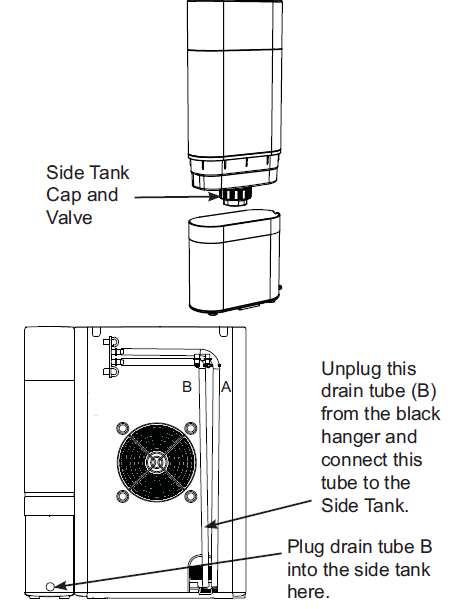
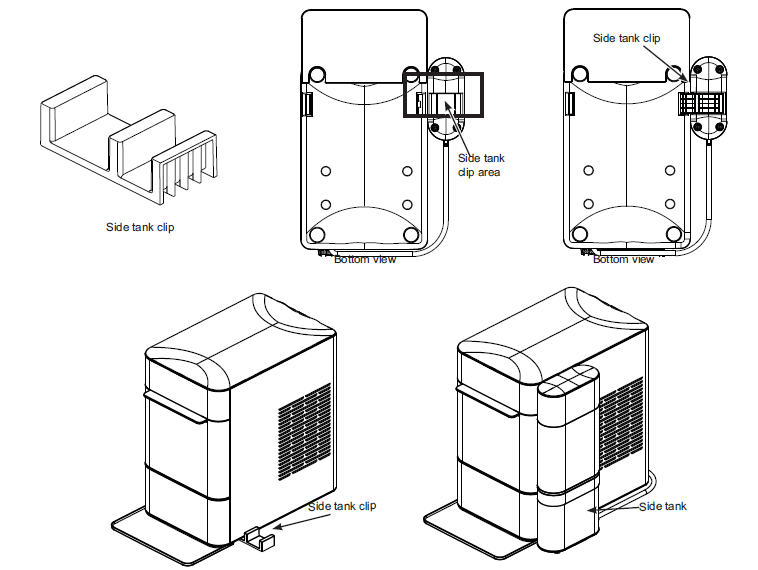
Place the Opal Side Tank on the right or left-hand side of the the Opal Nugget Ice Maker. Using the side tank attachment, slide the shorter side of the attachment under the unit, near the front of the unit. The attachment will slide into a slot on the bottom of the unit. Once this is placed, the side tank can slide onto the opposite attachment. See figures below and
NOTE: Care should be taken to connect the correct tube to the Opal Side Tank. Tube (B) should always be connected to the Side Tank, whether it is installed on the left or right side of the Opal Nugget Ice Maker. It is important to make sure the tube is lying flat,; otherwise , water may not flow from the side tank into the ice maker.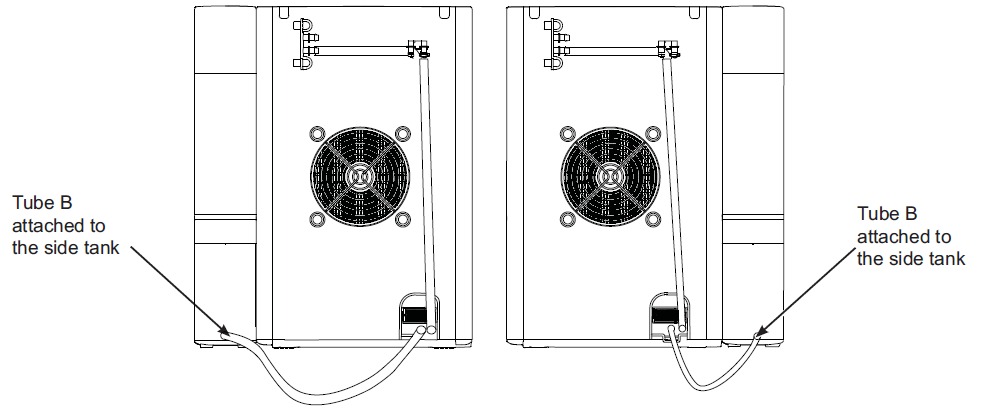
- Remove the Opal Side Tank's reservoir from its base.
- Unscrew the Opal Side Tank's cap from the reservoir. Fill the clear reservoir with water . Replace thePall Side Tank's cap. Ensure the cap is clean when installing.
- Carefully flip over the Opal Side Tank's reservoir and place it in the base. Water should start flowing into the Opal Nugget Ice Maker, and bubbles in the Opal Side Tank will appear periodically during the time water is flowing to the ice maker.
NOTE: If water does not appear to flow into the ice maker, please check for the following:
There may be bubbles in the tube (B) connecting the Side Tank to the Opal.
Tube (B) is not lying flat.
If either of the above issues is present, adjust tube (B) to allow the water to flow. - Fill Othe the pal the Nugget Ice Maker's reservoir (if desired).
- Plug in the Opal Nugget Ice Maker, and begin making ice.
Regulatory Module Instruction
This Wi-Fi/Bluetooth module installed in this product has been granted modular approval for mobile applications.
The module has been certified by FCC/IC/Bluetooth SIG, and complies with FCC ns. The production costs are as follows.
- Product Name: Opal 2.0 Ice Maker
- Contains FCC ID: ZKJ-WCATA008
- Contains IC: 10229A-WCATA008
GE Appliances Limited Warranty
Please have your serial number and your model number available when calling for service.
EXCLUSION OF IMPLIED WARRANTIES
- Your sole and exclusive remedies are product exchange or refund as provided in this Limited Warranty. Any implied warranties, including the implied warranties of merchantability or fitness for a particular purpose, are limited to one year or the shortest period allowed by law.
- For US Customers: This limited warranty is extended to the original purchaser for products purchased for home use within the USA.
Some states do not allow the exclusion or limitation of incidental or consequential damages. This warranty gives you specific legal rights, and you may also have other rights which vary from state to state. To know what your legal rights are, consult your local or state consumer affairs office or your state's Attorney General. - Warrantor: GE Appliances, a Haier company, Louisville, KY 40225
Pros & Cons of the GE Profile Opal 2.0 Nugget Ice Maker
- Pros:
- Produces over one pound of fresh nugget ice per hour, suitable for daily use or parties.
- Compact footprint fits easily on countertops and under cabinets, saving space.
- SmartHQ app integration with WiFi and Bluetooth for remote control and maintenance alerts.
- Chewable nugget ice enhances beverage experience and can be used as ice packs.
- Batch-based ice system continuously refreshes ice for maximum freshness.
- Includes a 3-pound capacity bin, reducing the need for frequent emptying.
- Cons:
- Price point (~$600) is higher than some basic ice makers, reflecting its premium features.
- Requires manual water reservoir refills; no direct water line hookup.
- Some users report that occasional alerts for water refills can be frequent during heavy use.
- Ice production speed, although rapid, may not meet very high-demand commercial needs.
- Value Comparison: Compared to alternatives like basic portable ice makers, the GE Profile Opal 2.0 commands a premium but offers superior ice quality, smart controls, and durability, making it a worthwhile investment for enthusiasts of nugget ice and smart appliances.
Customer Reviews and Feedback on the GE Profile Opal 2.0 Ice Maker
Customers consistently praise the GE Profile Opal 2.0 Ice Maker for its reliable production of chewable nugget ice and sleek countertop design. Many highlight the convenience of WiFi connectivity and voice control through the SmartHQ app as standout features that simplify ice management. Reviewers commonly rate this product around 4 to 4.5 stars out of 5, noting the fresh taste and ideal pellet size of the ice as major positives.
Some users mention that the water reservoir requires frequent refilling during parties or heavy usage, but appreciate the smart alert system that keeps them informed. A few reviews address the initial learning curve with app setup, but overall user satisfaction remains high. Many recommend the Opal 2.0 for home entertaining and daily use, emphasizing its ability to eliminate the hassle of traditional ice trays and freezer storage.
Faqs
How do I set up my ge profile Opal 2.0 Ice Maker for the first time?
What should I do if my ge profile Opal 2.0 Ice Maker is not making ice?
Why does my ge profile Opal 2.0 Ice Maker show an 'Add Water' message even when the tank is full?
How can I optimize the ice production speed on my ge profile Opal 2.0 Ice Maker?
What maintenance is required to keep my ge profile Opal 2.0 Ice Maker working efficiently?
Is the ge profile Opal 2.0 Ice Maker compatible with all types of water sources?
Why does my ge profile Opal 2.0 Ice Maker stop making ice and display a defrosting light?
How do I troubleshoot the ge profile Opal 2.0 Ice Maker if the ice tray or chute is blocked?
More ge profile manuals
Leave a Comment