
Setup: Geekee G650 Wireless Earbuds User Manual
Content
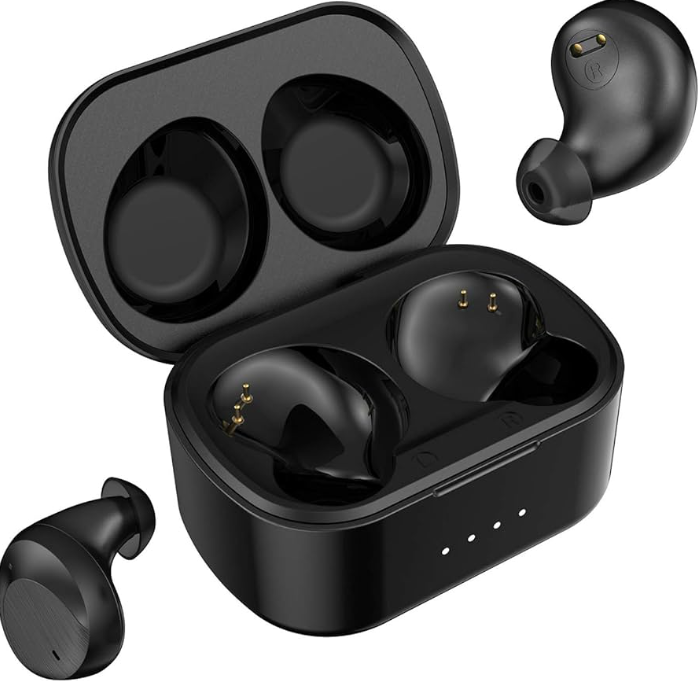
Geekee G650 Wireless Earbuds
Introduction
The geekee G650 Wireless Earbuds offer a compelling blend of advanced audio technology, durability, and portability designed for modern listeners who demand high-quality sound on the go. These true wireless earbuds uniquely combine aptX codec support and CVC dual-mic noise cancellation to deliver crystal-clear calls and an immersive music experience, making them ideal for commuters, fitness enthusiasts, and remote workers alike. Their IPX7 waterproof rating ensures resilience against sweat and rain, positioning these earbuds as a reliable companion for rigorous workouts and outdoor activities.
Equipped with Bluetooth 5.0, the geekee G650 guarantees a stable and low-latency wireless connection, supporting seamless stereo and mono modes. The earbuds’ compact design and USB-C fast charging enable extended use with minimal downtime, fulfilling the needs of users who require convenience without compromising sound performance. Priced approximately around $50, the gGeekeeG650 Wireless Earbuds offer an affordable yet feature-rich alternative to premium models, widely available through online retailers and official channels.
Specifications and Key Features of geekee G650 Wireless Earbuds
- Bluetooth Version: 5.0, ensuring a reliable connection within 10 meters (33 feet)
- Audio Codecs Supported: aptX, AAC, A2DP for high-fidelity sound streaming
- Noise Cancellation: CVC dual-mic technology for clearer calls and ambient noise reduction
- Driver: Advanced graphene-enhanced dynamic drivers for rich bass and detailed audio
- Water Resistance: IPX7 rating, capable of withstanding full immersion up to 30 minutes
- Battery Life: Up to 6 hours of playback per charge, with an additional 24 hours from the charging case
- Charging Interface: USB-C fast charging, offering 10 minutes of charge for 1 hour of playback
- Controls: Touch sensor for playback, calls, and voice assistant access
- Weight: Lightweight design optimized for comfort during extended use
Compared to similar models such as the Geekee G750, the G650 emphasizes superior noise-canceling microphones and aptX codec support, enhancing both call clarity and sound quality , especially for wireless Bluetooth earbuds in the sub-$60 price range.
PACKAGE LIST
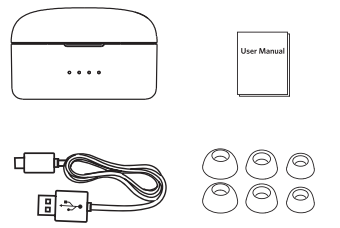
- WirelessEarbudsd * 2
- Magnetic Charging Case *1
- USB Charging Cable * 1
- Ear tips * 3 pairs
- User manual *1
- Gift card *1
CONNECT FOR STEREO MODE
Follow the tips to connect your earbuds:
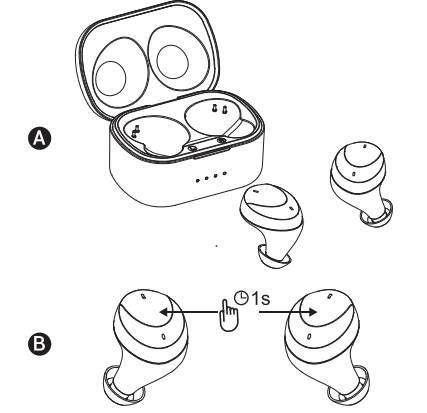
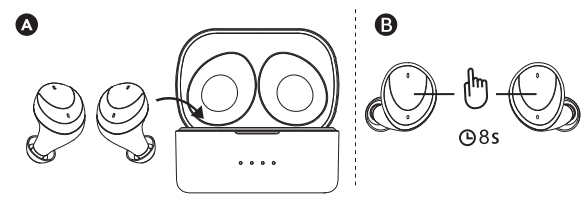
Step 1: Power on
The earbuds will power on AUTOMATICALLY when you take them out the earbuds from the charging case with a voice prompt of "POWER ON". (Or you can also touch the power keys on both earbuds up to 1 second to turn them on manually).
Step 2: Pairing
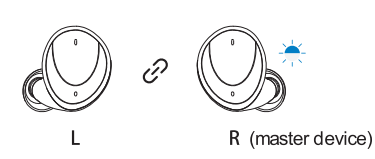
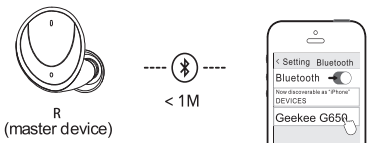
When both earbuds are on, the left and right earbuds will connect with each other AUTOMATICALLY with a voice prompt from each earbud. Once the two earbuds are connected, the right earbud (master device) will enter into the pairing mode AUTOMATICALLY with a voice prompt of "PAIRING".
Step 3:
Connected Search and select "Geekee G650" on your smartphone to finish your setup with a voice prompt of "CONNECTED".
Step 4: Power off
Return the earbuds to the charging case or touch the power key on either one of the earbuds up to 8 seconds to turn off the earbuds.
Troubleshooting Guide for geekee G650 Wireless Earbuds
- Issue: Earbuds not pairing with the device
Solution: Ensure both earbuds are fully charged, reset by placing them back into the charging case and holding the touch sensors for 10 seconds; then re-initiate Bluetooth pairing. - Issue: Low sound or distorted audio
Solution: Check earbud placement in ears for proper seal, clean earbuds to remove debris, and confirm device volume settings. - Issue: One earbud is not working
Solution: Verify mono mode settings, reset the arbuds, and reconnect to the device. - Error Codes: No specific error codes; use LED indicator flashes to diagnose charging or connection status (refer to this user manual).
- Preventive Measures: Avoid prolonged exposure to extreme temperatures, keep charging contacts clean, and regularly update device firmware if available.
Geekee offers a standard warranty covering manufacturing defects; customer support is accessible via their official website and authorized retailers for troubleshooting assistance and warranty claims.
Pros and Cons of geekee G650Wireless Earbuds
- Pros:
- Excellent sound quality with aptX codec and enhanced bass performance
- Highly effective CVC dual-mic noise cancellation improves call clarity
- IPX7 waterproof rating suitable for intense workouts and outdoor use
- Compact, lightweight design ensures comfortable long-term wear
- Fast USB-C charging reduces downtime markedly
- Affordable pricing provides strong value compared to premium competitors
- Cons:
- Battery life is solid but not class-leading; some competitors offer longer continuous playback
- Touch controls can be sensitive and may require practice to master
- Mono mode is only available on the right earbud, limiting flexibility
- Occasional connectivity drops are reported in environments with heavy wireless interference
Overall, the geekee G650 Wireless Earbuds present a balanced option for users seeking robust features without a premium price tag, especially compared to alternatives like the G750 and other sub-$60 true wireless earbuds.
Customer Reviews and Feedback on geekee G650 Wireless Earbuds
Users frequently praise the geekee G650 Wireless Earbuds for their solid sound quality, particularly highlighting the deep bass and clear mids. The IPX7 water resistance is often cited as a major advantage for workout and outdoor use, providing peace of mind during heavy sweating or rain. Customers commonly rate these earbuds between 4 and 4.5 stars out of 5, appreciating the responsive Bluetooth 5.0 connection and fast USB-C charging.
Some common complaints include the sensitivity of the touch controls and occasional connectivity hiccups in crowded wireless areas. However, many users recommend these earbuds as a great value purchase, especially for those looking for noise-canceling features and aptX support in an affordable package.
Faqs
How do I set up geekee G650 Wireless Earbuds for the first time?
What should I do if my geekee G650 Wireless Earbuds are not connecting to my phone?
Can I use geekee G650 Wireless Earbuds with Android and iPhone devices?
How do I control music and calls with geekee G650 Wireless Earbuds?
Why is there a delay when adjusting volume on geekee G650 Wireless Earbuds?
How do I optimize battery life on geekee G650 Wireless Earbuds?
Are geekee G650 Wireless Earbuds suitable for workouts and sports?
How do I clean and maintain geekee G650 Wireless Earbuds?
Leave a Comment