
General Aire DH100 Wi-Fi Dehumidifier User Manual
Content
GeneralAire DH100 Wi-Fi Dehumidifier Manual
Introduction
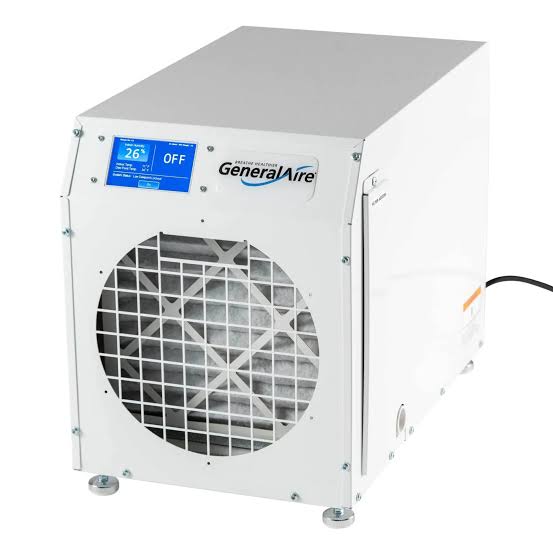
The General Aire DH100 Wi-Fi Dehumidifier is a whole-house moisture control solution built for basements, crawl spaces, garages, and larger living areas that struggle with high humidity. Designed to remove up to 100 pints of moisture per day, this unit combines strong dehumidification performance with Wi-Fi control and an LCD touch screen for convenient operation. The General Aire DH100 Wi-Fi Dehumidifier is especially useful for homeowners who want reliable humidity control without constant manual adjustment, making it a smart fit for damp climates, finished basements, and multi-room applications.
Key benefits include a high airflow rating, automatic defrost, auto-restart, ductable installation, and a MERV 11 pleated filter that helps capture dust and airborne particles. Its compact cabinet design also makes it easier to install in tight utility areas compared with bulkier whole-house units. The model is rated for spaces up to about 5,200 square feet, depending on conditions and layout, and it operates on standard 120V power. Typical pricing for the general aire DH100 Wi-Fi Dehumidifier is estimated in the mid-range for premium whole-house units, often around $1,000 to $1,500 depending on retailer, season, and availability. It is commonly available through HVAC suppliers, appliance distributors, and online specialty stores. For buyers comparing whole-home dehumidifiers, this model stands out for its Wi-Fi connectivity, strong capacity, and practical installation flexibility.
Troubleshooting Common Problems With the General Aire DH100 Wi-Fi Dehumidifier
If the unit is not collecting water, first check that the humidity setting is lower than the room’s current humidity, the filter is clean, and the drain line is clear and properly sloped. If the dehumidifier runs but does not lower humidity effectively, confirm that doors, windows, and bypass vents are closed and that the space is not oversized for the installation. A clogged filter, restricted airflow, or poor duct placement can also reduce performance.
Common error messages on the control panel are often linked to airflow, temperature, or drainage issues. If an error appears, power the unit off, inspect the filter and drain connection, and restart after clearing any blockage. For Wi-Fi connection issues, reconnect the unit by checking the home network password, signal strength, and app setup steps. Preventive care includes replacing the MERV 11 filter every six months, cleaning the cabinet intake, and inspecting the condensate line regularly. The unit is backed by a limited warranty, often listed as five years by major sellers, and support is typically available through the manufacturer’s customer service and dealer network. For help, contact the retailer where purchased or the GeneralAire support department listed in the owner’s manual.
Pros and Cons of the General Aire DH100 Wi-Fi Dehumidifier
Pros
- High capacity performance, removing up to 100 pints per day for large damp spaces.
- Wi-Fi control and touch screen operation make humidity management more convenient.
- Compact, ductable design works well in basements, crawl spaces, and utility rooms.
- MERV 11 filtration adds basic air-cleaning benefits while dehumidifying.
- Auto-restart and automatic defrost improve reliability during everyday use.
- Strong value for buyers who need a whole-house dehumidifier with smart features.
Cons
- Higher upfront price than portable dehumidifiers.
- Installation may require HVAC-style planning or professional help.
- No built-in condensate pump on some configurations, so drainage planning matters.
- Best performance depends on correct sizing, ducting, and regular filter maintenance.
- Compared with premium alternatives, smart-home features are useful but not especially advanced.
Overall, the General Aire DH100 Wi-Fi Dehumidifier offers strong value for homeowners who need serious moisture control and want connected features without moving up to a far more expensive commercial-style system. Compared with smaller 75-pint models, it is better suited to larger or wetter spaces.
Customer Reviews and User Feedback on the General Aire DH100 Wi-Fi Dehumidifier
Customer feedback for the General Aire DH100 Wi-Fi Dehumidifier is generally positive, with many buyers praising its quiet operation, strong water removal, and useful Wi-Fi controls. Typical star ratings fall around 4.3 out of 5 stars, especially among users who installed it in basements or crawl spaces. One homeowner reported, “It finally solved our damp basement problem and runs much quieter than expected.” Another reviewer noted, “The app control is simple, and the humidity readings are easy to monitor.”
Common complaints include the need for careful installation, occasional Wi-Fi setup frustration, and the importance of keeping the filter clean for best performance. Some users also mention that the unit works best when drainage is set up correctly from the start. Most buyers recommend the model for medium to large homes that need dependable humidity control. If you are shopping for a whole-house solution and want a balance of performance, smart controls, and energy-conscious operation, the general aire DH100 Wi-Fi Dehumidifier is a strong purchase candidate.
Faqs
How do I set up the general aire DH100 Wi-Fi Dehumidifier for the first time?
Why is my general aire DH100 Wi-Fi Dehumidifier not connecting to Wi-Fi?
What humidity setting should I use on the general aire DH100 Wi-Fi Dehumidifier?
How can I improve the performance of my general aire DH100 Wi-Fi Dehumidifier in a large room or basement?
What should I check if the general aire DH100 Wi-Fi Dehumidifier is running but not collecting water?
Can the general aire DH100 Wi-Fi Dehumidifier drain continuously, and what do I need for that setup?
How often should I clean and maintain the general aire DH100 Wi-Fi Dehumidifier?
Is the general aire DH100 Wi-Fi Dehumidifier suitable for smart home control and remote monitoring?
Tags
Leave a Comment