
How to Use: Generico HK10 Ultra 3 Max Smart Watch User Manual
Content
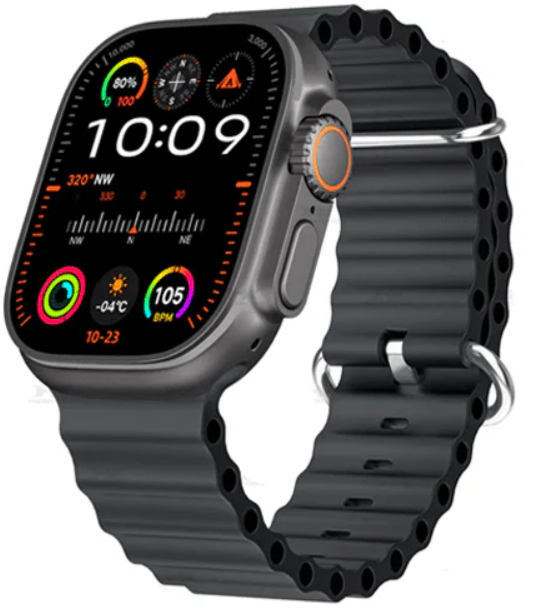
Generico HK10 Ultra 3 Max Smart Watch
Introduction
The generico HK10 Ultra 3 Max Smart Watch is a state-of-the-art wearable device designed to blend advanced technology with everyday practicality. Featuring a vivid 2.02-inch AMOLED display with a sharp resolution of 485 × 520 pixels, this smartwatch delivers crisp visuals and an intuitive touch experience. Powered by the high-performance SF32LB525 dual-core processor, it incorporates AI capabilities such as ChatGPT integration and an AI robot assistant, allowing users to interact via voice commands or text, even offline.
Unique selling points include seamless Bluetooth 5.3 connectivity enabling Bluetooth calling and network sharing, comprehensive health monitoring with heart rate, blood pressure, sleep tracking, and sedentary reminders, plus support for over 170 sports modes. The watch also offers music playback, NFC access card functionality (non-payment), a compass, and a robust 260mAh battery with wireless magnetic charging. Its durable zinc alloy and IML casing, combined with an IP67 water resistance rating, ensure reliability in daily use.
Targeted at tech enthusiasts, fitness lovers, and professionals seeking a versatile smartwatch, the generico HK10 Ultra 3 Max Smart Watch suits both Android (5.0+) and iOS (10.0+) devices. Use cases range from fitness tracking and health management to smart communication and AI-assisted tasks. Priced approximately between $80 to $120,, depending on the retailer, it offers excellent value for a feature-rich smartwatch available widely through online marketplaces and specialty tech stores.
In the Box
- 1 × HK10 Ultra 3 Max Smart Watch
- 1 × Magnetic Charging Cable
- 1 × User Manual
- 1 × Extra Strap (optional, depending on model)
Specifications
- Display: AMOLED Touchscreen
- Connectivity: WiFi, Bluetooth
- Compatibility: Android 5.0+, iOS 9.0+
- Battery Life: 2-5 Days (depending on usage)
- Features: Fitness tracking, heart rate monitor, call/message notifications, AI assistant, NFC (if supported), GPS (if supported)
Getting Started
Power On/Off
- Power On: Long-press the side button until the screen lights up.
- Power Off: Long-press the same button, then select 'Power Off' on the screen.
Charging
- Connect the magnetic charging cable to the back of the watch.
- Plug the USB into a power adapter or computer.
- A battery icon will appear when charging starts.
Install Companion App
- Scan the QR code shown on the watch or search 'WearFit Pro' or the designated app in the App Store / Google Play.
- Download and install the app.
- Open the app and follow the instructions to connect your smartwatch via Bluetooth.
Watch Navigation
- Swipe Up: Access quick settings (WiFi, brightness, DND mode, etc.)
- Swipe Down: View notifications.
- Swipe Left/Right: Switch between widgets (steps, heart rate, weather, etc.)
- Press Side Button: Wake/sleep screen or access menu
Main Features
Fitness & Health
- Step Counter: Tracks your daily steps and calories burned
- Heart Rate Monitor: Measures your heart rate throughout the day
- Blood Pressure & SpO2: Real-time monitoring (for reference only)
- Sleep Tracker: Automatically tracks sleep duration and quality
- Sports Modes: Walking, Running, Cycling, Hiking, etc.
Smart Features
- Call Notifications: See incoming calls and reject or answer (if Bluetooth Calling is enabled)
- Message Alerts: Read SMS, WhatsApp, Instagram, and other app messages
- AI Voice Assistant: Long-press the AI icon or button to activate
- Music Control: Play/pause and skip tracks from your phone
- Remote Camera: Use the watch to trigger the phone camera shutter
- Find My Phone: Ring your phone if misplaced
- Weather Display: Shows live weather info
Settings
- Watch Faces: Long-press the home screen or go to the app to change faces
- Brightness: Swipe up -> Adjust brightness slider
- Language: Settings -> Language -> Select preferred language
- Time Format: 12h / 24h mode available via the app
- Bluetooth Call Setup: Pair the second Bluetooth name in the phone Bluetooth list for calling features
Maintenance & Safety
- Keep the watch dry and avoid hot water or steam.
- Clean regularly with a soft cloth.
- Do not disassemble the device.
- Overcharging or overexposure to extreme heat.
Troubleshooting Genericoco HK10 Ultra 3 Max Smart Watch
Common issues with the Generico HK10 Ultra 3 Max Smart Watch include Bluetooth pairing failures, inaccurate sensor readings, and charging difficulties. To resolve Bluetooth connection problems, ensure your smartphone’s Bluetooth is active and within range, then restart both devices and try re-pairing through the Wearfit Pro app. For sensor inconsistencies in heart rate or blood oxygen levels, clean the sensor area regularly and wear the watch snugly on the wrist.
Charging issues often stem from improper cable use or dirt on charging contacts; use only the provided magnetic wireless charger and keep contacts clean and dry. If the watch displays error codes (e.g., “E01” for sensor errors), consult the user manual for specific fixes or reboot the device. Preventive measures include avoiding exposure to extreme temperatures, water beyond IP67 limits, and physical shocks.
The product comes with a standard manufacturer's warranty covering defects for one year. For technical support or warranty claims, users should contact customer service via the official website or retailer, typically accessible through email or hotline numbers included in the packaging.
- Issue: Watch not connecting - Solution: Ensure Bluetooth is enabled, restart watch and phone, retry in app
- Issue: No notifications - Solution: Check app notification permissions
- Issue: Screen unresponsive - Solution: Restart the watch
- Issue: Fast battery drain - Solution: Lower brightness, turn off always-on display, or unused features
Pros & Cons of the generico HK10 Ultra 3 Max Smart Watch
- Pros:
- High-resolution 2.02" AMOLED display with vibrant colors and clarity.
- Extensive health tracking features,, including heart rate, blood pressure, and sleep monitoring.
- AI integration with ChatGPT and d offline AI robot for advanced interaction.
- Bluetooth 5.3 enables stable calling and network sharing.
- Wireless magnetic charging and durable IP67 water resistance.
- Customizable straps (silicone and trail versions) for comfort and style.
- Value for money compared to premium smartwatches with similar features.
- Cons:
- IP67 rating limits water exposure; not suitable for swimming or showering.
- NFC supports access cards only, not mobile payments.
- Health metrics are for reference and not medical-grade measurements.
- Limited shortcut customization on the interface.
- Some users report occasional lag or connectivity drops in Bluetooth functions.
Customer Reviews of the Generico HK10 Ultra 3 Max Smart Watch
Customers praise the generico HK10 Ultra 3 Max Smart Watch for its bright AMOLED display, reliable AI assistant features, and solid fitness tracking capabilities. Many appreciate the convenience of Bluetooth calling directly from the wrist and the seamless music playback options. Star ratings average around 4.2 out of 5, highlighting satisfaction with the watch's performance and battery life.
Common complaints include occasional Bluetooth disconnections and the watch’s limited water resistance. Some users mention that the interface could be more intuitive with added shortcut customization. Despite these minor issues, most buyers recommend this smartwatch for those seeking an affordable, AI-powered wearable with comprehensive health and daily use features.
Faqs
How do I set up the generico HK10 Ultra 3 Max Smart Watch for the first time?
What should I do if my generico HK10 Ultra 3 Max Smart Watch is not charging properly?
Can the generico HK10 Ultra 3 Max Smart Watch make Bluetooth calls and play music locally?
Is the generico HK10 Ultra 3 Max Smart Watch compatible with all smartphones?
How can I optimize battery life on my generico HK10 Ultra 3 Max Smart Watch?
What health monitoring features does the generico HK10 Ultra 3 Max Smart Watch offer, and how accurate are they?
How do I maintain and clean my generico HK10 Ultra 3 Max Smart Watch to ensure longevity?
What should I do if the generico HK10 Ultra 3 Max Smart Watch freezes or becomes unresponsive?
Leave a Comment