
Genesis Technologies GT-3.0 Entertainment System User Manual
Content
Genesis Technologies GT-3.0 Entertainment System: Complete Product Manual
Introduction
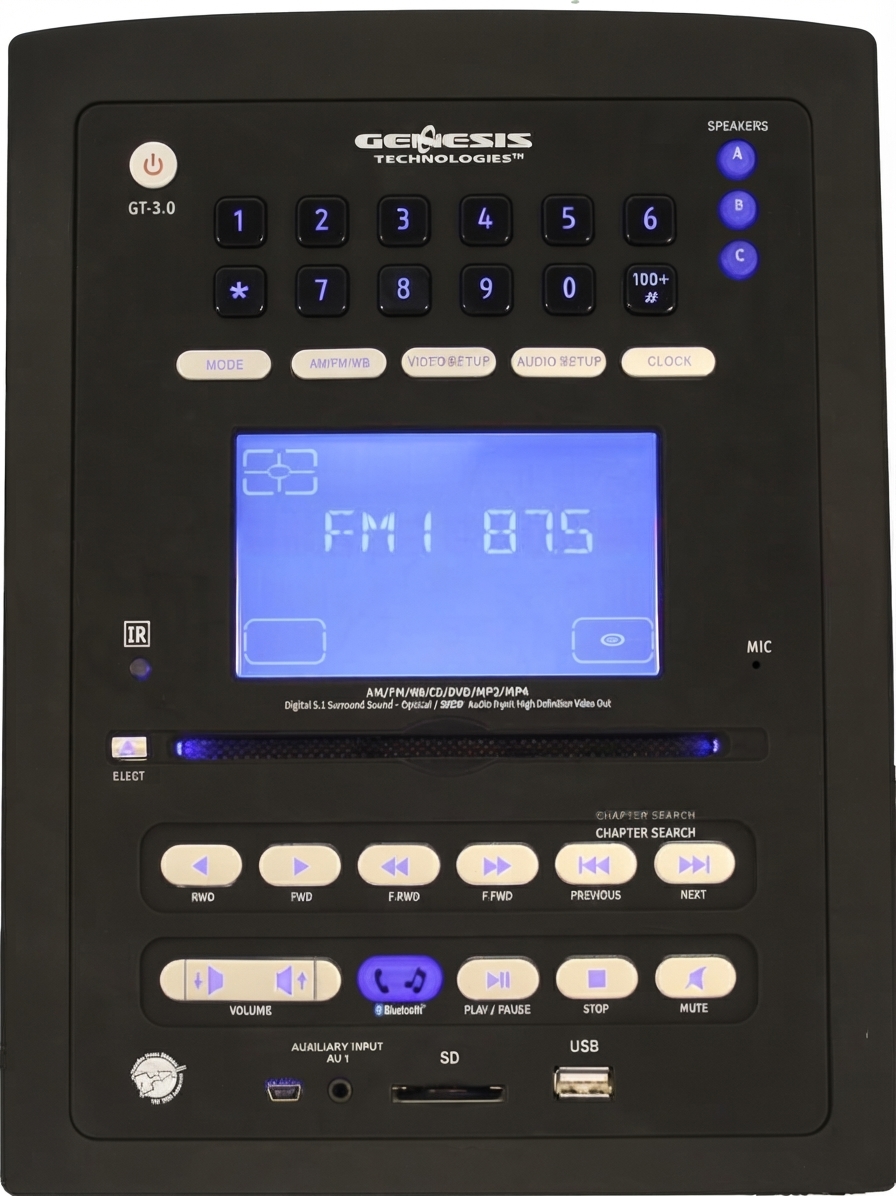
The Genesis Technologies GT-3.0 Entertainment System is a compact RV multimedia receiver designed to bring home-style audio and video entertainment into mobile living spaces. Built for recreational vehicles, fifth wheels, and travel trailers, it combines a DVD/CD player, AM/FM/Weather Band tuner, Bluetooth connectivity, and multi-zone audio into one wall-mount unit. The system is engineered for users who want a central entertainment hub without sacrificing space, making it a practical upgrade for family travel, campsite viewing, and long road trips.
One of the biggest advantages of the Genesis Technologies GT-3.0 Entertainment System is its flexibility. It supports multiple media formats, external audio/video inputs, high-definition video output, and surround sound configurations, allowing users to connect TVs, speakers, gaming devices, and portable media players. The built-in 12V DC design is ideal for RV electrical systems, while the 200W total power output delivers enough performance for small to medium vehicle interiors.
Target users include RV owners, campers, and anyone replacing an older factory-installed stereo with a more capable multimedia receiver. Typical use cases include movie playback, music streaming, weather monitoring, and zone-based audio distribution across multiple rooms or sleeping areas. The estimated price range is generally in the mid-range RV electronics category, with replacement remotes and accessories widely available. Availability may vary by retailer and aftermarket inventory, but the unit and compatible parts are commonly found through RV parts suppliers and online marketplaces.
Specifications
- Product type: RV multimedia receiver with DVD/CD playback, radio, and multi-zone audio
- Power supply: 12V DC negative ground, operating range 11.0V to 15.0V
- Continuous power output: 200W total
- Maximum current consumption: 10A
- Load impedance: 4Ω, with 4–8Ω allowable
- Audio formats: DVD, MP3, MP4, CD, CD-R, CD-RW, JPEG-CD
- Video system support: AUTO, PAL, NTSC
- Aspect ratios: 4:3 Letter Box, 4:3 Pan Scan, 16:9
- Video output: High-definition video out up to 1080p
- Inputs: 2 audio/video inputs, 2 audio inputs, and 1 digital audio input
- Physical dimensions: approximately 8-3/6 in. W x 11 in. H x 6 in. D
- Mounting dimensions: 6-3/4 in. W x 9-1/2 in. H x 5 in. D
- Net weight: 6 lb
- Audio capability: 5.1 surround sound support with multiple speaker zones
- Comparison point: more feature-rich than basic RV stereo units, but less advanced than newer touchscreen multimedia systems with wireless streaming and modern app integration
In practical use, the GT-3.0 stands out for offering solid legacy-format compatibility and zone-based audio control in a single chassis. Compared with simple AM/FM RV radios, it adds DVD playback, digital audio input, and video routing. Compared with newer premium systems, it delivers strong fundamentals rather than cutting-edge smart features.
Setup Guide: How to Install and Configure the GT-3.0
Before installation, disconnect vehicle power and confirm that the mounting cavity matches the required dimensions. Slide the unit into the opening carefully, secure it with the proper brackets, and make sure ventilation space remains around the chassis. Connect the 12V DC power leads using correct polarity, then attach speaker wires, video outputs, antenna leads, and any external audio or video sources.
Next, configure your preferred output settings. Select the correct video format for your display, such as 16:9 for widescreen TVs or 4:3 for older panels. Pair Bluetooth devices by entering pairing mode on the receiver and selecting the unit from your phone or tablet. For best results, test each zone individually and verify that front, rear, and subwoofer channels are assigned correctly.
If the system does not power on, check the fuse, grounding point, and supply voltage first. If sound is distorted, confirm speaker impedance and cable integrity. Avoid operating the unit in damp conditions, do not block ventilation openings, and never exceed the recommended current draw. For safety, always use insulated tools and disconnect the battery before changing wiring.
Troubleshooting
- Unit will not turn on: check the 12V supply, grounding, fuse, and battery voltage range.
- No sound from speakers: verify speaker wiring, channel assignment, mute status, and impedance compatibility.
- Disc will not load or play: inspect the disc for scratches, confirm supported formats, and clean the disc surface.
- Bluetooth will not connect: delete old pairings, restart the receiver, and re-enter pairing mode.
- Weak or no video signal: confirm the correct output selection, cable seating, and TV input source.
- Possible error symptoms such as no-disc, read failure, or media compatibility issues are usually resolved by using supported disc types and properly formatted storage media.
Preventive maintenance helps reduce downtime. Keep discs clean, avoid overloading the system with incompatible speakers, and periodically inspect wiring harnesses for wear or looseness. If problems continue, consult the owner documentation or contact the retailer or RV electronics specialist that supplied the unit.
Warranty coverage is commonly offered through the seller or distributor, and many replacement parts, including remotes, are available through aftermarket channels. For help, contact the original retailer, an RV service center, or the manufacturer support line listed with your purchase documentation.
Pros & Cons
Pros
- All-in-one RV entertainment solution with radio, DVD, and multimedia playback
- Supports multiple inputs for TVs, cameras, gaming devices, and external audio sources
- 5.1 surround sound capability adds a more immersive listening experience
- Compact wall-mount design saves space in RV interiors
- Good value for users who want legacy media support and multi-zone audio
Cons
- Older interface and feature set compared with modern touchscreen systems
- No native support for many current smart-home or app-based streaming features
- Installation may require careful wiring for best results
- Disc playback and legacy media support are useful, but less relevant for some users
For value-conscious RV owners, the Genesis Technologies GT-3.0 Entertainment System remains a practical choice because it bundles several functions into one unit. Compared with newer alternatives, it is less advanced, but it can still outperform basic factory stereos in output, connectivity, and flexibility.
Customer Reviews
User feedback for the Genesis Technologies GT-3.0 Entertainment System is generally positive, especially among RV owners upgrading from older stereo units. Many buyers rate it around 4 out of 5 stars for convenience, audio output, and its ability to handle multiple entertainment sources. Common praise includes strong sound for the size, easy integration into RV cabinets, and useful zone control.
Frequent complaints center on dated controls, occasional setup complexity, and the learning curve for wiring and source selection. Some users also mention that modern streaming-focused buyers may prefer newer units with wireless casting and touchscreen navigation. Overall, this system is recommended for shoppers who want dependable RV entertainment with DVD and multi-zone audio support rather than a fully modern smart-media platform.
Faqs
How do I set up the genesis technologies GT-3.0 Entertainment System for the first time?
What should I do if the genesis technologies GT-3.0 Entertainment System has no sound?
How do I connect Bluetooth devices to the genesis technologies GT-3.0 Entertainment System?
Which devices are compatible with the genesis technologies GT-3.0 Entertainment System?
How do I improve picture and audio performance on the genesis technologies GT-3.0 Entertainment System?
Why does the genesis technologies GT-3.0 Entertainment System keep skipping DVDs or freezing during playback?
How do I use the multi-zone audio features on the genesis technologies GT-3.0 Entertainment System?
What maintenance does the genesis technologies GT-3.0 Entertainment System need to stay reliable?
Tags
Leave a Comment