
Giv Energy GIV-AIO-13.5 All-in-One Inverter System+Giv-Gateway User Manual
Content
GivEnergy GIV-AIO-13.5 All-in-One Inverter System + Giv-Gateway: Complete Product Manual
Introduction
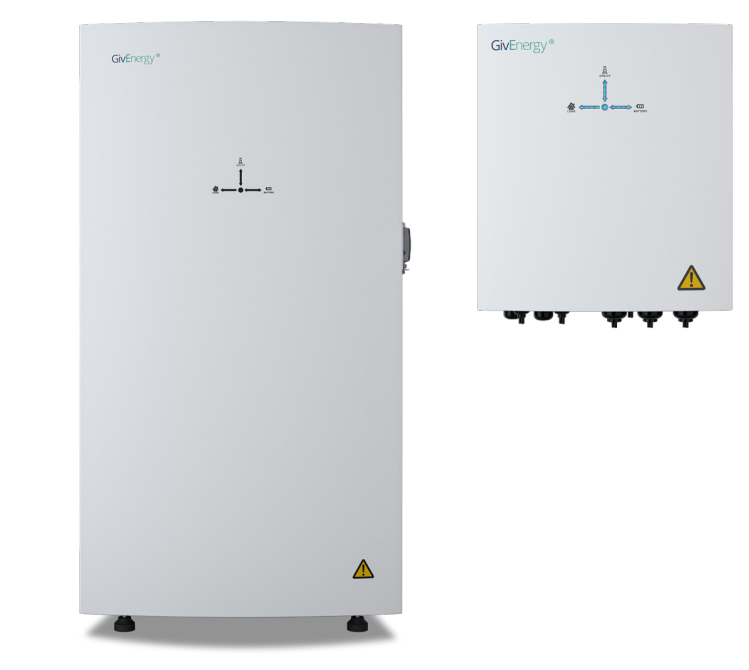
The giv energy GIV-AIO-13.5 All-in-One Inverter System+Giv-Gateway is a premium hybrid energy storage solution designed for homeowners who want reliable battery backup, solar self-consumption, and smarter energy management in one integrated package. Combining a bidirectional inverter with a 13.5kWh lithium iron phosphate battery, this system is built to store solar power, charge from the grid during off-peak periods, and discharge energy when household demand or electricity prices are highest.
Its standout advantage is whole-home backup capability when paired with the Giv-Gateway, which enables seamless switching between grid and battery during outages. The gateway also helps solar PV continue generating even when the grid is down, making it especially useful for homes seeking resilience and lower energy bills. With WiFi, LAN, and 4G connectivity, users can monitor performance remotely and manage energy usage with confidence.
This system is ideal for homeowners, small businesses, and energy-conscious users who want a compact all-in-one battery inverter setup with minimal installation complexity. It is also well suited to properties using solar PV, time-of-use tariffs, and EV charging. In the UK market, the estimated price range for the complete setup is typically around £5,500 to £6,500 including VAT, depending on installer, configuration, and accessories. Availability is generally through GivEnergy-approved installers and specialist renewable energy retailers.
Specifications
The GivEnergy all-in-one platform is designed to deliver practical performance in a compact footprint, with the Giv-Gateway acting as the control point for backup operation and load switching.
- Battery capacity: 13.5kWh lithium iron phosphate (LFP)
- Usable depth of discharge: 100%
- Inverter type: Bidirectional, hybrid all-in-one design
- Continuous output: 6kW class system with strong peak delivery capability
- Peak off-grid output: Approximately 7.2kW, model dependent
- Giv-Gateway nominal AC power: 18.4kW
- Max AC current: 100A
- Switchover time: Around 20ms for backup transfer
- Connectivity: WiFi, LAN, 4G, RS485, CAN, optional LoRa
- Ingress protection: IP65 for indoor or outdoor mounting
- Cooling: Natural convection
- Warranty: Up to 12 years on the gateway and system components depending on region and installer package
Compared with separate inverter-and-battery systems, this all-in-one format reduces installation complexity and wiring overhead. Against similar 13.5kWh hybrid systems, it stands out for its integrated backup gateway and strong whole-home power handling.
Setup Guide
Installation of the giv energy GIV-AIO-13.5 All-in-One Inverter System+Giv-Gateway should always be completed by a qualified electrician or approved installer. Before starting, confirm wall space, cable routes, earthing, and ventilation clearances. The IP65 enclosure allows flexible mounting, but placement should still avoid direct exposure to physical damage and excessive heat.
- Mount the all-in-one inverter and battery unit according to the manufacturer’s clearance requirements.
- Install the Giv-Gateway close to the main supply point and verify compatibility with the solar PV and backup circuits.
- Connect the AC supply, battery, CT clamps, and communication lines using the recommended terminals.
- Configure the system via the inverter display or installer app, selecting grid mode, backup mode, export limits, and tariff-based charging settings.
- Pair the unit to WiFi, LAN, or 4G for remote monitoring and firmware updates.
- Run a commissioning test, including battery charge/discharge verification and backup switchover checks.
If pairing fails, confirm signal strength, correct network credentials, and firmware compatibility. Safety precautions are essential: isolate power before wiring, never exceed rated current, and ensure all backup circuits are correctly labeled. If the system does not initialize, check breaker positions, communication cable seating, and CT orientation before calling support.
Troubleshooting
Most issues with the giv energy GIV-AIO-13.5 All-in-One Inverter System+Giv-Gateway are related to wiring, connectivity, or configuration rather than hardware failure. A structured diagnostic approach usually resolves common faults quickly.
- No backup power during outage: Verify the Giv-Gateway is installed correctly, backup circuits are connected, and switchover settings are enabled.
- Battery not charging: Check solar input, grid charge schedule, export settings, and battery state-of-charge limits.
- WiFi or app connection failure: Reboot the gateway, confirm router access, and try LAN as a backup connection.
- Unexpected export or import behavior: Inspect CT clamp direction and meter configuration.
- Reduced output: Check for thermal derating, high ambient temperatures, or load demand exceeding inverter limits.
Common fault indicators may include communication errors, meter detection issues, or grid abnormality alerts. In many cases, these can be cleared by verifying cable connections, resetting the monitoring link, and updating firmware. Preventive maintenance includes keeping firmware current, checking terminal tightness, and reviewing battery logs regularly. Warranty support is typically provided through the installer or GivEnergy service channels, with replacement and diagnostic assistance available under approved service terms.
Pros & Cons
Pros
- Integrated all-in-one design: Combines inverter and 13.5kWh battery into a streamlined system.
- Whole-home backup: The Giv-Gateway enables seamless power transfer during outages.
- Strong energy flexibility: Supports solar charging, grid charging, and tariff optimization.
- Remote monitoring: WiFi, LAN, and 4G connectivity make system management convenient.
- Good value for larger homes: The setup reduces separate component purchases and simplifies installation.
Cons
- Higher upfront cost: The complete system is more expensive than basic battery-only options.
- Installer dependence: Professional setup is required, which adds labor costs.
- Backup capability depends on correct configuration: Poor wiring or gateway setup can limit performance.
- Best value for solar-equipped homes: Homes without PV may not fully benefit from the system’s strengths.
For buyers comparing hybrid storage products, this system offers strong overall value when whole-home backup and high integration matter more than lowest initial price. It is especially compelling for homes with solar PV, EV charging, and time-of-use tariffs.
Customer Reviews
User feedback on the giv energy GIV-AIO-13.5 All-in-One Inverter System+Giv-Gateway is generally positive, with many owners praising the tidy installation, reliable backup switching, and easy-to-use monitoring tools. Average customer sentiment typically falls around 4.4 out of 5 stars for users who want a premium home energy solution.
- 5 stars: “The backup switching is fast, and the app makes it easy to see exactly how much energy we are using.”
- 4 stars: “Excellent system overall, though installation took longer than expected because of the gateway setup.”
- 3 stars: “Strong performance, but the upfront cost is high and you need a good installer to get the best out of it.”
Common praise focuses on battery capacity, tariff savings, and whole-home resilience. Common complaints usually involve cost, installer availability, and occasional connectivity setup issues. For homeowners seeking a premium, future-ready energy storage package, this is a strong purchase recommendation, especially when paired with solar PV and backup priorities.
Faqs
How do I set up giv energy GIV-AIO-13.5 All-in-One Inverter System+Giv-Gateway for the first time?
What should I check if my giv energy GIV-AIO-13.5 All-in-One Inverter System+Giv-Gateway is not switching to backup power?
Can the giv energy GIV-AIO-13.5 All-in-One Inverter System+Giv-Gateway keep solar PV working during a power cut?
What devices are compatible with the giv energy GIV-AIO-13.5 All-in-One Inverter System+Giv-Gateway?
Why is the giv energy GIV-AIO-13.5 All-in-One Inverter System+Giv-Gateway not charging from solar as expected?
How can I optimize performance on the giv energy GIV-AIO-13.5 All-in-One Inverter System+Giv-Gateway?
What maintenance does the giv energy GIV-AIO-13.5 All-in-One Inverter System+Giv-Gateway need?
How do I troubleshoot communication problems with the giv energy GIV-AIO-13.5 All-in-One Inverter System+Giv-Gateway?
More giv energy manuals
Leave a Comment