
Setup: Global Sources PJ06/07 Series HPEA Air Purifier User Manual
Content
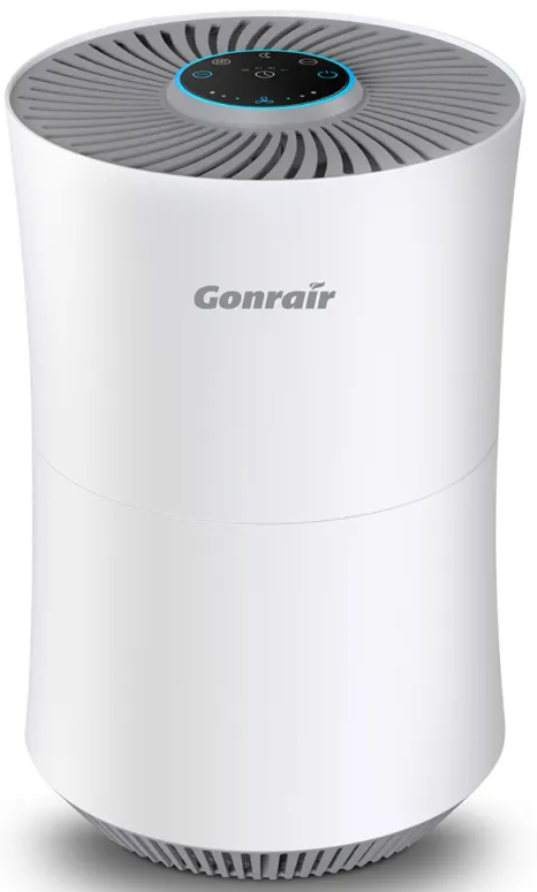
global sources PJ06/07 Series HPEA Air Purifier
Introduction
The global sources PJ06/07 Series HPEA Air Purifier offers advanced air purification technology designed to enhance indoor air quality with efficiency and ease. Equipped with a high-performance True HEPA filtration system, it effectively captures 99.97% of airborne particles such as dust, pollen, pet dander, smoke, mold spores, and household odors, which makes it ideal for creating a cleaner, healthier living environment.
This air purifier is perfect for families, allergy sufferers, pet owners, and individuals seeking relief from air pollution. Its smart features—including Wi-Fi connectivity, real-time air quality monitoring, and voice control—make it highly adaptable for use in bedrooms, living rooms, offices, and other indoor spaces up to 110 m². The purifier’s sleek design and intuitive touch panel also enhance user experience.
Priced competitively within the mid-range market segment, the global sources PJ06/07 Series is readily available through major online platforms and authorized retailers. Its unique combination of efficiency, smart controls, and comprehensive filtration sets it apart from many standard air purifiers, making it a compelling choice for those prioritizing both performance and convenience.
Specifications of global sources PJ06/07 Series HPEA Air Purifier
- Name: Air Purifier
- Product Model: PJ06
- Product size: 192*192*235.5mm
- Product net weight: 1.2 kg
- Used area: 15m2
- Noise:< 28dB
- Measured according to GB/T18801-2015 standards>Particle purification energy efficiency: high energy efficiency
- Formaldehyde purification energy efficiency: high energy efficiency
- Particulate Clean Air Density (PCADR) :100m3 /h Rated
- Voltage: DC5V 2.0A
- Rated power: 9W
- Filtration System: 3-in-1 with Pre-filter, H13 True HEPA filter, and Activated Carbon filter for odor and VOC removal
- Particle Capture Efficiency: 99.97% of particles as small as 0.3 microns, including PM2.5 pollutants
- Coverage Area: Up to 110 m² suitable for medium to large rooms
- Fan Speeds: Multiple adjustable speeds for customized airflow
- Operating Modes: Auto mode, Sleep mode, and Timer settings (2/4/8 hours)
- Smart Features: Wi-Fi connectivity, app control, voice command compatibility, child lock, and filter replacement alerts
- Dimensions & Weight: Approximately 208 x 290 mm, weighing about 2.3 kg
- Additional Features: Negative ion generator for enhanced purification, real-time PM2.5 air quality ring light display
Compared to other air purifiers in its class, the PJ06/07 series stands out due to its certified H13 True HEPA filter and integrated activated carbon layer for comprehensive odor and pollutant removal, aligning well with top competitors offering similar multi-stage filtration and smart home connectivity.
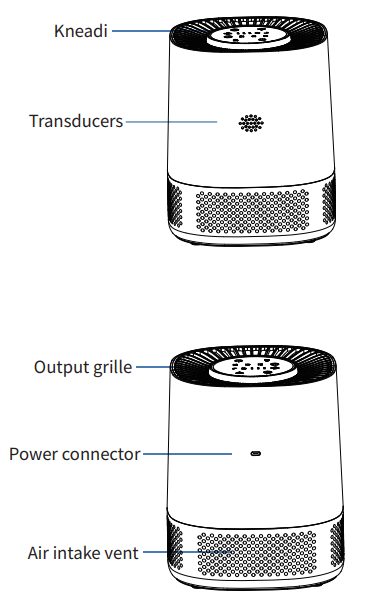
Product Model
3:PM
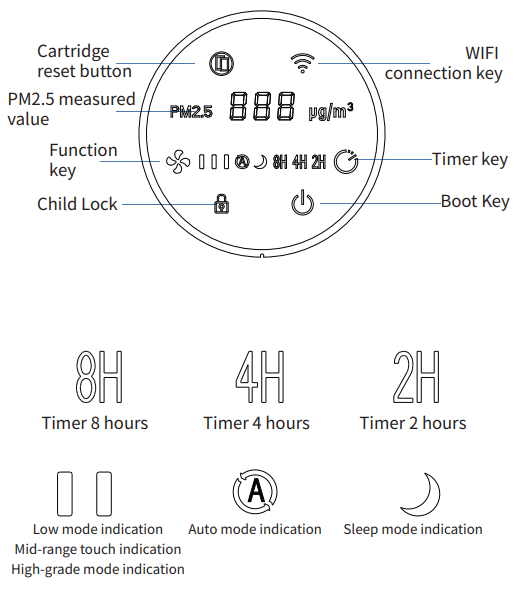
Use Tutorial
Connecting the power supply
Users with their own 5V, 2A or more with a USB-C port power adapter will be equipped with the machine TYPE-C cable connected to the power connector.
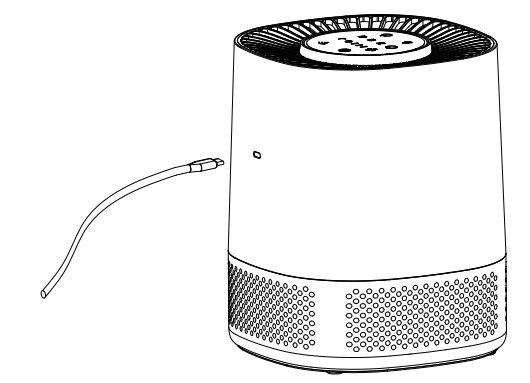
Tip: When using the purifier, it is recommended to close windows and doors for better purification.
Pragmatic
The purifier is powered on and enters the self-test program; all the indicator lights on the control panel flash three times and then go out, and the purifier enters the standby state.

Power switch
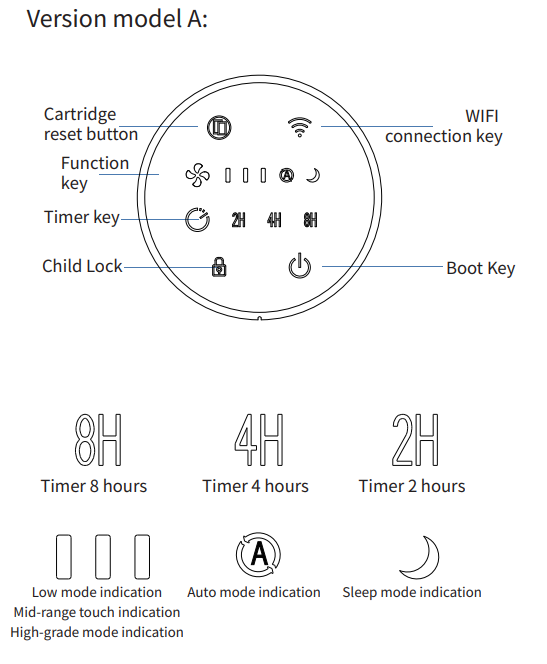
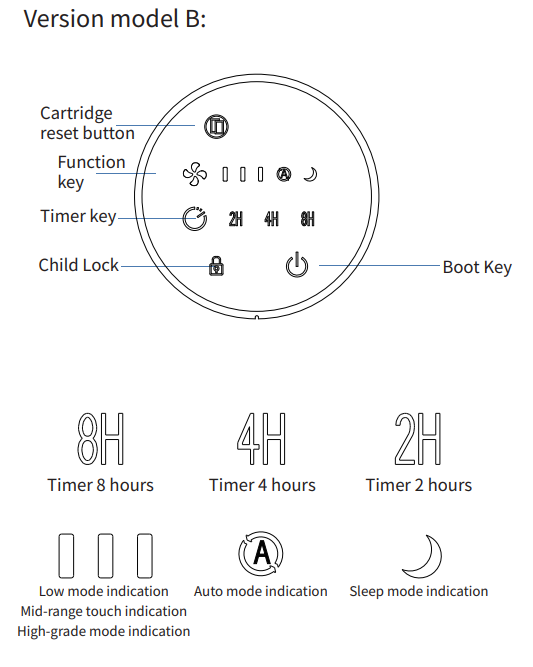
Press the eye, after hearing the "drop" sound, the air purifier will be turned on, with white light when it is turned on. Long-press press key for 3 seconds to turn off the air purifier, and it will turn red light when it is turned off.
The default is to run in low gear after powering up.
Switching gears
In the power-on state, short-press to cycle through low, medium, high, auto, and sleep gears in turn, and the corresponding gear indicator status is shown in the table below.
Child lock function
Press and hold the key for 3 seconds to turn on the child lock function. When the child lock function is on, the child lock light is red. Press the key for 3 seconds to release the child lock, and the child lock light will turn white.
Power failure memory function
When the power supply is restored after the purifier is disconnected, it will automatically return to the operating state before the power failure (time, child lock mode, and sleep mode are not memorized).
WIFI network (applicable to WIFI models and PM digital display models, not applicable to ordinary models)
Long-press the key for 3 seconds in standby mode, the indicator flashes red, the machine enters the network state, and at this time, the machine can be networked. After successful networking, the indicator turns white light.
Note: If no distribution operation is performed for 2 consecutive minutes, the distribution mode is exited.
Product Use APP Download
First, turn on your cell phone's 4G network, WIFI, and Bluetooth. Download the "Pinnacle Intelligent" APP to experience more functions of the air purifier
Method: Open your cell phone application store, search for " Pinnacle Intelligence", download and install it.
Smart Control
- Use your air purifier with the “pjrobot” App.
- Please download the“pjrobot” App to get more features of the air purifier.
Before you start, make sure that:
- Your smartphone is connected to a Wi-Fi network and Bluetooth.
- Your smartphone is running iOS 10.0 (or above) or Android 5.0 >(or above).
- The 2.4 GHz band WiFi(wireless signal) is enabled on your wireless
- router.
- The Wi-Fi icon on the control panel is slowly flashing red.
- Ensure that the air purifier is powered on and connected to.
- Wi-Fi during setup.
- Download the “pjrobot” App from the App Store(iOS devices) or Google Play (Android devices).
- Open the App and create a user account.
- Tap the “+” icon or “Add Device” to find the nearby devices and choose air purifier Wi-Fi.
- During the set Wi-Fi network,, press and hold the Wi-Fi icon for 3secondso.nds The Wi-Fi statublinksink quickly” for connecting.
- After connecting successfully, you can control your air purifier.
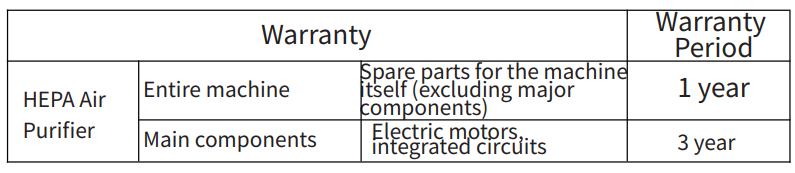
Warranty Description
When you have problems during use or the equipment is damaged, we provide 24 months of worry-free service.
Troubleshooting Guide for global sources PJ06/07 Series HPEA Air Purifier
- Unit does not start: Ensure the power cord is securely connected and the outlet is functional; try resetting the unit by unplugging it for 30 seconds.
- Unexpected shutdown: Check for overheating; clean air inlets and ensure adequate ventilation around the unit.
- Insufficient airflow: Replace clogged filters; verify fan speed settings are appropriately adjusted.
- Excessive noise: Inspect for obstructions near fan blades; ensure the unit is placed on a stable surface.
- Unpleasant odor from purifier: Replace the activated carbon filter if saturated; regularly clean the pre-filter.
- Filter replacement indicator persists after changing filter: Reset the filter indicator through the control panel or app settings.
- Wi-Fi connection issues: Confirm network credentials, reset Wi-Fi on the device, and ensure the router supports the required frequency bands.
Preventive measures include routinely cleaning filters every 2-4 weeks and replacing HEPA and activated carbon filters every 6-12 months, depending on air quality. The product comes with a standard warranty covering manufacturing defects, and customer support is accessible via the official website and authorized distributors.
Pros & Cons of the global sources PJ06/07 Series HPEA Air Purifier
- Pros:
- Highly effective 3-stage filtration captures 99.97% of fine particles and pollutants
- Smart connectivity with Wi-Fi and voice control compatibility for modern homes
- Quiet operation suitable for bedrooms and offices
- Real-time air quality monitoring with visual feedback
- Child lock and timer functions enhance safety and convenience
- Cons:
- Filter replacements can be moderately costly over time
- Connectivity setup may require technical knowledge for some users
- Limited availability in some regional markets may affect prompt purchase or support
- Unit size may be slightly bulky for very small rooms
In terms of value for money, the global sources PJ06/07 Series offers robust performance comparable to premium models but at a more accessible price point, balancing features and affordability when compared to alternatives like other branded HEPA air purifiers without smart features.
Customer Reviews of global sources PJ06/07 Series HPEA Air Purifier
Users consistently praise the global sources PJ06/07 Series HPEA Air Purifier for its strong filtration capabilities and smart home integration. Many highlight improved allergy relief and noticeable reduction in household odors. The quiet operation and ease of use through the app and voice commands receive positive remarks.
Common complaints revolve around the initial Wi-Fi setup complexity and the cost of replacement filters. The average star rating is approximately 4.3 out of 5, with testimonials recommending it particularly for pet owners and households in urban areas with higher pollution levels. Customers also appreciate the timely filter replacement reminders and real-time air quality feedback, which enhance user engagement and maintenance.
Faqs
How do I set up the global sources PJ06/07 Series HPEA Air Purifier for first-time use?
What should I do if the global sources PJ06/07 Series HPEA Air Purifier is not turning on?
Can I control the global sources PJ06/07 Series HPEA Air Purifier remotely through WiFi?
How often should I replace the filter in the global sources PJ06/07 Series HPEA Air Purifier for optimal performance?
What are the main features of the global sources PJ06/07 Series HPEA Air Purifier that enhance air quality?
How do I properly clean and maintain the global sources PJ06/07 Series HPEA Air Purifier to extend its lifespan?
Is the global sources PJ06/07 Series HPEA Air Purifier suitable for use in cars and small rooms?
What can I do if the global sources PJ06/07 Series HPEA Air Purifier produces unusual noise during operation?
Leave a Comment