
Go Power GP-PWM-10-SQ Solar Charge Controller User Manual
Content
Go Power GP-PWM-10-SQ Solar Charge Controller Review and Manual
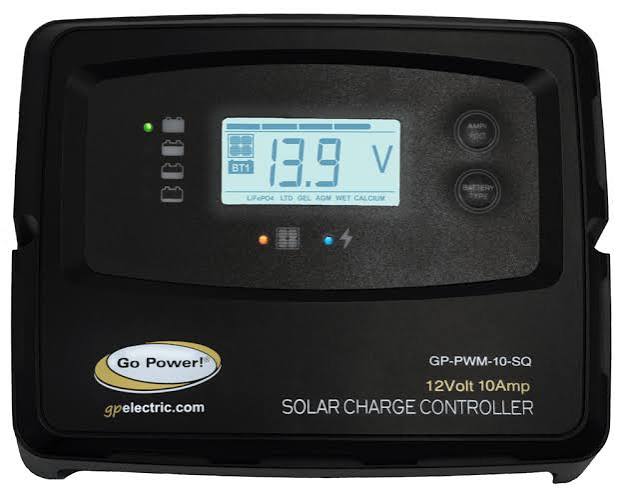
The Go Power GP-PWM-10-SQ solar charge controller is a compact 10-amp PWM controller designed for small solar power systems, especially RVs, trailers, boats, and off-grid battery charging setups. It is built to protect batteries from overcharging while helping solar panels deliver stable, efficient charging through a four-stage charging profile. With support for common battery types such as sealed, AGM, flooded, and LiFePO4, it offers flexibility for many 12V applications.
One of the biggest strengths of the GP-PWM-10-SQ is its simplicity. The square-form design is easy to mount, the LCD-style status display makes daily monitoring straightforward, and the temperature compensation feature helps improve charging accuracy in changing weather conditions. It also includes reverse polarity protection and overcurrent safeguards, which add confidence for first-time installers and everyday users alike.
This controller is best suited for RV owners, van-life builds, marine users, and anyone running a modest 12V solar setup. It is commonly paired with rooftop solar arrays and battery banks where space and reliability matter more than advanced programmability. At the time of writing, the estimated price range is typically around $40 to $80 depending on seller, availability, and whether it is new old stock or bundled with other solar components. The GP-PWM-10-SQ is also widely discussed in replacement and retrofit scenarios because it accepts up to 190 watts of solar at 12 volts, making it a practical fit for many factory-installed or entry-level systems.
Specifications: Go Power GP-PWM-10-SQ Solar Charge Controller Details
- Controller type: PWM solar charge controller
- Nominal system voltage: 12V
- Maximum solar array current: 10A
- Maximum solar input power: Up to 190W at 12V
- Maximum solar panel input voltage: 25V
- Battery voltage range: 6V to 15.5V
- Charging stages: Four-stage charging with boost, absorption, float, and equalize functions
- Battery profiles: Sealed/GEL, AGM, Flooded, and LiFePO4
- Temperature compensation: Included for improved charging accuracy
- Protection features: Battery reverse polarity, solar array reverse polarity, overtemperature, and overcurrent protection
- Operating temperature: -25°C to 50°C
- Dimensions: 102 x 130 x 27 mm
- Weight: 151 g
- Maximum wire gauge: #6 AWG
- Warranty: 1 year
Compared with similar 10-amp PWM controllers, the GP-PWM-10-SQ stands out for its battery-type flexibility and temperature compensation. Many budget controllers offer fewer charging profiles or weaker protection features, while higher-end MPPT models offer better harvesting efficiency but at a much higher cost. For small 12V systems, this controller delivers a balanced mix of reliability, simplicity, and value.
Pros and Cons of the Go Power GP-PWM-10-SQ Solar Charge Controller
Pros
- Easy to use: The interface is straightforward, making it ideal for RV owners and beginners.
- Multiple battery settings: Supports sealed, AGM, flooded, and LiFePO4 batteries for broader compatibility.
- Reliable protection: Built-in safeguards help reduce the risk of wiring mistakes and overheating.
- Compact design: The small footprint works well in tight electrical compartments.
- Good value for small systems: Suitable for modest solar setups where a full MPPT controller would be unnecessary.
Cons
- Limited to 10 amps: Not suitable for larger solar arrays or future system expansion.
- PWM efficiency: Less efficient than MPPT controllers, especially when panel voltage is significantly higher than battery voltage.
- Best for 12V systems only: It is not a flexible choice for multi-voltage installations.
- Basic feature set: Lacks advanced monitoring and smart connectivity found in premium alternatives.
For users comparing entry-level solar charge controllers, the GP-PWM-10-SQ is a strong fit if the goal is dependable battery maintenance rather than maximum solar harvest. If the plan is to add more panels later, an MPPT option may offer better long-term value.
Customer Reviews: What Users Say About the Go Power GP-PWM-10-SQ
Customer feedback on the Go Power GP-PWM-10-SQ solar charge controller is generally positive, with many users giving it around 4.3 out of 5 stars for reliability and ease of installation. RV owners often praise its simple operation, compact size, and clear battery charging behavior. A common positive comment is that it works well as a direct replacement for factory-installed solar controllers.
Typical user praise includes remarks like, “Simple to install and it immediately started charging our batteries properly,” and “A dependable controller for a small RV solar setup.” Common complaints usually focus on the 10-amp limit and the lack of advanced display features. Some buyers also note that it is not the right choice for larger solar arrays or heavy daily power use.
Purchase it if you need a straightforward, affordable controller for a small 12V system. Skip it if you want maximum efficiency, app-based monitoring, or expansion potential. For many RV and marine users, it remains a practical and trustworthy option.
Frequently Asked Questions
What is the Go Power GP-PWM-10-SQ used for?
It is used to regulate charging from solar panels into a 12V battery bank and protect the batteries from overcharging.
How many watts can the GP-PWM-10-SQ handle?
It accepts up to 190 watts of solar at 12 volts, with a maximum input current of 10 amps.
Is the GP-PWM-10-SQ good for lithium batteries?
Yes, it includes a LiFePO4 battery profile, making it suitable for compatible lithium setups.
Is this controller still available?
The GP-PWM-10-SQ is commonly listed as a discontinued product, so availability may be limited to remaining inventory, replacement stock, or resale marketplaces.
Faqs
How do I set up the go power GP-PWM-10-SQ Solar Charge Controller for the first time?
What battery types are compatible with the go power GP-PWM-10-SQ Solar Charge Controller?
Why is my go power GP-PWM-10-SQ Solar Charge Controller not charging the battery?
How much solar input can the go power GP-PWM-10-SQ Solar Charge Controller handle?
What do the display and LED indicators on the go power GP-PWM-10-SQ Solar Charge Controller mean?
How do I choose the correct battery type setting on the go power GP-PWM-10-SQ Solar Charge Controller?
What should I do if the go power GP-PWM-10-SQ Solar Charge Controller shows a reverse polarity or error problem?
How can I maintain the go power GP-PWM-10-SQ Solar Charge Controller for long-term performance?
Tags
Leave a Comment