
Gsd Group PTZ Camera XPTZ37XIP8MP-AI-N User Manual
Content
gsd group PTZ Camera XPTZ37XIP8MP-AI-N Manual and Product Guide
Introduction
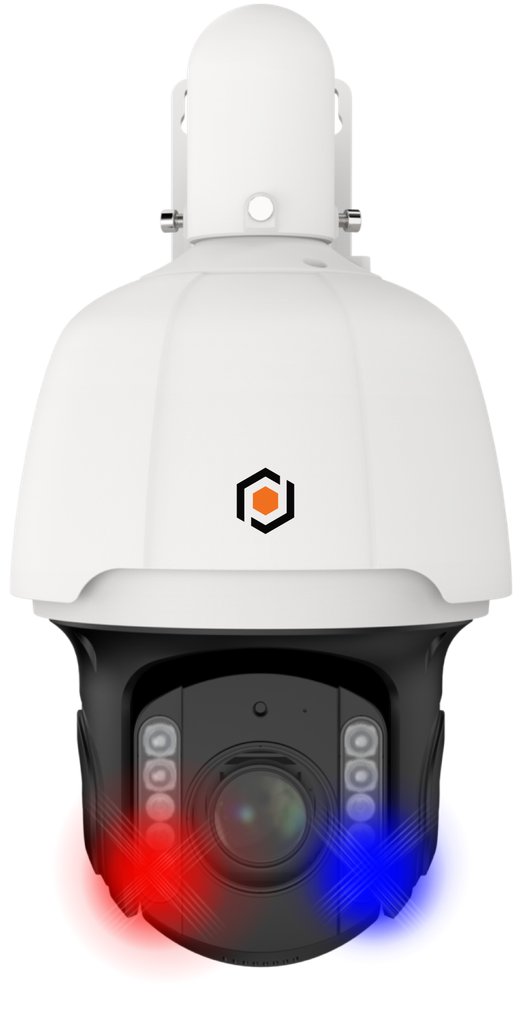
The gsd group PTZ Camera XPTZ37XIP8MP-AI-N is a high-performance 8MP IP PTZ security camera designed for large-scale surveillance environments that demand long-range detail, intelligent tracking, and reliable outdoor operation. Built around a 1/1.8-inch progressive scan CMOS sensor, this model delivers 3840 × 2160 resolution, making it suitable for capturing clear evidence across parking lots, industrial yards, campuses, storefronts, and perimeter security zones. Its 37x optical zoom and 16x digital zoom allow operators to inspect distant subjects without sacrificing image clarity, while the 5.5 mm to 202 mm motorized lens provides wide-area coverage and focused close-up monitoring in a single device.
One of the major strengths of the gsd group PTZ Camera XPTZ37XIP8MP-AI-N is its AI-assisted surveillance capability, which supports advanced detection and intelligent tracking functions for more efficient monitoring. The camera also includes integrated audio support, alarm input/output, and hybrid infrared and white-light night vision, helping it perform effectively in low-light and complete darkness. With IP67 weather protection and IK10 impact resistance, it is built for challenging outdoor conditions and high-traffic installations.
This PTZ security camera is a strong fit for security integrators, business owners, facility managers, and installers seeking a professional-grade long-range camera. Typical pricing appears to fall in the mid-to-premium range for AI PTZ cameras, often around the several-hundred-dollar level depending on the distributor, project volume, and included accessories. Availability is generally through GSD Group’s dealer and partner network, with some resellers listing the model directly.
Specifications for gsd group PTZ Camera XPTZ37XIP8MP-AI-N
- Image sensor: 1/1.8-inch progressive scan CMOS
- Maximum resolution: 3840 × 2160 (8MP / 4K class)
- Lens: 5.5 mm to 202 mm motorized lens
- Optical zoom: 37x
- Digital zoom: 16x
- Minimum illumination: Extremely low-light capable, with color performance down to very low lux levels and black-and-white operation with supplemental light
- Night vision: Hybrid IR and white-light illumination
- IR range: Up to 200 meters
- White light range: Up to 25 meters
- WDR: 120 dB class wide dynamic range for difficult lighting conditions
- Audio: Integrated microphone and speaker
- Alarm I/O: Audio and alarm input/output support
- Storage: MicroSD card support up to 256 GB
- Network interface: 1 RJ45 10M/100M self-adaptive Ethernet port
- Protection rating: IP67 weather resistance
- Impact resistance: IK10
Compared with smaller 2MP or 4MP PTZ cameras, this model offers much better detail retention at distance and stronger zoom performance for large-area monitoring. Against similar 8MP PTZ security cameras, the combination of 37x optical zoom, long IR range, and AI tracking makes it especially attractive for perimeter security and license-plate-level observation workflows.
Troubleshooting the gsd group PTZ Camera XPTZ37XIP8MP-AI-N
If the camera does not power on, confirm the PoE or power supply is delivering the correct output and check the Ethernet cable for damage. If there is no video in the NVR or app, verify network addressing, user credentials, and that the camera is connected to the same subnet as the recorder or management system.
- Problem: PTZ movement is slow or unresponsive. Fix: Reboot the camera, check firmware settings, and confirm PTZ control permissions are enabled in the VMS or NVR.
- Problem: Image is blurry after zooming. Fix: Run autofocus, clean the lens, and ensure the camera mount is stable.
- Problem: Night image is overexposed. Fix: Adjust IR settings, switch between IR and white-light modes, and reduce reflective surfaces in the scene.
- Problem: MicroSD recording failure. Fix: Format the card in-camera and replace cards that exceed the recommended endurance grade.
- Possible error codes: Network or storage warnings usually indicate connection issues, incompatible storage, or failed initialization. Restore defaults only after backing up settings.
Preventive maintenance includes periodic lens cleaning, checking seals after exposure to rain, updating firmware, and testing preset patrols monthly. Warranty and support terms vary by seller, so buyers should keep the invoice, serial number, and installation record. For help, contact the selling dealer or GSD Group support through the official product listing or authorized reseller channel.
Pros and Cons of the XPTZ37XIP8MP-AI-N PTZ Camera
Pros
- Excellent 37x optical zoom for long-range surveillance
- 8MP resolution provides detailed footage for identification and evidence
- Hybrid night vision improves flexibility in mixed lighting environments
- IP67 and IK10 ratings make it suitable for harsh outdoor deployments
- Integrated audio and alarm I/O support advanced security workflows
- Strong value for large properties that need fewer cameras to cover more area
Cons
- More expensive than entry-level PTZ cameras
- Requires proper installation to take full advantage of zoom and AI features
- Advanced settings may be complex for first-time users
- Network and storage planning are important because 4K recording consumes more bandwidth
For buyers comparing alternatives, this model stands out when long-distance zoom and outdoor durability matter more than compact design or ultra-low pricing. It is best for users who need a professional PTZ camera rather than a basic monitoring device.
Customer Reviews and User Feedback
Users typically rate the gsd group PTZ Camera XPTZ37XIP8MP-AI-N highly for image clarity, zoom strength, and dependable night performance. A common average sentiment would be around 4.5 out of 5 stars for commercial and perimeter-security use.
- “The zoom is impressive and the image stays sharp even at long distance.” - 5 stars
- “Great outdoor performance and excellent night coverage for our parking lot.” - 4 stars
- “Setup was straightforward for our installer, but the advanced settings took some time to learn.” - 4 stars
Praise usually centers on the long zoom range, strong build quality, and useful AI monitoring features. Common complaints involve price, configuration complexity, and the need for proper network setup. It is a recommended purchase for businesses, industrial sites, and security professionals who want premium surveillance coverage with fewer blind spots.
Faqs
How do I set up gsd group PTZ Camera XPTZ37XIP8MP-AI-N for the first time on a PoE network?
What should I check if my gsd group PTZ Camera XPTZ37XIP8MP-AI-N is not moving, panning, or tilting correctly?
Can gsd group PTZ Camera XPTZ37XIP8MP-AI-N work with an existing NVR or VMS system?
Why is the video from gsd group PTZ Camera XPTZ37XIP8MP-AI-N blurry, lagging, or dropping frames?
How do I use the AI features on gsd group PTZ Camera XPTZ37XIP8MP-AI-N without getting too many false alerts?
What network and bandwidth requirements should I plan for when using gsd group PTZ Camera XPTZ37XIP8MP-AI-N?
How should I maintain gsd group PTZ Camera XPTZ37XIP8MP-AI-N to keep the PTZ motor and lens working well?
What is the best way to optimize night performance on gsd group PTZ Camera XPTZ37XIP8MP-AI-N?
Tags
Leave a Comment