
Setup : Gustard H26 Headphone Amplifier User Manual
Content
Gustard H26 Headphone Amplifier
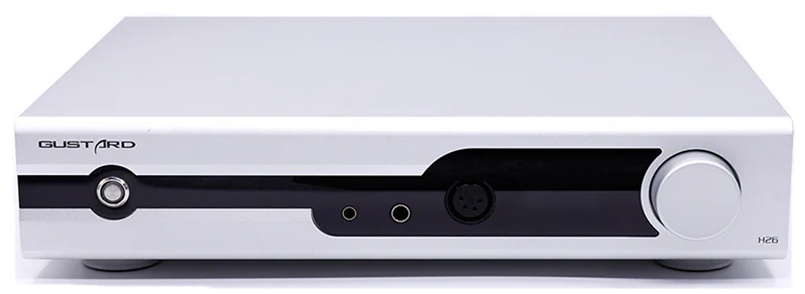
Introduction
The Gustard H26 Headphone Amplifier is a premium desktop-class audio device designed for audiophiles and professional users seeking exceptional sound clarity and power. Featuring a fully balanced discrete Class A amplification circuit, the H26 delivers an unparalleled listening experience with rich detail, low distortion, and precise control. Its robust build includes two custom 50W toroidal transformers, one dedicated to each channel, ensuring minimal interference and dynamic, powerful output suitable for a wide range of high-end headphones.
Key benefits of the Gustard H26 include its ability to drive demanding headphones with up to 12W balanced power at 32Ω load (with undistorted power rating typically at 6W), independent power switching for headphone and preamp outputs, and a sophisticated matrix relay volume control providing smooth, consistent adjustments. Audiophiles and sound engineers will appreciate its versatility, supporting single-ended and balanced inputs with seamless switching between headphone and speaker listening modes.
The Gustard H26 is ideal for users with high-impedance headphones like the Sennheiser HD 800 or luxury models such as Utopia 2022 and Susvara, delivering optimal soundstage and detail. Pricing for this high-performance amplifier typically ranges from $1100 to $1300 USD, with availability through select audiophile retailers and online stores specializing in high-fidelity audio equipment.
Technical Specifications and Features of the Gustard H26 Headphone Amplifier
- Amplifier Type: Fully balanced discrete Class A amplification
- Power Transistors: 8 pairs of power transistors for robust drive and control
- Transformers: Two custom 50W toroidal transformers (one per channel)
- Headphone Outputs: Balanced 4-pin XLR and 4.4mm, Single-ended 6.35mm jack
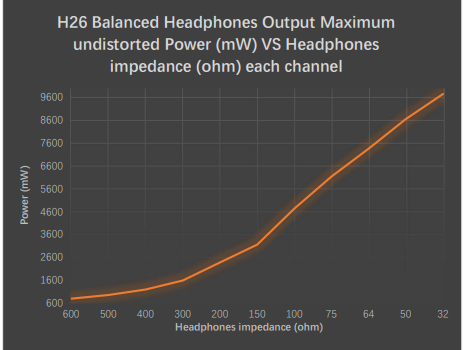
- Output Power: Up to 12W balanced power into 32Ω load (6W undistorted); approx. 7.35W at 64Ω
- Input Options: Dual XLR balanced inputs, RCA single-ended input
- Volume Control: Matrix relay volume control for bias-free, precise adjustments
- Preamp Features: Dual LME49720 op-amps for seamless preamp output switching
- Frequency Response: 20Hz – 80kHz ±0.1dB
- Signal-to-Noise Ratio: >122dB for headphone out; >123dB for line out
- THD+N: <0.0005% at rated output power
- Dimensions: Approximately 330mm (W) x 260mm (D) x 65mm (H)
- Weight: Solid construction for desktop use
- Line-in
- RCA standard input x1, input sensitivity typical: 2-3Vrms; input impedance 4kΩ
- XLR balanced input x2, input sensitivity typical: 4-6Vrms, maximum 12Vrms; input impedance 8kΩ
- Preamp-out
- Output Impedance: 100Ω (XLR&RCA)
- Frequency Response: 20-80kHz /-0.1dB
- Signal-to-noise ratio: >123dB
- Crosstalk: -123dB @ 1kHz
- THD+N: <0.0002%
- IMD: <0.0003%
- XLR pinout: XLR 1-Ground 2-Hot 3-Cold
- Headphone-out
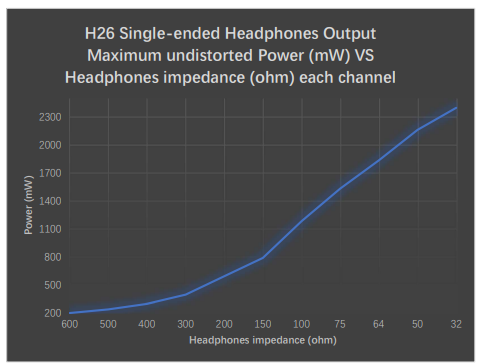
- Single-ended output impedance (6.35mm): 0.05Ω
- Balanced output impedance (XLR 4 PIN or 4.4): 0.1Ω
- Frequency Response: 20-80kHz /-0.1dB
- Signal-to-noise ratio: >122dB
- Crosstalk: -112dB @ 1kHz
- THD+N: <0.0005% @9700mW into 32Ω LOAD
- IMD: <0.0005% @9700mW into 32Ω LOAD
- Maximum undistorted output power: 9700mW into 32Ω LOAD
- Maximum output power: 12000mW @32Ω (when THD=1%)
- Load power (per channel)
- 64Ω 7350mW
- 150Ω 3152mW
- 300Ω 1576mW
- 600Ω 788mW
- Others
- AC power supply: AC 115V/230V 50/60Hz (manually adjustable).
- Power consumption of the whole machine: ~30W
- Size: W330mm H65mm D260mm (excluding protruding parts) Weight: 7Kg (including packaging)
Compared to other headphone amplifiers in its class, such as the Gustard A26 or R26 DACs, the H26 emphasizes discrete Class A design and fully balanced architecture, ensuring cleaner sound and better channel separation. Its independent amplifier power switching is a unique feature that enhances versatility for hybrid listening setups.
Front Panel
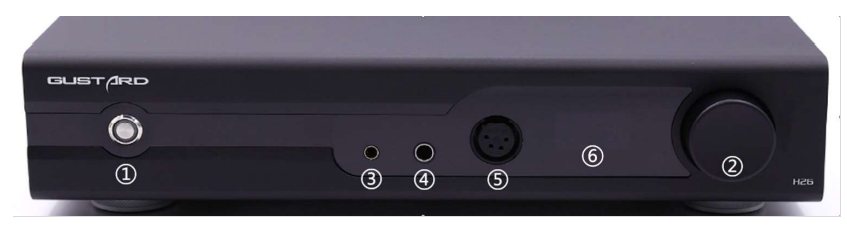
- Power and mute switch: key switch, short press to turn on the power in off state, long press to turn off the power in on state. Press in power button on the state can enter and release mute.
- Volume and operation knob: volume in the normal state, clockwise increase, counterclockwise decrease. Short press to switch the input channel, long press to enter the menu.
- 4.4 balanced headphone jack
- 6.35 single-ended headphone jack
- XLR 4-pin balanced headphone jack:
- Pin 1=Left+
- Pin 2=Left-
- Pin 3=Right+
- Pin 4=Right-
- Screen: Displays the current volume level, or provides access to menu operations.
Back Panel
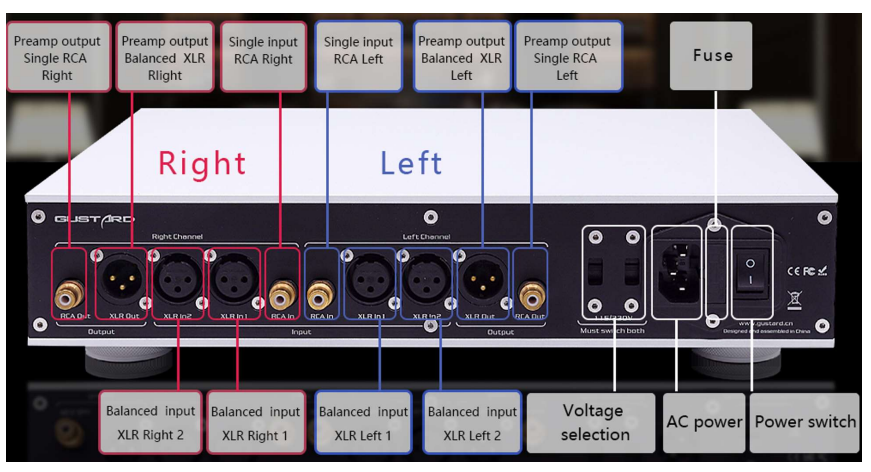
AC international voltage switching is a dual switch because there are 2 transformers inside. So when switching the supply voltage, both switches must be switched at the same time in the power off and power off state.
Otherwise, you will damage the one transformer that has not been properly configured.
Remote
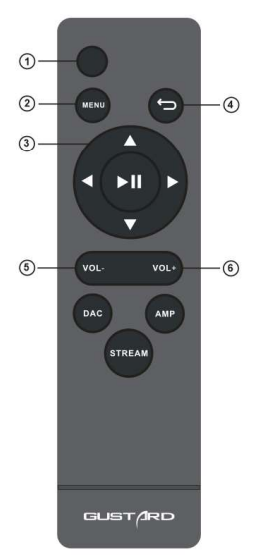
When using the H26's remote control for the first time, please press and hold the AMP button for more than 3 seconds to enter the operation mode of the headphone amplifier product.
- Power Button: Turn on the H26 power in the off state, or turn off the power in the working state .
- Menu button: Press this button to enter the function setting menu of the H26 headphone amplifier.
- 4-Direction Button: By pressing the up/down button, you can switch the input channel. When entering the menu of the H26 headphone amplifier, switch the entry by up/down and left/right to adjust the options.
- Return button: return to the volume display.
- Volume down button: When the H26 headphone amplifier is in volume display, press this button to reduce the output volume.
- Volume up button: When the H26 headphone amplifier is in the volume display, press this button to increase the output volume.
Note:
- The operating distance varies depending on the angle
- If there are objects between the remote control and the sensor, it may not operate properly
- If the remote control will not be used for a long period of time (one month or more), remove the batteries
- If the batteries are leaking, thoroughly clean all residue in the battery compartment and install new batteries
- When other devices controlled by infrared light are being used, the use of this remote control may cause those devices
Output power vs. impedance graph
Balanced
Single-ended
Common Troubleshooting for Gustard H26 Headphone Amplifier
- No Sound Output: Verify proper connection of headphone cables and input sources; ensure power is switched on for the headphone amplifier section independently from the preamp output.
- Distorted Audio: Check gain settings; high gain may cause clipping with sensitive headphones. Use the lower gain setting for low-impedance or efficient headphones.
- Volume Control Issues: If volume adjustments feel inconsistent, reset the device power. The matrix relay volume control offers precise steps but requires clean signal paths.
- Interference or Noise: Ensure balanced cables are used where possible; minimize nearby electronic interference. The dual toroidal transformers reduce noise,, but grounding issues can still affect performance.
- Error Codes: The H26 does not display error codes; issues generally relate to hardware connections or source compatibility.
Preventive measures include powering off the unit when not in use and avoiding sudden volume spikes to protect connected headphones. The Gustard H26 typically comes with a one-year warranty covering manufacturing defects. For support, users can contact authorized dealers or Gustard’s official service centers via their website or customer service email.
Product Warranty
You will enjoy the 2-year free warranty and lifetime maintenance after the date of purchasing GUSTARD’s product.
The manufacturer bears only the freight from the Chinese mainland. Part of the freight and tax generated from overseas will be solved by the user through the dealer negotiations.
Free Warranty Service
GUSTARD’s products from the purchasing date in the free warranty period, the user uses the product in normally, and the product fails due to component quality or manufacturing problems.
Beyond the Warranty Service
Belonging to one of the following circumstances, products are no longer provided with warranty service.
- Products from the date of purchase have exceeded a predetermined warranty period.
- Model, barcodes,, and purchase date do not match the actual product and warranty card.
- Without GUSTARD technician permission, unauthorized modifications to the circuit, components,, or self-repaired product.
- Damage caused by irresistible natural forces.
- Beyond the permitted use of environmental damage.
- Damaging due to incorrect use or improper storage. Including but not limited to: the voltage is too high to burn the circuits or components; Bumping and resulting in damaging the shell or internal components; damaging due to water, oil, liquid,, and excessive dust; product oxidation or corrosion, etc.
- Beyond the warranty period, such as an individual component damage, appearance due to human damage, firmware modifications leathat d to the inability to work by unauthorized users. GUSTARD commits to take reasonable maintenance fees (except for large area components or circuit boards burned beyond repair). Freight and maintenance costs, material costs,, are required the user to bear.
Pros and Cons of the Gustard H26 Headphone Amplifier
- Pros:
- Exceptional sound clarity with fully balanced discrete Class A circuitry
- High output power capable of driving demanding headphones effortlessly
- Independent power control for headphone and preamp outputs enhances flexibility
- Robust build quality with premium components,, including dual toroidal transformers
- Matrix relay volume control enables precise, bias-free volume adjustments
- Supports both balanced and single-ended input/output connections
- Cons:
- Price point may be high for casual listeners or entry-level users
- Basic feature set without digital inputs or advanced connectivity; a large desktop footprint may not suit compact setups
- Requires some technical knowledge to optimize gain settings and connections
Overall, the Gustard H26 offers excellent value for money in the high-end headphone amplifier segment, especially for audiophiles who prioritize sound purity and power output. Alternatives may include integrated DAC/amps,, but often lack the discrete Class A design and power independence found in the H26.
Customer Reviews and Feedback on the Gustard H26 Headphone Amplifier
Users frequently praise the Gustard H26 Headphone Amplifier for its exceptional build quality, clean sound signature, and ability to drive a wide range of headphones from sensitive to high-impedance models. Many reviews highlight the amplifier's natural tonal balance, low noise floor, and excellent channel separation, enhancing the listening experience.
Common compliments include seamless switching between headphone and preamp modes and the smooth, bias-free volume control. Some users note the device's relatively simple feature set but agree that this simplicity contributes to its reliability and straightforward operation. Typical star ratings range around 4.5 out of 5, reflecting strong satisfaction.
Frequent complaints concern the unit's size and price, which may deter budget-conscious buyers. A few mention the need to carefully manage gain settings to avoid distortion on sensitive headphones. Nevertheless, the consensus recommends the Gustard H26 for serious headphone enthusiasts and professionals seeking a high-performance amplifier with refined sound quality.
Faqs
How do I set up the gustard H26 Headphone Amplifier for optimal performance?
What should I do if my gustard H26 Headphone Amplifier produces no sound or low output?
Can the gustard H26 Headphone Amplifier work with both balanced and single-ended headphones?
How do I use the preamp function on the gustard H26 Headphone Amplifier?
What makes the gustard H26 Headphone Amplifier’s Class A discrete amplification special?
How can I optimize the gustard H26 Headphone Amplifier for different headphone impedances?
What are common maintenance tips to keep the gustard H26 Headphone Amplifier in good condition?
Why does the gustard H26 Headphone Amplifier have separate power control for headphone and preamp outputs?
Tags
Leave a Comment