
Setup: Gyroor Board Electric-Assisted Scooter H30 User Manual
Content
Gyroor Board Electric-Assisted Scooter H30
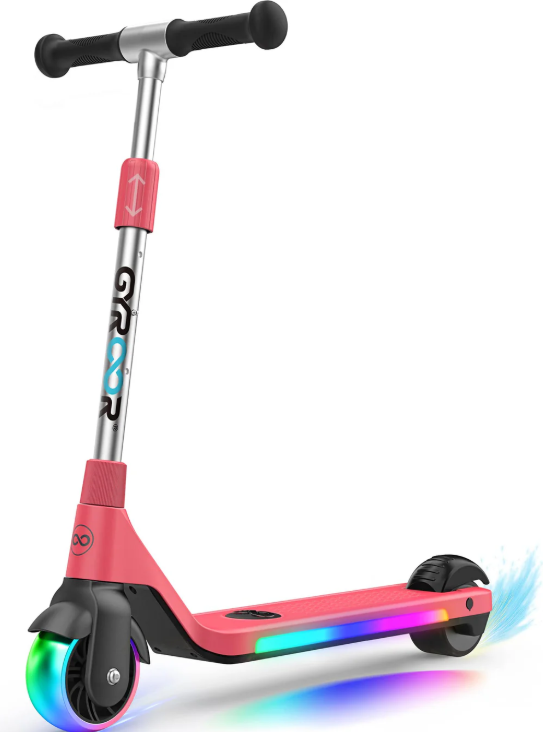
Introduction
The Gyroor Board Electric-Assisted Scooter H30 is a cutting-edge, innovative transportation solution designed for both recreational and commuting purposes. This scooter is equipped with advanced technology to provide a smooth, stable, and enjoyable riding experience. The H30 model is expected to launch in the summer of 2023, with an estimated price range of $499 to $599, making it an affordable option for those looking to invest in a high-quality electric scooter.
The Gyroor Board H30 is perfect for short to medium-distance commutes, leisure rides, and even off-road adventures. Its robust design and powerful motor ensure that it can handle various terrains with ease. Whether you're navigating through urban streets or exploring trails, this scooter offers the versatility and performance you need.
Product Accessories
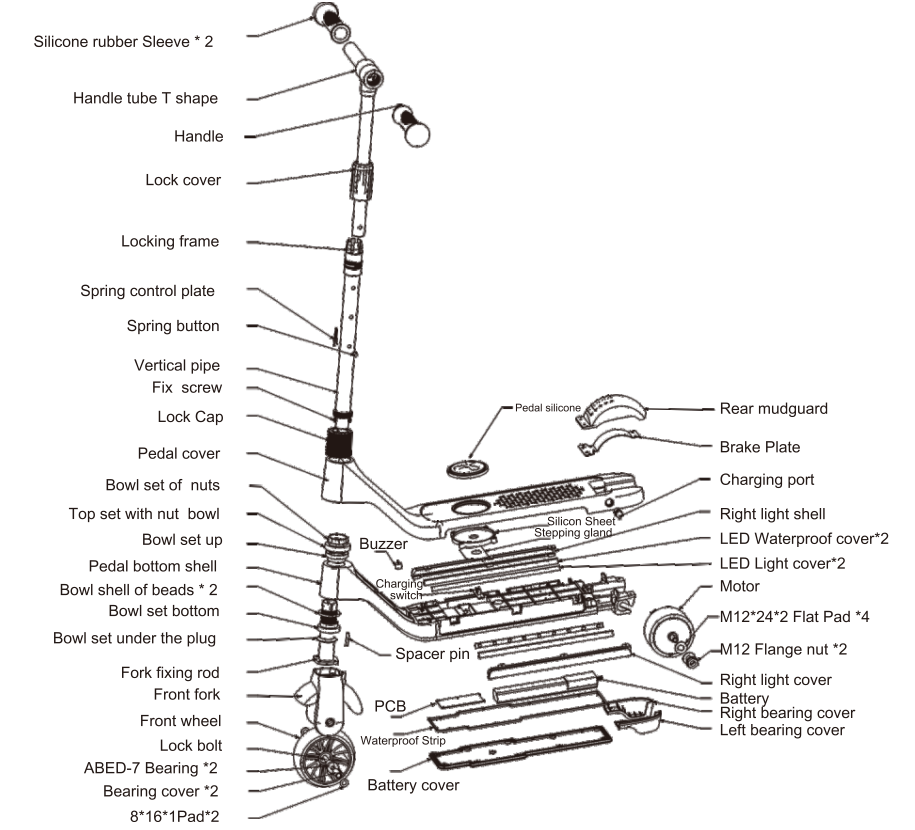
Product Installation and Expansion Display
Product Installation Diagram
- Tighten the handle toward the Arrow
- Attach the vertical rod to the bottom plate and align it with the screw hole.
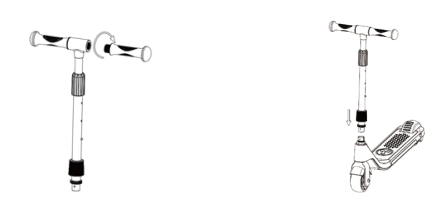
Use a screw to tighten the scre
- Tighten the cap in the direction of the Arrow
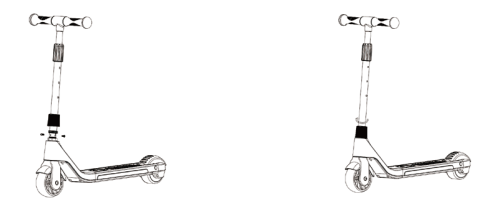
Product Expansion Diagram
- UNSCREW IT in the direction of the Arrow
Press the vertical lever to load the marble, then grab the handle and pull it up and down.
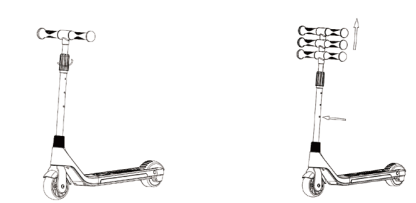
- Tighten after adjusting the height
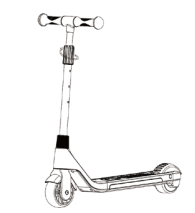
Introduction To Riding Operations
- Starting method: Hold the handle with both hands and gently push it forward. When you hear "drop "from the buzzerrr,itmeansthatthecurrentspeedis6KM/H. When the buzzer emits three "drops'', it means the current speed is OKM/H.
- Gear change mode: After sliding the motor, press the pedal switch 5 times continuously to change gears at different speeds.
- When the speed setting is successful: When the current speed is 6KM / H, the buzzer will sound 1 time; 1 OKM/ H, 3 sounds. tartingme
- Automatically turn off: The scooter will automatically turn off after 15 seconds of inactivity. If you need to use it, please slide the motor again.
- Lights: After the motor is started, the lights cycle from cyan to seven colors, then turn off, and turn on again when the induction contact is pressed. When the scooter is started, press and release the foot switch, and the buzzer will emit a"drop". If it is not started, press and release the foot switch; the buzzer will not sound.
- Riding method: Hold the handle with both hands, put one foot on the foot switch, and pedal the other foot pedal back to accelerate. When the gliding speed reaches about 3KM / H, it will start slowly increasing the speed to the current gear. Set the speed, and keep driving at a uniform speed.
- Stop method.
- Please ease the use of one foot to step on the rear wheel brake plate
- The foot leaves the foot switch on the pedal to complete the stop.
- Low battery indication: If the scooter emits a continuous sound of "drops, drops, drops", indicating that the battery is low, please charge the scooter in time.
Safety Instruction
- This product is a mini electric power-assisted scooter for children. It is restricted to one child.
- It should not be used by adults or two people at the same time. Children must be accompanied y parents or adults when using electric-assisted scooters.
- When riding this product, please wear a safety helmet and other protective equipment.
- Do not ride this product in places where it is unsafe or illegal, such as motor vehicle lanes.
- Please practice first in an open place and master the operation before driving.
- Do not make dangerous moves or one-handed rides while the scooter is running. Keep your feet
on the pedal. - Do not try to directly pass the step of 3 cm or more in the gap, which may cause the scooter to subvert, causing the rider to be injured or the car to be damaged; the steps below 3 cm should be avoided as much as possible.
- When encountering rough or uneven road conditions, please slow down or get off.
- Users must adjust the height of the product to the proper position to ensure safe driving.
- Do not ride this product on slippery surfaces , such as oil or ice on the surface.
- Do not use this product below -S°C..
- Do not use it in a sloping section over 5 degrees. To use it over 5 degrees uphill, you need pedal assist.
- Do not immerse the product in water depths above 5 cm to avoid damage to the electrical parts of he vehicle due to water ingress.
- In the bad weather, such as rain, snow,, and wind, please avoid riding as much as possible to avoid unnecessary damage caused by unnecessary factors. If the product is fully charged, it will not be used for at least one month, and it must be charged a least once a month. If it is running on no electricity (the electricity is exhausted), it must be charged once every 7 days.
Battery and Charger
Lithium Battery
When you get the electric assist scooter for the first time, please fully charge the battery before using it.
- Please charge immediately after the car emits a low battery warning tone to avoid damage to the battery and affect your use.
- When the battery is not used for a long time, please charge it at least once a month (when the battery is fully charged).
- If the battery is not used for a long time, the battery level is lower than the battery protection status,, and it cannot be used. Please contact the dealer quickly.
Note: The battery is damaged due to water, collision, or other abnormal factors, and is not covered by the warranty.
Charger
The dedicated charger provided by the company has a charging protection function, and when the battery is 100% fully charged, it will automatically stop charging. Damage caused by other abnormalities, such as water ingress, collision, etc., is not covered by the warranty.
- Open the charging rubber cover on the pedal and insert the charger output connector into the charging hole.
- Plug the charger input power into the power socket (ACl 00V-240V)
- The charger indicator is red, indicating that it is charging; when the charger indicator turns green, the battery is fully charged.
- When charging the battery, please place it in a dry and ventilated environment.
The Scope Of Warranty
Under normal use, if the parts of the electric-assisted scooter are in the following order during the warranty period, please contact our company or product distributor, and we will provide relevant after-sales service.
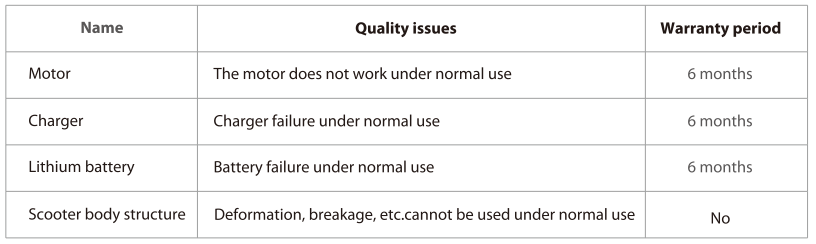
(The above quality problem is free service, no maintenance fee)
Note: Please correctly use our products
The damage and damage to the parts caused by abnormal use is not covered by free maintenance.
During the warranty period, if the following reasons cause the failure, the damage is not within the scope of quality assurance.
- Not properly maintained and repaired in accordance with this manual.
- Use the electric assist scooter for dangerous actions such as stunts,, etc, resulting in damage or malfunction.
- Any disassembly or use of parts outside the original factory.
- Body and body parts damaged by mistakes, traffic accidents, ts, or accidental collisionIncompletelete label, water, part number mismatch.
- Driving on an abnormal road can cause damage or a malfunction.
- Commercial rental or improper use.
- The irresistible cause of the natural disaster. Exposing this product to the sun for a long time or long-term rain, thus causes rapid aging and failure of the product.
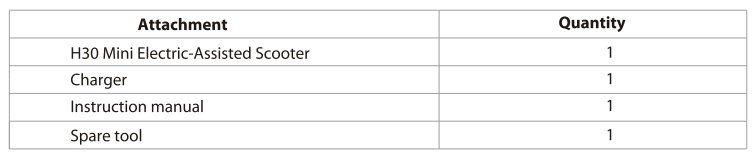
Package Attachment
Specifications
- Color : Black/blue/Red
- Speed: 6-10KM/H/4460000C008Os00%it will run at a constant speed)
- Maximum grade: 5°
- Battery: 21.6V, 2.5 AH
- Attachment: 3.5 inch. 80W
- Motor: 3.5 inch. 80W
- Max loading: 50KG
- Maximum running distance: 5-10KM
- Scooter size: 70*34*74/80/86CM
- Pedal distance from the ground: 8CM
- Scooter-body ground clearance: 4.5CM
- Net Weight/Gross Weight: 4.2/5.5KG
- Color: Black/blue/Red
Contact
- Contact us if you experience issues relating to riding, maintenance,, and safety, or errors/faults witthe h the scooter.
- Messenger: Gyroor (scan the QR code on the back cover)
- Have your order number on hand when contacting Gyroor.
- Learn more News about the Gyroor hoverboard?
- Scan the "Gyroorboard" Messenger QR code to get it soon.
Troubleshooting
If you encounter any issues with your Gyroor Board H30, here are some common problems and solutions:
- Issue: Scooter Not Turning On - Check if the battery is fully charged. Ensure all connections are secure.
- Issue: Brake Malfunction - Adjust the brake cable and ensure it is properly connected.
- Issue: Bluetooth Connectivity Problems - Restart both the scooter and your smartphone, then try pairing again.
Always follow safety instructions and wear protective gear during use.
Pros & Cons
Pros:
- Powerful Motor and Long Battery Life
- Sturdy and Durable Design
- Advanced Safety Features (Dual Braking System)
- Comfortable Ride with Pneumatic Tires
- Bluetooth Connectivity for Enhanced User Experience
Cons:
- Relatively Heavy Weight
- Charging Time Could Be Longer
- No Foldable Design
- Higher Price Point Compared to Basic Models
Customer Reviews
Customers have praised the Gyroor Board H30 for its performance, stability, and comfort. Many users appreciate the scooter's ability to handle rough terrain and its long battery life. However, some users have noted that the charging time could be shorter and that the scooter is somewhat heavy to carry around.
Faqs
What is the top speed of the Gyroor Board H30?
How long does it take to charge the battery fully?
Is the Gyroor Board H30 waterproof?
What are the dimensions and weight of the scooter?
Can I use the Gyroor Board H30 off-road?
How do I assemble and pair my Gyroor Board H30?
What safety features does the Gyroor Board H30 come with?
Can I customize or upgrade parts of my Gyroor Board H30?
What kind of maintenance does the Gyroor Board H30 require?
Is there a warranty on the Gyroor Board H30?
Tags
More gyroor manuals
Leave a Comment