
Pairing: Hator A60 Pro Earbuds User Manual
Content
Hator A60 Pro Earbuds
Introduction
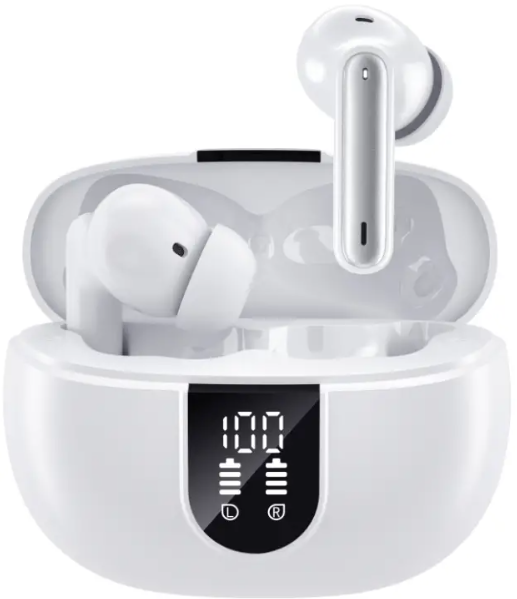
The hator A60 Pro Earbuds deliver an exceptional true wireless audio experience designed for users seeking convenience, superior sound quality, and modern features. These earbuds combine active noise cancellation (ANC), Bluetooth 5.3 connectivity, and ergonomic design to provide clear calls, immersive music, and comfortable wear throughout the day. Ideal for athletes, commuters, remote workers, and casual listeners, the hator A60 Pro is versatile enough for sports, travel, gaming, and daily use.
Unique selling points include advanced ENC (Environmental Noise Cancellation) with four microphones, an IPX7 waterproof rating for durability against sweat and rain, and a compact charging case featuring a digital LED battery display. They offer up to 12 hours of playback on a single charge with an additional 30+ hours from the charging case, ensuring long-lasting use without frequent recharging.
Available globally through various online retailers, including Amazon and specialized electronics stores, the hator A60 Pro Earbuds typically range between $18 to $40, depending on the vendor and regional pricing. Their affordable price, coupled with premium features, makes them a compelling choice for budget-conscious audiophiles seeking wireless freedom and noise isolation.
Specifications and Features of hator A60 Pro Earbuds
- Bluetooth Version: 5.3 for stable and efficient wireless connection
- Battery Life: 5-6 hours continuous playback per charge; up to 42 hours total with charging case
- Charging Time: Approximately 1.5 hours to fully recharge earbuds and case
- Charging Case Capacity: 320 mAh with an LED digital display for battery status
- Microphones: Four ENC mics providing clear voice calls and environmental noise cancellation
- Water Resistance: IPX7 rated, suitable for sports and outdoor use in wet conditions
- Audio Quality: HiFi stereo sound with frequency response spanning 20-20,000 Hz
- Controls: Touch-sensitive controls on each earbud for play/pause, track navigation, volume adjustment, call handling, and voice assistant activation
- Transmission Distance: 10-15 meters wireless range
Compared to similar earbuds in the same price segment, such as generic Bluetooth 5.0 models, the hator A60 Pro offers enhanced connectivity, longer battery life, and advanced noise cancellation technology, making it a strong contender for those valuing both sound quality and durability.
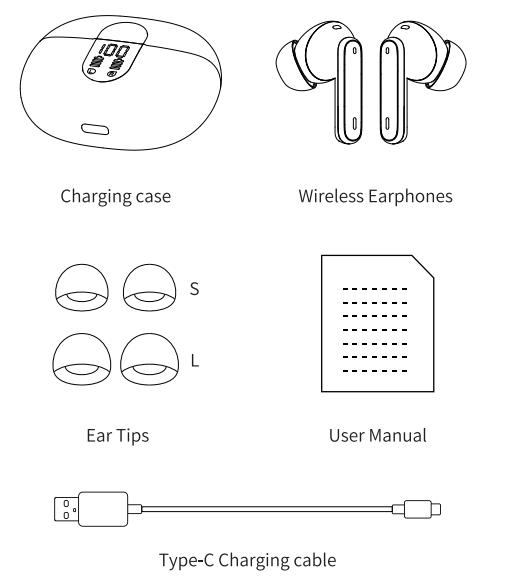
Accessories
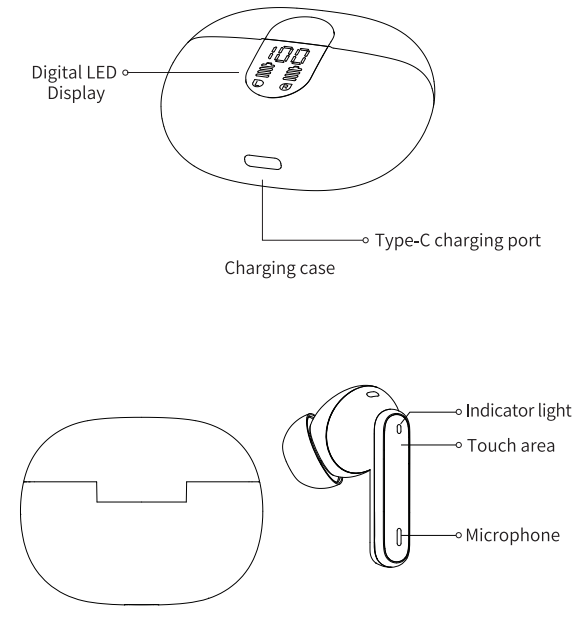
Overview
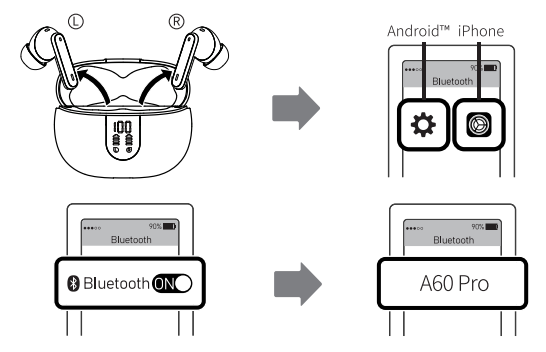
Bluetooth Pairing
Take out the earphones and search "A60 Pro" on your mobile to connect. (Clear pairing: Quickly 5-click any side in the power-on state, the headset will be turned off. After restarting, the pairing history information is cleared.)
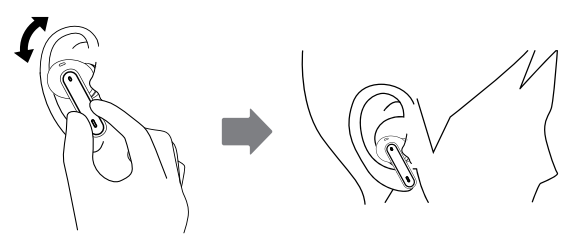
How to Wear
Take the earphones out and put them in your ears, and wiggle them slightly for the best fit and comfort.
Safety Information
Before using and operating the earphones, please read and follow the below precautions to ensure the best performance of them and to avoid dangerous or illegal situations.
Hearing Loss
- Listening to sound at high volume may permanently damage your hearing.
- When you use earphones to listen to music or calls, it is recommended to use the minimum volume required for music or calls to avoid hurting your hearing.
- Exposure to high levels of volume while driving, driving attention may distract attention and cause accidents.
Operating environment
- Do not use the device in dusty, sharp, compact, or near magnetic fields to avoid failure of the internal circuit of the device.
- When installing the device, please keep it away from strong magnetic fields or electrical appliances with strong magnetic fields, such as ovens and refrigerators.
- Do not use the device in thunderstorm weather. Thunderstorm weather may cause equipment failure or an electric shock hazard.
- Please use the device within a temperature range of -10 0 °C + 55 0 C, and store the device and its accessories within a temperature range of -40C + 70 0 C. When the ambient temperature is too high or too low, it may cause device function failure.
- When the temperature is below 50 °C, the performance of the battery is limited.
- Do not place the device in direct sunlight, such as the dashboard or windowsill of a car.
- Do not place the device near heating sources or exposed fire sources, such as electric heaters, ovens, water heaters, stoves, candles, or other places that may generate high temperatures.
- Do not place sharp metal objects such as pins near the device's earpiece or speaker; otherwise, the metal objects may adhere and cause injury to you.
Child health
- This device and its accessories may contain some small parts. Keep the device and its accessories in a place out of children's reach.
- Children may inadvertently damage the device and its accessories, or swallow small parts, causing suffocation or other hazards.
Troubleshooting Guide for hator A60 Pro Earbuds
- Issue: Earbuds not pairing or connecting
Solution: Ensure earbuds are charged, reset by long-pressing both earbuds for 5 seconds, and re-enable Bluetooth on your device. Clear previous pairing data to avoid conflicts. - Issue: One earbud is not producing sound
Solution: Check battery levels; clean the earbud and charging contacts. Re-pair the earbuds to the device. - Issue: Poor call quality or the microphone not working
Solution: Verify four ENC microphones are unobstructed. Disable any active noise cancellation if causing interference. Update device firmware if available. - Error Codes: No specific error codes, but flashing LED indicators signal pairing or low battery status.
- Preventive Measures: Keep earbuds and the case clean and dry, avoid extreme temperatures, and charge regularly to maintain battery health.
- This device is not a toy; children should use this device under adult supervision.
Battery safety
- Do not disassemble or modify the battery, or immerse in water or other liquids, to avoid battery leakage, excessive, fire or explosion.
- Do not drop, crush, or puncture the battery. It can cause internal short circuits and overheating..
- This device is equipped with a non-removable built-in battery.
- Do not replace the battery yourself to avoid damage to the battery or device.
Charger safety
- When charging the device, the power socket should be installed near the device and should be easily accessible.
- When charging is completed or not charging, disconnect the charger from the device and unplug the charger from the power outlet.
Precautions
- The earphones should be stored in a dry/ventilated environment and avoid contact with oil, water vapor, steam, moisture, and dust to maintain the performance of the product.
- Avoid using harsh organic solvents or items containing these ingredients to clean the earphones.
- The earphones should be used correctly according to the requirements, and pay attention to the effect of the environment on the product. Make sure the connection is smooth and recommend a distance between them within 10 meters.
- If the earphones failed to connect or have with poor connection, please do not dismantle them or the accessories privately. Otherwise, no warranty.
- When charging the earphones, please use the standard car charger or the charger specified by our company.
- To ensure the normal use of the earphones, please make sure they are fully charged.
Support and warranty services are commonly provided by the vendor with typical one-year coverage for manufacturing defects. Users should contact the point of purchase or official support channels for assistance, replacement requests, or firmware updates.
Pros & Cons of hator A60 Pro Earbuds
- Pros:
- Advanced Bluetooth 5.3 ensures a stable connection and low latency
- Effective active noise cancellation with four ENC microphones enhances call clarity
- IPX7 waterproof rating makes these earbuds suitable for sports and outdoor activities
- Long battery life with up to 42 hours using the charging case
- Touch controls are intuitive and support voice assistant activation
- Compact charging case with digital LED battery display for convenience
- Cons:
- Sound quality, while good, may not match premium high-end earbuds with larger drivers
- Slightly smaller battery capacity on earbuds compared to some competitors leads to 5-6 hours of playback versus up to 8 hours on flagship models.
- Limited brand recognition might concern users who prefer established names
- Touch controls may occasionally misinterpret gestures, requiring practice
Overall , the Hatorrr A60 Pro offers solid value for money, especially for users seeking active noise cancellation and waterproof features without a high price tag. Alternatives like Apple AirPods or Sony WF series offer premium sound but at significantly higher costs.
Customer Reviews and Feedback on Hator A60 Pro Earbuds
Users generally praise the hator A60 Pro Earbuds for their reliable Bluetooth 5.3 connection, effective noise cancellation during calls, and comfortable fit for long sessions. Many reviewers highlight the impressive battery life and the convenience of the LED battery indicator on the charging case.
Common compliments include crisp audio playback for music and podcasts, as well as the IPX7 waterproof rating, which suits workout enthusiasts. Star ratings often range between 4 to 4.5 out of 5, reflecting strong user satisfaction.
Some customers report occasional issues with touch control sensitivity and recommend adjusting usage to avoid accidental commands. A few mention minor latency in gaming scenarios,s but agree that the ultra-low latency mode improves performance.
Most reviewers recommend the Hator A60 Pro Earbuds as an excellent budget-friendly option for those wanting ANC and water resistance in a compact wireless package.
Leave a Comment