
Hayes Stack 300 Baud Smart Modem User Manual
Content
Hayes Stack 300 Baud Smart Modem Overview
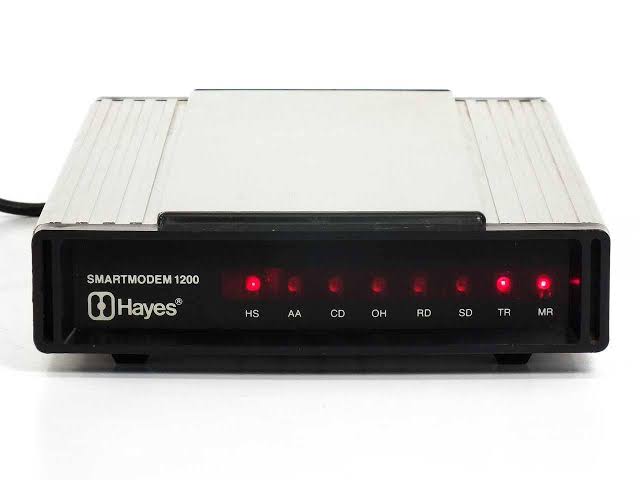
The Hayes Stack 300 Baud Smart Modem is a landmark dial-up modem that helped define modern computer communications. Known for its distinctive stacked aluminum case, this classic external modem brought software-controlled dialing, answering, and hang-up functions to personal computers in a way that was revolutionary for its era. For users looking for a vintage modem with historical significance, the Hayes Stack 300 Baud Smart Modem remains one of the most recognizable names in early data communications.
Its biggest selling point is the built-in AT command set, which lets a computer control the modem through simple text commands instead of manual switches and hand dialing. That made it especially useful for bulletin board systems, remote logins, early online services, and hobbyist networking. The modem supports 300 baud operation, Bell 103 compatibility, RS-232C connectivity, and built-in speaker feedback for audible call progress. It was widely praised for reliability, ease of use, and outstanding documentation.
This modem is best suited for collectors, retro-computing enthusiasts, museums, and anyone restoring vintage communications hardware. It is not intended for modern high-speed internet use, but it remains valuable for historical demonstrations and legacy systems. Based on historical listings and period references, the estimated price range for a Hayes Stack 300 Baud Smart Modem today is roughly $199 to $300 for used or refurbished units, with some specialty sellers listing it higher depending on condition and warranty. Availability is limited, and stock often appears through vintage electronics dealers, auction sites, and retro-computing marketplaces.
Detailed Description of the Hayes Stack 300 Baud Smart Modem
The Hayes Stack 300 Baud Smart Modem is an external direct-connect modem built around a microprocessor-controlled design that replaced manual dialing workflows with software commands. The modem communicates over an RS-232 serial connection and responds to AT-style instructions such as dialing, answering, redialing, and hanging up. At 300 baud, it delivers classic Bell 103-compatible data transmission, making it a foundational device in the evolution of PC communications.
In real-world use, this modem was ideal for connecting to bulletin board systems, time-sharing services, and early remote-access environments. It also supported both touch-tone and pulse dialing, giving users flexibility with different phone line setups. The front speaker provided audible connection status, which helped users monitor handshake tones and call progress. The aluminum enclosure gave the unit a sturdy, professional feel, while the compact stacked form factor made it easy to place beside a desktop computer.
User experience was defined by simplicity and control. Once configured, the modem could be driven entirely by software, reducing errors and streamlining connections. That combination of automation, reliability, and compatibility is what made the Hayes Stack 300 Baud Smart Modem a milestone product in personal computing history.
Pros and Cons of the Hayes Stack 300 Baud Smart Modem
Pros
- Historic AT command set that became an industry standard for modem control.
- Reliable 300 baud Bell 103-compatible performance for legacy systems and demonstrations.
- External RS-232 connection makes it easy to integrate with vintage computers and terminal setups.
- Built-in speaker and software-controlled dialing improve usability for retro networking.
- Strong build quality with a durable metal enclosure and classic Hayes Stack design.
- Excellent documentation and broad compatibility with early communications software.
Cons
- Very slow by modern standards, so it is unsuitable for contemporary internet use.
- Limited availability makes replacement parts and service difficult to find.
- Often priced as a collectible, which can reduce value for casual buyers.
- Requires legacy hardware or adapters for full compatibility with older computers.
- Compared with later 1200 baud and 2400 baud modems, it offers far less speed and flexibility.
For vintage hardware users, the value for money depends on purpose. As a working artifact and collector’s piece, the Hayes Stack 300 Baud Smart Modem is compelling. As a practical communications device, later Hayes SmartModem models or more advanced retro modems provide better performance.
Customer Reviews and User Feedback on the Hayes Stack 300 Baud Smart Modem
Vintage users commonly rate the Hayes Stack 300 Baud Smart Modem around 4.7 out of 5 stars for historical importance, reliability, and ease of use. Enthusiasts often describe it as “the modem that made PCs feel truly connected,” while collectors praise the solid metal case and iconic design. Many users also value the clear command-based workflow, which made dialing and managing calls much simpler than manual alternatives.
Common complaints focus on speed, age-related wear, and limited modern practicality. Some buyers note that cables, adapters, and compatible serial ports can be difficult to source. Others mention that refurbished units vary in condition, so careful purchasing matters. Despite those issues, recommendations remain strong for retro-computing fans, museum displays, and anyone building a period-correct communications setup.
If you want a classic external modem with genuine historical value, the Hayes Stack 300 Baud Smart Modem is still a standout choice. If you need a modem for speed or current network tasks, a newer alternative is the better investment.
Faqs
How do I set up the hayes stack 300 Baud Smart Modem for the first time?
What should I do if the hayes stack 300 Baud Smart Modem is not responding to AT commands?
Which computers and software are compatible with the hayes stack 300 Baud Smart Modem?
How can I improve connection reliability on the hayes stack 300 Baud Smart Modem?
Why does the hayes stack 300 Baud Smart Modem connect but fail to transfer data correctly?
What are the main features of the hayes stack 300 Baud Smart Modem that users rely on most?
How often should I maintain the hayes stack 300 Baud Smart Modem to keep it working well?
How do I troubleshoot noisy calls or repeated disconnects on the hayes stack 300 Baud Smart Modem?
Tags
Leave a Comment