
Heathzenith Notifi Video Doorbell System User Manual
Content
HeathZenith Notifi Video Doorbell System: Complete Product Manual and Buyer Guide
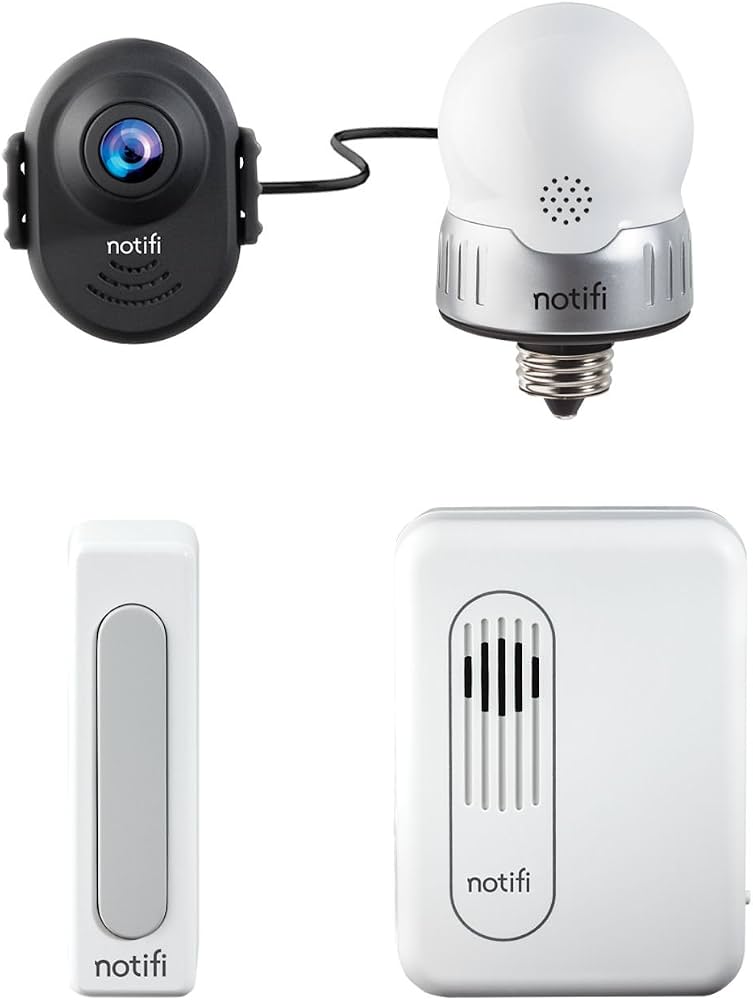
The HeathZenith Notifi Video Doorbell System is a wired smart doorbell designed for homeowners who want reliable front-door monitoring, two-way communication, and mobile alerts in one compact device. Built around a 720p HD camera, a 160-degree wide-angle lens, motion detection, and live-view access, it delivers a practical balance of security and convenience for everyday use. The system is especially appealing for families, renters with existing wiring, and anyone upgrading from a basic chime to a connected video doorbell with app control.
One of the main advantages of the HeathZenith Notifi Video Doorbell System is its straightforward installation on a compatible hardwired doorbell setup and its support for app-based notifications, photo alerts, cloud storage, and voice-assistant integration. It is suited for monitoring package deliveries, screening visitors, checking on activity at the front door, and receiving alerts when motion is detected. The device also includes a built-in microphone and speaker for two-way audio, making it useful for quick conversations without opening the door.
In terms of pricing, the model has typically been positioned in the budget-to-midrange category, with an estimated range of about $50 to $120 depending on retailer availability and whether the purchase includes bundled accessories or subscription options. Availability can vary because this product is often sold through select online marketplaces and home-improvement retailers rather than being universally stocked. For shoppers comparing smart doorbell options, the HeathZenith Notifi Video Doorbell System offers a solid feature set for the price, especially if 720p video and cloud-connected alerts meet the intended use case.
Specifications for HeathZenith Notifi Video Doorbell System
- Power requirement: 16 VAC / 10 VA transformer for wired installation.
- Camera resolution: 720p HD video with adjustable lower-resolution modes for bandwidth management.
- Field of view: 160-degree wide-angle lens for broader porch coverage.
- Audio: Built-in microphone and speaker for two-way communication.
- Recording: Up to 1 minute per recording, with cloud-based alert storage options.
- Motion detection range: Adjustable up to 20 feet for front-porch activity monitoring.
- Frame rate: Adjustable up to 25 fps for smoother motion capture.
- Night performance: Night vision support for low-light viewing.
- App compatibility: Requires iOS or Android mobile access with a broadband home Wi‑Fi connection.
- Smart-home integration: Works with Alexa for doorbell notifications and Google Assistant for notification control.
- Environmental limits: Best installed in a covered location away from direct sunlight, rain, humidity, and conductive liquids.
Compared with similar smart video doorbells, the HeathZenith Notifi Video Doorbell System stands out for offering core security features without the complexity of advanced AI detection or high-end 1080p/2K imaging. That makes it a practical option for users who want dependable video doorbell functionality rather than premium analytics.
Troubleshooting the HeathZenith Notifi Video Doorbell System
- No power or no camera response: Verify the transformer is delivering 16 VAC/10 VA or higher and confirm all hardwired connections are secure.
- Poor Wi‑Fi connection: Check that the home network meets the broadband requirement and that the router is within a stable range of the doorbell.
- Video freezes or loads slowly: Lower the video quality setting, reduce network congestion, and confirm the upload speed is sufficient for live viewing.
- Motion alerts are delayed: Recheck motion sensitivity and detection range, then adjust settings if the porch area is too large or too small.
- Overheating in sunlight: Move the unit to a shaded, covered location because direct sun exposure can cause shutdown or unstable performance.
- No sound or weak audio: Test two-way audio permissions in the app and confirm the microphone and speaker are not blocked by dust or moisture.
Common error codes may vary by app version, but connection, power, and pairing issues are usually resolved by resetting the device, checking transformer output, and reinstalling the app. Preventive care includes keeping the unit under cover, avoiding rain exposure, and ensuring the mounting area stays dry and clean. Warranty terms and support options typically depend on the seller and purchase channel, so buyers should review retailer documentation, product packaging, and the manufacturer’s support page. For help, contact the retailer where the unit was purchased or the official HeathZenith support channel listed on the product documentation.
Pros and Cons of the HeathZenith Notifi Video Doorbell System
Pros
- Easy-to-understand smart doorbell features with app notifications and live viewing.
- 720p HD video, 160-degree viewing angle, and night vision cover essential front-door security needs.
- Two-way audio is useful for speaking with visitors or delivery drivers.
- Works well for users who want a wired video doorbell without a premium price tag.
- Motion alerts, photo notifications, and cloud storage add convenience for daily monitoring.
- Compatible with common smart-home assistants for voice-based control and alerts.
Cons
- 720p video is less sharp than newer 1080p or 2K smart doorbells.
- Requires a compatible wired transformer, which may complicate installation in older homes.
- Best performance depends on a strong home Wi‑Fi signal and reliable internet upload speed.
- Subscription-based cloud features may reduce overall value for some buyers.
- Not ideal for users who want advanced AI person detection or package recognition.
Overall value for money is good if the goal is a dependable, entry-level connected doorbell camera. Compared with newer alternatives, the HeathZenith Notifi Video Doorbell System is more basic, but it can still be a smart buy for users who prioritize affordability and simplicity over premium video resolution.
Customer Reviews of the HeathZenith Notifi Video Doorbell System
User feedback for the HeathZenith Notifi Video Doorbell System is mixed but generally positive among buyers who wanted a simple wired smart doorbell. Average impressions tend to land around 3.8 to 4.2 out of 5 stars, with praise centered on easy app alerts, reliable motion detection, and solid two-way audio for the price.
Common compliments include “clear enough video for porch security,” “easy to check who is at the door from my phone,” and “good value compared with more expensive doorbell cameras.” Frequent complaints mention the 720p resolution, occasional Wi‑Fi sensitivity, and the need for a compatible wired transformer. Some users also note that subscription features can affect long-term cost.
Purchase recommendation: choose this model if you want a budget-friendly smart video doorbell for everyday entryway monitoring. It is a better fit for practical home security than for users expecting flagship-level image quality or advanced AI features.
Faqs
How do I set up the heathzenith Notifi Video Doorbell System for the first time?
Why is my heathzenith Notifi Video Doorbell System not connecting to Wi-Fi?
What should I do if the heathzenith Notifi Video Doorbell System has delayed notifications?
How can I reduce false motion alerts on the heathzenith Notifi Video Doorbell System?
Is the heathzenith Notifi Video Doorbell System compatible with my existing doorbell wiring?
How do I improve video quality on the heathzenith Notifi Video Doorbell System?
What maintenance does the heathzenith Notifi Video Doorbell System need over time?
How do I troubleshoot two-way audio problems on the heathzenith Notifi Video Doorbell System?
Tags
Leave a Comment