
Setup: Hero Band 3 P36D Smart Watch User Manual
Content
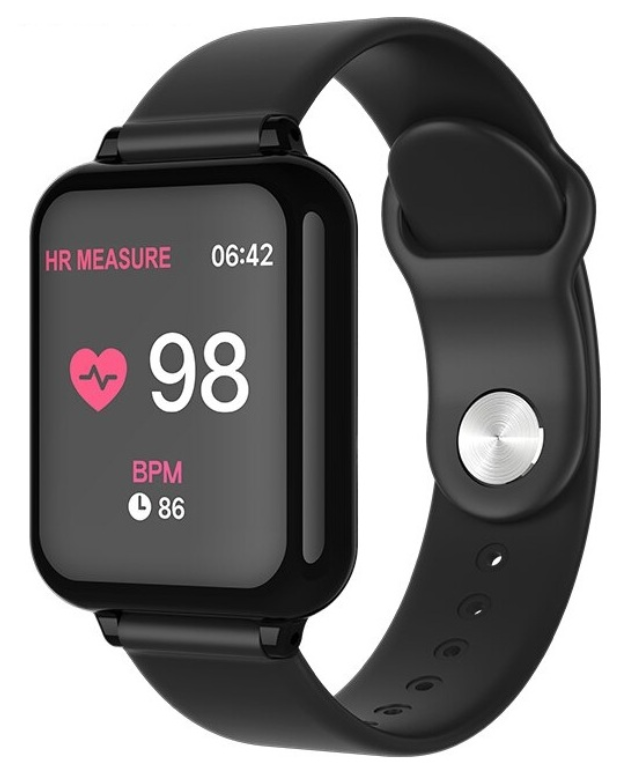
Hero Band 3 P36D Smart Watch
Introduction
The Hero Band 3 P36D Smart Watch is a versatile, budget-friendly fitness tracker designed to help users monitor their health and stay connected throughout the day. With a vibrant 1.3-inch color IPS display offering 240x240 pixel resolution, this smartwatch delivers clear visuals for fitness metrics and notifications. The device is equipped to track key health indicators such as heart rate, blood pressure, sleep quality, step count, calorie burn, and distance traveled, making it an excellent companion for fitness enthusiasts and casual users alike.
Unique selling points include its multiple sports modes—walking, running, cycling, jumping rope—and smart notifications support for incoming calls, texts, and app alerts, allowing users to remain connected without frequent phone checks. The IP67 waterproof rating ensures durability for everyday use, including exposure to rain and handwashing. The watch also features additional smart functions such as remote camera control, music playback control, weather display, and breathing training exercises.
Targeted primarily at fitness-conscious individuals and tech-savvy users seeking an affordable smartwatch, the Hero Band 3 P36D offers a compelling blend of health tracking and lifestyle features. Typically priced in the budget range, it provides excellent value compared to more expensive smartwatches with similar capabilities. The device is widely available through online retailers and select stores, making it accessible to a broad audience.
Specifications of the Hero Band 3 P36D Smart Watch
- Display: 1.3-inch color IPS, 240x240 pixels resolution
- Health Monitoring: Heart rate, blood pressure, blood oxygen saturation, sleep quality analysis
- Fitness Tracking: Step counting, calorie burn, distance measurement
- Sports Modes: Walking, running, cycling, jumping rope, multi-function exercise mode
- Connectivity: Bluetooth syncing with smartphone app for detailed data analysis and smart notifications (calls, messages, app alerts)
- Additional Features: Remote camera control, music playback control, weather display, breathing training, stopwatch, alarm
- Battery & Charging: Magnetic charging stand, USB charging, battery life typically lasts several days,, depending on usage
- Durability: IP67 waterproof rating for water resistance
- Compatibility: Works with Android and iOS devices via the Hero Band III app
Compared to similar products like basic fitness bands or entry-level smartwatches, the Hero Band 3 P36D stands out for offering a rich set of health metrics and smart features at a highly competitive price. Its display quality and multiple exercise modes make it a versatile choice for both casual and more dedicated users.
Why can't the smart watch successfully connect with the phone?
Refer to the actual operation diagram(IOS)
Check the following points in order:
- First, download the Hero Band III application on the phone.
- Download method 1: Scan the APP QR code in the manual
- Download method 2: Scan the QR code attached to the watch
Download method 3: Search for Hero Band III in the mobile store to download
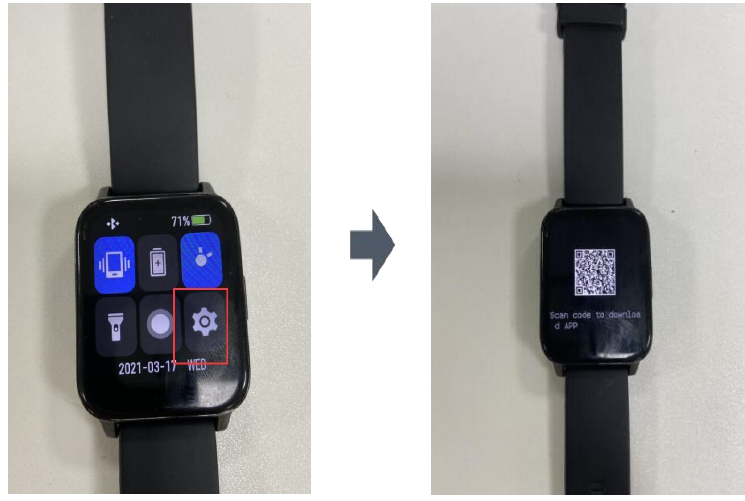
After the download is complete, open the APP, enter the interface in the picture, and click the small red box to pair the watch with the phone. Please select the corresponding watch to connect. During the connection process, the interface will pop up asking whether to allow pairing. Select the pairing button. The interface will also pop up asking whether to receive mobile messages; select the Allow button.
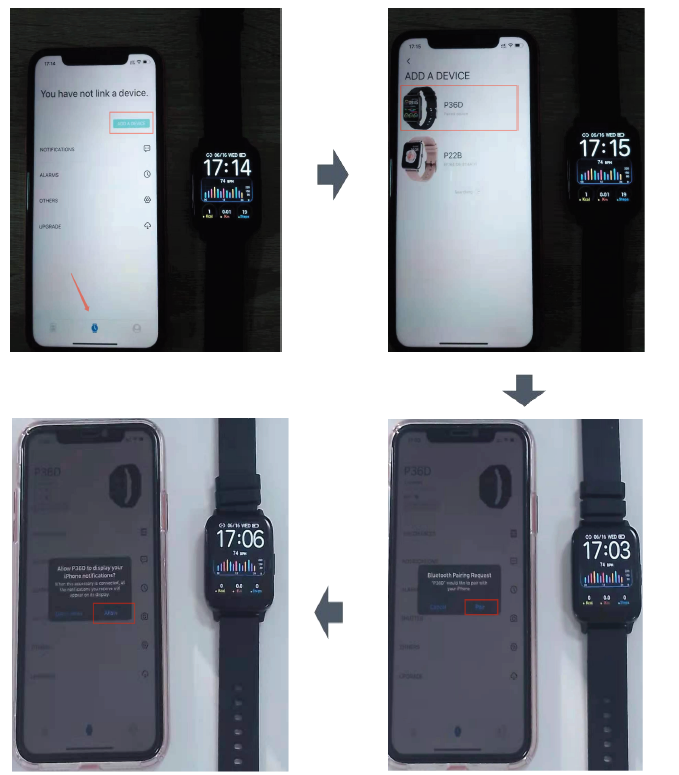
- In addition, please set it to show confirmation whether the Bluetooth in the phone successfully connects with the P36E.
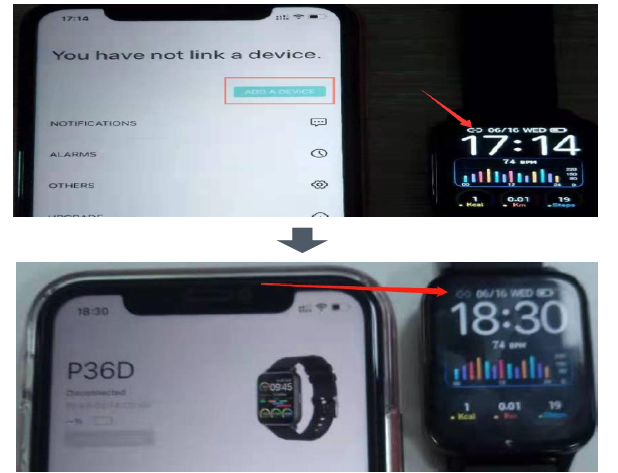
The comparison chart before and after the successful connection between the mobile phone and the watch is as follows:
Refer to the actual operation diagram(Android)
- First,, download the Hero Band III application on the phone. (The download method can refer to the IOS version above)
- Download method 1: Scan the APP QR code in the manual
- Download method 2: Scan the QR code attached to the watch
- Download method 3: Search for Hero Band III on Google Play to download
- After the download is complete, open the APP, enter the picture interface, and click the small red box to pair the watch with the phone. When the interface pops up, allow the program to turn on Bluetooth, and select the Allow button. Then, please select the corresponding watch to connect.
- Finally, the Bluetooth icon on the watch lights up, indicating that the phone and the watch are successfully connected. For details, please refer to the Bluetooth icon comparison chart placed in the IOS system above.
.png)
_a.png)
Why can't my bracelet receive any push notifications?
Check the following points in order:
- Confirm the Bluetooth connection between the bracelet and the mobile phone (the battery level can be displayed on the APP)
- The button to confirm the message push is turned on;
- Confirm whether the APP has the authority to obtain notifications from mobile apps;
- Confirm whether the message you need to receive can be displayed in the notification bar; if not, turn it on by yourself;
- If it is still invalid, it means that the authorization of the mobile phone is not successful, and it needs to be restarted before use (only needs to be restarted once, no longer needed in the future)
Refer to the actual operation diagram(IOS):
.png)
_a.png)
If it is still invalid, it means that the authorization of the mobile phone is not successful, and it needs to be restarted before use (only needs to be restarted once, no longer needed in the future)
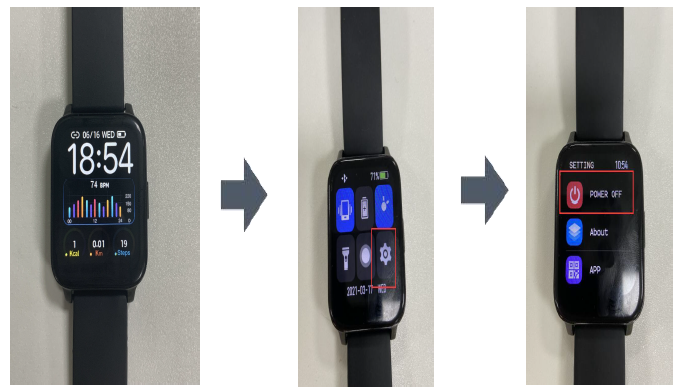
Swipe down on the watch homepage, restart the smart watch.
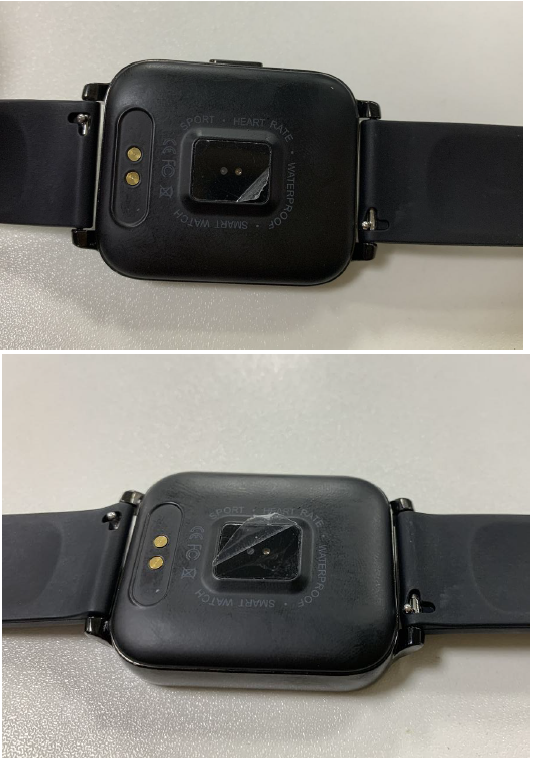
Why does the sensor on the back of the smart watch always have scratches, like a second-hand watch?
The surface of our watch sensor is sealed with a protective film. This is to prevent jolts from damaging the sensor of the watch during transportation. There is no a trace of the watch being used,. Please understand. Whether to tear off the protective film can be based on personal wishes.
The protective film diagram of the watch sensor is as follows:
Troubleshooting the Hero Band 3 P36D Smart Watch
- Common Issues:
- Bluetooth connection problems – Ensure the Hero Band III app is updated and Bluetooth is enabled on your phone. Restart both devices if necessary.
- Inaccurate heart rate or blood pressure readings – Wear the band snugly and avoid movement during measurements.
- Device not charging – Use only the provided magnetic charger; avoid exceeding 5V/1A input current to prevent damage.
- Screen unresponsive – Perform a restart or restore factory settings from the watch settings menu.
- Error Codes & Fixes: The device generally indicates errors via vibration or on-screen messages; refer to the app for detailed logs.
- Preventive Measures: Keep firmware updated through the app, avoid exposure to extreme temperatures, and clean charging contacts regularly.
- Warranty & Support: The Hero Band 3 P36D typically includes a limited manufacturer warranty; contact the seller or official support channels for repair or replacement requests.
- Contact Information: Support is available via the official Hero Band III app, retailer customer service, or manufacturer’s website/email as provided at purchase.
Pros & Cons of the Hero Band 3 P36D Smart Watch
- Pros:
- Affordable price with comprehensive health and fitness tracking features
- Clear, vibrant 1.3-inch color display with good resolution
- IP67 waterproof rating for everyday durability
- Multiple sports modes offer tailored exercise tracking
- Smartphone compatibility with notifications, music, and camera controls
- Cons:
- Health metrics like blood pressure and heart rate may lack medical-grade accuracy.
- Limited battery life compared to premium smartwatches—typically a few days,s depending on usage.
- Some users report occasional Bluetooth connectivity. The app interface may be less polished compared to top-tier smartwatch brands..
- Value for Money: Considering its feature set and price, the Hero Band 3 P36D offers excellent value for users seeking a budget-friendly fitness tracker with smart capabilities.
Customer Reviews and Feedback on the Hero Band 3 P36D Smart Watch
Users generally praise the Hero Band 3 P36D Smart Watch for its affordability and comprehensive fitness tracking features. Common compliments highlight the bright, easy-to-read screen and useful sports modes that cater to various exercise types. Many appreciate the convenience of smart notifications and remote music controls integrated with their smartphones.
On the downside, some reviewers mention occasional issues with Bluetooth connectivity and discrepancies in health measurement accuracy, especially for heart rate and blood pressure monitoring. Battery life and app interface receive mixed feedback, with suggestions for improvement in future software updates.
Overall, the product receives an average user rating of around 4 out of 5 stars, with many recommending it for those seeking a feature-rich but budget-conscious smartwatch option. Frequent purchasers note it as a reliable entry-level device for daily fitness and health monitoring.
Faqs
How do I pair my hero band 3 P36D Smart Watch with my smartphone for the first time?
Why is my hero band 3 P36D Smart Watch not accurately tracking heart rate or blood pressure?
How can I use the hero band 3 P36D Smart Watch to control my phone’s camera or music player?
What should I do if my hero band 3 P36D Smart Watch is not charging or turns off unexpectedly?
Can I wear the hero band 3 P36D Smart Watch while swimming or in the shower?
How do I customize watch faces and adjust display settings on the hero band 3 P36D Smart Watch?
Is the hero band 3 P36D Smart Watch compatible with both Android and iOS devices?
How often should I perform maintenance on my hero band 3 P36D Smart Watch to ensure optimal performance?
Leave a Comment