
How to Use: Hmdxaudio Rave Bluetooth Portable Speaker User Manual
Content
hmdxaudio Rave Bluetooth Portable Speaker Review and User Manual
Introduction
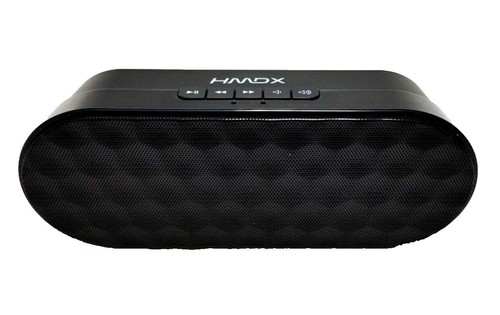
The hmdxaudio Rave Bluetooth Portable Speaker is a compact wireless speaker designed for everyday listening, travel, and casual indoor or outdoor use. Built for users who want a simple Bluetooth audio solution, it combines portability, easy pairing, and dual wired-wireless connectivity in a lightweight form factor. The speaker is especially appealing to smartphone users, students, and anyone looking for an affordable portable Bluetooth speaker for music, podcasts, and hands-free audio.
Key benefits include Bluetooth connectivity, AUX input support, rechargeable battery power, and a size that makes it easy to carry in a bag or place on a desk. The speaker is also a practical choice for quick setup and basic on-the-go listening without complex controls. Typical battery performance is up to 4 hours over Bluetooth and up to 12 hours when connected through the line-in audio jack, making it suitable for short outings, study sessions, and personal entertainment.
The estimated price range for the hmdxaudio Rave Bluetooth Portable Speaker in the resale and secondary market is generally around budget-friendly levels, often seen near the low-cost portable speaker category depending on condition and seller availability. Because this is an older model, availability may be limited to marketplaces, used electronics listings, and remaining retail stock rather than major current storefronts.
Specifications: hmdxaudio Rave Bluetooth Portable Speaker Technical Details
- Brand: HMDX / hmdxaudio
- Model: Rave, HX-P205 series
- Connectivity: Bluetooth and wired AUX input
- Bluetooth range: approximately 9.14 m
- Battery life: up to 4 hours wireless, up to 12 hours via line-in audio jack
- Power source: rechargeable battery
- Portability: compact, lightweight design for mobile use
- Physical dimensions: about 165.1 mm wide, 44.45 mm deep, 63.5 mm high
- Color options: varies by version, including pink
- Recommended use: smartphone and mobile audio playback
- Connection options: Bluetooth, AUX, and 3.5 mm connector support
Compared with modern Bluetooth portable speakers, the hmdxaudio Rave Bluetooth Portable Speaker focuses more on simplicity than advanced features such as app control, waterproof ratings, or high-output stereo sound. It is best compared with entry-level wireless speakers that prioritize basic portability and battery-powered convenience over premium bass response or rugged outdoor protection.
Setup Guide: How to Connect and Use the Speaker
1. Charge the speaker fully before first use using the compatible charging cable and power source.
2. Turn the speaker on and wait for pairing mode to activate.
3. Open Bluetooth settings on your phone, tablet, or laptop and select the speaker from the available devices list.
4. If Bluetooth pairing fails, switch the speaker off and on again, then retry pairing within a few feet of the device.
5. For wired playback, connect a 3.5 mm AUX cable from your source device to the speaker’s AUX input.
6. Adjust the volume gradually to avoid distortion and protect the speaker driver.
7. Keep the unit away from moisture, heat, and direct sunlight, since this model is designed as a basic portable speaker rather than a rugged outdoor device.
Troubleshooting tip: if audio cuts out, reduce the distance between the phone and speaker and remove interference sources such as other Bluetooth devices. If no sound plays, confirm the correct input mode is selected and check cable seating at both ends.
Troubleshooting: Common Problems and Fixes
If the speaker will not power on, charge it for at least 30 minutes and test another charging cable or adapter. If Bluetooth does not connect, delete the speaker from your device’s Bluetooth list and pair it again from scratch.
If the sound is weak or distorted, lower the source volume and check whether the battery is nearly empty. Low power can affect audio stability and output quality. If the AUX connection works but Bluetooth does not, the issue is usually related to pairing rather than the speaker hardware.
Common issues do not usually involve detailed error codes on this class of speaker. Instead, most fixes involve resetting power, re-pairing, replacing worn cables, or moving closer to the source device. Preventive care includes regular charging, safe storage, and avoiding overexposure to dust or liquid.
Warranty coverage for HMDX products has historically been one year from the date of original purchase, but support and replacement options depend on seller and region. For help, contact the retailer, marketplace seller, or the manufacturer’s customer support channel listed in the product documentation.
Pros and Cons of the hmdxaudio Rave Bluetooth Portable Speaker
Pros
- Very portable design for travel, desks, and small rooms
- Bluetooth and AUX support provide flexible playback options
- Simple setup makes it easy for beginners and casual users
- Affordable value compared with many modern wireless speakers
- Good battery runtime for short listening sessions
Cons
- Older design lacks modern features such as waterproofing and app control
- Battery life is modest compared with newer portable Bluetooth speakers
- Sound output is best for personal use, not large parties
- Availability is limited and often depends on used or leftover stock
- No advanced EQ or multi-speaker pairing features
For value for money, the hmdxaudio Rave Bluetooth Portable Speaker is strongest when bought at a low price and used as a basic everyday speaker. Alternatives such as newer compact Bluetooth speakers may offer better bass, longer battery life, and tougher builds, but usually cost more.
Customer Reviews: What Buyers Usually Say
Typical customer feedback for the HMDX Rave Bluetooth speaker is mixed to positive, with many users giving it around 3.5 to 4 out of 5 stars for portability and ease of use. Buyers often praise the small size, fast pairing, and convenience of having both Bluetooth and AUX input.
Common complaints focus on limited battery life, average loudness, and the lack of premium sound features. One frequent comment is that the speaker performs well for personal listening but is not ideal for bass-heavy music or large spaces. A typical user testimonial might say, “Great little speaker for my desk and travel bag, but not powerful enough for outdoor parties.”
Purchase recommendation: choose this model if you want a simple, budget-friendly portable speaker for casual listening. If you need louder output, stronger bass, or weather resistance, a newer Bluetooth speaker is the better option.
Quick Answer: Is the hmdxaudio Rave Bluetooth Portable Speaker Worth It?
The hmdxaudio Rave Bluetooth Portable Speaker is worth considering if your priority is low-cost portability, basic Bluetooth connectivity, and simple everyday use. It is a practical choice for users who want an easy-to-carry speaker for phones and small spaces.
Faqs
How do I set up the hmdxaudio Rave Bluetooth Portable Speaker for the first time?
Why is my hmdxaudio Rave Bluetooth Portable Speaker not pairing with my phone?
What should I do if the hmdxaudio Rave Bluetooth Portable Speaker has low volume or weak bass?
Can the hmdxaudio Rave Bluetooth Portable Speaker connect to more than one device at the same time?
How do I improve Bluetooth range and reduce audio dropouts on the hmdxaudio Rave Bluetooth Portable Speaker?
Is the hmdxaudio Rave Bluetooth Portable Speaker compatible with TVs, laptops, and older devices?
How should I clean and maintain the hmdxaudio Rave Bluetooth Portable Speaker safely?
What are the best ways to get the most battery life from the hmdxaudio Rave Bluetooth Portable Speaker?
Leave a Comment