
Pairing & Setup: Homespot Wireless Earbuds JQ290N User Manual
Content
Homespot Wireless Earbuds JQ290N
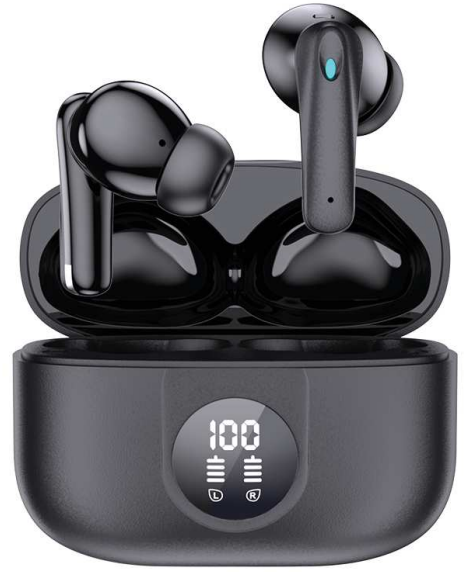
Introduction
The homespot Wireless Earbuds JQ290N deliver an exceptional true wireless audio experience designed for everyday use and active lifestyles. These earbuds combine sleek design with advanced audio technology, offering users crystal-clear sound, deep bass, and reliable Bluetooth connectivity. Ideal for fitness enthusiasts, commuters, and anyone seeking hands-free convenience, the JQ290N ensures seamless music playback and clear voice calls without the hassle of wires.
Equipped with intuitive touch controls and a compact charging case, the homespot Wireless Earbuds JQ290N provide up to 20 hours of total battery life, making them perfect for long workdays or extended workouts. Their ergonomic fit includes multiple ear tip sizes to ensure comfort and noise isolation. With splash resistance and quick pairing capabilities, these earbuds cater to a wide range of scenarios, from casual listening at home to outdoor activities.
Currently, the homespot Wireless Earbuds JQ290N are available through major online retailers and select electronics stores, with an estimated price range of $50 to $70, positioning them as a competitive option in the budget-friendly true wireless earbud market.
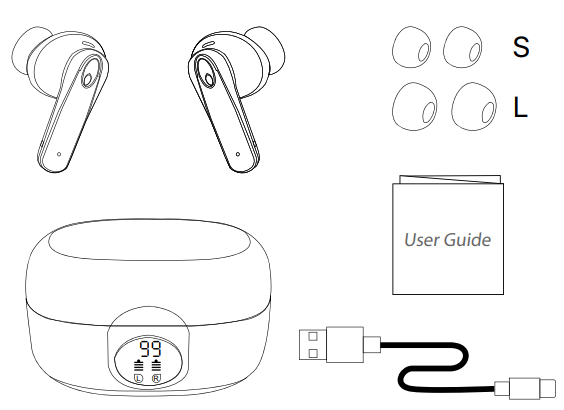
Package Contents
Specifications of Homespot Wireless Earbuds JQ290N
- Model: HomeSpot JQ290N
- Driver Size: 13mm Dynamic Driver
- Earbud Weight: 4 grams each
- Charging Case Weight: 46 grams
- Bluetooth Version: 5.3
- Audio Codec: AAC, SBC
- Bluetooth Profile: HFP, HSP, A2DP, AVCRP, SPP
- Effective Range: 10 meters (30 feet)
- Play Time with ANC on: 4.5 Hrs (single charge)
- Play Time with ANC off: 7 Hrs (single charge)
- Frequency Response: 20Hz - 20KHz
- Impedance: 32 ohms
- Charge Case Input Power: 5V 1A
- Charge Case Dimensions: 62 x 48 x 30mm
- Charging Time: 2 Hrs
- Maximum Operating Temperature: 45 °C
Compared to similar models like the Generic M90 Pro and Philips 1000 Series, the JQ290N offers competitive battery life and touch controls, with the advantage of USB-C fast charging and updated Bluetooth 5.2 technology for enhanced connectivity and range.
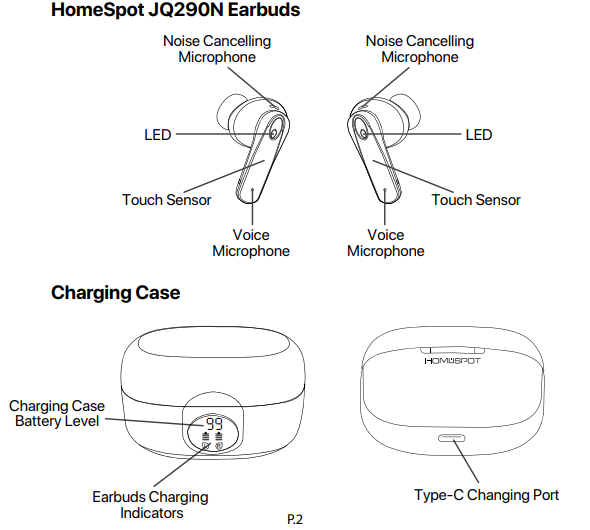
Product Overview
How to Wear
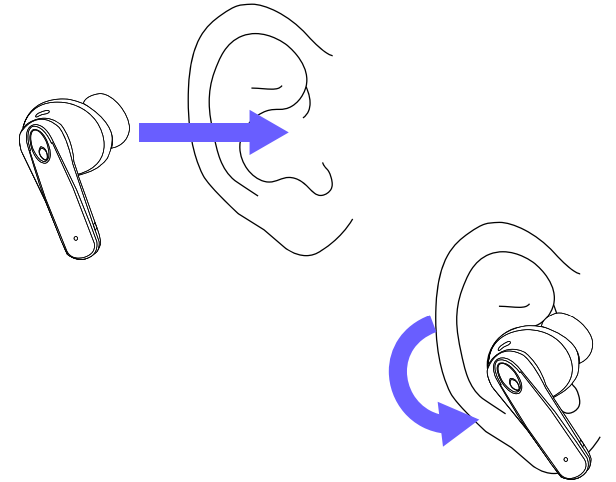
Place the earbud tips in your ear canal, and twist the earbuds so that they are firmly and properly placed in the ears. Position the earbud voice microphones towards your mouth.
Power On and Connect
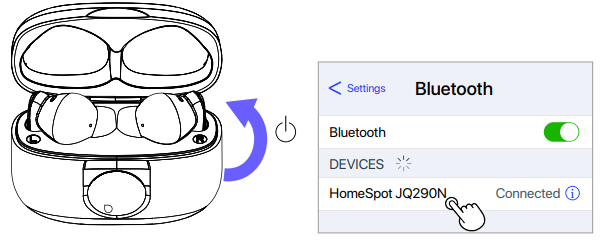
Open the charging case to power on the earbuds. Choose HomeSpot JQ290N from the Bluetooth settings. The device name may carry a suffix depending on the model variation.
Power Off
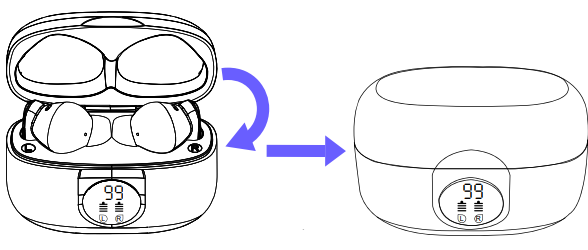
Charging
The earbuds offer up to 7 hours of usage. The charging case provides 3 recharge cycles with a total of 30 hours of usage.
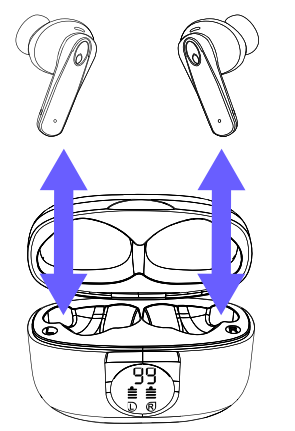
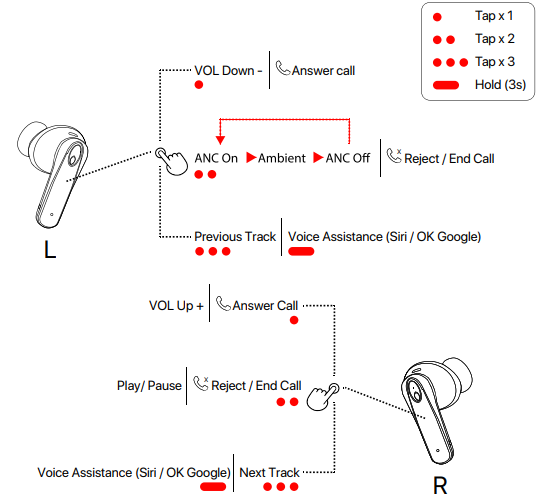
Basic Controls
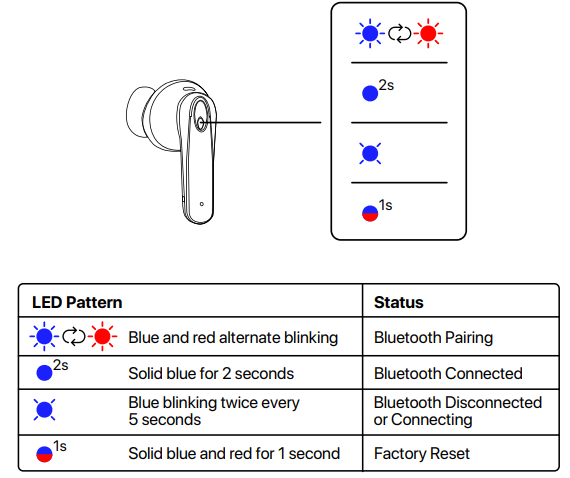
LED Indicators
Troubleshooting HomeSpot Wireless Earbuds JQ290N
- Issue: Earbuds not pairing with the device
Solution: Ensure earbuds are charged, place them in pairing mode by holding the touch controls for 5 seconds until LED flashes, and select "homespot JQ290N" in your device's Bluetooth list. - Issue: One earbud not connecting
Solution: Reset both earbuds by placing them in the charging case, then press and hold both touch controls for 10 seconds. Re-pair with your device. - Issue: Poor call quality or static noise
Solution: Check for Bluetooth interference, move closer to the connected device, and ensure microphones are unobstructed. - Preventive Measures: Keep charging ports clean; avoid exposure to extreme temperatures and moisture beyond splash resistance limits.
The homespot Wireless Earbuds JQ290N come with a 12-month warranty covering manufacturing defects. For further support, contact the customer service team via the official homespot website or authorized retailer channels.
Pros & Cons of Homespot Wireless Earbuds JQ290N
Pros
- Excellent Value: Affordable pricing with features typically found in higher-end models
- Strong Battery Life: Up to 20 hours including case, ideal for all-day use
- Comfortable Fit: Multiple ear tip sizes for secure, ergonomic wear
- Responsive Touch Controls: Easy access to playback, calls, and voice assistant without reaching for your device
- Fast USB-C Charging: Quick recharge compared to older micro-USB designs
Cons
- No Active Noise Cancellation: May not block out loud environments as effectively as premium models
- IPX4 Rating Only: Suitable for sweat and splash but not full water immersion
- Limited Codec Support: Lacks advanced audio codecs like aptX or LDAC for audiophiles
Compared to alternatives like the Philips 1000 Series, the JQ290N sacrifices some advanced audio features but excels in affordability and everyday usability.
Customer Reviews of Homespot Wireless Earbuds JQ290N
Users consistently praise the homespot Wireless Earbuds JQ290N for their comfort and stable Bluetooth connection, highlighting the intuitive touch controls and reliable battery life. One verified buyer noted, "Great sound quality for the price and fits well during workouts." Another customer appreciated the fast charging feature, stating it "quickly juices up between uses."
Common complaints include occasional one-earbud connectivity issues and the absence of noise cancellation, which some users expected. The average star rating based on user feedback is around 4 out of 5 stars. Buyers recommend the JQ290N as an affordable choice for casual listening, workouts, and hands-free calls, particularly for those who value convenience over premium features.
Faqs
How do I set up the homespot Wireless Earbuds JQ290N for the first time?
What should I do if my homespot Wireless Earbuds JQ290N are not connecting to my phone?
Can the homespot Wireless Earbuds JQ290N be used with both Android and iOS devices?
What are the key features of homespot Wireless Earbuds JQ290N that improve audio performance?
How do I maintain and clean my homespot Wireless Earbuds JQ290N to ensure longevity?
What should I do if the touch controls on my homespot Wireless Earbuds JQ290N are unresponsive?
How can I optimize the battery life of my homespot Wireless Earbuds JQ290N during extended use?
Is it possible to use homespot Wireless Earbuds JQ290N for calls, and how is microphone quality?
Leave a Comment