
Horizon Fitness 7.4AT Treadmill User Manual
Content
Horizon Fitness 7.4AT Treadmill Manual and Product Guide
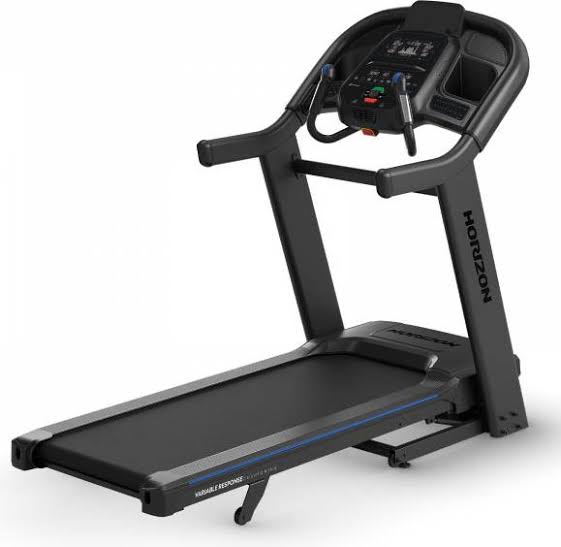
Introduction: Horizon Fitness 7.4AT Treadmill Overview
The Horizon Fitness 7.4AT Treadmill is a premium home cardio machine built for runners, interval trainers, and anyone who wants gym-level performance in a folding treadmill. Designed with an extra-wide 22" x 60" running deck, a 3.5 CHP motor, and a top speed of 12 mph, it delivers a stable and comfortable training experience for everything from walking to sprint intervals. Its 0% to 15% incline range makes it suitable for endurance work, hill training, and calorie-focused workouts, while the FeatherLight folding frame helps save space when the machine is not in use.
One of the biggest selling points of the horizon fitness 7.4AT Treadmill is its balance of performance and convenience. The QuickDial controls make speed and incline changes fast and intuitive, which is especially useful for HIIT sessions and tempo runs. The 3-Zone Variable Response Cushioning is designed to reduce impact, making long sessions easier on joints without feeling overly soft. Bluetooth audio support, a tablet holder, USB charging, and built-in fan add everyday usability for home fitness users.
This treadmill is a strong fit for intermediate to advanced users, families sharing one machine, and runners training for 5K, 10K, or marathon goals. It is also a practical choice for users who want a durable treadmill for daily walking or incline workouts. In most markets, the estimated price range is around $1,500 to $2,400 depending on sales, bundle offers, and retailer availability. The horizon fitness 7.4AT Treadmill is commonly available through Horizon Fitness and major fitness retailers, though stock levels may vary by region.
Specifications: Horizon Fitness 7.4AT Treadmill Technical Details
- Motor: 3.5 continuous-duty horsepower for smooth daily training and interval use
- Running surface: 22" x 60" XL deck for runners needing extra stride room
- Speed range: 0.5 to 12 mph for walking, jogging, running, and sprint work
- Incline range: 0% to 15% for hill simulation and workout variety
- Cushioning: 3-Zone Variable Response Cushioning for impact reduction and support
- Frame: FeatherLight folding design for easier storage in home gyms
- Weight capacity: up to 350 lb, making it suitable for a wide range of users
- Assembled dimensions: approximately 76" L x 37" W x 63" H
- Machine weight: about 318 lb, which helps improve stability during runs
- Console features: QuickDial controls, Bluetooth speakers, tablet holder, fan, USB charging, and handgrip controls
- Power requirements: standard 120V household outlet
Compared with many mid-range folding treadmills, the horizon fitness 7.4AT Treadmill stands out for its wider deck, stronger motor, and higher weight capacity. It is generally positioned above entry-level home treadmills and below high-end commercial models, making it a strong value pick for serious home users.
Troubleshooting: Common Horizon Fitness 7.4AT Treadmill Problems and Fixes
If the treadmill will not start, first check that the power cord is fully connected and the safety key is inserted correctly. Also confirm that the outlet is active and the unit is not plugged into an incompatible GFCI circuit. If the belt does not move smoothly, inspect belt tension and lubrication, and make sure the deck is properly aligned.
Common console issues include blank displays, unresponsive buttons, or dropped Bluetooth connections. In many cases, these problems can be fixed by turning the machine off, waiting a few minutes, and restarting it. If speed or incline changes lag, recalibrate the machine using the manufacturer’s reset procedure and verify that no obstructions are affecting the deck or motor area.
Typical error-related issues on home treadmills include safety key faults, incline calibration errors, and power interruptions. If a code appears repeatedly, consult the owner’s manual for the exact reset sequence and avoid repeated forced restarts. Preventive care includes keeping the treadmill clean, tightening hardware regularly, lubricating the belt as recommended, and using the machine on a level surface. Horizon Fitness typically offers lifetime frame and motor coverage, plus parts and labor coverage for limited periods depending on the component, so warranty support is worth checking before paying for repairs. For help, use Horizon Fitness customer support through the official support channels or contact the retailer where the unit was purchased.
Pros and Cons: Horizon Fitness 7.4AT Treadmill Review
Pros
- Wide 22" x 60" running area supports comfortable stride length for taller runners
- Strong 3.5 CHP motor handles walking, jogging, and interval training well
- 15% incline adds challenge for hill workouts and calorie burn
- QuickDial controls make on-the-fly adjustments easier during workouts
- Foldable frame improves space efficiency for home use
- High 350 lb capacity adds durability and broad user compatibility
- Good value for money compared with many treadmill alternatives in the same class
Cons
- Heavy frame makes setup and moving the machine difficult without help
- No decline feature, which some advanced runners may want for more varied training
- Console design is functional rather than premium
- Large footprint may be challenging for smaller rooms even when folded
- Some alternatives in the same price range may offer larger touchscreens or subscription features
Overall, the horizon fitness 7.4AT Treadmill offers an excellent blend of performance, durability, and practical home-gym features. It is especially attractive for users who want a serious running treadmill without stepping up to a commercial-grade price point.
Customer Reviews: What Buyers Say About the Horizon Fitness 7.4AT Treadmill
Most customer feedback is positive, with many users giving it around 4.5 out of 5 stars for sturdiness, motor power, and deck size. A common praise is that it feels stable at higher speeds and works well for interval training. One typical testimonial is: “The belt is spacious, the incline is smooth, and it feels like a real runner’s treadmill.”
Common complaints usually focus on the treadmill’s heavy frame, the size of the machine, and the fact that assembly can take time. Some buyers also mention wanting a more advanced display or built-in workout entertainment features. Even so, many recommend it as a smart purchase for serious home cardio users who care more about performance than flashy extras.
Frequently Asked Questions About the Horizon Fitness 7.4AT Treadmill
- Is the Horizon Fitness 7.4AT Treadmill good for running? Yes, the 22" x 60" deck and 12 mph top speed make it suitable for runners.
- Does it fold for storage? Yes, it uses a FeatherLight folding frame.
- Is it good for heavy users? Yes, its 350 lb weight capacity makes it suitable for many body types.
- Is it worth the price? For users who want durability, incline training, and a roomy deck, it is a strong value choice.
Faqs
How do I set up the Horizon Fitness 7.4AT Treadmill for the first time?
Why is the Horizon Fitness 7.4AT Treadmill belt slipping or feeling loose during workouts?
How do I connect Bluetooth and fitness apps to the Horizon Fitness 7.4AT Treadmill?
What should I do if the Horizon Fitness 7.4AT Treadmill console is not turning on?
What workout features on the Horizon Fitness 7.4AT Treadmill help improve interval training?
Is the Horizon Fitness 7.4AT Treadmill compatible with heavier runners or long-distance training?
How often should I maintain the Horizon Fitness 7.4AT Treadmill to prevent noise and wear?
How can I reduce treadmill noise and vibration from the Horizon Fitness 7.4AT Treadmill at home?
More horizon fitness manuals
Leave a Comment