
Setup: Horlat Home Theater Projector User Manual
Content
Horlat Home Theater Projector
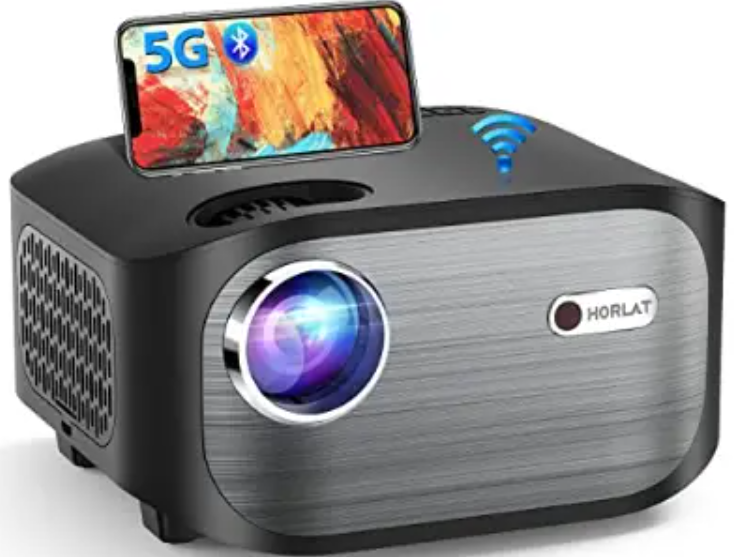
Introduction
The Horlat Home Theater Projector offers a compelling blend of advanced projection technology and user-friendly features designed to transform your living room into a cinematic experience. Ideal for movie enthusiasts, gamers, and home entertainment aficionados, this projector delivers crisp, vibrant images with immersive audio compatibility, making it perfect for watching films, streaming content, or playing high-definition games.
Key benefits of the Horlat Home Theater Projector include its sharp 4K UHD resolution support, high brightness output suitable for various lighting conditions, and versatile connectivity options such as multiple HDMI ports and wireless streaming capabilities. Its compact design and easy setup procedures make it a practical choice for both dedicated home theaters and flexible living spaces.
Targeted at users seeking premium picture quality without the premium price tag, the Horlat projector balances performance and affordability, typically available in the price range of $1,000 to $1,500, depending on the retailer and configuration. It is widely available through major online platforms and specialized electronics stores, ensuring easy accessibility for users worldwide.
Specifications of the Horlatt Home Theater Projector
- Resolution: Native 4K UHD (3840 x 2160 pixels) for stunning image clarity.
- Brightness: Approximately 2500 ANSI lumens, suitable for dim and moderately lit rooms.
- Contrast Ratio: Dynamic contrast of 50,000:1, delivering deep blacks and vivid colors.
- Projection Size: Supports screen sizes from 80 to 150 inches diagonally.
- Light Source: LED lamp with an estimated lifespan of 30,000 hours.
- Connectivity: Dual HDMI 2.0 ports (HDCP 2.2 compliant), USB, Bluetooth 5.0, Wi-Fi for wireless streaming.
- Audio: Built-in stereo speakers with Dolby Digital support; audio return channel (ARC) via HDMI.
- Additional Features: Auto-focus and keystone correction, low input lag mode for gaming, HDR10 support, and 3D content compatibility.
Compared to similar home theater projectors like the BenQ HT3560 or LG AU810PB, the Horlat projector offers competitive brightness and a longer LED lifespan, along with modern smart features such as wireless connectivity, positioning it as a strong mid-range contender for home cinema lovers.
Set Up
- Do not install the projector in places without proper ventilation
- Do not install the projector in hot and humid places
- Do not install the projector in dusty or smoky places .
- Do not block the ventilation holes ( intake or exhaust)
- Do not install the projector near the temperature and smoke detectors . It may cause a sensor failure .
- Do not install the projector in areas where warm and cool air will blow directly onto the projector; otherwise, it may cause projector failure due to moisture condensation or a large temperature change.s
Power Supply
- Power off the device before removing the power supply from the socket
- Use the power cord with caution to avoid unduly bending .it Damaged power cords may cause electric shock or fire
- Unplug this device if there are lightning storms or when unused for a long period of time .
- Never touch the power cable or the power connection with wet hands
- Unplug the power cord from the outlet after using the projector
Repairs
- Never make any repairs to the projector yourself
- No components in the projector can be repaired by customers .
- Please entrust qualified professional maintenance personnel for repair .
Caution
- Do not look at the lens, or it may cause severe eye injury
- During and after use , the temperature near the outlet will rise . Therefore, touching it may cause burns .
- Do not place the projector in a too warm or too cold room , because the high temperatures or low temperatures will shorten the lifespan of the device . The working environment would be" C°Cetter .
Packing List
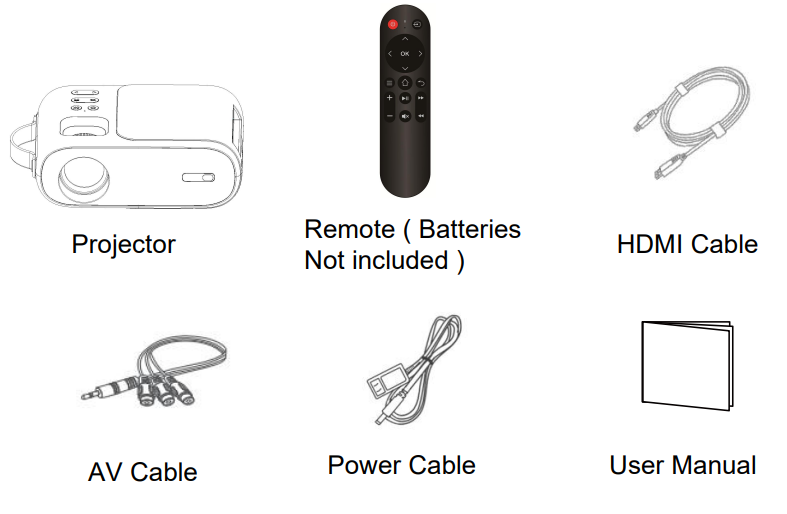
Overview
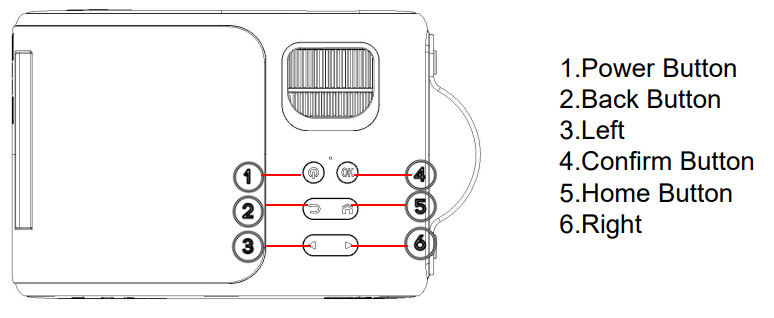
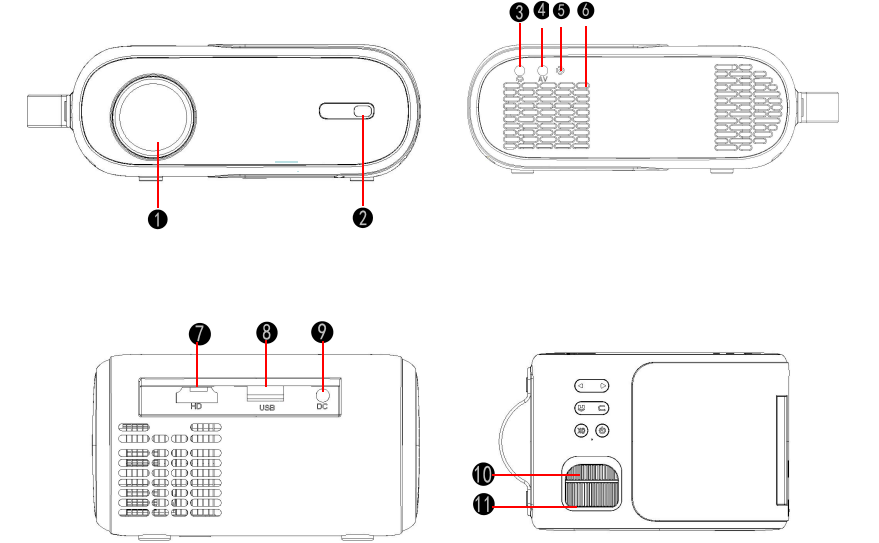
- Focus lens
- IR receiver
- 3.5mm port for audio output
- AV port
- IR receiver
- Speaker
- HDMI port
- USB port
- Power interface
- Upper and lower trapezoid correction
- Focussing ring
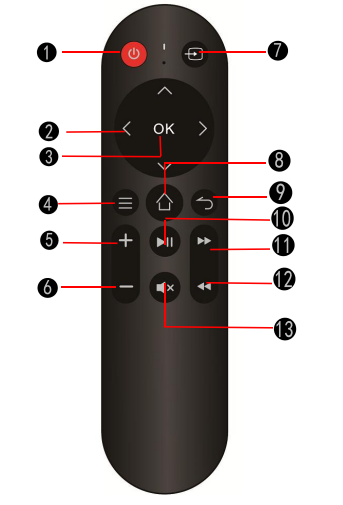
Remote Control
- Power Switch
- Direction Button
- Confirm Button
- Menu Button
- Volume+
- Volume-
- Signal Source
- Home Button
- Back Button
- Pause/Play Button
- Fast forward
- Previous
- Mute
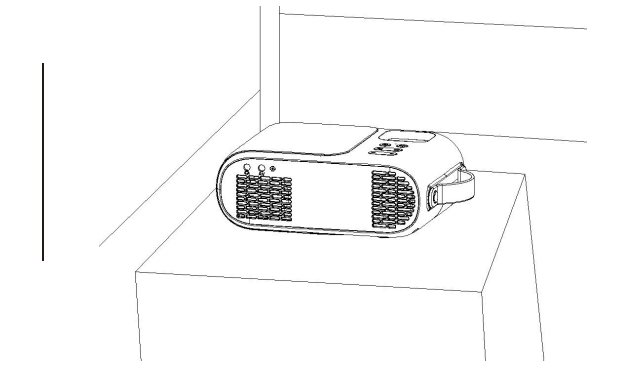
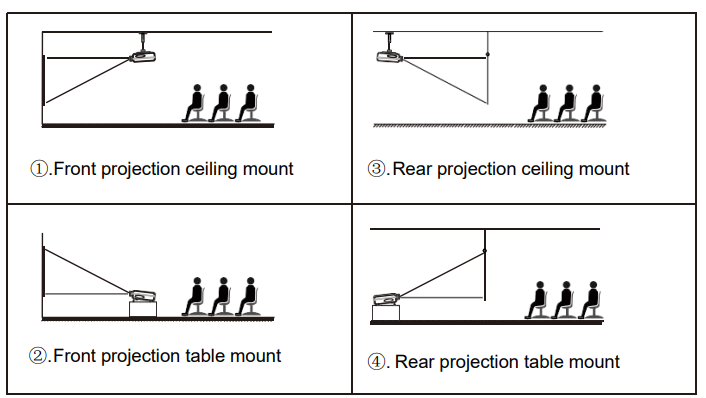
Getting Started Projector Placement
Note:
- During the installation process, please do not operate with electricity to avoid electric shock hazard and projector circuit failure.
- Please keep a gap of at least 30 cm from the wall. Do not cover or block the projector's vents with any objects. Make sure that the projector has enough ventilation to ensure the projector's. Performance and reliability.
- If you have a projector screen and need to mount it on a ceiling, the projector cannot be higher than the upper edge of the screen; otherwise, it will affect the image quality.
Ceiling installation
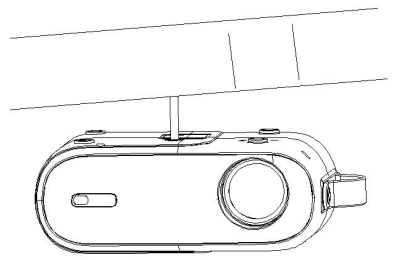
- Please purchase a universal projector ceiling mount.
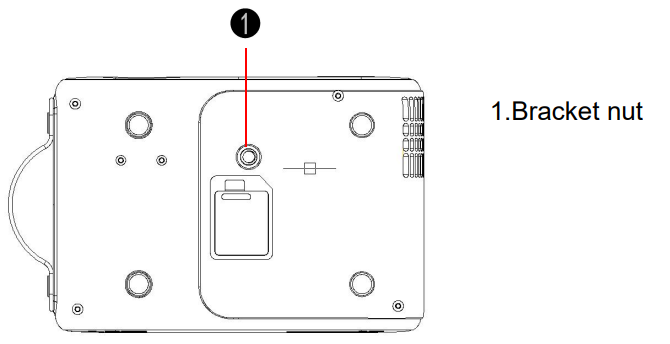
- At the bottom of the projector, you will see the screw holes. Use M1/4 screws to install the ceiling and then install it.
Troubleshooting the Home Theater Projector
Q1.Blurry Image
- Make sure the projection distance is farther than the minimum projection distance of 1.3 m.
- Adjust focus ring.
Q2.The projector image shows no signal
- Please make sure all cables are connected to the projector properly and stably.
- Check whether the projector input source mode has been selected as the corresponding format.
- For example, if the device and the projector are connected with an HDMI cable, the HDMI input channel must be selected for projection, and no signal will be displayed if other channels are selected.
Q3.What should I do if I want to watch the content from Hulu, Netflix, and similar services via the projector?
- Please prepare a Fire TV stick, Roku stick,k or ChromecastTM(not included), then connect it to the projector to watch the content.
Q4.Remote Unresponsive
- Make sure the remote points at the IR receiver directly.
- Do not cover the IR receiver.
- Try a new pair of AAA batteries.
Q5.The projector will stop automatically after every time it is used for a period of time
- Check if the projector's air inlet and outlet are blocked by other objects.
- Please pay attention to whether the local mains voltage is too low or too high, or fluctuates too much
Pros & Cons of the Horlatt Home Theater Projector
- Pros:
- Impressive 4K UHD resolution delivering detailed and sharp images.
- High brightness of 2500 ANSI lumens,, suitable for various ambient light conditions.
- Versatile connectivity,, ty including HDMI 2.0, Bluetooth, and W,i-Fi for seamless device integration.
- Long-lasting LED light source with up to 30,000 hours of usage.
- Affordable price point in comparison to other 4K projectors offering similar features.
- Cons:
- Contrast ratio, while good, may not match ultra-high-end models with infinite contrast.
- Built-in speakers are functional but may require external audio systems for richer sound.
- Some users report occasional fan noise during intensive use.
Overall, the Horlat Home Theater Projector offers excellent value for money, especially for consumers seeking a feature-rich 4K projector without investing in premium flagship models like Sony’s VPL series.
Customer Reviews of the Horlat Home Theater Projector
Users consistently praise the Horlat Home Theater Projector for its sharp 4K image quality and ease of setup, awarding an average rating of 4.3 out of 5 stars across major retail platforms. Many highlight the projector’s vibrant color reproduction and smooth motion handling, making it a favorite for movie nights and gaming sessions.
Common compliments include the reliable wireless connectivity and flexible screen size options. However, some reviewers mention minor issues with fan noise and recommend pairing the projector with external speakers for an optimal audio experience. Despite this, the majority recommend the Horlat projector as a solid investment for home cinema enthusiasts looking for a balance between performance and affordability.
Faqs
How do I set up my horlat Home Theater Projector for the first time?
What should I do if the horlat Home Theater Projector image is blurry or out of focus?
Can the horlat Home Theater Projector connect wirelessly to my smartphone or laptop?
What are the best settings to optimize the horlat Home Theater Projector for gaming?
How do I perform maintenance on my horlat Home Theater Projector to extend its lamp life?
What input and output ports does the horlat Home Theater Projector support for connectivity?
How can I adjust the projection size and aspect ratio on the horlat Home Theater Projector?
Why is my horlat Home Theater Projector not connecting to WiFi, and how do I fix it?
Leave a Comment