
Usage: Hypershell Next-Gen Exoskeleton User Manual
Content
Hypershell Next-Gen Exoskeleton
Introduction
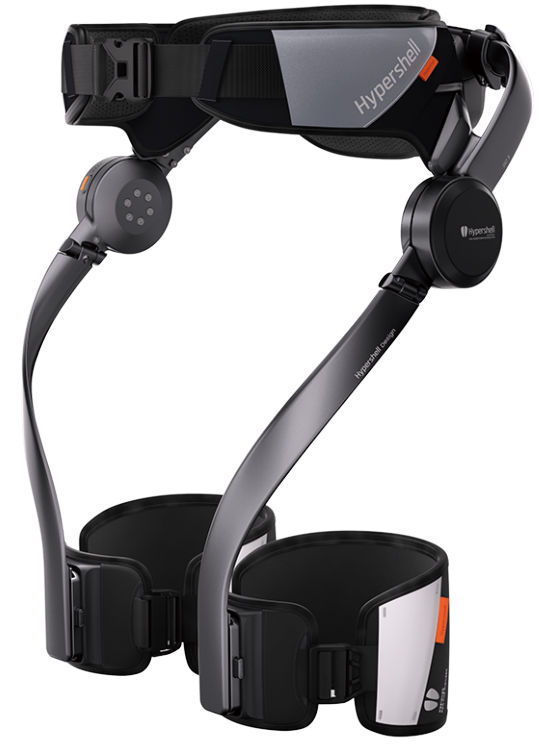
The hypershell Next-Gen Exoskeleton represents a breakthrough in wearable technology, designed to revolutionize outdoor mobility and reduce physical strain for active users. This ultra-lightweight exoskeleton, weighing approximately 1.8 kg, integrates advanced AI-driven motion assistance to provide seamless, natural support during walking, hiking, cycling, and other dynamic activities. By leveraging over a dozen sensors—including IMUs, gyroscopes, and barometers—the system continuously monitors movement and terrain, intelligently adjusting its motors to boost leg lifts and forward propulsion exactly when needed.
Key benefits include up to 20% reduction in physical exertion while walking and a 39% reduction during cycling, making it ideal for outdoor enthusiasts, adventurers, and individuals seeking enhanced endurance without medical device constraints. Its ergonomic, foldable design and carbon fiber reinforced polymer frame ensure portability and durability, while the IP54 weather resistance protects against splashes and dust, allowing use in diverse conditions.
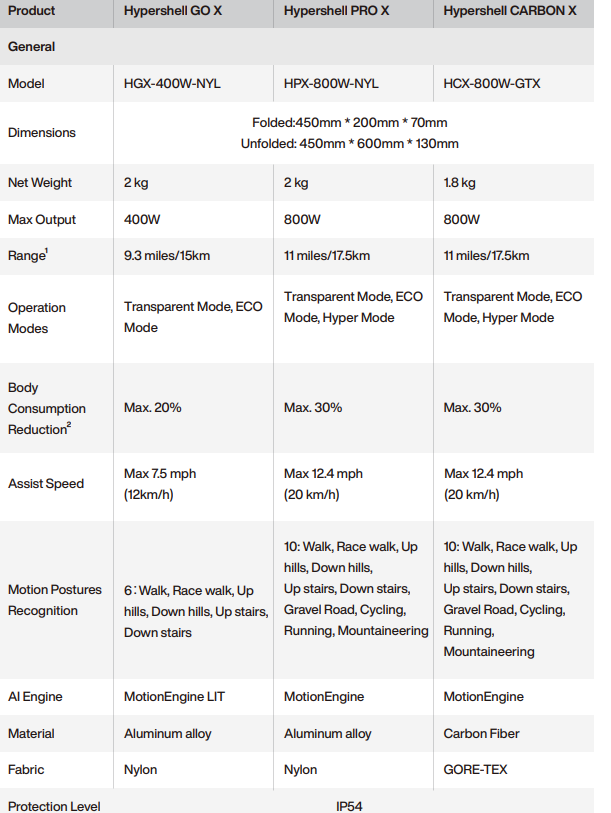
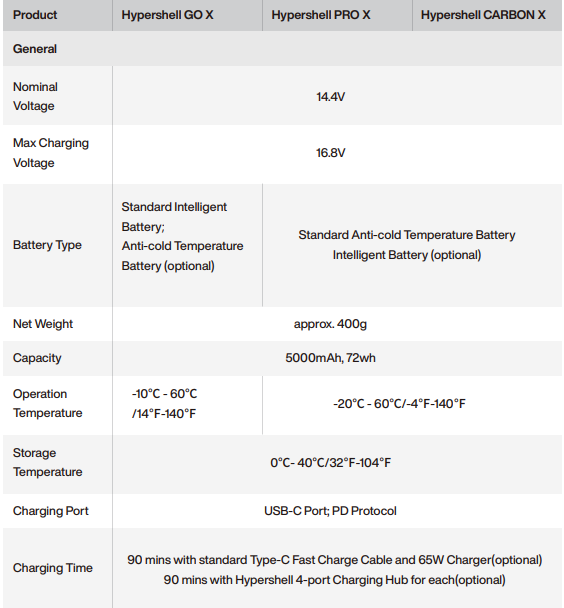
The hypershell Next-Gen Exoskeleton features a powerful 800 W motor system with an AI MotionEngine controlling up to 10 intelligent modes—such as uphill, downhill, mountain, and race walking—to optimize support and efficiency. With a battery range of approximately 30 km and airline-friendly removable batteries rated at 72 Wh, users can enjoy extended outdoor excursions with convenient battery swaps.
Available globally, the exoskeleton is priced in the premium segment at around £1,600, reflecting its advanced technology and lightweight construction. This device caters primarily to outdoor adventurers, hikers, cyclists, and professionals requiring enhanced mobility support during extended physical activity.
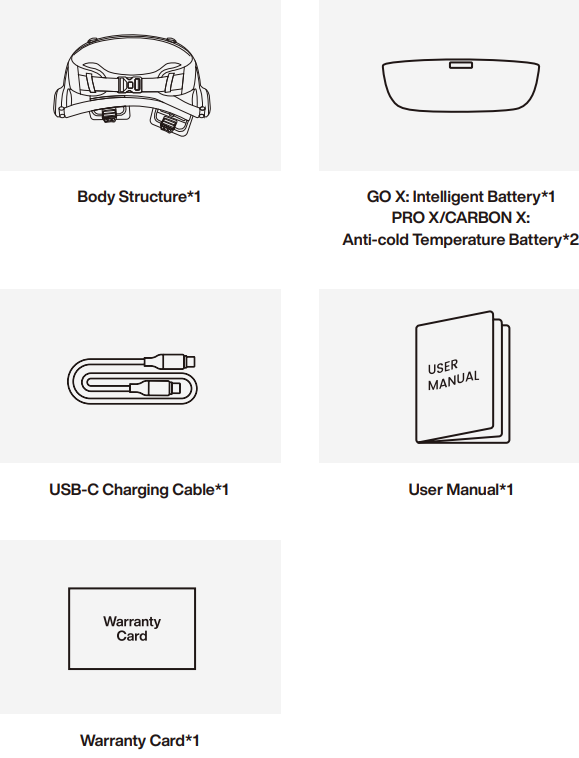
In The Box
Specification
Product Overview
Diagram
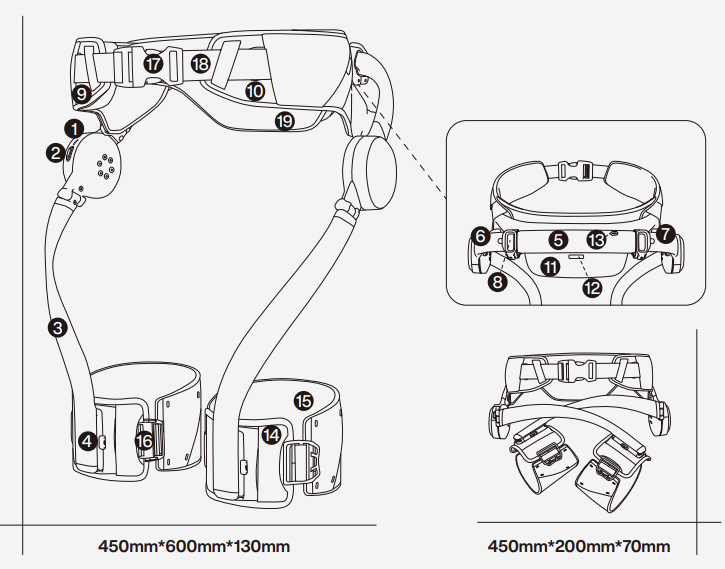
- Status LEDs
- Control Button
- Leg Lever
- Leg Lever Slide Button
- Hip Lever
- Left Hip Lever Tube
- Right Hip Lever Tube
- Hip Clamp
- Right Hip Support
- Left Hip Support
- Battery
- Battery Release Button
- Charging Port
- Front Leg Strap
- Back Leg Strap
- Leg Buckle
- Hip Buckle
- Hip Belt strap
- Hip Rest
Start to Use
Power on/off the device
- To power on the device, click and immediately long-press the control button for 2 seconds until 4 lights illuminate sequentially.
- To power off the device, click and immediately long-press the control button for 2 seconds until 4 lights turn off sequentially.
Operation instruction
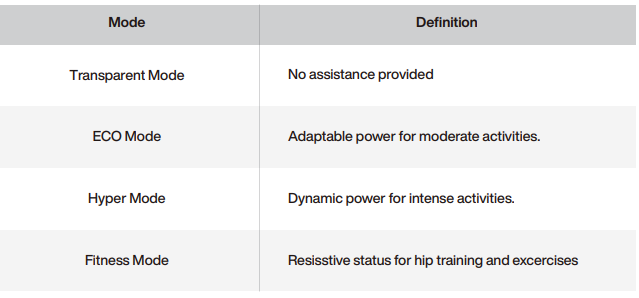
Mode Definition
Hypershell X Series supports three operation modes, and the modes can be switched via the Control Button on the right leg lever.
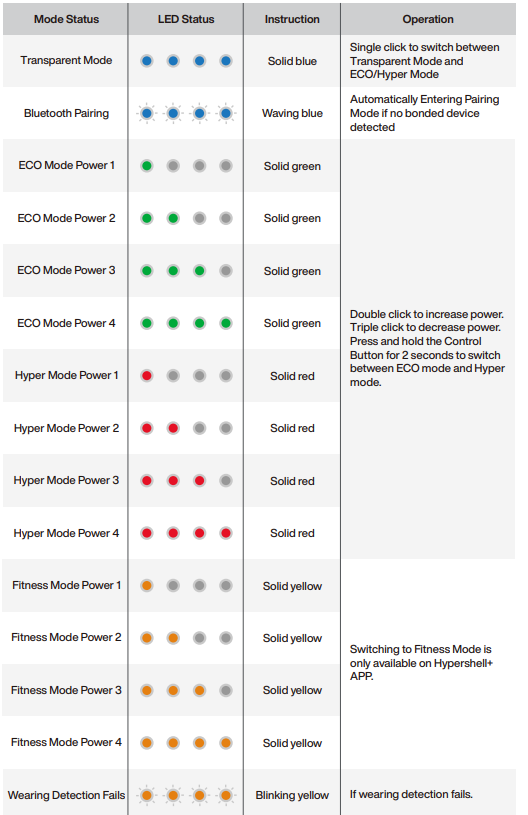
Operation via the Control Button on the right leg lever(Method 1).
- Single click to switch between Transparent Mode and ECO/Hyper Mode if wearing is detected.
- Single click to redo the wearing detection if it failed.
- Double-click to increase power.
- Triple-click to decrease power.
- Press and hold the Control Button for 2 seconds to switch between ECO mode and Hyper mode.
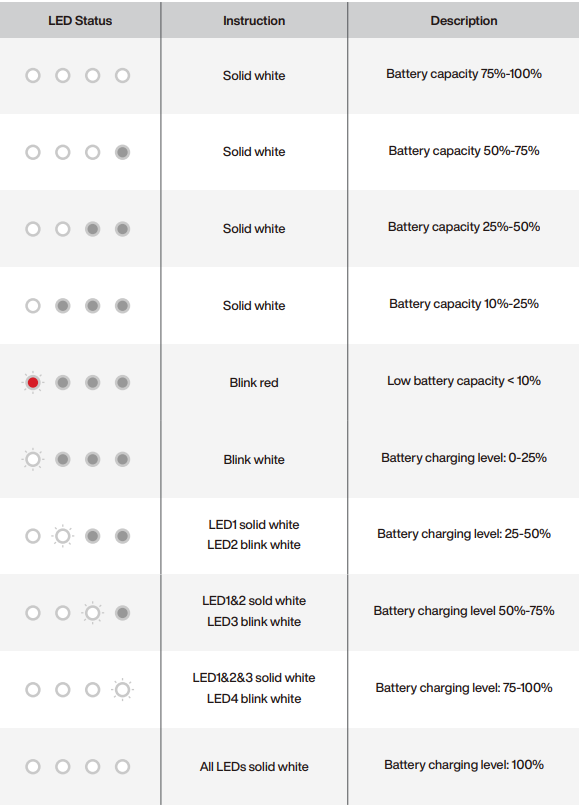
Battery Instruction
Battery features
Whether the battery is an Intelligent Battery or an Anti-cold Temperature Battery, the batteries include below features:
- Auto-Discharging Function: to prevent swelling, the battery automatically discharges to 96% of the battery level when it is idle for three days, and automatically discharges to 60% of the battery level when it is idle for nine days. It is normal to feel moderate heat being emitted from the battery during the discharging process.
- Balanced Charging: During charging, the voltages of the battery cells are automatically balanced.
- Overcharge Protection: The battery stops charging automatically once fully charged.
- Temperature Detection: to prevent damage, the battery only charges when the temperature is between 0℃ and 40℃/32℉-104℉.
- Overcurrent Protection: The battery stops charging if an excess current is detected.
- Over-discharge Protection: discharging stops automatically to prevent excess discharge when the battery is not in use. Over-discharge protection is not enabled when the battery is in use.
- Short Circuit Protection: The power supply is automatically cut if a short circuit is detected.
Safety Instructions
- Hypershell X Exoskeleton is a wearable exoskeleton device for outdoor recreational use. Please do not use it for rehabilitation or medical purposes. It is not designed or intended for use in the diagnosis of disease or other conditions, or in the cure, mitigation, treatment, or prevention of disease.
- Hypershell X Exoskeleton couldn't help the user maintain walking or standing balance, support weight,, and prevent the user from falls, or pain. Mobility issues are strictly prohibited from using with this product.
- Hypershell X Exoskeleton is not intended for use where the failure of the device could lead to death, personal injury, or severe environmental damage.
- Hiking uphill/downhill and mountain treks are outdoor sports experiences that are heavily influenced by personal physical fitness and the variety of terrains and landscapes, in some specific circumstances, cause injuries and accidents. Hypershell X Exoskeleton could not guarantee personal safety. Please ensure a good travel guide, appropriate preparations, and safety precautions when choosing a destination and roadmap.
- DO NOT use Hypershell X Exoskeleton in sports applications and scenarios that are not officially introduced, promoted, or verified, including but not limited to skiing, board skating, and surfing.
- DO NOT attempt the first use in any outdoor places with potential hazards without following the instructions in the manual.
- Please wear the hip belt and leg straps outside your clothes to avoid personal damage or injuries during sports activities. DO NOT directly contact this product with the skin to avoid skin allergies, damage, etc.
- This product is suitable for limited adult body sizes. Uses by individuals outside the range may lead to improper product functioning and personal injury risk.\
- Children under 18 must be supervised by adults. Ensure that the product is kept out of reach of pets and children.
- People who shall not use Hypershell X Exoskeleton include:
- Anyone under the influence of alcohol or drugs.
- Anyone with mobility issues or problems with balance or motor skills would hinder their ability to maintain balance.
- Anyone who exceeds the body compatibility limits (this can be self-assessed through the Hypershell+ APP or the product page).
- Pregnant women.
- Hypershell X Exoskeleton contains lithium batteries with potentially dangerous chemicals. Do not use the product near a heat source, such as a fire source or a heating furnace. If possible, make sure that the battery is fully discharged before disposing of it in a designated battery recycling bin. For more details, please follow local laws and regulations on battery disposal. DO NOT use the product in an
- DO NOT use the product in an environment with strong static electricity or magnetic fields.
- Hypershell X Exoskeleton contains components and radios that emit electromagnetic fields. These electromagnetic fields and magnets may interfere with pacemakers, defibrillators,, or other medical devices. Please consult your physician and manufacturer for information specific to your medical device. Stop using Hypershell X Exoskeleton if there is a case.
- DO NOT put the product and battery in immersed water. Avoid exposure to heavy downpours or extended periods of heavy rain during transportation, storage, or use.
- DO NOT charge the product if the metal terminals, charging port, Charger, or the Hub are wet. Clean them with a dry cloth to prevent the risk of electric shock, injury, burns, or fire.
- DO NOT alter, modify, or disassemble the product in any way or pierce the product with sharp objects.
- DO NOT use a battery or appliance that is damaged or modified. Damaged or modified batteries may lead to unpredictable behavior resulting in fire, explosion, or risk of injury.
- DO NOT use unofficial components or accessories to avoid the risk of fire, electric shock, or injury to persons. Consult with Hypershell's official technical support team or authorized partners for support and related information.
- DO NOT use the product when the following circumstances occur:
- The product emits a burning odor.
- The product stops working unexpectedly.
- The product's internal components are damaged.;
- The product has an abnormal sound or light.
To reduce injury risks, please read and follow all “CAUTION”, “WARNING,” and “NOTICE "sections in the manual:
Maintenance and Storage
Regular Maintenance:
Body structure
- Gently clean the body structure with a soft, wet cloth.
- For difficult-to-remove dirt or scratches, scrub with a toothbrush and toothpaste. Wipe clean with a wet cloth.
CAUTION
- DO NOT clean the body structure with alcohol, gas, diesel, acetone, or other corrosive and volatile chemical solvents. These substances may damage the appearance and internal components.
- DO NOT wash the body structure with a power washer or high-pressure hose or expose the body structure to pressurized or high-velocity water.
- DO NOT get water into the charging port, or metal terminals on the battery port during cleaning.
Hip Belt and leg straps
If the hip belt and leg straps are made of nylon, please wipe them with a soft, wet cloth.
- Avoid using a laundry machine, as aggressive agitation will cause fading or deformation to the material.
- DO NOT tumble try. Allow them to air dry naturally.
- Avoid prolonged sun exposure and high environments to prevent fading and deformation.
If the hip belt and leg straps are made of GORE-TEX material, please wipe them with a wet cloth and mild detergent. Apply a GORE-TEX protective spray regularly to restore the material’s s waterproof properties.
- Avoid using cleaners with bleach or strong alkaline ingredients, as they will damage the material’s performance.
- Avoid using a laundry machine, as aggressive agitation will cause damage to the material.
- DO NOT tumble dry them or direct sunlight exposure.
CAUTION
- Replace regularly the hip belt and leg straps if you notice visible wear, tearing, breakage, deformation, or other damage.
Storage
- Rotate he the left thigh lever toward the inner direction to fold the body structure.
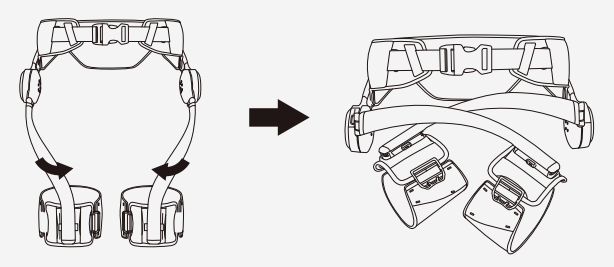
- Keep the device in a dry, well-ventilated environment. DO NOT store it outdoors or in the direct sun.
- Avoid storing or charging the battery in too hot or too cold environments outside the stated limits. These conditions may shorten battery life and lead to battery malfunction. Avoid dramatic changes in temperature or humidity.
- When used at room temperature, the battery range and performance are at their best. It will decrease range and performance at lower temperatures and recover when the temperature rises.
- 2.5 While not using the device for over 3 months, charge it to 40%-60% to keep it in optimal condition.
Troubleshooting Guide
- Power-on and start-up problems
Please ensure that the battery is connected and has sufficient power. If the issue persists and is not related to the battery, please contact Hypershell Technical Support for assistance. - My Hypershell doesn't respond when I press the control button and switch modes.
Please contact Hypershell Technical Support for assistance. - The lights don’t work when I press the control button.
Please contact Hypershell Technical Support for assistance. - The device doesn't respond if I operate on the Hypershell APP.
- Verify if the Bluetooth connection is established successfully.
- Confirm whether you are logged into the account or if the login credentials are accurate.
- Update the Hypershell APP Version to the newest version.
- If the issue still exists, contact Hypershell Technical Support for assistance.
- I forgot my account’s SSN or password on the Hypershell APP.
- If you only know the password, click forgot password on the login page to reset the password.
- If both the account name and password are found, find the email addresses that are registered. Otherwise,, you need to create a new account.
- Data cannot be synchronized tthe o the Hypershell APP.
- Verify if the Bluetooth connection is established successfully.
- Confirm whether you are logged into the account or if the login credentials are accurate.
- Update the Hypershell APP Version to the newest version.
- If the issue still exists, contact Hypershell Technical Support for assistance.
- Procedures to reset to factory default configuration.. Use the Hypershell APP to reset to factory default.
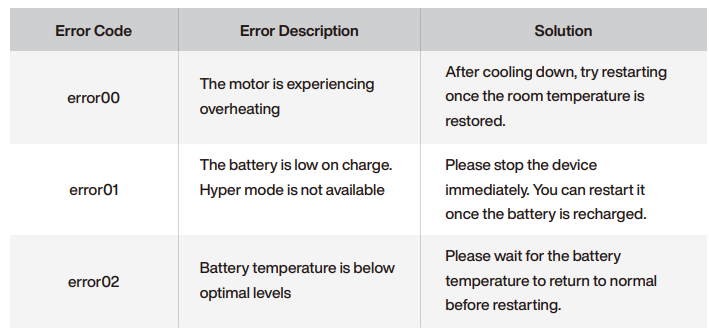
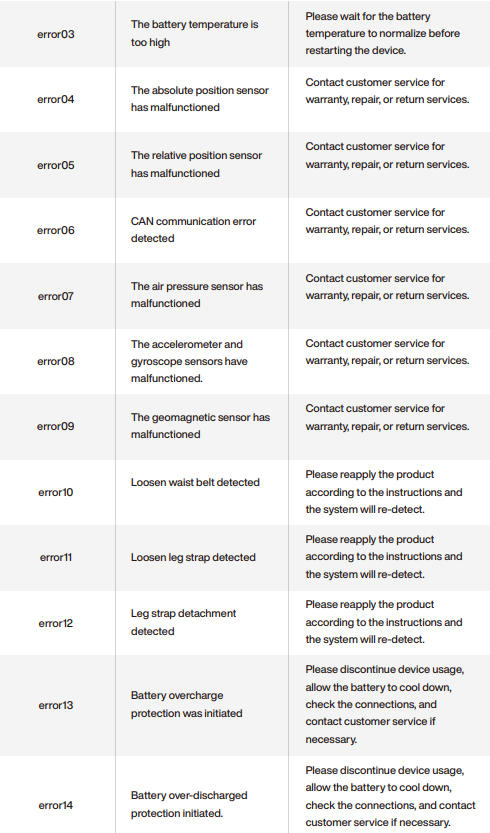
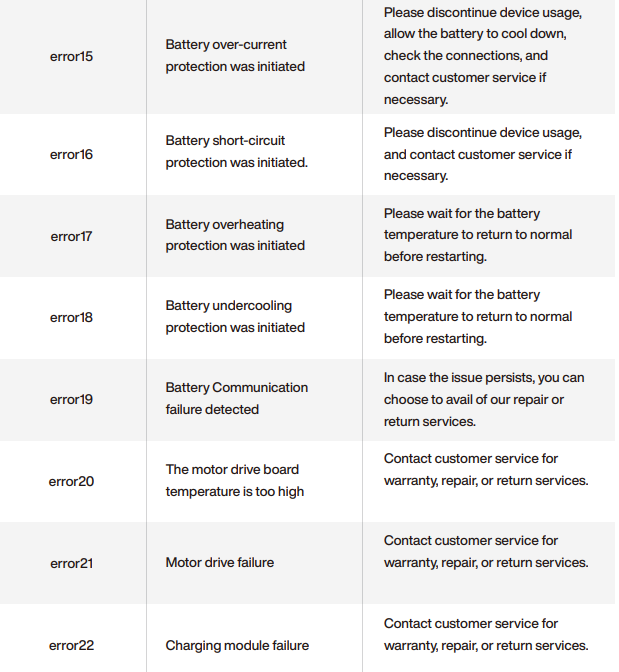
If an Error Code is displayed on the Hypershell+ APP, please follow the solutions in the following chart.
Pros & Cons of the Hypershell Next-Gen Exoskeleton
- Pros:
- Advanced AI MotionEngine delivers precise, adaptive assistance based on real-time sensor data, enhancing movement fluidity and reducing fatigue.
- Lightweight (1.8 kg) and foldable design enhances portability and comfort during extended wear.
- Robust carbon fiber reinforced polymer frame provides strength without bulk.
- Multiple intelligent modes (up to 10) tailor assistance for various activities such as hiking, cycling, and uphill/downhill walking.
- IP54 rating ensures reliable all-weather performance, suitable for outdoor adventures in different environments.
- Removable batteries with airline-compliant rating (72 Wh) facilitate easy travel and long usage times.
- Cons:
- Premium price point (~£1,600) may be a barrier compared to some less sophisticated exoskeleton alternatives.
- Not intended or certified as a medical device, limiting its use for clinical mobility assistance.
- Limited top speed assistance (max ~20 km/h) may not suit users seeking high-speed performance enhancements.
- Battery range (~30 km) could require multiple swaps for ultra-long excursions, adding logistical considerations.
- Compared to bulkier industrial exoskeletons, it offers lower maximum torque output but balances this with portability.
- Value for Money: The hypershell Next-Gen Exoskeleton delivers excellent technological innovation, ease of use, and durability for outdoor enthusiasts, justifying its premium positioning despite higher upfront costs compared to basic exoskeleton models.
Customer Reviews of the Hypershell Next-Gen Exoskeleton
Users consistently praise the hypershell Next-Gen Exoskeleton for its lightweight feel and the natural, intuitive assistance provided by its AI-powered MotionEngine. One verified buyer noted a “significant reduction in leg fatigue during long hikes,” emphasizing the device’s smooth integration with natural movement. The foldable design and weather resistance also receive positive mentions for enhancing usability in real-world outdoor conditions.
Common complaints include the high price and occasional need to carefully manage battery swaps on extended trips. Some users express a desire for a medical-grade version for mobility-impaired individuals. The device’s speed assistance is described as moderate but sufficient for its target market.
Overall ratings average around 4.5 out of 5 stars, with recommendations focused on outdoor adventurers and professionals seeking enhanced endurance rather than clinical rehabilitation. Customers appreciate the comprehensive support modes and portability, often recommending the exoskeleton for anyone investing in next-generation wearable mobility technology.
Faqs
How do I set up my hypershell Next-Gen Exoskeleton for the first time?
What should I do if my hypershell Next-Gen Exoskeleton is not responding or powering on?
How do I properly wear and adjust the hip belt and leg straps on the hypershell Next-Gen Exoskeleton?
Can I control and customize the hypershell Next-Gen Exoskeleton using a smartphone app?
What body sizes and clothing considerations should I be aware of when using the hypershell Next-Gen Exoskeleton?
How can I optimize the performance of my hypershell Next-Gen Exoskeleton during physical activities?
What routine maintenance is recommended to keep the hypershell Next-Gen Exoskeleton functioning properly?
Are there any common problems with the hypershell Next-Gen Exoskeleton and their quick solutions?
Tags
Leave a Comment