
Hypertech Speedometer Car Calibrator 730123 User Guide
Content
Hypertech Speedometer Car Calibrator 730123
Introduction
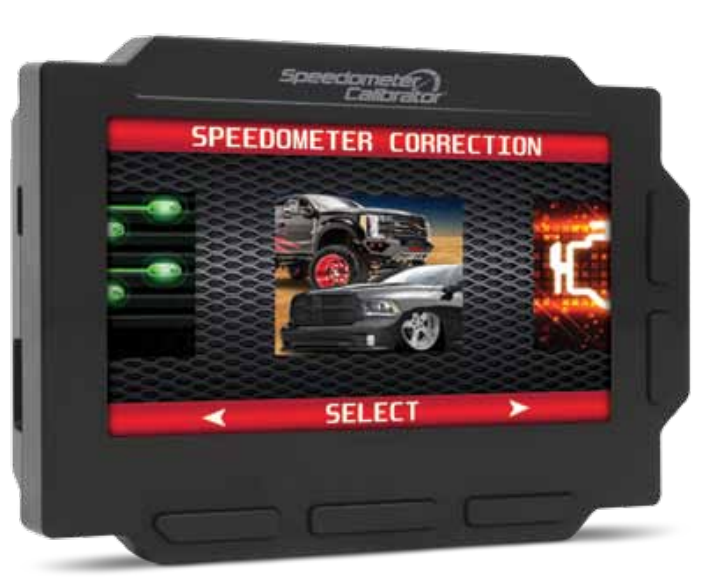
The Hypertech Speedometer Car Calibrator 730123 is a sophisticated automotive accessory designed to ensure accurate speedometer readings after modifications such as tire size changes, gear ratio adjustments, or axle ratio changes. This calibrator is essential for drivers who have altered their vehicle's configuration and need to recalibrate the speedometer to reflect the correct speed. The Hypertech Speedometer Car Calibrator 730123 is expected to be priced around $200-$300 and is scheduled to launch in the first quarter of 2024.
This product is particularly useful for car enthusiasts and off-road vehicle owners who frequently modify their vehicles. It ensures that the speedometer, odometer, and other related gauges provide accurate readings, which is crucial for both safety and compliance with legal requirements. The device is user-friendly and does not require any complex technical knowledge to install or operate.
Setup/Info
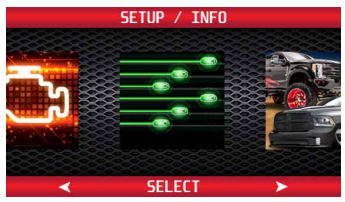
From the main menu, press the left or right arrow buttons and scroll to the Setup/Info icon. Press ‘Select’ to enter the Setup/Info menu.
DEVICE INFO
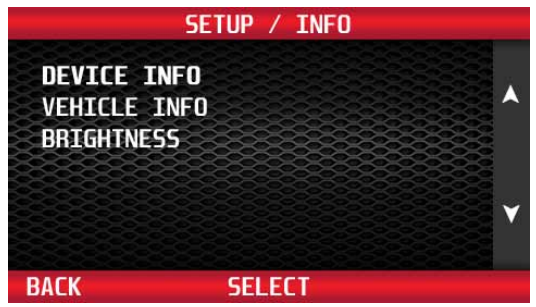
Use the buttons to the right of the screen to highlight Device Info. Press the ‘Select’ button to display the Device Info menu.
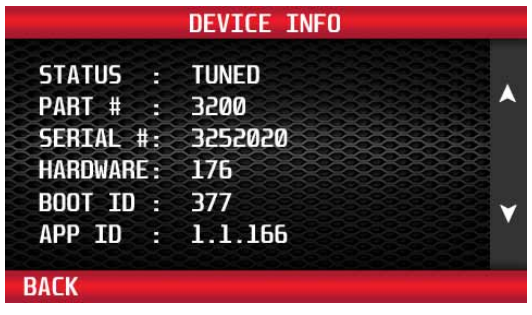
Use the buttons to the right of the screen to scroll up or down and review the device info.
VEHICLE INFO
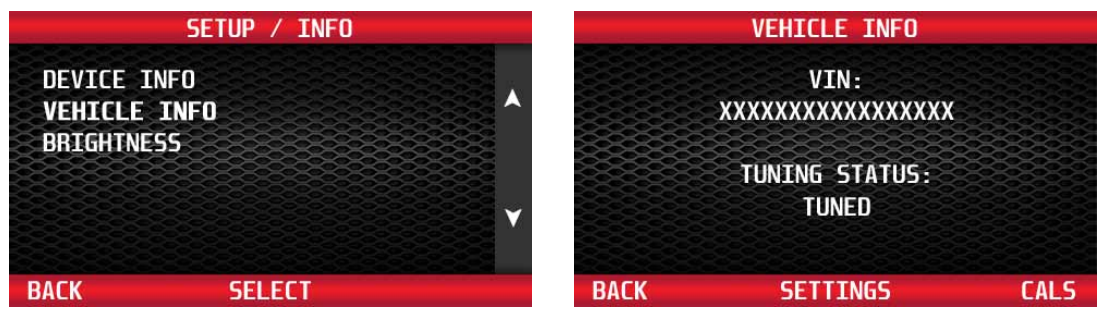
Use the buttons to the right of the screen to highlight Vehicle Info. Press the ‘Select’ button to display the Vehicle Info menu. The info menu displays the VIN # of the vehicle that the programmer was last connected to, and the current status of the programmer.
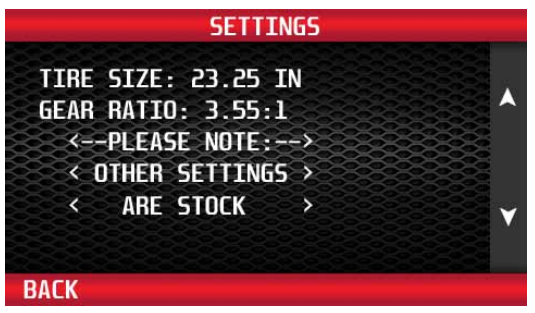
Select ‘Settings’ to view the current options that are programmed in the vehicle. Select the ‘Back button to return to the previous menu. Use the buttons to the right of the screen to view all the settings programmed into the vehicle.
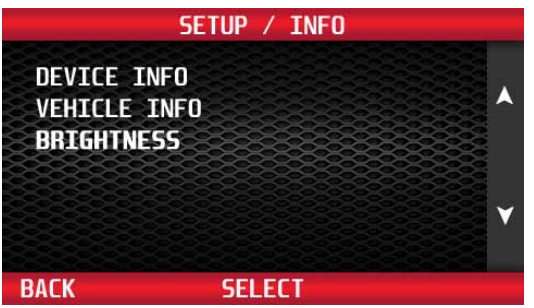
SCREEN BRIGHTNESS
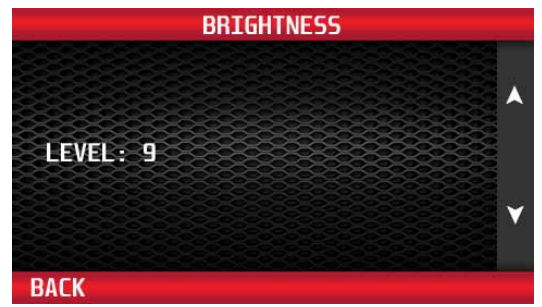
Use the buttons to the right of the screen to highlight the Brightness feature. Press the ‘Select’ button to display the Brightness menu.
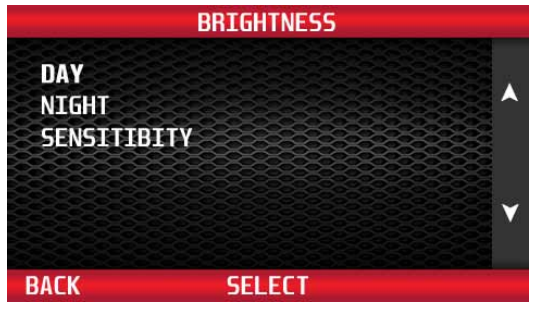
Use the buttons to the right of the screen to select Day, Night, or Sensitivity. Press ‘Select’ to choose.
Use the buttons to the right of the screen to adjust the brightness of the display screen, from 1 to 9. Press the ‘Back’ button to return to the previous menu.
Detailed Specifications (Key Features)
- Compatible with a wide range of vehicle makes and models
- Easy-to-use interface for quick calibration
- Supports various tire sizes and gear ratios
- Accurate speedometer and odometer recalibration
- Durable and compact design
- No additional wiring required; plug-and-play installation
Troubleshooting
What To Do Before Taking The Vehicle In For Service
Return The Vehicle To The Stock Programming
When the vehicle is taken to a dealership or repair shop for any service, the vehicle’s computer must be returned to the original stock calibrations, before taking the vehicle for service. To do this, follow the Back To Stock instructions in Section 2. This allows the original factory calibrations to be transferred from their stored location in the programmer and reinstalled into the vehicle’s computer. This process returns the computer to factory stock and resets the programmer to allow the user to reprogram the vehicle AFTER repairs or service.
Why Is It Necessary To Return To The Stock Tuning?
The reason that this should be done is that the factory diagnostic equipment will only recognize factory calibration information. If that information is not stored, it will automatically update the vehicle’s computer to the original calibrations or to the most recent updated version, erasing the optimized tuning and other adjustable features that were installed by the programmer.
Reprogramming The Vehicle After Service Or Repair
After the vehicle has been serviced or repaired, you may retune your vehicle. If the factory has reprogrammed the vehicle with a calibration that is new and not recognized by the programmer, the programmer will display a “Update Required” message. If this occurs, the user will be instructed on how to update the programmer. This is a safety feature of the programmer. We do not want to rewrite any information if it is different from the calibrations currently stored in the vehicle. Following the instructions will allow the vehicle to have the latest and most current performance calibration that will match the updated factory version. Call the tech service line that appears on the screen for instructions on how to update the programmer. Due to the factory update of the computer, the programmer will have to be upgraded to match the new calibrations that have been installed in the vehicle’s computer. There is no charge for calibration updates.
Troubleshooting Guide
Vehicle Not Supported
The following message is displayed when the programmer does not recognize the vehicle, along with an error code. THIS VEHICLE IS NOT SUPPORTED FOR PROGRAMMING; CALL HYPERTECH AT 800.532.3351. Verify that the vehicle year/make/model/engine shows to be supported with the programmer part number. The part number is located on the label on the back of the programmer, and on the end of the box. If the vehicle is supported, the programmer may need to be updated to the latest revision to work on your vehicle. See Section 4 for instructions on how to update your programmer.
Loss Of Communication
The following message will appear if the programmer is unable to communicate with the vehicle’s computer. AN ERROR OCCURRED DURING VEHICLE PROGRAMMING; CALL HYPERTECH AT 800.532.3351.
Follow the steps below to correct the issue.
- Make sure that the ignition key is in the ‘Run’ position and that the engine is not running.
- Make sure that both ends of the cable are securely attached.
- Wait at least five (5) minutes for the programmer to re-establish communication before restarting the programming process.
- If the three (3) steps above do not correct the problem, call the Hypertech tech service line at the phone number that appears on the programmer screen. Cable Removed While Programming
The programmer will lose power during programming if the cable is removed for any reason. If this happens, simply reconnect the cable, and follow the messages on the programmer.
Attempting To Program A Different Vehicle
VIN mismatch will appear if attempting to program the computer in another vehicle without first programming the last vehicle it was used on back to stock. Return the previous vehicle back to stock, following the Back To Stock procedure in Section 2.
Update Required
There are several instances where an update may be required to use the programmer. The following codes require an update. The programmer will display a message that it needs to be updated. The programmer can be updated via the internet using the Hypertech Tuner Update Software, and the supplied USB cable. See Section 4 (next page) for instructions on how to update your programmer.
Blank Screen
If the programmer does not power up, make sure that both ends of the cable are fully inserted. If the programmer still does not turn on, check for a blown fuse in the vehicle fuse panel for either the cigarette lighter or the accessory circuit. Replace with the proper amperage fuse.
Product Warranty & Contact Info
Factory Direct Limited 1 Year Warranty
- (Effective January 1, 2020, replaces and supersedes previous product warranty policy.)
- Hypertech products are warranted against defects in materials or workmanship for one (1) year from the date of purchase. Hypertech’s liability under this warranty shall be limited to the prompt correction or replacement of any defective part of the product which Hypertech determines to be necessary. This limited one (1) year warranty is to the original purchaser, provided all the information requested is furnished. You must retain a copy of your original sales invoice or receipt. Without proper documentation, a service fee will be applied. Third-party resellers and resold units are NOT covered under this warranty.
Important Note: The Speedometer Calibrator is designed to be used on only one (1) vehicle at a time. To use the Speedometer Calibrator on another vehicle, the vehicle it is currently being used on must be returned to stock by following the Back To Stock procedure in Section 2. Once the Speedometer Calibrator has been returned to stock, it can then be used on another vehicle, if that vehicle is supported by the Speedometer Calibrator. - The Speedometer Calibrator is limited for use on a maximum of three (3) vehicles. Each time the Speedometer Calibrator is connected to a vehicle, the VIN # is stored in the Speedometer Calibrator memory. Once the Speedometer Calibrator has a third VIN # stored, it will no longer be able to be reused on another vehicle. Warranty coverage is only for the original purchaser, and on the original vehicle the Speedometer Calibrator was used on. After the third VIN #, there will be a service fee applied to reset the unit.
- Additional licenses for new vehicles can be purchased from Hypertech. To order, call our Tech Department at 901.382.8888, , with the serial number off of the programmer.
30-Day Risk-Free, Money Back Guarantee
- (Effective January 1, 2020)
- The 30-day money-back guarantee applies to all Max Energy Spectrum Power ProgrammersReact Throttle Optimizers, Max Energy 2.0 Power Programmers, Max Energy Power Programmers, Interceptors, and Speedometers.
- Calibrators, In-Line Speedometer Calibrator Modules, and Power Chips for GM. The product MUST be returned to the place of purchase within thirty (30) days. All items must be received in a new, unused, and ready-to-sell condition (including all original packaging, parts, and paperwork) to receive a refund, excluding any shipping and handling fees. Units purchased, used orreconditionedde, from a non-authorized Hypertech dealer, or units sold by 3rd-party vendors (i.e., eBay) are NOT covered under this guarantee.
Pros & Cons
Pros:
- Ease of use with a user-friendly interface
- Compatible with a wide range of vehicles
- Accurate recalibration of the speedometer and odometer
- No additional wiring required
- Durable and compact design
Cons:
- Potentially higher cost compared to other calibrators on the market
- May require some technical knowledge for advanced settings
- Compatibility issues with very old or highly customized vehicles
Customer Reviews
Customers have praised the Hypertech Speedometer Car Calibrator 730123 for its ease of use and accuracy. Here are some common reviews:
"I recently installed larger tires on my truck and this calibrator made it easy to adjust my speedometer. The process was quick and straightforward." - John D.
"I was skeptical about spending money on a calibrator, but this device works perfectly. No more incorrect speed readings!" - Sarah K.
Some common complaints include compatibility issues with older vehicles and the higher price point compared to other options.
Faqs
What is the Hypertech Speedometer Car Calibrator 730123 used for?
How do I install the Hypertech Speedometer Car Calibrator 730123?
Is the Hypertech Speedometer Car Calibrator 730123 compatible with all vehicles?
How long does the calibration process take?
Do I need any technical knowledge to use the Hypertech Speedometer Car Calibrator 730123?
What if I encounter issues during the calibration process?
Is the Hypertech Speedometer Car Calibrator 730123 durable?
Can I use the Hypertech Speedometer Car Calibrator 730123 on multiple vehicles?
What is the estimated price of the Hypertech Speedometer Car Calibrator 730123?
When is the Hypertech Speedometer Car Calibrator 730123 expected to launch?
Tags
Leave a Comment