
I Robot Roomba-Series Vacuum Cleaner User Manual
Content
iRobot Roomba-Series Vacuum Cleaner: Product Manual and Buyer Guide
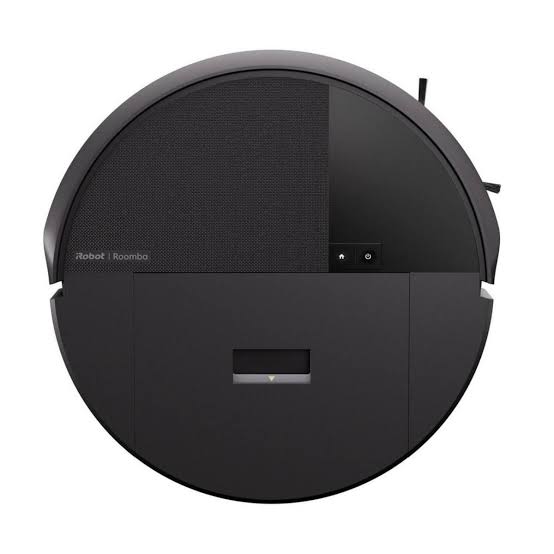
Introduction to the i robot Roomba-Series Vacuum Cleaner
The i robot Roomba-Series Vacuum Cleaner is a smart robot vacuum line built to simplify everyday floor cleaning with automated suction, app control, and hands-free scheduling. Designed for busy households, pet owners, and anyone looking to reduce manual vacuuming, Roomba models combine compact navigation with multi-surface cleaning performance for carpets, rugs, hardwood, and tile. Depending on the model, the series can include features such as self-emptying docks, automatic mop washing, mapping, voice assistant support, and advanced dirt detection for more targeted cleaning.
One of the biggest advantages of the i Roomba Series Vacuum Cleaner is convenience. Users can start, stop, schedule, and customize cleanings from a mobile app, while select models handle debris disposal automatically. This makes the lineup especially useful for homes with pets, frequent foot traffic, or mixed flooring. Higher-end versions are also appealing for larger homes that need room-by-room cleaning and stronger suction power.
In 2026, Roomba pricing spans a broad range, with entry-level models starting around the mid-$200s and premium combo models reaching roughly $1,400, depending on the region and dock configuration. The series is widely available through iRobot’s official store and major online retailers. For shoppers comparing robot vacuums, Roomba remains a leading choice for smart navigation, easy maintenance, and a wide feature ladder that fits different budgets.
Specifications for i Roomba Series Vacuum Cleaner
- Product type: Robot vacuum cleaner, with select combo models that vacuum and mop.
- Navigation: Smart navigation with app-based room control on supported models.
- Suction performance: Ranges from entry-level cleaning power to premium models with very high suction for debris, dust, and pet hair.
- Cleaning system: Multi-surface brushes, edge cleaning, and dirt-focused cleaning modes on many models.
- Dust management: Standard dustbin on base models; self-emptying dock on select Plus and Max variants.
- Mopping capability: Available on combo models with wet-cleaning and self-washing dock options on higher tiers.
- Control: Mobile app scheduling, cleaning maps, and voice assistant compatibility on supported versions.
- Best for: Apartments, family homes, pet owners, and users who want automated daily floor maintenance.
- Price range: Roughly $250 to $1,400 depending on model, features, and accessories.
- Benchmark comparison: Compared with budget robot vacuums, Roomba models typically offer stronger app support, better ecosystem integration, and more polished automation. Compared with premium rivals, the top-tier Roomba units compete well on smart features and docking convenience, while some alternatives may offer lower prices or different mop designs.
Troubleshooting i robot Roomba-Series Vacuum Cleaner Problems
Most Roomba issues are easy to fix with basic maintenance. If the robot stops cleaning, check the battery charge, clean the brushes, empty the bin, and make sure the dock has power and clear floor space around it. If suction drops, remove hair and dust from the rollers, filter, and inlet path. If navigation seems poor, clear clutter, lift cords, and reposition the charging base away from obstacles.
- Error: battery or charging issue: Clean the charging contacts, reseat the robot on the dock, and verify the outlet is active.
- Error: brush or wheel jam: Remove tangled hair, strings, and debris from the main brushes and side brush.
- Error: stuck or trapped: Move rugs, cables, and small objects out of the path before starting a job.
- Error: bin full or airflow blocked: Empty the bin and clean the filter regularly.
- Error: app connection problem: Restart the robot, router, and phone, then reconnect through the app.
Preventive maintenance improves long-term performance: clean filters weekly, inspect rollers every few runs, and keep the dock in an open area. Warranty terms may vary by model and region, but Roomba products generally include limited manufacturer support. For help, use iRobot’s official support channels, live chat, or customer service listed on the brand’s website and product documentation.
Pros and Cons of the i robot Roomba-Series Vacuum Cleaner
Pros
- Strong convenience for daily cleaning without manual effort.
- Useful app controls for scheduling, mapping, and targeted room cleaning.
- Good performance on pet hair and mixed flooring in many models.
- Self-emptying and self-washing dock options reduce maintenance on higher-end units.
- Wide lineup makes it easier to match features to budget.
Cons
- Premium models can be expensive compared with competing robot vacuums.
- Smaller homes may not fully benefit from advanced mapping or dock automation.
- Some users still need to clear cords, rugs, and clutter before each run.
- Entry-level models may lack the advanced navigation found in higher tiers.
Overall value for money depends on the model. Mid-range Roomba units often deliver the best balance of smart features and cost, while flagship versions are most attractive for users who want maximum automation. Compared with alternatives from Roborock, Shark, and Ecovacs, Roomba stands out for brand recognition, app experience, and dock convenience, though some rivals offer stronger raw specs at similar prices.
Customer Reviews of the i robot Roomba-Series Vacuum Cleaner
Customer feedback is generally positive, with many users praising the time savings, reliable daily cleaning, and ability to handle pet hair. Common ratings for well-liked models often sit around 4 out of 5 stars, especially when the robot performs well on both hard floors and rugs.
Typical praise includes comments like, “It keeps the floors clean between deep cleanings,” and “The scheduling feature makes it effortless to maintain the house.” Frequent complaints usually mention the robot getting stuck on cables or furniture, weaker battery life on older models, and the need for regular brush maintenance.
Most buyers recommend Roomba for people who want hands-free floor care and are willing to keep floors reasonably clear. Customers with large, cluttered spaces or strict budget limits sometimes prefer alternative brands with more aggressive feature bundles. For the best experience, choose a model that matches your home size, floor type, and willingness to use dock automation.
Faqs
How do I set up i robot Roomba-Series Vacuum Cleaner for the first time?
Why is my i robot Roomba-Series Vacuum Cleaner not connecting to Wi-Fi?
How can I improve cleaning performance on my i robot Roomba-Series Vacuum Cleaner?
What should I do if i robot Roomba-Series Vacuum Cleaner keeps getting stuck?
Which floors and home layouts are compatible with i robot Roomba-Series Vacuum Cleaner?
How often should I clean and maintain i robot Roomba-Series Vacuum Cleaner?
Can i robot Roomba-Series Vacuum Cleaner handle pet hair and allergens effectively?
How do I optimize scheduling and smart features on i robot Roomba-Series Vacuum Cleaner?
More i robot manuals
Leave a Comment