
Setup: Iclever Wireless Headphones BTH19 User Manual
Content
iClever Wireless Headphones BTH19: Comprehensive Product Manual and Setup Guide
Introduction to iClever Wireless Headphones BTH19
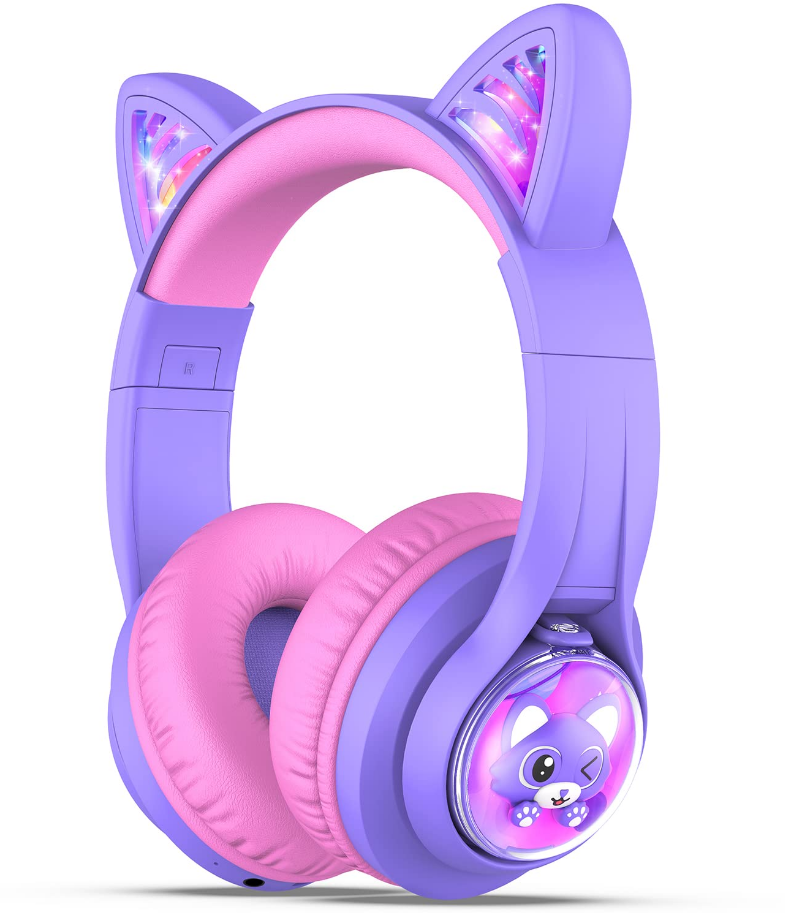
The iClever Wireless Headphones BTH19 are a standout choice for kids, combining adorable cat ear design with advanced Bluetooth technology for safe, immersive listening. These cat ear Bluetooth headphones feature dazzling RGB LED lights that pulse to the music rhythm, making them perfect for gaming, online learning, or everyday playtime. Equipped with Bluetooth 5.2, the iClever BTH19 delivers stable wireless connectivity up to 33 feet, plus wired mode for reliability.
Key benefits include an impressive 50-hour battery life (lights off), fast charging (10 minutes for 4 hours playtime), and child-safe volume limiting at 74/85/94dBA levels to protect young ears. The 40mm stereo drivers provide rich, clear sound, while the built-in microphone ensures crystal-clear calls. Comfortable protein leather ear cups and adjustable headband allow hours of wear without pressure.
Ideal for children aged 3-12, these headphones suit school, travel, or entertainment. Parents love the safety features and fun aesthetics. Priced around $25-$35, they're widely available on Walmart, Shopee, and iClever's site, offering excellent value in kids wireless headphones.
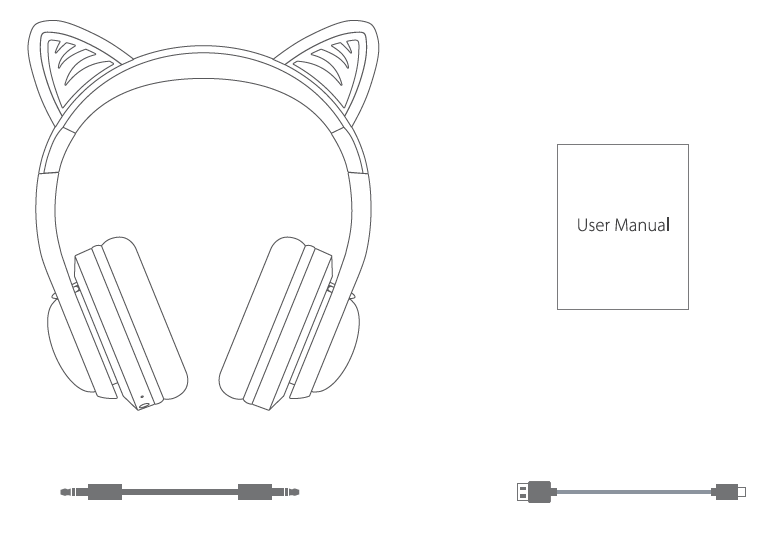
Package Contents
- iClever BTH19 Wireless Headphones
- User Manual
- 3.5mm Audio Cable
- USB Type-c cable
Technical Specifications and Key Features of iClever BTH19
The iClever Wireless Headphones BTH19 boast robust specs tailored for kids. Here's a detailed breakdown:
- Bluetooth Version: 5.2 for stable connection up to 33 feet.
- Battery: 500mAh capacity; 50 hours playtime (lights off), 15-45 hours (lights on); 2.5-hour full charge, 10-min fast charge for 4 hours.
- Drivers: 40mm stereo for immersive sound.
- Volume Limiter: 3 levels (74/85/94dBA) for hearing protection.
- Microphone: Built-in for calls; wired mode uses cable mic.
- Design: Over-ear with adjustable headband, soft protein leather cushions; cat ear RGB LEDs (pulse to music, toggle via M button).
- Connectivity: Wireless Bluetooth or 3.5mm wired.
- Weight/Comfort: Lightweight, flexible for no headaches during extended use.
Compared to rivals like standard kids headphones, the BTH19 excels in battery life and lights, outperforming basic models without volume limits or fun designs.
Step-by-Step Setup Guide for iClever Wireless Headphones BTH19
Setting up your iClever Wireless Headphones BTH19 is simple for seamless cat ear wireless headphones experience.
- Charge the Headphones: Use the included USB-C cable; full charge in 2.5 hours. Lights off mode extends battery to 50 hours.
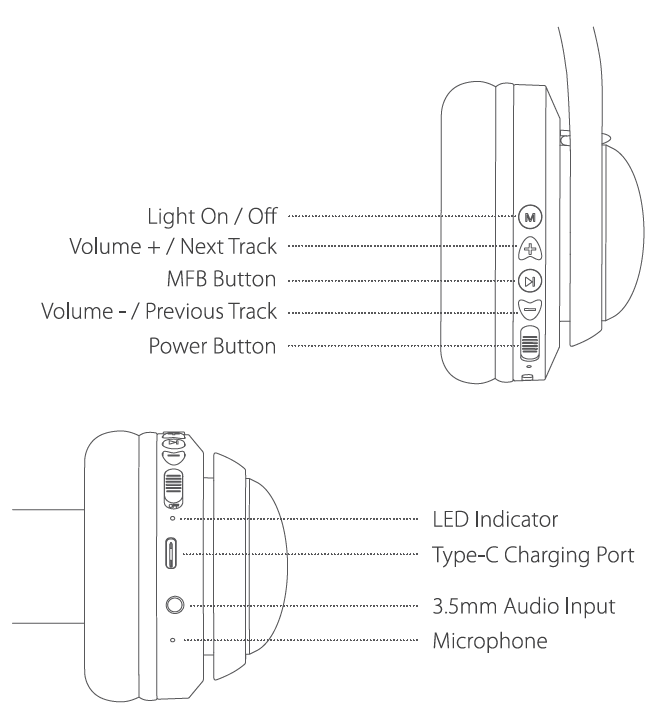
- Power On: Press the power button until LEDs flash. Toggle lights with M button (off for max battery).
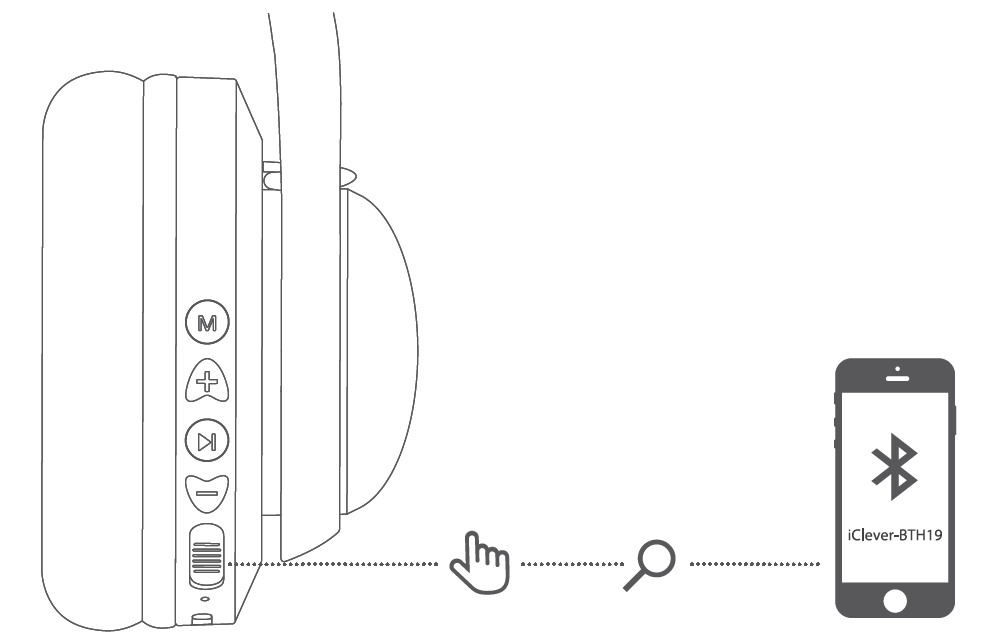
- Bluetooth Pairing: Enable Bluetooth on your device (phone/tablet). Search for "iClever-BTH19" and select to pair. Range: 33 feet.
- Wired Mode: Plug in 3.5mm cable; mic activates on cable.
- Volume Control: Use 3-level limiter for safety; adjust via buttons.
On/Off
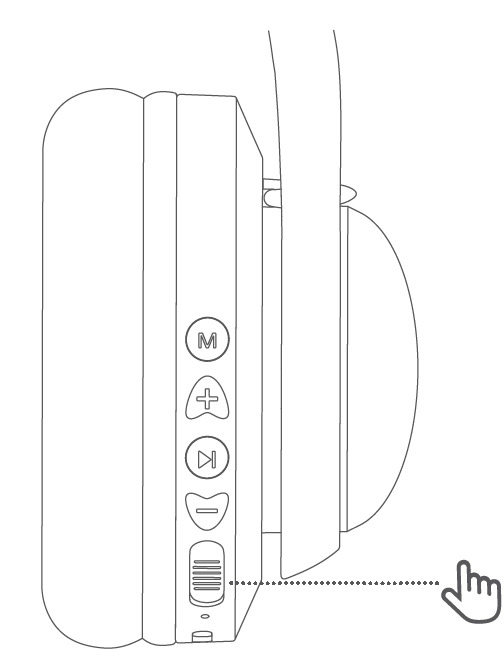
- Power on: Switch the button to the "ON" position. The LED indicator flashes blue for 1 second, and the colorful lights turn on.
- Shutdown: Switch the button to the "OFF" position. The headphones turn off, and the LED indicator flashes blue for 1 second before turning off.
Bluetooth Pairing
- In the power-on state, switch the button to the "ON" position. The colorful lights turn on, Bluetooth enters pairing mode, and the red and blue indicators flash alternately.
- Turn on Bluetooth on your mobile phone. Find and select "iClever-BTH19A" from the available device list to establish a Bluetooth connection.
Light On/Off
Short press the "Light On / Off" button to turn the lights on or off.
Volume Limit Gear Switching
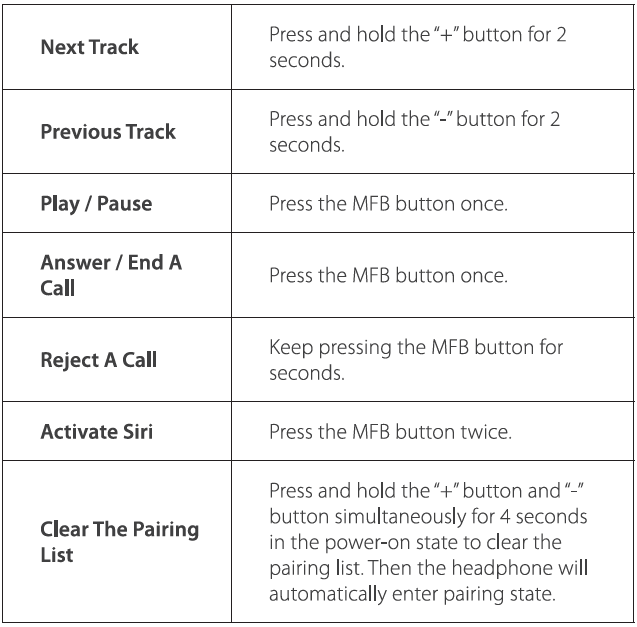
- Press and hold the "+" and "−" buttons simultaneously to switch the volume limit to 74 dB. The voice prompt announces "74 dB".
- Press and hold the "+" and "−" buttons simultaneously to switch the volume limit to 85 dB. The voice prompt announces "85 dB".
- Press and hold the "+" and "−" buttons simultaneously to switch the volume limit to 94 dB. The voice prompt announces "94 dB".
Operation of Buttons

Troubleshooting Common Issues with iClever BTH19 Kids Bluetooth Headphones
Resolve most iClever Wireless Headphones BTH19 problems quickly with these fixes.
- No Bluetooth Connection: Ensure device Bluetooth is on; forget "iClever-BTH19" and re-pair. Check range under 33 feet.
- Short Battery Life: Turn off LEDs via M button for 50 hours. Fast charge if low.
- Poor Sound/Mic: Clean ear cups; test wired mode. Update device Bluetooth.
- Lights Out of Sync: Toggle off/on; minor issue, doesn't affect audio.
- No Power: Charge 10+ minutes; check cable.
Pros and Cons of iClever Wireless Headphones BTH19
Pros
- Exceptional 50-hour battery with fast charging beats competitors.
- Child-safe volume limiter (74-94dBA) protects sensitive ears.
- Fun RGB cat ear lights pulse to music, engaging for kids.
- Comfortable fit for hours, no headaches.
- Versatile: wireless/wired, built-in mic for calls/learning.
- Great value at $25-$35 vs pricier alternatives.
Cons
- Lights may desync slightly after seconds.
- Battery drops to 15 hours with lights on.
- Kid-focused design may not appeal to adults.
Overall, pros outweigh cons for kids wireless headphones, offering superior value.
Customer Reviews and Feedback on iClever BTH19 Cat Ear Headphones
Users rave about the iClever Wireless Headphones BTH19, averaging 4.5+ stars. "The sound is so good, I could listen for hours without headaches—perfect for kids' sensitive ears!" praises one reviewer.[3] Common praises: adorable lights, long battery, comfort, and safe volume.
Complaints include minor light sync issues, easily fixed by toggling. "Lights are adorable but desync a bit—still love them!" notes a user. Recommended for children; addresses ear protection needs better than non-limited headphones. Buy if seeking fun, safe kids Bluetooth headphones.
More iclever manuals
- Setup: Iclever Wired Headphones IC-HS26 User Manual
- Setup: Iclever Wired Headphones IC-HS25 User Manual
- Setup: Iclever Wired Headphones IC-HS18 User Manual
- Setup: Iclever Wired Headphones IC-HS14 Owner Manual
- Setup: Iclever Kids Headphones IC-HS01 User Manual
- Setup: Iclever BTH21 Wireless Headphones User Manual
Leave a Comment