
Setup: Icy Box External RAID Enclosure IB-RD3680SU3 User Manual
Content
External RAID Enclosure IB-RD3680SU3
Introduction
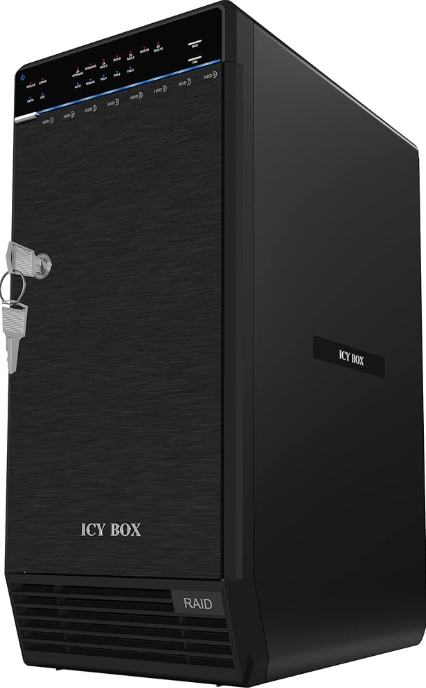
The icy box External RAID Enclosure IB-RD3680SU3 is a high-capacity, versatile storage solution designed for professionals and enthusiasts needing reliable external RAID storage. This 8-bay enclosure supports eight 3.5-inch SATA I/II/III hard drives or SSDs, enabling storage capacities up to an impressive 192TB with current large-capacity HDDs. Its robust aluminum construction ensures excellent heat dissipation for stable performance during intensive data operations.
Key benefits include plug & play ease with USB 3.0 and eSATA interfaces, hot-swappable drive bays with a convenient trayless design, and support for multiple RAID levels such as 0, 5, 10, 50, and BIG spanning, which caters to a wide variety of data redundancy and speed needs. Silent operation is maintained through temperature-controlled fans, while energy-saving sleep mode reduces power consumption during idle times. The secure lockable door offers physical protection for installed drives.
This enclosure is ideal for small businesses, creative professionals, and IT administrators requiring scalable, high-speed external storage for backups, video editing, or network-attached storage expansions. Compatible with Windows 7/8.x and macOS 10.5+, it fits seamlessly into diverse computing environments. The estimated price range is typically around $400-$500 USD, making it a competitively priced option for enterprise-grade external RAID storage. It is widely available through specialized computer hardware suppliers and online retailers.
Specifications
- Drive Bays: 8 x 3.5" SATA I/II/III HDDs or SSDs
- Maximum Capacity: Up to 192TB (8 x 24TB drives)
- Connectivity: USB 3.0 and eSATA interfaces for fast data transfer
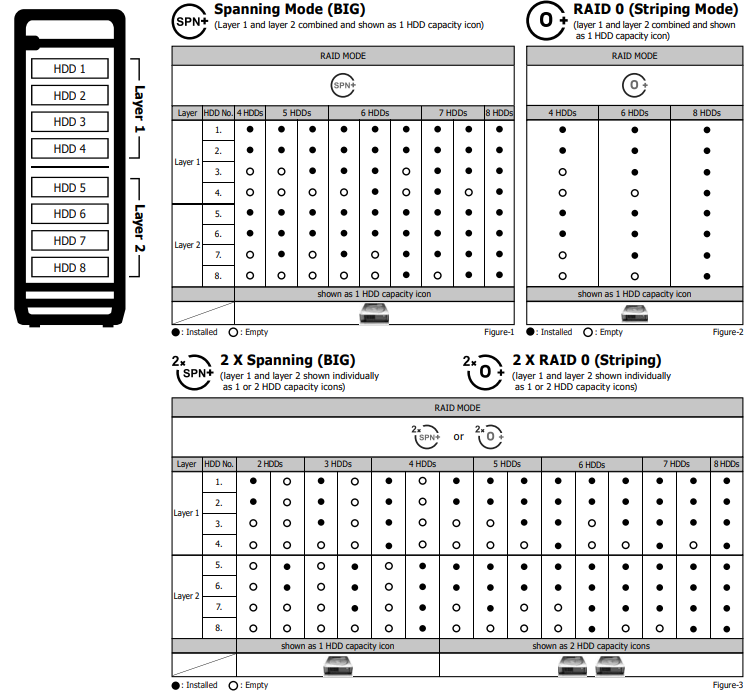
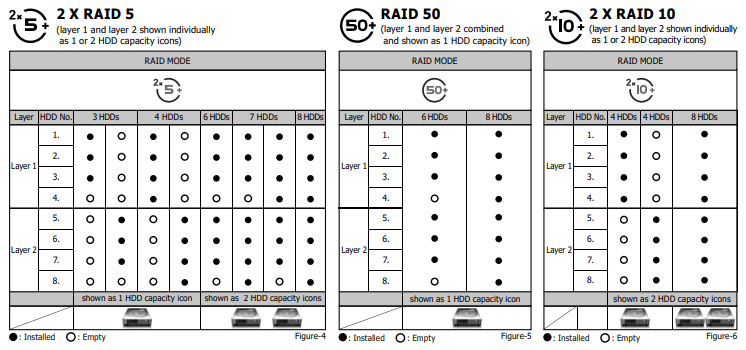
- RAID Support: RAID 0, 5, 10, 50, BIG (Spanning), and JBOD modes
- Cooling: Two temperature-controlled 80mm fans with front air inlets for silent, efficient cooling
- Power Management: Energy-saving sleep mode and power control
- Build: Durable aluminum and hard plastic housing, lockable front door
- Drive Installation: Trayless, hot-swap support for easy and fast drive changes
- LED Indicators: Status, activity, fan operation, and RAID mode display via multi-color LEDs
- Compatibility: Windows 7/8.x, Mac OS X 10.5 and higher
The IB-RD3680SU3 outperforms many similar enclosures by combining high drive count, extensive RAID level support, and efficient cooling in a relatively compact footprint (352mm x 253mm x 155mm). Its trayless design eliminates the need for screws during drive installation, speeding up maintenance compared to other external RAID units.
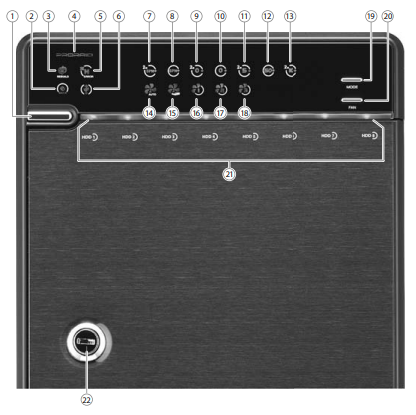
Front Panel Overview
LED Indication / Button
Rear Panel Overview
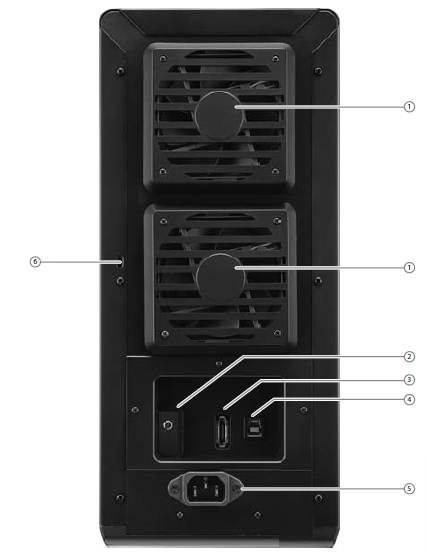
- Fan
- RAID Mode confirmation button
- eSATA port
- USB 3.0 port
- 220 V AC Input port
- Kensington hole
Inside Overview
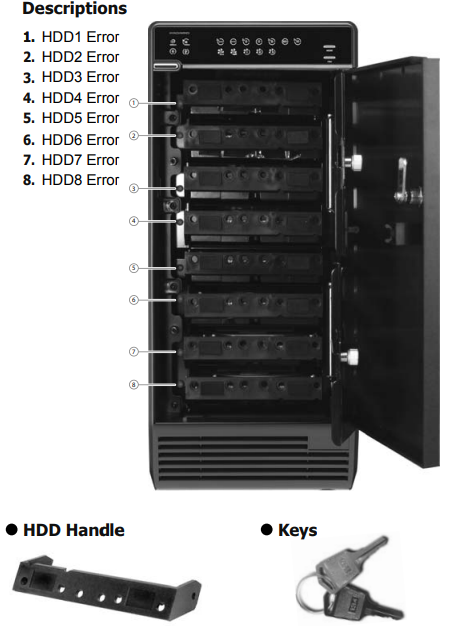
Inside Panel
Quick Installation Guide
- Please use the provided screws to secure the handles to the HDDs.
- Unlock the cover with the key supplied and press the curricular depression to open the cover.
- Release the inner covers anti-clockwise!
- Install the HDDs from up to down. Please refer to STEP 6 for details.
- Close and secure the covers.
- Plug in a USB or eSATA cable.
- RAID mode setup, users need to press and HOLD the "RAID" button for 3 seconds till the LED flashes, press again to change the mode.
- After selecting the RAID you want, press and HOLD the confirmation button in the rear panel till the device shuts down.
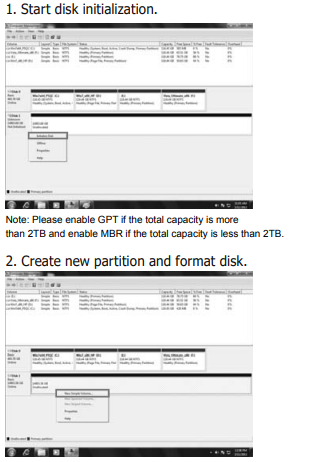
- Initialize the HDD accordingly to your operating system.
- Rebuild time varies depending on the HDD volume, say about 1 hour for 200GB.
- When the rebuild completes, the rebuild LED goes off.
RAID mode setup
Set-up
First, install the HDD from up to down in the enclosure. Power on the device, press and hold the RAID button for 3 seconds until the LED flashes. Press it again, select the RAID mode you want to use,, and press the Confirmation Button on the rear panel till the device shuts down. Power the device on again, and the RAID mode setup is completed.
Common Troubleshooting for Icy Box External RAID Enclosure IB-RD3680SU3
- Drive Not Recognized: Ensure proper insertion of drives; check the USB or eSATA connection; verify power supply stability. Reset RAID configuration if necessary.
- RAID Error Codes: Refer to the user manual for LED error indicators; reconfigure the RAID array or replace faulty drives. Backup data before RAID reinitialization.
- Fan Noise or Overheating: Confirm fans are unobstructed and operating; clean air inlets from dust; ensure enclosure placement in a well-ventilated area.
- Data Transfer Issues: Use supplied high-quality USB 3.0/eSATA cables; update drivers for host computer ports; avoid USB hubs to ensure full speed.
- Preventive Measures: Use compatible, healthy hard drives; regularly monitor RAID health via software; keep firmware updated.
The product typically includes a warranty covering hardware defects and manufacturer support. For additional assistance, support can be contacted via the official icy box website or through authorized resellers providing technical service and replacement parts.
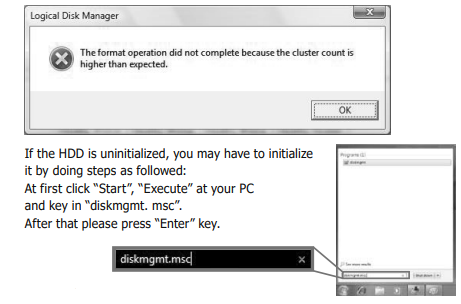
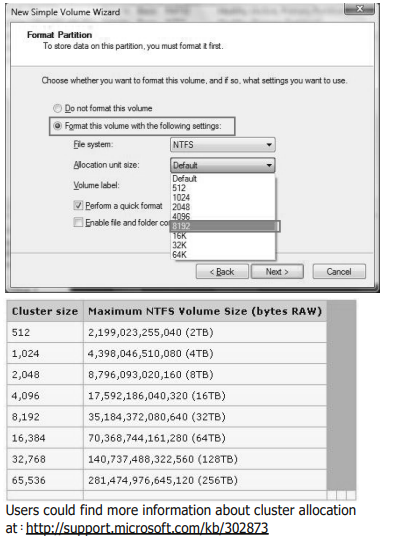
Under Windows Vista (32/64-bit) / Windows XP (64-bit), if the total capacity is more than 16 TB.
Pros & Cons of i-Box External RAID Enclosure IB-RD3680SU3
- Pros:
- High capacity with support for 8 drives and various RAID modes offers flexible storage options
- Silent, efficient cooling system prolongs drive lifespan and maintains performance
- Trayless, hot-swappable drive bays enable quick maintenance without downtime
- Robust aluminum build ensures durability and effective heat dissipation
- Multi-interface support with USB 3.0 and eSATA for versatile connectivity
- Cons:
- Relatively large physical size requiring dedicated space on or near the workspace
- Initial setup and RAID configuration may be complex for non-technical users..
- Price point might be higher than basic external enclosures without RAID support.rt
- Limited to 3.5" SATA drives; no native support for 2.5" drives without adapters
Compared to alternatives, the IB-RD3680SU3 stands out for its enterprise-grade RAID features andcapacityc,,ity but might not be the best choice for casual users or single-drive enclosures seeking simplicity and lower cost.
Customer Reviews and Feedback on icy box External RAID Enclosure IB-RD3680SU3
Customers commonly praise the icy box External RAID Enclosure IB-RD3680SU3 for its reliable performance, ease of drive swapping, and quiet operation during long-term use. Star ratings often hover around 4 to 4.5 out of 5, reflecting high satisfaction with build quality and data throughput speeds.
Some users report initial setup challenges related to RAID configuration and compatibility with certain operating sy , stems but note that the detailed manual and support resources help overcome these hurdles. A few frequent complaints mention bulkiness and the need for careful cooling placement to avoid heat buildup.
Overall, buyers recommend the enclosure for professional environments requiring scalable and high-speed external RAID storage, emphasizing its value for money given the extensive features and robust design.
Faqs
How do I set up the icy box External RAID Enclosure IB-RD3680SU3 for the first time?
What should I do if the icy box External RAID Enclosure IB-RD3680SU3 is not recognized by my computer?
Can I use both HDDs and SSDs in the icy box External RAID Enclosure IB-RD3680SU3?
What RAID levels are supported by the icy box External RAID Enclosure IB-RD3680SU3 and how do they impact performance?
How can I optimize cooling and reduce noise in the icy box External RAID Enclosure IB-RD3680SU3?
Is the icy box External RAID Enclosure IB-RD3680SU3 compatible with both Windows and Mac operating systems?
What maintenance steps should I follow to ensure longevity of the icy box External RAID Enclosure IB-RD3680SU3?
How do I perform a hard drive replacement or hot-swap in the icy box External RAID Enclosure IB-RD3680SU3?
Tags
Leave a Comment