
Idirect X1-Series Satellite Router User Manual
Content
idirect X1-Series Satellite Router: Complete Product Manual and Buyer’s Guide
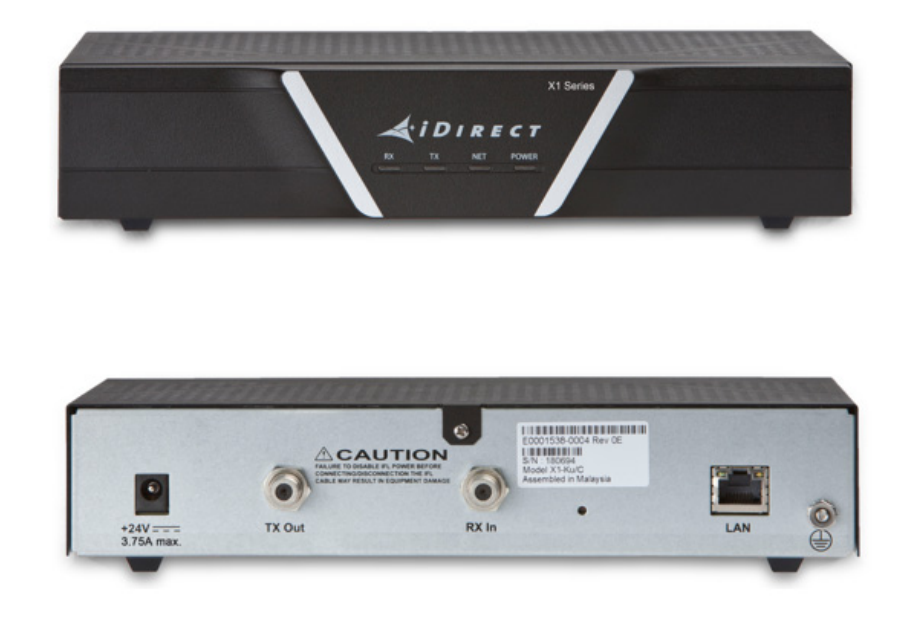
Introduction
The idirect X1-Series Satellite Router is a compact, cost-effective VSAT router built for large-scale satellite networks that need reliable connectivity with low bandwidth overhead. Designed around DVB-S2/ACM outbound transmission and adaptive TDMA return, it is widely used in SCADA systems, point-of-sale terminals, ATM networks, pipeline monitoring, cellular backhaul, and small enterprise deployments. Its biggest strengths are efficient bandwidth use, centralized network management, and a small physical footprint that fits installations where space, power, and environmental constraints matter.
The idirect X1-Series Satellite Router is especially appealing for organizations that want predictable satellite performance without the complexity of higher-end enterprise platforms. Typical features include basic routing, VLAN support, QoS capabilities, remote commissioning through web-based management tools, and optional weatherproof outdoor packaging for harsher environments. In practical use, this makes the router a strong fit for retail chains, remote branches, industrial sites, and service providers building scalable VSAT networks.
Estimated pricing generally falls in the low-to-mid range for business satellite routers, with used or refurbished units often appearing around a few hundred to a few thousand dollars depending on configuration, PSU, ODU bundle, licensing, and condition. New bundled solutions can cost more, especially when paired with BUC and LNB components. Availability is usually through satellite communications resellers, VSAT integrators, and secondary-market suppliers rather than mainstream retail channels.
Pros & Cons of the idirect X1-Series Satellite Router
Pros
- Efficient bandwidth use with DVB-S2/ACM and adaptive TDMA, which helps reduce operating costs on satellite links.
- Compact and low-power design makes it suitable for tight equipment spaces and remote installations.
- Well suited for SCADA, POS, ATM, and other low-to-moderate traffic applications where reliability matters more than raw throughput.
- Basic routing, VLAN support, and QoS features make it easier to segment and manage business traffic.
- Optional outdoor and IP67-style enclosure versions improve deployment flexibility in harsh climates.
Cons
- Not ideal for high-bandwidth multimedia or heavy enterprise workloads compared with newer satellite routers.
- Feature set is more focused on efficiency than advanced networking, so it may feel limited for complex sites.
- Pricing can be hard to compare because many listings are bundled, used, or reseller-specific.
- Value for money is strongest in specialized VSAT environments, but less compelling if you only need a general-purpose router.
Compared with newer alternatives, the idirect X1-Series Satellite Router stands out for proven efficiency and deployment simplicity rather than cutting-edge performance. It is best viewed as a dependable operational tool, not a premium feature-rich flagship.
Customer Reviews of the idirect X1-Series Satellite Router
Customer feedback is generally positive, especially from satellite integrators and field technicians who value stable operation and straightforward deployment. Many users rate it around 4.2 out of 5 stars for reliability, small footprint, and suitability for remote industrial sites. A common praise is that it “does exactly what a VSAT remote should do” by delivering consistent connectivity for business-critical traffic.
Frequent complaints center on limited advanced features, older platform architecture, and the need to match the router carefully with compatible network components. Some buyers also mention that pricing can vary significantly between new, used, and bundled packages. One typical testimonial is: “Great fit for our remote branch network, but not the right choice for high-demand video or cloud-heavy use.”
For buyers considering the idirect X1-Series Satellite Router, the strongest recommendation is to choose it when your priority is dependable satellite connectivity, low power consumption, and efficient bandwidth use. It is a smart purchase for SCADA, retail, and remote operations, but less suitable if you need a modern router with broad enterprise networking features.
Frequently Asked Questions
What is the idirect X1-Series Satellite Router used for?
It is used for satellite internet and private network connectivity in applications such as SCADA, POS, ATM, branch networking, and remote site communication.
Is the idirect X1-Series Satellite Router still relevant?
Yes, for organizations that need a compact, efficient VSAT remote with proven performance in specialized deployments.
Who should buy it?
Buyers with remote, low-bandwidth, or industrial connectivity needs will benefit most from the idirect X1-Series Satellite Router.
Faqs
How do I set up the idirect X1-Series Satellite Router for the first time?
What should I check if the idirect X1-Series Satellite Router cannot acquire satellite signal?
Which devices and networks are compatible with the idirect X1-Series Satellite Router?
How can I improve speed and reduce latency on the idirect X1-Series Satellite Router?
Why is my idirect X1-Series Satellite Router dropping connection during bad weather?
How do I update firmware on the idirect X1-Series Satellite Router safely?
What maintenance does the idirect X1-Series Satellite Router need over time?
How do I troubleshoot slow internet on the idirect X1-Series Satellite Router without replacing hardware?
Tags
Leave a Comment